

dsh-working-changes
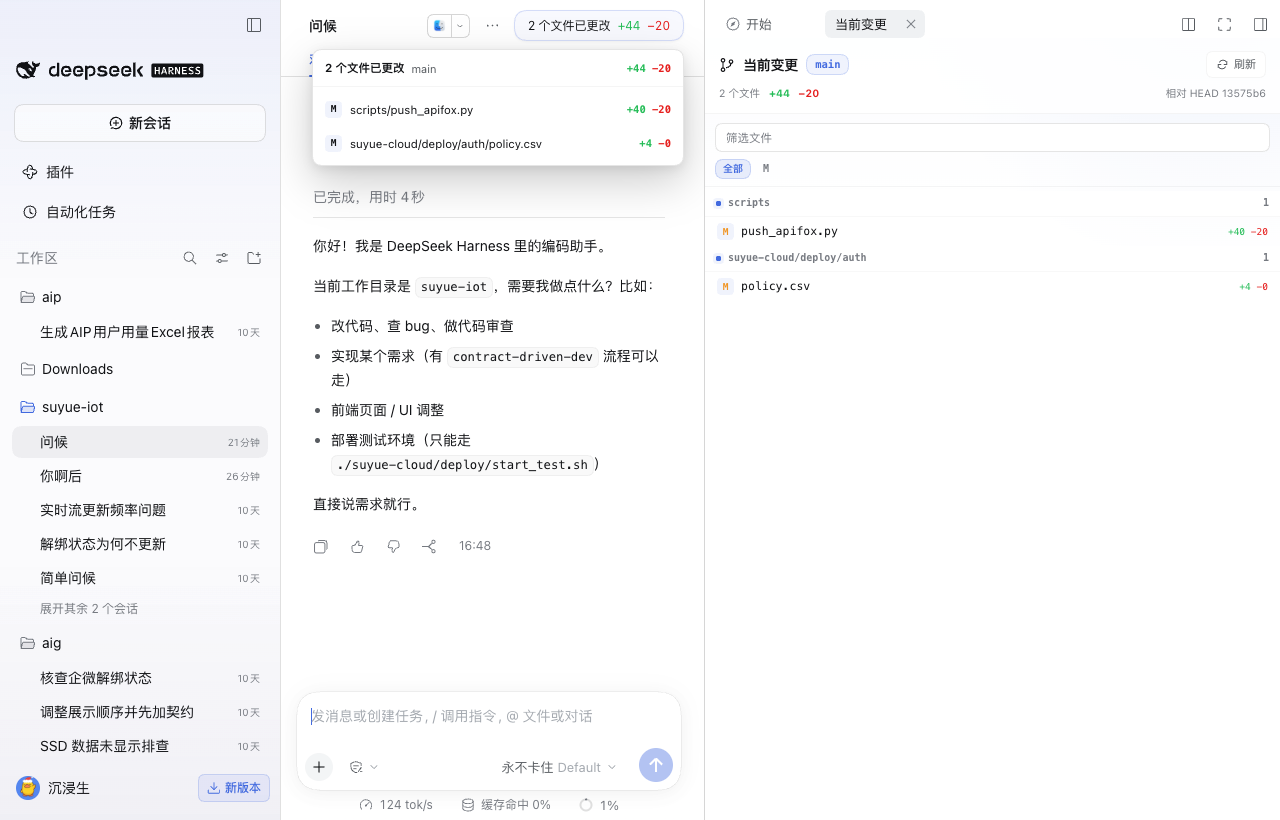
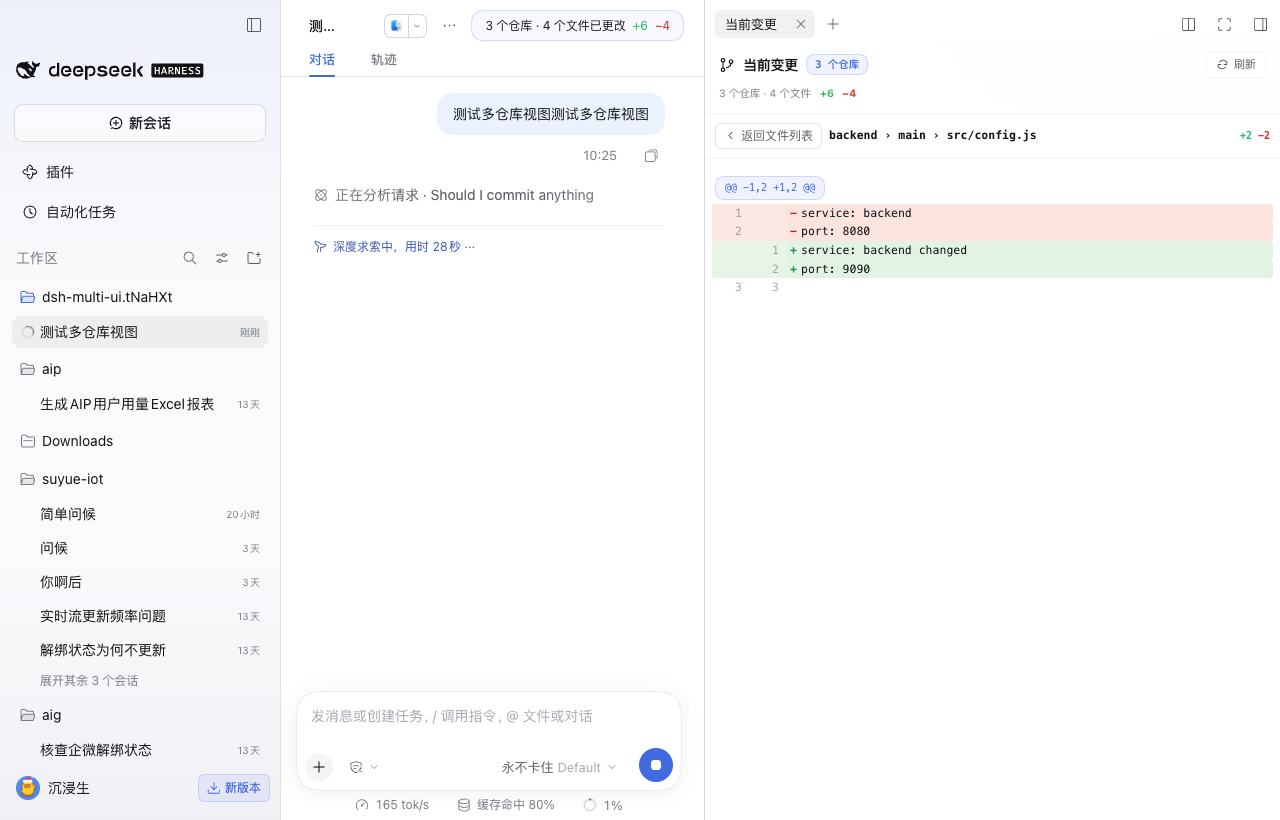
Manifest validSee files changed from HEAD in the current DSH workspace and inspect each diff in the native right sidebar.
Working Changes for DeepSeek Harness


A small, read-only DSH plugin that shows what the current session has changed and lets you browse local branch history across its Git repositories. It works for a single repository and for container workspaces containing multiple independent repositories.
English
Features
- Shows
branch · changed files · +insertions −deletionsin the session header. - Auto-discovers independent child repositories when the workspace root is not itself a Git repository.
- Shows
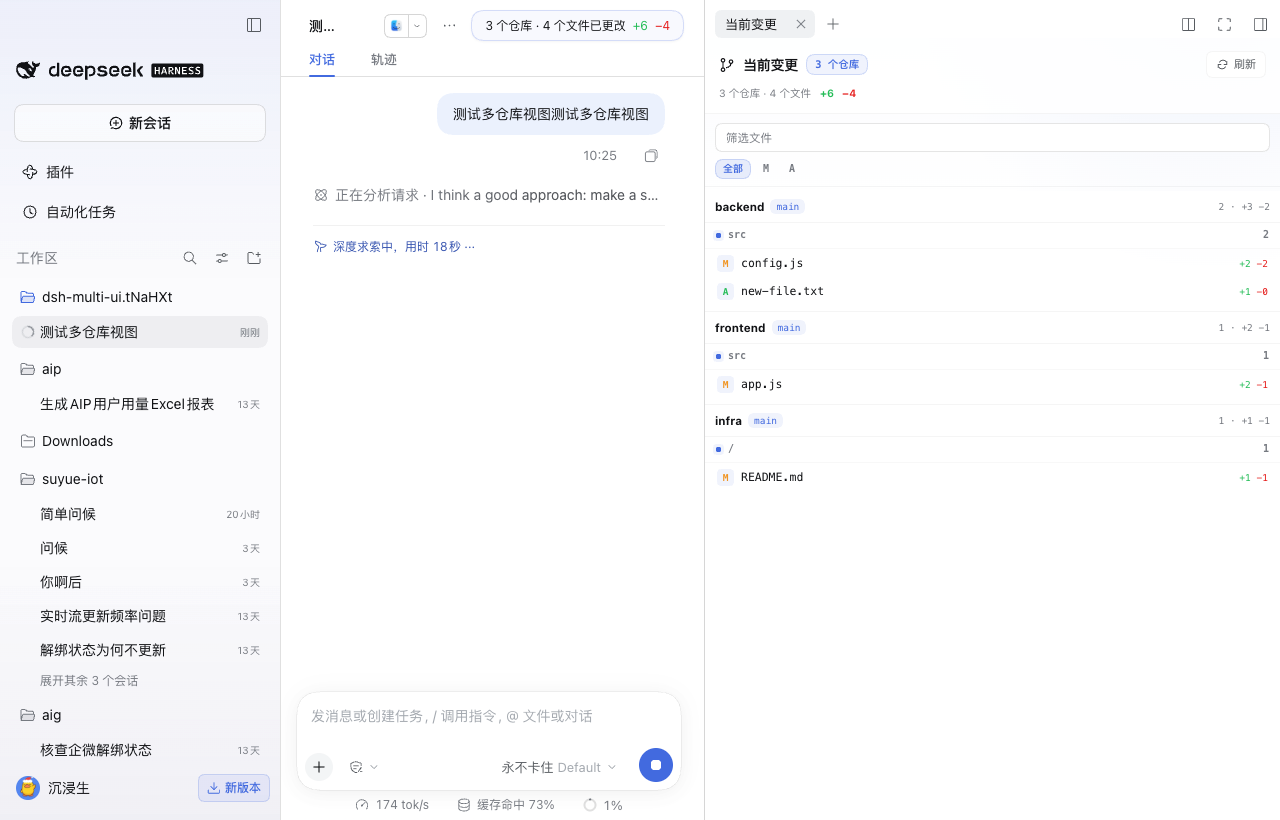
repositories · files · +insertions −deletionsfor multi-repository workspaces and groups files by repository. - Separates working changes into staged, unstaged, untracked, and conflicted states.
- Hovering the summary shows each project and current branch, including freshly initialized repositories without commits, then lists changed files with per-file line counts.
- Clicking the summary or a file opens the native DSH right sidebar.
- Renders unified diffs with line numbers and platform diff colors.
- Supports file filtering, status badges, renames, binary files, and refresh.
- Shows a Codex-style collapsible file tree with path search; only directories that contain changed files are included.
- Adds a revision picker that opens from Current changes and lists commits made in the current session on every local branch, newest first.
- Opens each selected commit against its first parent and lets you inspect the changed files and their diffs.
- Refreshes after an Agent turn, on window focus, and on demand.
- Read-only: no stage, commit, branch, stash, push, pull, or worktree actions.
Install
DSH Plugins UI
- Open Plugins in DSH.
- Choose Add plugin.
- Enter
https://github.com/xuex991/dsh-working-changes. - Install and enable Working Changes.
Plugin market index
In Plugins → Discover → Index sources, add:
https://xuex991.github.io/dsh-working-changes/index.json
Then open Working Changes from the discovery page.
All xue1991 DSH plugins and their stable install entry points are also listed at xuex991.github.io/dsh-working-changes.
Requirements
- DeepSeek Harness
0.2.1-rc.2or newer. gitavailable in the DSH host environment.
Limits
- The current worktree is compared with
HEAD; staged and unstaged states are labeled separately, while the file diff remains the combined worktree-to-HEAD diff. - History reads local branches only and scopes commits to the current session using each branch's first observed HEAD as a Git ancestry baseline. Remote branches, push status, and push events are not shown.
- History shows at most 200 local branches per repository and 500 commits per branch, with an explicit truncation notice.
- Binary files are listed but not rendered as text.
- One diff is capped at 400,000 characters.
- Submodule contents are not expanded.
- Nested repositories inside a discovered repository are not expanded.
- Automatic discovery defaults to one directory level and skips dependency and build directories.
中文
功能
- 在会话顶部显示
分支 · 更改文件数 · +新增行 −删除行。 - 工作区根目录不是 Git 仓库时,自动发现其下并列的独立仓库。
- 多仓库时显示
仓库数 · 文件数 · +新增行 −删除行,并按仓库分组。 - 当前变更区分已暂存、未暂存、未跟踪和冲突状态。
- Hover 总览,查看当前项目与分支,并直接查看每个文件改了多少行;刚初始化、 尚无 Commit 的仓库也会显示当前分支。
- 点击总览或文件,在 DSH 原生右侧栏查看 unified diff。
- 支持文件筛选、状态标记、重命名、二进制文件和手动刷新。
- 使用 Codex 风格的层级文件树,支持按路径搜索和目录折叠,只展示包含变更 文件的目录。
- 从“当前变更”下拉选择本 Session 内各本地分支产生的 Commit,按项目分组并按时间倒序加载。
- 选中 Commit 后查看它相对第一个父提交的文件变更,并可继续打开文件 diff。
- Agent 每轮结束、窗口重新聚焦和手动刷新时更新。
- 只读:没有暂存、提交、切分支、stash、push、pull 或 worktree 操作。
安装
通过 DSH 插件页
- 打开 DSH 的 插件。
- 点击 添加插件。
- 输入
https://github.com/xuex991/dsh-working-changes。 - 安装并启用 当前变更。
通过插件市场索引
在 插件 → 发现 → 索引源 中添加:
https://xuex991.github.io/dsh-working-changes/index.json
安装后,在发现页找到 当前变更。
两个插件的最新版本和安装入口统一列在 xuex991.github.io/dsh-working-changes。
说明
- 当前文件状态区分 staged / unstaged,但文件 diff 仍比较完整工作区与
HEAD。 - 历史只读取本地分支,并以 Session 首次观察到分支时的 HEAD 作为 Git 祖先基线, 只展示之后产生的 Commit;不比较提交时间,也不展示远程分支、Push 状态或 Push 事件。
- 每个仓库最多读取 200 个本地分支,每个分支最多读取 500 个 Commit,超出时明确提示截断。
- 二进制文件只显示在文件列表里,不渲染正文。
- 单个 diff 最多显示 400,000 字符。
- 不展开 submodule 内容。
- 不展开已发现仓库内部的嵌套仓库。
- 自动发现默认只扫描一层,并跳过依赖目录和构建目录。
多仓库工作区
project/                 ← 不是 Git 仓库
  frontend/.git          ← 会发现
  backend/.git           ← 会发现
  infra/.git             ← 会发现
  node_modules/...       ← 跳过
每个文件都属于唯一仓库;右侧栏的 diff 会携带该仓库根和它自己的 tree 对。一个仓库读取失败不会隐藏其他仓库的改动。
发现配置
Host RPC 支持 discoverDepth、repos、repoLabels、untracked、
maxRepos、concurrency 和 repoTimeoutMs。默认发现一层、最多 20 个仓库、
4 个仓库并发、每个仓库 15 秒超时。显式传入 repos 时会关闭自动发现。
Development
npm test
node --check index.js
node --check src/git.js
node --check src/operations.js
node --check lib/client.js
The Host RPC is exposed at POST /api/session-changes with snapshot, diff,
history, commits, and commit operations. A temporary GIT_INDEX_FILE
represents the worktree as a Git tree, so the plugin never modifies the user's
real index.
Comments
Loading…
Similar plugins
by sqfcyily
在DeepSeek Harness Web GUI 中浏览工作区的目录/文件,并结合 Git 显示文件改动。
★ 8
↓ 19/wk
MIT
JavaScript
Sep 3, 2026
dsh plugin --profile web add dsh-workspace-filesby happyqu
Git workbench for deepseek-harness: changelists, staging, history, branches, stashes and optional AI assistance
★ 0
NOASSERTION
JavaScript
Oct 19, 2026
dsh plugin --profile web add @happyqu/dsh-plugin-gitby Rainier-Z
A DeepSeek Harness plugin that periodically detects added, modified, and deleted files in a workspace and reports the changes.
★ 2
↓ 125/wk
MIT
JavaScript
Sep 27, 2026
dsh plugin --profile web add dsh-workspace-monitorby lee259
Right-side file workspace for DeepSeek Harness Web.
★ 10
↓ 539/wk
MIT
TypeScript
Sep 30, 2026
dsh plugin --profile web add dsh-workbenchby konnga
Read-only Git panel for the current workspace: branch, changed files and diffs, plus which files this session changed, what has been reviewed, and which tools and skills it ran.
★ 4
↓ 482/wk
MIT
JavaScript
Nov 9, 2026
dsh plugin --profile web add @konnga/dsh-hudby gaor0605-kq
在 DSH 左侧栏查看工作区文件,拖进对话让 DSH 读取或修改 · DSH plugin: browse workspace files in the left sidebar and drag them into the chat
★ 0
MIT
JavaScript
Nov 6, 2026
dsh plugin --profile web add dsh-workspace-explorer