

dsh-video
Manifest validAI video production studio panel for DeepSeek Harness — storyboard, prompts, and shot pipeline. DSH Plugin: AI Video Production Studio.

The AI Video Studio for DeepSeek Harness
Plan AI short films the way multi-model teams actually work — storyboard, prompts, and shot pipeline, one sidebar panel away from your agent sessions.
README · Workflow (中文) · Screenshots · Changelog (中文)
release v1.0.0 · license MIT · topic dsh-plugin · install 1 command
English · 简体中文



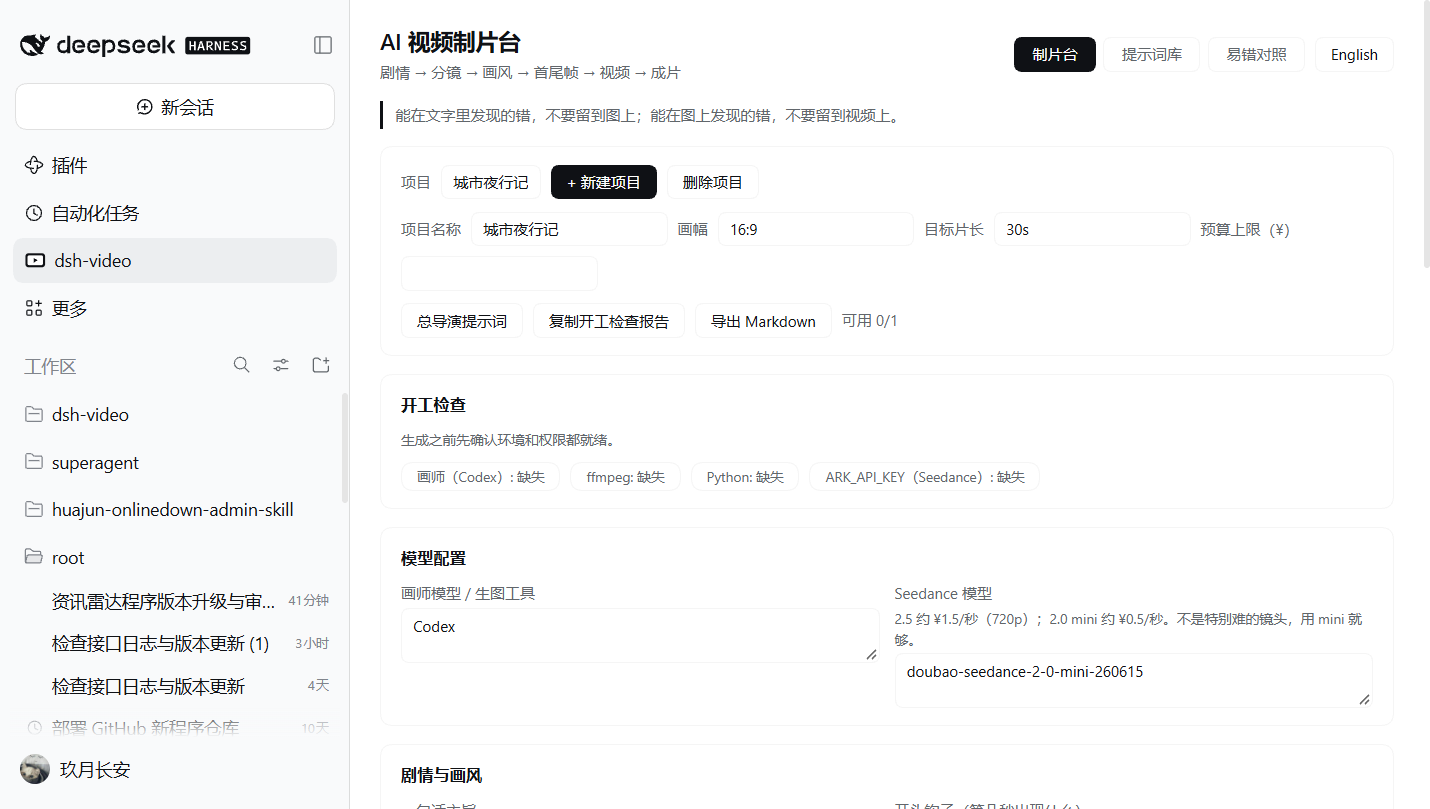
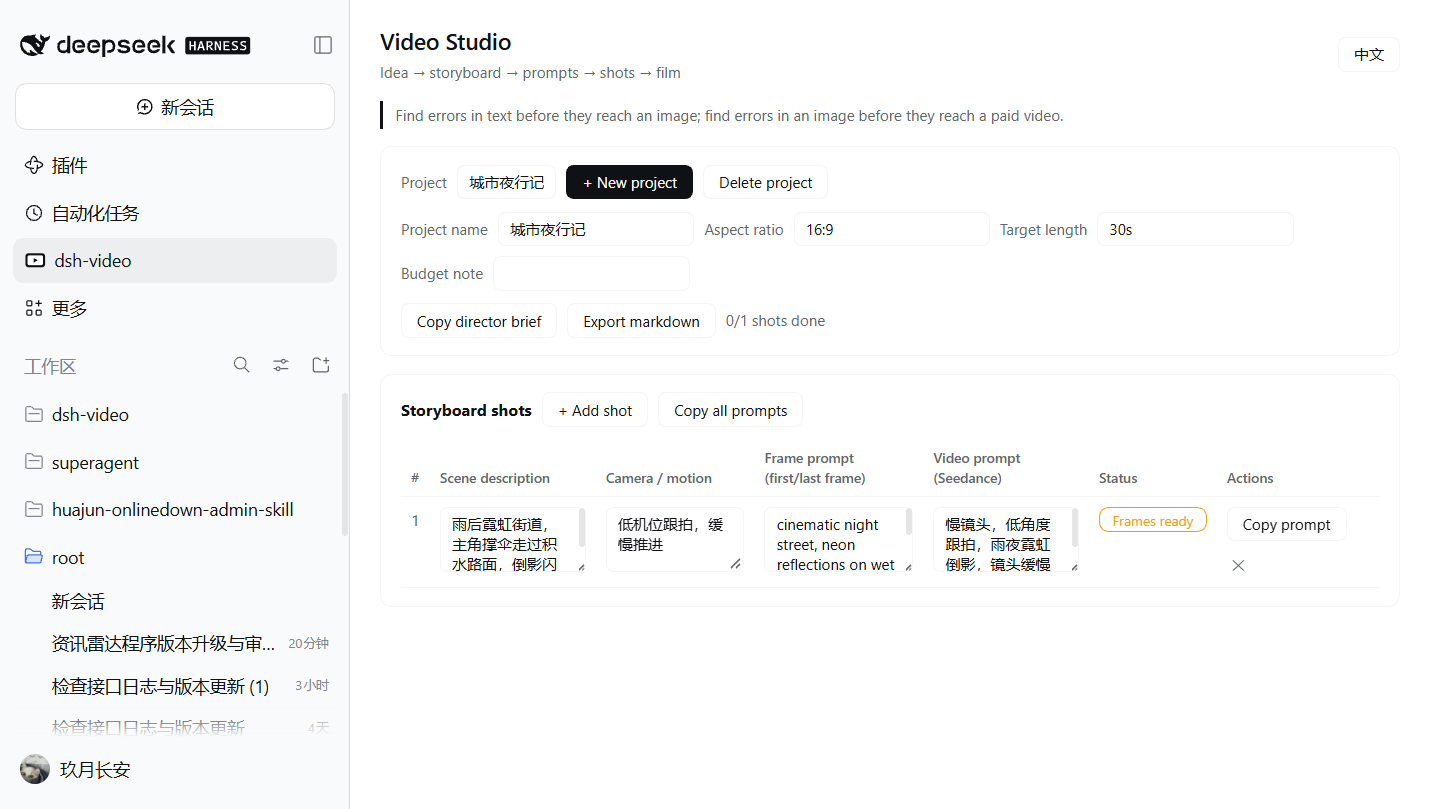
dsh-video is a DeepSeek Harness plugin that gives your AI video production workflow a home inside the Harness Web UI. It adds a Video Studio panel to the left sidebar where you plan a short film the way multi-model teams actually work: a director (your coding agent) writes the story and prompts, a painter model (e.g. Codex) draws concept art and first/last frames, and an animator model (e.g. Seedance) turns frames into seconds of paid video.
The workflow this plugin manages was popularized by the article "Claude Code/Codex + Seedance AI video: from an idea to a finished film" — one director agent, cheap text iterations first, expensive video generations last.
| 中文 | English |
|---|---|
 |  |
Why
AI video is expensive: regenerating a shot costs money by the second, while rewriting a prompt is free. The discipline that keeps costs down — find errors in text before they reach an image, and in images before they reach video — needs a place to live. dsh-video is that place: a storyboard sheet, a prompt library, and a shot pipeline, one panel away from your agent sessions.
Features
- Sidebar entry — the Video Studio registers as a global panel in the Harness left sidebar (next to Plugins and Scheduled tasks), with three tabs: Studio, Prompt library, and Failure modes.
- Director brief — the full multi-model kickoff prompt: roles (you / director / painter / animator), the Codex CLI invocation, the Seedance API endpoint, model ids with 720p prices (
doubao-seedance-2-5-260628≈ ¥1.5/s,doubao-seedance-2-0-mini-260615≈ ¥0.5/s), and the seven working rules (audit agents, new files per version, never top up credits). - Pre-flight check — painter tool / ffmpeg / Python /
ARK_API_KEYtoggles per project, with a copyable report; nothing gets generated before the environment is ready. - Story & style card — one-line message, hook, story structure (episodic vs continuous), art style, character sheet, palette table, music. The rules from the article are printed right under each field.
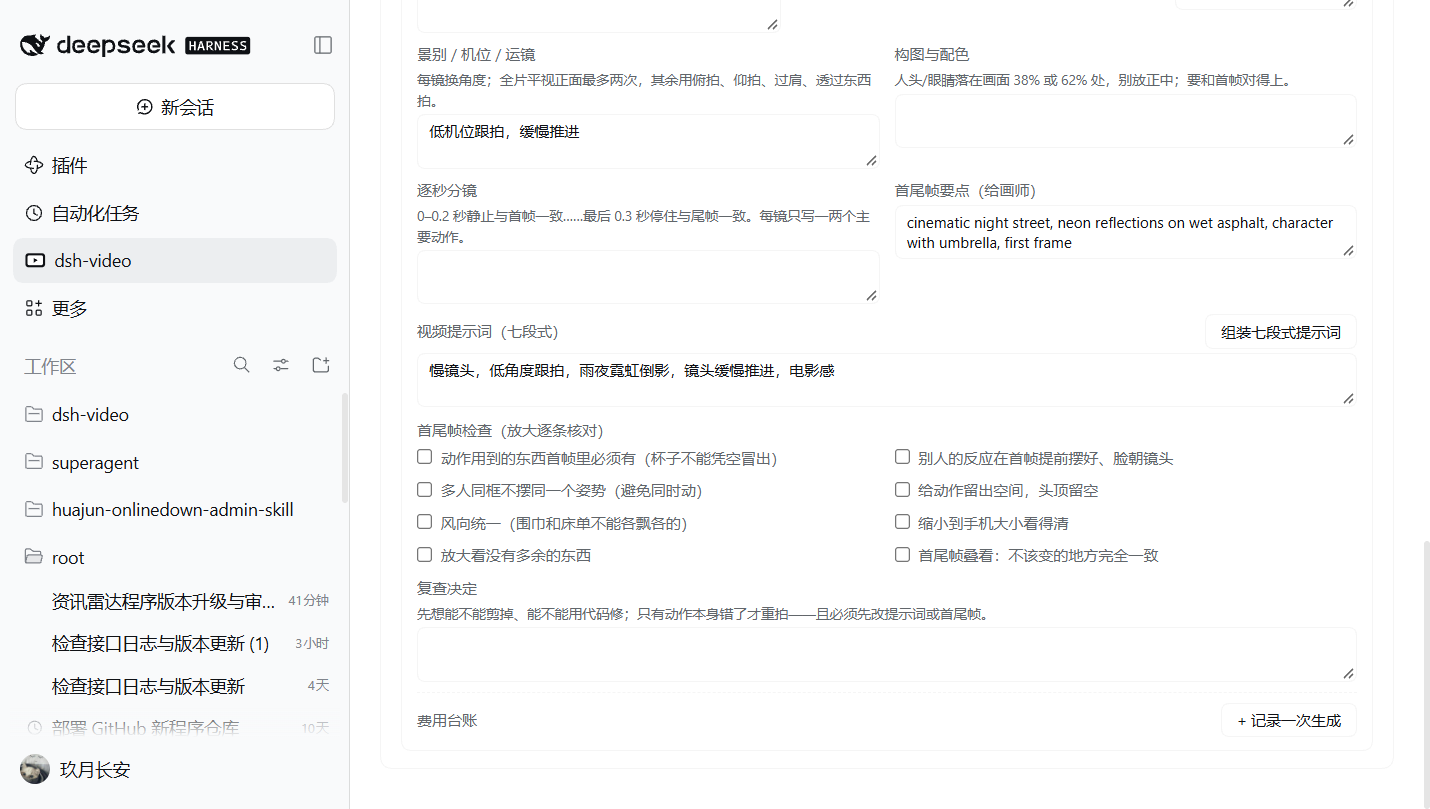
- Storyboard shots — per shot: what happens, main action, what is moving, link to next shot, shot size/camera/move, composition (38%/62% rule), estimated seconds, per-second beats, frame notes for the painter, sound.
- Seven-section prompt builder — one click assembles the article's
[画风][镜头][构图与配色][人物][逐秒][声音][约束]prompt from the fields above, in both languages. - Frame checklist — the article's 8 first/last-frame checks (props exist, bystanders staged, no shared poses, headroom, wind consistency, phone-size readability, stray objects, overlay drift) as per-shot checkboxes.
- Cost ledger — every submitted generation (model, seconds, kept/failed, file/failure reason), auto-priced from the model id, with project totals against the budget cap.
- Review decision — cut vs code-fix vs regenerate, with the article's ordering rule printed in the field.
- Prompt library — ten copy-ready pipeline prompts in Chinese and English: director brief, story development, story audit agent, storyboard rules, first/last-frame audit, pre-submission audit, post-production, final film review, and the four-thread team mode (maker / auditor / supervisor / deputy).
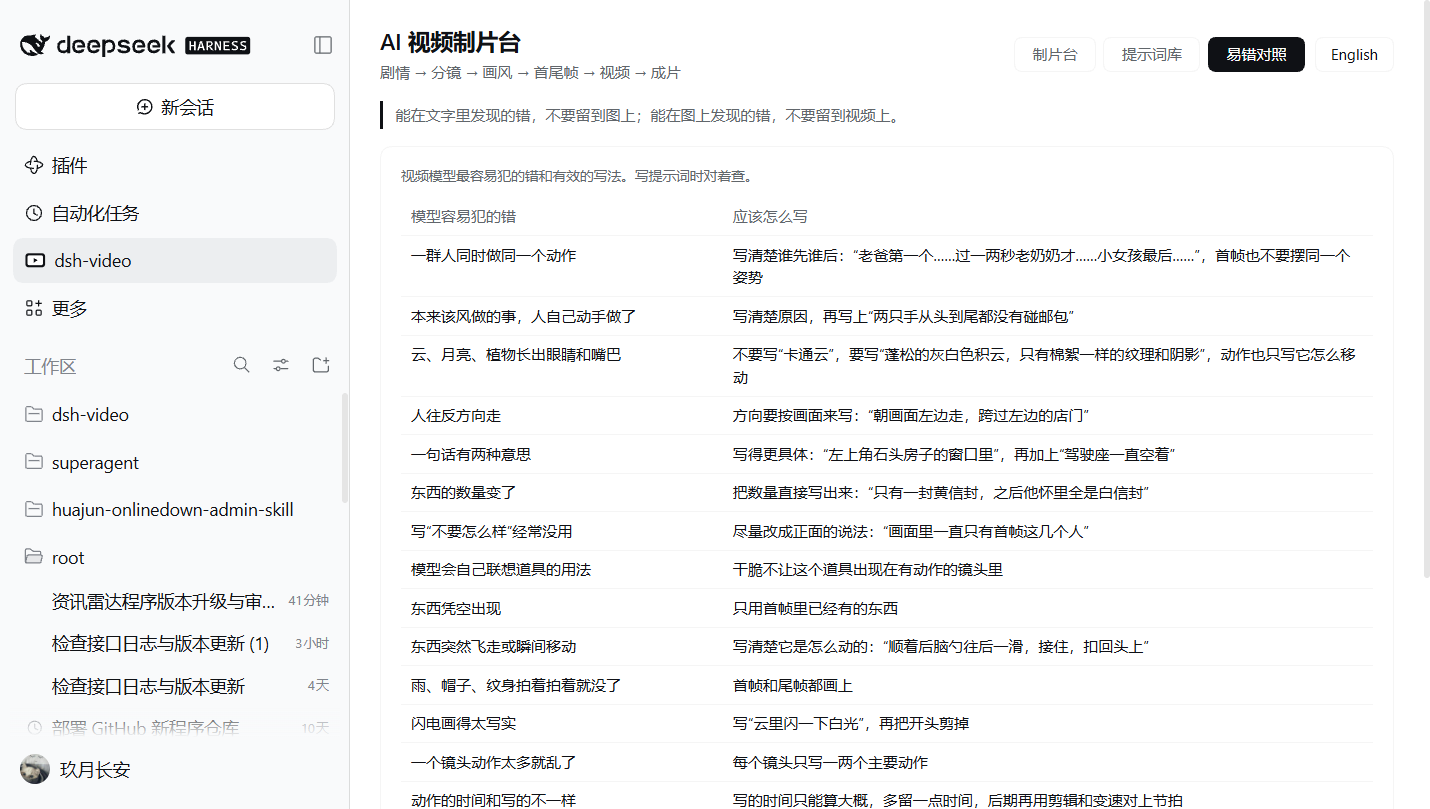
- Failure modes tab — the article's 20-row table of typical video-model failures and the phrasing that fixes them, for checking prompts against.
- Bilingual — full Chinese and English UI with a one-click toggle; the default follows your browser language.
- Local-first — everything is stored in your browser (
localStorage); no accounts, no server, no telemetry. v1 projects migrate automatically. - Cloud sync (optional, SaaS) — point the plugin at any endpoint implementing the dsh-video sync protocol and get multi-device sync: Push uploads, Pull & merge reconciles by project id +
updatedAt(last write wins, losing copies preserved as conflict snapshots). A zero-dependency self-hosted reference server ships inserver/. The token is memory-only by default;ARK_API_KEYnever enters the browser. - Theme-aware — styled exclusively with Harness theme tokens, so it matches light and dark mode automatically.
Screenshots
| Failure modes (中文) | Shot pipeline (中文) | Cloud sync (中文) |
|---|---|---|
 |  | 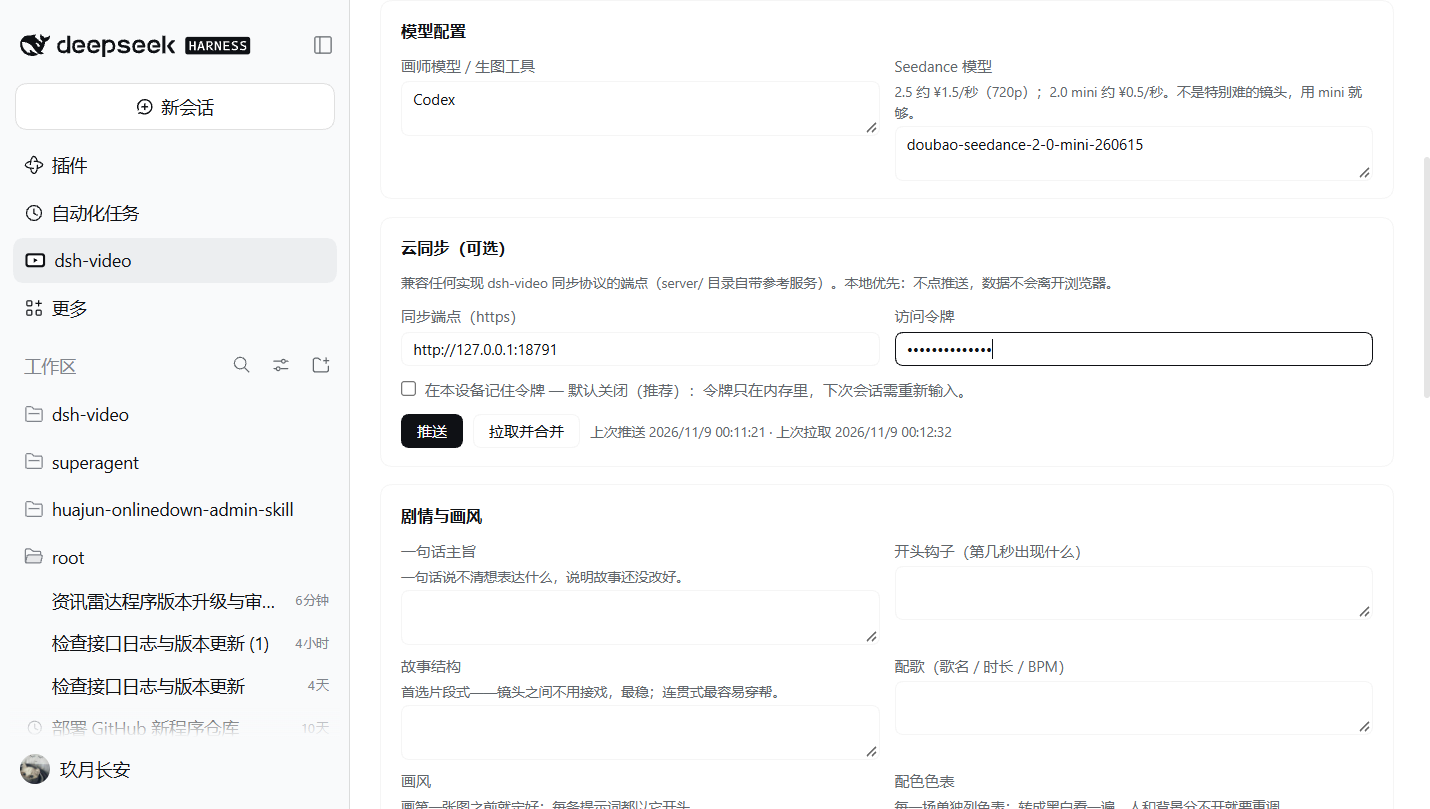 |
Self-hosted sync in 3 commands
SYNC_TOKEN=my-secret node server/server.mjs   # starts on 127.0.0.1:8787
# in the plugin: Cloud sync → endpoint http://127.0.0.1:8787, token, Push
# on another device: same endpoint + Pull & merge
Requirements
- A running DeepSeek Harness installation (Desktop app or
dsh web). - No build step, no runtime dependencies — the plugin is a plain-JavaScript Cordis bundle.
Install
Install into any non-desktop Harness profile with the dsh CLI:
# create a profile from the shipped web template (first time only)
dsh video --from-default-profile web

# install the plugin from this checkout
dsh plugin --profile video add /path/to/dsh-video

# serve the UI
dsh video --no-open --host 127.0.0.1 --port 10891
Inside the Desktop profile, install the bundle through the Harness plugin manager (Plugins → Add → local directory), then restart the app so the new client module generation is loaded.
Alternatively, publish or fork this repository and install by Git URL wherever dsh plugin add accepts one.
Usage
- Click the dsh-video icon in the left sidebar's global panel list.
- New project — name it and set the aspect ratio / target length.
- Add shot — describe the scene, the camera move, and write two prompts: the frame prompt for your painter model and the video prompt for your animator model.
- Work the pipeline top-down: fix the text first, generate frames, check them, only then generate video, and advance the status badge as each shot completes.
- Copy director brief into a new Harness session to bootstrap the full multi-model workflow with your agent.
Project structure
dsh-video/
├── package.json        # Cordis bundle manifest + dsh.client section
├── cordis.patch.yml    # Loader patch: inserts the dsh-video entry
├── index.js            # Host half (entry activation)
├── client.js           # Client half: sidebar icon, Studio panel, i18n, storage
├── locale/
│   ├── en.json         # Plugin title/description (English)
│   └── zh.json         # Plugin title/description (Chinese)
├── icon.svg            # Original panel icon
├── screenshots/        # Real-app screenshots (light theme, Windows)
└── docs/               # Workflow notes (English + 中文)
How it plugs in. The bundle patch inserts one Loader entry named after the package. On the Client, the module registers two slot factories: an icon into sidebar.panellist (the left sidebar's global panel list) and the full panel into the keyed main slot under the same id, so selecting the sidebar entry swaps the central pane to the Studio. All styling uses --dsw-alias-* theme tokens only.
Compatibility
| Harness | 0.2.x (client slot API: sidebar.panellist, main, __ModuleLoader__) |
| Plugin API | Cordis bundle + plain-JS client module |
| Locales | en, zh |
Contributing
Issues and PRs are welcome. Keep client code plain JavaScript (no build step), route every visible string through the i18n dictionary in client.js, and style only with Harness theme tokens.
License
MIT © 2026 dsh-video contributors

Comments
Loading…
Similar plugins
by hackerFish
鲸影 DSH Video Studio:DeepSeek Harness 原生视频/漫剧生成插件——六段导演流水线、多供应商免费额度调度、四层提示词自优化,质量优先省钱第二
★ 18
MIT
JavaScript
Sep 4, 2026
dsh plugin --profile web add @hackerfish/dsh-video-studioby q253595422
DeepSeek Harness plugin: image + video generation studio with an infinite canvas. Fork of dickpy/dsh-imagegen with a complete video pipeline and clip stitching.
★ 90
↓ 3k/wk
Apache-2.0
TypeScript
Nov 10, 2026
dsh plugin --profile web add @q253595422/dsh-imagegen-videoby fengyungithub
基于deepseek harness和ComfyUI的AI视频创作工作台
★ 39
↓ 1.7k/wk
Apache-2.0
JavaScript
Nov 9, 2026
dsh plugin --profile web add dsh-short-video-studioby HengryLiang
DeepSeek Harness 插件:AI 短剧工作区(立项/总纲/人物/剧本/分镜/导出)+「短剧模式」Agent 预设(34 个 drama_* 工具、9 个随包技能)· AI short-drama workspace plugin for DSH
★ 8
MIT
JavaScript
Nov 4, 2026
dsh plugin --profile web add dsh-plugin-ai-dramaby mjw0531
Install-and-use AI Studio for DeepSeek Harness: workspace dashboard, roles, tasks, verification, decision desk, merge governance, and portable project bundles.
★ 1
MIT
JavaScript
Nov 9, 2026
dsh plugin --profile web add dsh-ai-studioby LaplaceYoung
DirectorX as a DeepSeek Harness plugin: AI video/image/audio skills, knowledge corpus, and configurable vision/image/video/audio model tools.
★ 14
Apache-2.0
JavaScript
Aug 22, 2026
dsh plugin --profile web add dsh-directorx