
dsh-message-edit
Manifest validInline user message editor: adds a pencil edit button next to Copy below sent user bubbles, switches the bubble in-place into a rounded editor card, and resends via session branch fork or in-session f
dsh-message-edit
DeepSeek Harness (DSH) 用户消息原位编辑与重发插件(Inline User Message Edit & Resend Plugin for DeepSeek Harness)。
在已发送的用户消息气泡下方**「复制」按钮旁原位提供「编辑(铅笔图标)」按钮**;点击后消息气泡原位切换为圆角内联编辑卡片(无边框多行自适应输入框 + 右下角白底「取消」/ 黑底「发送」胶囊按钮),支持修改文本后自动从上一轮末尾分叉回退重发(branch)或在当前会话直接追发(followup),并自动保留原消息图片附件。
✨ 核心特性 (Features)
- 原生插槽无损接管(Slot Shadowing)
- 基于 DSH 客户端插槽(
conversation.chat.node)的priority: -10优先级选举机制无损接管user与steering消息节点,完整复用宿主conversation.chat.user.content工厂插槽渲染图片附件、文件卡片、@file引用与dsh-selection-quote引用块;禁用或卸载插件后自动无感回退至内置组件,零侵入app.asar。
- 基于 DSH 客户端插槽(
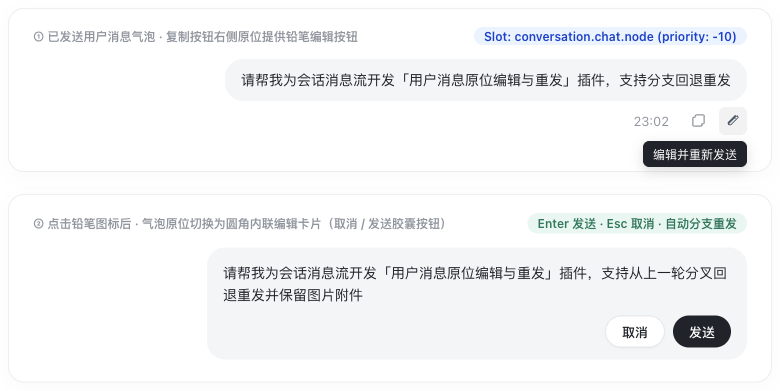
- 气泡下方复制按钮旁铅笔编辑图标
- 在每条已发送用户消息气泡下方的操作栏(
MessageIconActions)中,紧贴原生「复制」按钮右侧渲染 1:1 尺寸与悬停态的铅笔编辑图标(IconEditOutlineRegular),悬停提示「编辑并重新发送 / Edit & resend」。
- 在每条已发送用户消息气泡下方的操作栏(
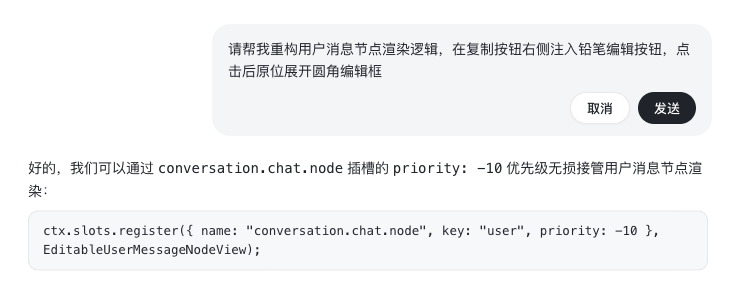
- 原位圆角内联编辑卡片
- 点击铅笔图标后,消息气泡原位切换为与原生用户气泡同色系(
--dsw-specific-bubble)的大圆角(--dsw-radius-xl)内联编辑框:- 自适应多行
<textarea>:自动聚焦并将光标定位至末尾,随内容行数自动伸缩高度。 - 右下角胶囊操作按钮:提供浅色胶囊按钮 「取消」(支持
Esc快捷键一键恢复原气泡)与深色胶囊主按钮 「发送」(支持Enter或⌘/Ctrl+Enter快捷键)。
- 自适应多行
- 点击铅笔图标后,消息气泡原位切换为与原生用户气泡同色系(
- 双模式会话重发(分支回退重发 / 当前会话追发)+ 原图片附件保留
- 分支回退重发(
branch,默认推荐):- 编辑第 $N$ ($N > 1$) 轮用户消息时,自动定位上一已完成轮次的末尾事件序号
prevTurnEndSeq,调用ctx.sessions.fork({ sessionId, atSeq: prevTurnEndSeq, increaseTitle: true })分叉出干净的新分支会话,自动切换焦点并发送修改后的消息。 - 编辑第 $1$ 轮首条用户消息时,自动在相同工作区(
cwd)创建全新会话、切换并发送修改后的消息。
- 编辑第 $N$ ($N > 1$) 轮用户消息时,自动定位上一已完成轮次的末尾事件序号
- 当前会话直接追发(
followup):若当前会话正在生成则先安全中断,随后直接在当前会话发送修改后的消息。 - 原消息图片附件自动携带(
preserveAttachments):若被编辑的原用户消息带有图片附件,重发时自动读取原附件 Base64 数据并随新消息一并发送。
- 分支回退重发(
📸 实机运行截图 (Screenshots)
1. 气泡下方铅笔编辑图标与原位圆角内联编辑框全景
2. 对话流中原位展开圆角内联编辑卡片(取消 / 发送胶囊按钮)
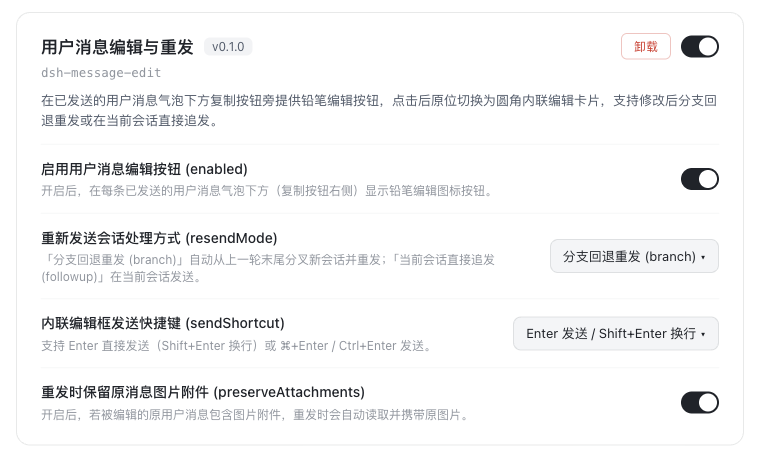
3. 插件可视化设置面板(支持切换重发模式、发送快捷键与附件保留)
🏗️ 运行时架构与重发状态机 (Architecture & Resend Flow)
flowchart LR
  Click["点击用户气泡下方<br/>铅笔编辑按钮"] --> Editor["原位展开圆角内联编辑卡片<br/>修改文本 + 按 Enter / 点击发送"]
  Editor --> Mode{"检查配置项<br/>resendMode"}
  Mode -- "branch (默认)" --> TurnCheck{"是否存在上一轮<br/>prevTurnEndSeq?"}
  TurnCheck -- "Turn N > 1" --> Fork["sessions.fork(atSeq: prevTurnEndSeq)<br/>切换新分支会话并自动发送"]
  TurnCheck -- "Turn 1 (首轮)" --> Create["sessions.create({ cwd })<br/>同工作区新建会话并自动发送"]
  Mode -- "followup" --> Followup["当前会话直接发送<br/>beginSubmission + session.prompt"]

  style Click fill:#e3f2fd,stroke:#1565c0,color:#0d47a1
  style Editor fill:#e0f2f1,stroke:#00695c,color:#004d40
  style Mode fill:#fff8e1,stroke:#ff8f00,color:#e65100
  style TurnCheck fill:#fff8e1,stroke:#ff8f00,color:#e65100
  style Fork fill:#e8f5e9,stroke:#2e7d32,color:#1b5e20
  style Create fill:#e8f5e9,stroke:#2e7d32,color:#1b5e20
  style Followup fill:#fce4ec,stroke:#ad1457,color:#880e4f
📦 安装与使用 (Installation)
方式一:通过 DSH CLI 一键安装
dsh plugin add https://github.com/xt765/dsh-message-edit/releases/latest/download/dsh-message-edit.tgz --trust
方式二:通过 npm 安装
npm install @xt765/dsh-message-edit
# 或无作用域别名包:
npm install dsh-inline-message-edit
方式三:在 DeepSeek Harness Profile 中配置启用
在 Profile 的 package.json 中添加 "dsh-message-edit" 依赖与 dsh.profile.bundles 项,并在 cordis.patch.yml 中声明:
- id: message-edit
  name: dsh-message-edit
  config:
    enabled: true
    resendMode: branch
    sendShortcut: enter
    preserveAttachments: true
⚙️ 配置项说明 (Configuration)
| 配置项 | 类型 | 默认值 | 说明 |
|---|---|---|---|
enabled | boolean | true | 是否在已发送用户消息气泡下方(复制按钮旁)显示铅笔编辑按钮 |
resendMode | 'branch' | 'followup' | 'branch' | 重新发送会话处理方式:branch 为从上一轮末尾分叉新会话重发(首轮新建同工作区会话);followup 为当前会话直接追发 |
sendShortcut | 'enter' | 'mod-enter' | 'enter' | 内联编辑框发送快捷键:enter 为 Enter 发送 / Shift+Enter 换行;mod-enter 为 ⌘/Ctrl+Enter 发送 |
preserveAttachments | boolean | true | 重发时是否自动保留并携带被编辑消息原本包含的图片附件 |
🧪 运行单元测试 (Testing)
npm test
📄 开源协议 (License)
MIT © xt765
Comments
Loading…
Similar plugins
by Yaya716
Persistent user-message tools for DeepSeek Harness Web: hover actions on user bubbles in the chat flow (copy, and edit-and-resend as a new message).
★ 0
JavaScript
Aug 15, 2026
dsh plugin --profile web add @local/dsh-msg-toolsMessage and attachment editing with save-only updates, forked regeneration, and a version timeline for DSH desktop.
★ 0
dsh plugin --profile web add @sh1robana/dsh-plugin-message-editby SpookySandwich
DSH 消息编辑插件:编辑已发送的消息并从该处分叉对话,气泡下方带版本计数与树状视图。Edit a sent message and branch from that point — version counter, tree view, placement presets.
★ 23
↓ 686/wk
NOASSERTION
JavaScript
Oct 5, 2026
dsh plugin --profile web add dsh-plugin-message-editby Moeblack
DSH 插件:分支式消息编辑、重掷、重试与版本时间线 | DSH plugin: branch-based message editing, reroll, retry, version timeline
★ 53
↓ 625/wk
TypeScript
Aug 16, 2026
dsh plugin --profile web add dsh-message-editby mbj733
DeepSeek Harness (DSH) plugin: edit sent messages and resend (stop an in-flight reply, edit, resend), plus branch-based edit / reroll / retry and a version timeline.
★ 4
↓ 34/wk
MIT
TypeScript
Sep 9, 2026
dsh plugin --profile web add dsh-edit-resendby lxl8182
DSH Web 用户消息编辑重发插件:改掉某一轮提问重发,该轮之后的内容丢弃,原会话归档(新会话继承逐字节相同前缀以保住 prompt 缓存)。
★ 0
MIT
JavaScript
Sep 30, 2026
dsh plugin --profile web add dsh-message-edit