
dsh-auto-effort
Manifest validPicks the reasoning effort (off, low, high or max) for each message before it is queued, from the message itself plus a short card the plugin keeps of what the conversation is doing and what is left,
English · 简体中文 · 日本語 · Español · Français · Deutsch · Русский · Português
dsh-auto-effort · Auto-select effort
Stop picking an effort. Install it once and DeepSeek picks it for every message.
Something broken? Open an issue — include the plugin version and the last lines of ~/.dsh/auto-effort.log.
Cheaper, faster, more relaxed — cost in sight, switch anytime
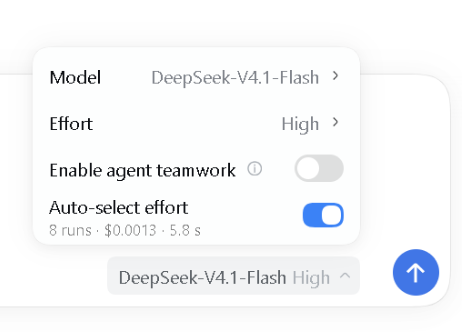
- Cheaper: picking an effort by hand usually means picking wrong — too low means rework and more spend, too high burns tokens. Auto costs only about
$0.0002extra per message off-peak, about$0.0004at peak. - Faster: picking by hand takes two clicks and 2–3 s; a too-low pick means redoing the work, a too-high one wastes reasoning time. Auto adds only about 0.7 s per message.
- More relaxed: no more weighing "low or max" for every message, and no more "oops, wrong effort". Just say what you want; the effort follows. No anxiety!
- Cost in sight: the menu row shows this conversation's runs, cost and judging time, and the plugin page keeps a running total.
- Switch anytime: turn it off whenever you do not want it, on when you do.
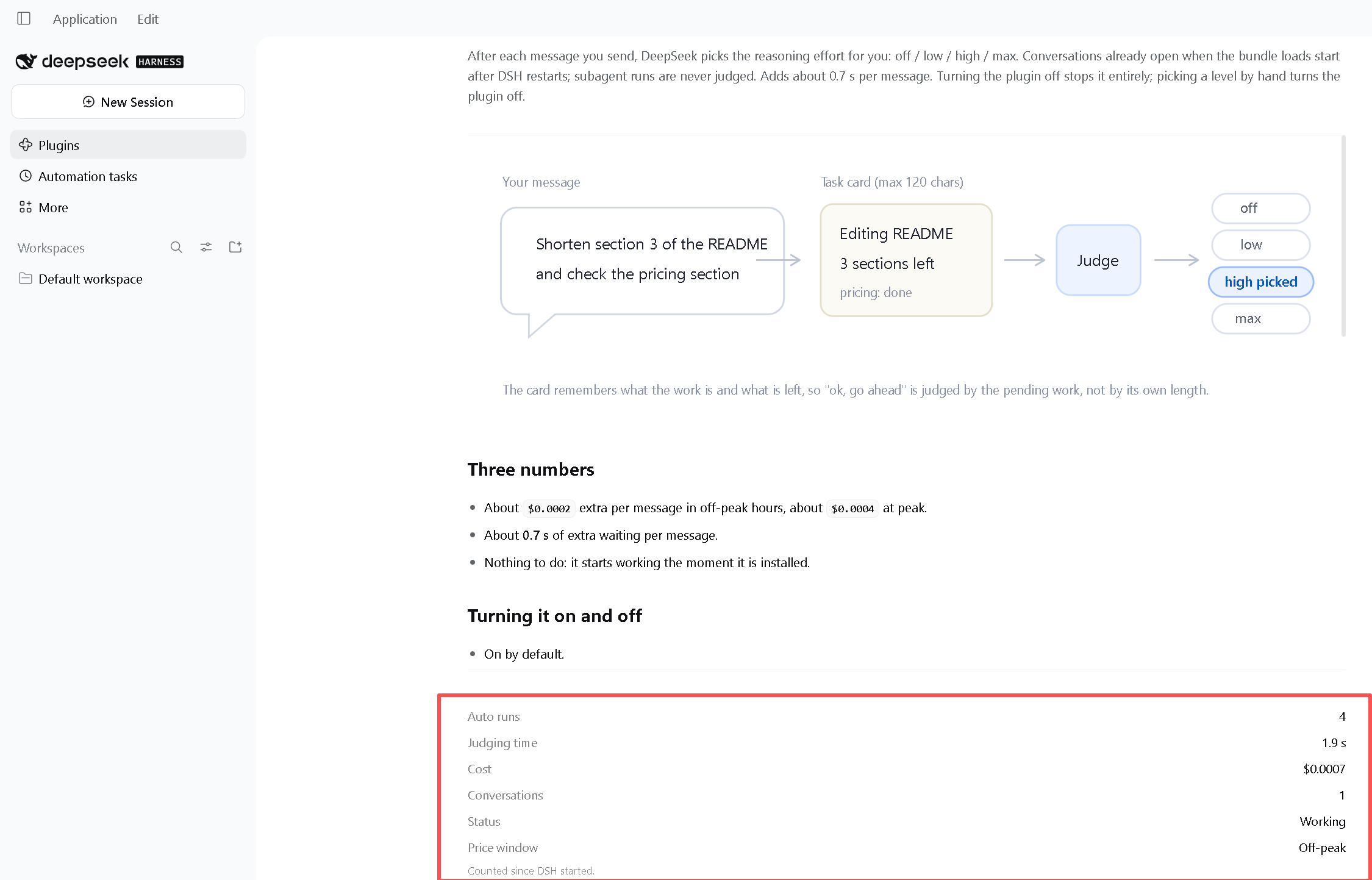
This is the plugin page — DSH → Plugins → dsh-auto-effort.
How it judges
The plugin plugs into the latest DeepSeek model. It summarises the conversation and keeps a card of at most 120 characters in the background. Every time you send a message it reads that message plus the card, then picks one of the four efforts. The card records what the conversation is doing and what is left, so "ok, go ahead" is judged by the pending work rather than by its own length.
| Effort | What DeepSeek picks it for | Measured example |
|---|---|---|
off | chat, confirmations, lookups, config edits, running commands | list the current directory |
low | small edits, renames, tidying, applying a known pattern | rename these variables consistently |
high | analysis, debugging, explaining why, non-trivial code | help me work out why this approach is slow |
max | architecture, comparing options, multi-factor tradeoffs, hard bugs | trace this intermittent memory leak in the log to its root cause |
DeepSeek documents the strength parameter (
low/high/max, plusofffor thinking off) but never says which kind of task belongs to which effort. The table above is what the DeepSeek judge suggests on its own, with no human input; every example was run against the real judge.
Cost
The plugin makes one judgement and one card update per message. The judgement only ever answers one word — off, low, high or max — so it costs almost no tokens, and it takes about 0.7 s. The card is capped at 120 characters, so it never grows with the conversation. The card is written in the background after the reply and never adds to your wait.
| Per message | Off-peak | Peak |
|---|---|---|
| Judge + card | about $0.0002 | about $0.0004 |
Install
Three ways, pick one.
1. Let DSH install it — send this in any conversation:
Install the plugin dsh-auto-effort
2. Terminal — with the DSH CLI installed:
dsh plugin --profile web add dsh-auto-effort
3. Plugin page — open Plugins in the sidebar, search dsh-auto-effort, click Install.
A line starting with + dsh-auto-effort means it worked.
After installing or updating the plugin, restart DSH.
To see what changed before you update, check CHANGELOG.md.
Turning it on and off
On
It is on the moment it is installed: a new conversation starts auto-selecting immediately, and a conversation that was already open starts once you restart DSH.
Off
- Turn off Auto-select effort in the model menu: this conversation only.
- Pick any effort by hand: this also turns auto off in the current conversation.
- Turn the plugin off on the plugin page: every conversation stops auto-selecting.
Configuration
You normally do not edit any of this. Everything below is for tuning and troubleshooting, and the defaults suit almost everyone.
| Field | Default | Meaning |
|---|---|---|
enabled | true | master switch; off means no judging logic loads |
mode | auto | the default for new conversations: auto judges every message, manual only hands off; the menu switch changes the conversation you are in |
levels | ["off","low","high","max"] | efforts auto mode may use |
judgeModel | deepseek-flash | model used for judging; blank or model judges with this conversation's own model |
timeoutMs | 3000 | judge timeout; on timeout the current effort is used |
defaultLevel | null | fallback effort when judging fails; null means the current effort is kept |
requireMaxForUpgrade | false | off by default, so auto can pick the top level max; when on, auto stops at high and max is manual only |
logFile | null | log path; null means ~/.dsh/auto-effort.log |
cardInputChars | 600 | how much of the reply the card writer reads; smaller is cheaper, but accuracy may drop |
cardMaxChars | 120 | cap on the card text itself; smaller is cheaper, but accuracy may drop |
debug | false | verbose logging, including the raw judge output |
Sending while a turn is running
Settings → General → Send behavior while busy decides what happens to a message you send while a reply is still being written:
- Steer — it joins the running turn and keeps that turn's effort.
- Queue — it behaves exactly like a normal message.
If nothing happens
- Check that the plugin is enabled on the plugin page (Plugins → Installed plugins).
- If the conversation already existed when you installed it, restart DSH once.
- Check that Auto-select effort in the model menu is still on — picking an effort by hand turns it off in this conversation only.
- Read the log at
~/.dsh/auto-effort.log— every message writes aturn N judging …line. - If a turn hit an API error, or judging failed three times in a row, the plugin pauses this conversation and a bar above the input box tells you why. Press Turn it back on in that bar, or toggle the switch off and on again — no restart needed.
Uninstall
Plugins → Installed plugins → dsh-auto-effort → Remove. Judging stops; the configuration it added is cleaned up.
Development
- Source:
index.js(host half),client.js(the switch in the model menu and the paused banner),judge.js(the two judge calls),config.js(dependency-free validation),schema.js(config schema),stats.jsandserver.js(the local cost counter and the per-conversation switch behind the numbers). - Installing from a local directory (
install_bundle <dir>) is a developer path — ordinary users never install this way; back the directory up before removing the plugin. npm testruns three offline suites: config/parse/timeout, the takeover and per-conversation switch wiring (including the paused banner's status), and the loopback sidecar.
Comments
Loading…
Similar plugins
by imkingjh999
DSH plugin: auto reasoning_effort (low/high/max) per turn via MiniMax complexity scorer + token ledger + per-reply metadata label
★ 0
MIT
TypeScript
Aug 26, 2026
dsh plugin --profile web add dsh-adaptive-effortby haidashu79-prog
For non-expert users who struggle to write clear prompts: on every message the plugin (agent/pre-step hook) auto-completes the vague/incomplete input into a full instruction with goal/constraints/deli
★ 0
JavaScript
Nov 15, 2026
dsh plugin --profile web add dsh-prompt-boosterby zhangzhenwen1
Auto-adjust model reasoning effort per task (off/low/high/max): task classification, [effort=...] markers, in-turn error escalation, DeepSeek peak-pricing-period capping with countdown notices, and ma
★ 0
↓ 61/wk
MIT
JavaScript
Aug 30, 2026
dsh plugin --profile web add dsh-task-effortby tietoumiao
DeepSeek Harness plugin: choose a subagent thinking effort (low | high | max) per call.
★ 0
MIT
JavaScript
Oct 18, 2026
dsh plugin --profile web add dsh-subagent-effortby huhu23333
Distill over-long model reasoning into its useful core, replay the compressed version on every later request, and report each session's cost and savings. Disabled by default: you must install and sele
★ 0
MIT
TypeScript
Oct 24, 2026
dsh plugin --profile web add dsh-reasoning-distillby DC1024
DSH plugin: sync model-catalog reasoning levels (reasoningEfforts) from what the provider advertises on /v1/models — sync_reasoning_levels tool plus a one-click button in the Models settings page.
★ 0
MIT
JavaScript
Oct 17, 2026
dsh plugin --profile web add dsh-effort-sync