

deepseek-harness-dsh-for-vscode
Discovered★ 7DeepSeek Harness(dsh) for VS Code
DeepSeek Harness(dsh) for VS Code
A Cursor-like AI coding experience inside VS Code — powered by your own DeepSeek Harness (DSH) agent.
Embeds the full DSH web UI in the VS Code auxiliary sidebar: every window automatically starts and owns a local dsh web service (cwd = current workspace), so your modules, skills, MCP servers, credentials and sessions all just work. On top of that it adds the IDE integration layer:
- Chat in the sidebar:
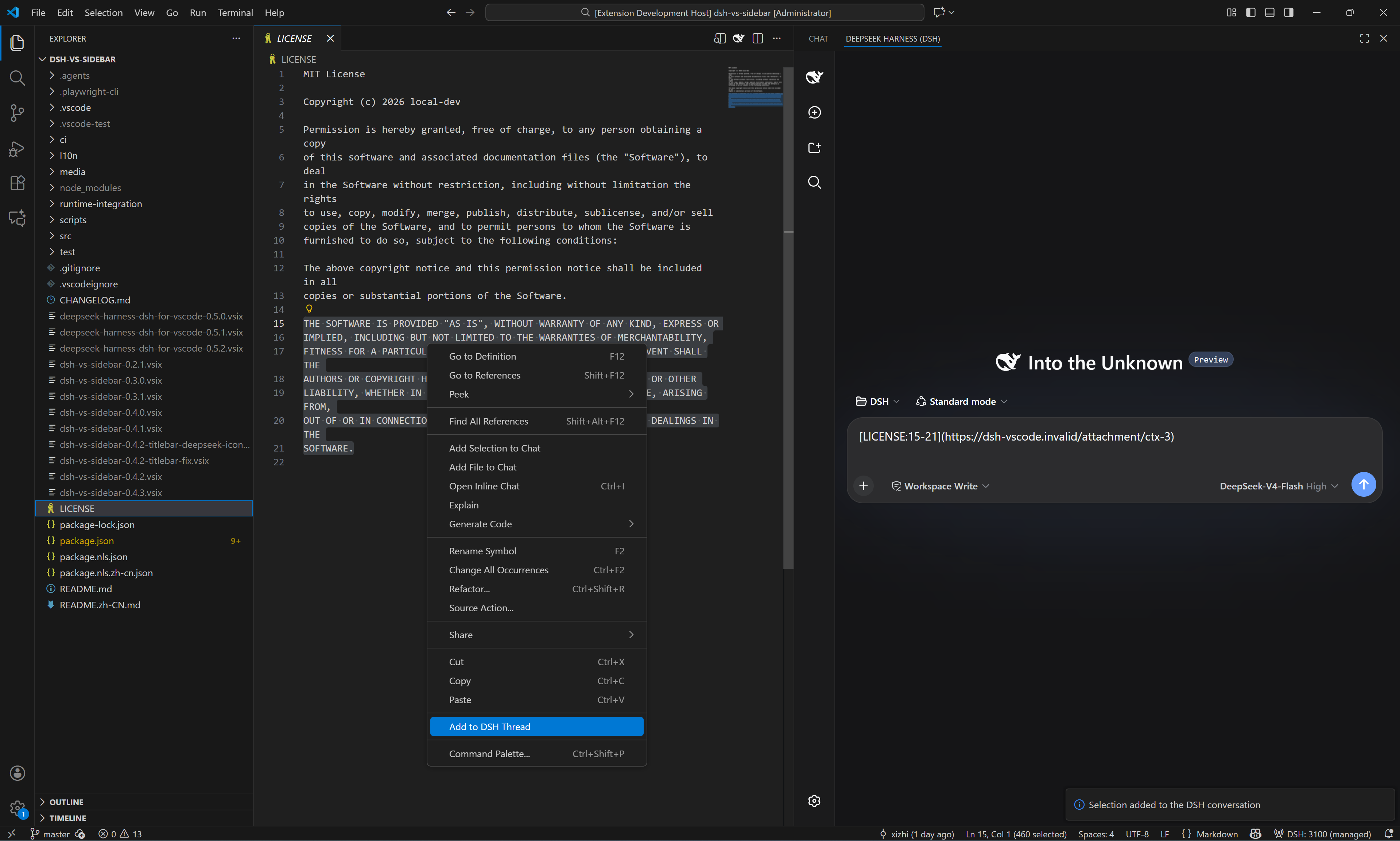
Ctrl+Alt+Bopens it; copy/paste/context menu, file jumps and theme following are all native - Context attachment: right-click a file / selection / folder / Problems to append a compact link to the DSH draft — source text is never pasted, nothing is ever auto-sent
- DSH Changes review: workspace edits pushed by DSH land in a dedicated tree with diff / accept / undo; every write needs explicit approval (on by default)
- @dsh chat participant: type
@dshin the native VS Code chat to talk to your local DSH session with streaming replies — zero Copilot quota (on by default) - Advanced, opt-in: Ctrl+K / Ctrl+I inline edit, model routing into the VS Code LM picker, MCP consumption, terminal / UI bridges, FIM tab completion — every capability behind an explicit consent switch
⚠️ Compatibility
| Item | Requirement |
|---|---|
| VS Code | ≥ 1.106, desktop only; remote / virtual / untrusted workspaces not supported |
| DSH CLI | npm i -g @deepseek-ai/dsh, ≥ 0.1.0-rc.7 recommended (older runtimes auto-retry degraded, some features limited) |
| Node.js | auto-detected; set dsh.local.nodePath for non-standard locations |
📦 Install
- Marketplace (recommended): search DeepSeek Harness (publisher Xizhi1024) in the Extensions view, or
code --install-extension Xizhi1024.dsh-vs-sidebar - VSIX: download from Releases →
Extensions: Install from VSIX...
🚀 Usage
- Press
Ctrl+Alt+B— the extension starts (or reuses) the localdsh weband loads the UI - Select code → right-click Add to DSH Thread; the draft receives a compact
file:linelink, press Enter to send - Type
@dsh+ your question in the VS Code chat — replies stream from your local DSH session - Let DSH propose an edit through the bridge: it lands in the DSH Changes view for diff / accept / undo — nothing is written without approval
Common commands (palette, DSH: prefix): New / Switch Session · Open Session History · Restart / Stop Server · Open in Browser · New DSH Instance (Ctrl+Alt+N) · Diagnose · Restart Cleanly · Set DSH FIM API Key.
⚙️ Configuration
| Key | Default | Description |
|---|---|---|
dsh.port | 3080 | Port for the DSH web server |
dsh.autoStart | true | Start the service when VS Code opens |
dsh.home.mode | shared | shared = official ~/.dsh; isolated = extension-private home |
dsh.profile | web | DSH profile directory name |
dsh.executablePath | (empty) | Explicit DSH executable / package dir / shim; takes precedence over discovery |
dsh.closePolicy | onVscodeExit | When to stop the owned server |
dsh.features.changes-review | true | DSH changes review (approval-gated writes) |
dsh.changes.observe-tools | true | Attribute tool-made edits in the changes tree (tool group) |
dsh.features.chat-participant | true | @dsh chat participant |
dsh.features.ctrl-k / ctrl-i | false | Inline edit commands (Ctrl+K / Ctrl+I) |
dsh.features.lm-route | false | Expose DSH models in the VS Code LM picker |
dsh.features.mcp-consume | false | Let DSH consume VS Code-side MCP servers |
dsh.features.tab-completion | false | FIM tab completion — needs dsh.fim.baseUrl + DSH: Set FIM API Key, then restart the DSH server |
dsh.fim.baseUrl | (empty) | Upstream FIM endpoint (full URL of an OpenAI-compatible completions API) |
dsh.keybindings.ctrlL | true | Ctrl+L adds the selection to the thread (never sends) |
dsh.bridge.terminal / editorRead / ui | false | Terminal / editor-read / UI surface bridges (consent switches) |
Full key list in package.json; run DSH: Diagnose for a health summary.
License
Comments
Loading…
Similar plugins
by foxi-ui
Deepseek Harness 插件-工作区快速打开编辑器vscode、idea等
★ 0
MIT
JavaScript
Aug 19, 2026
dsh plugin --profile web add @foxi-ai/dsh-command-vscodeby potterlee369-prog
在deepseek harness聊天框加入VS code和文件管理器按钮
★ 0
MIT
TypeScript
Aug 19, 2026
dsh plugin --profile web add dsh-vscode-openerby omdsh-dev
Open DeepSeek Harness workspace directories in VS Code directly from the web GUI.
★ 53
MIT
JavaScript
Aug 16, 2026
dsh plugin --profile web add dsh-open-in-vscodeby yuehancn
DeepSeek Harness plugin
★ 0
MIT
JavaScript
Oct 2, 2026
dsh plugin --profile web add dsh-tool-qrcodeby nullifyi
DeepSeek Harness plugin: VS Code-style sash dividers in the left sidebar, per-row compact mode with auto-shrinking content, and per-block collapse into icons above the avatar.
★ 0
MIT
JavaScript
Oct 21, 2026
dsh plugin --profile web add dsh-sidebar-widthby leonardoxr
Secure bounded coding tools for DeepSeek Harness
★ 0
MIT
TypeScript
Aug 24, 2026
dsh plugin --profile web add dsh-coding-tools