
dsh-serial-sifarCRT
IdentifiedWindows serial debug console in the DSH right sidebar: port settings, ANSI color logs, an in-log Linux command line, editable command buttons, keyword log search, multi-port tabs and log export.
dsh-serial-sifarCRT



A SecureCRT-style Windows serial debug console that lives in the DeepSeek Harness (DSH) right sidebar. Configure a COM port from a dialog, connect, watch hardware debug output with ANSI colors, and type Linux commands directly into the log window — with several serial ports open side by side in tabs.
中文简介见下方「中文说明」。
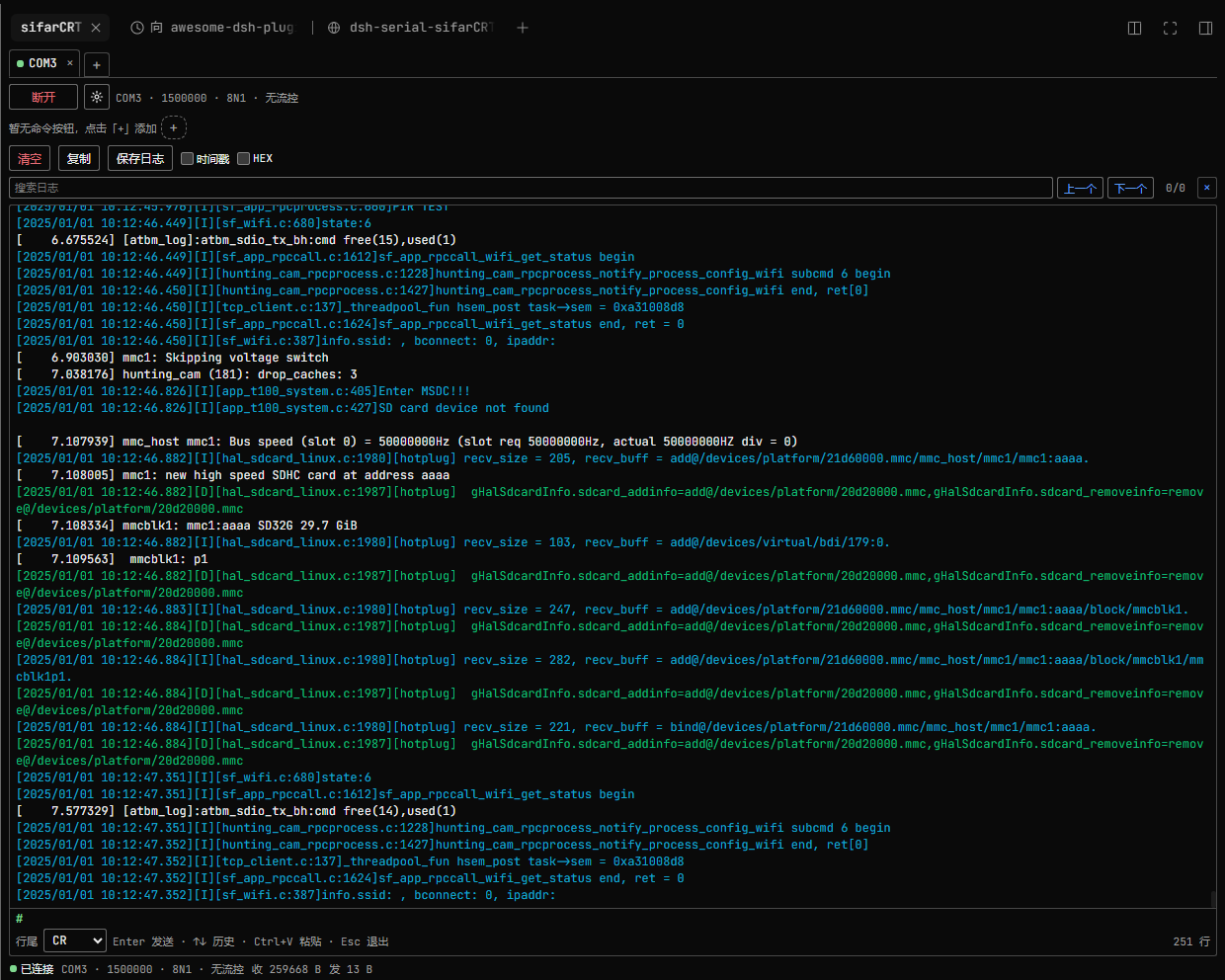
sifarCRT connected to a board: per-line ANSI colors ([I] cyan, [D] green, [E] red, plain kernel lines white), the in-log # terminal with blinking caret, command buttons, and the keyword log search row.
Features
- Right sidebar panel — registered as a native right-sidebar tab type (
sifarCRTin the right column's guide). Opening it does not replace the built-in right-sidebar pages. - Serial settings dialog — a gear button opens one dialog with port (auto-enumerated, with adapter descriptions), baud rate (editable, presets 9600 / 115200 / 1500000, default 1500000, valid 50–1500000), parity (default None), flow control (default 无/None), data bits and stop bits. Confirm, then Connect/Disconnect from the toolbar.
- ANSI colors — Linux ANSI SGR sequences such as
ESC[0m,ESC[36;22mandESC[7mare parsed and rendered (16 / 256 / truecolor, bold, dim, italic, underline, reverse, hidden). Colors are applied per log line: the color set at the start of a line colors that line, while lines with no ANSI (kernel/plain output) use the default text color — no bleed-over into following lines. Other cursor/clear control sequences are hidden instead of shown as garbage. A streaming parser keeps state across serial chunks. - In-log Linux terminal — click the log pane and type directly: green
#prompt with a blinking caret,Entersends (an empty Enter sends a bare CR so the board prints its prompt),Backspace,↑/↓command history,Ctrl+Vpaste (multi-line paste sends line by line),Escapeto leave the keyboard.Ctrl+Csends a single0x03(ETX) to interrupt a foreground program such astop; with text selected it copies instead. - Keyword search — a search box highlights every match in the visible log (current match emphasized), with 上一个/下一个 navigation, an
n/mcounter and a clear button.Entergoes to the next match,Shift+Enterto the previous,Escapeclears; navigating centers the match and pauses auto-follow. - Log scrolling that stays out of the way — pressing the left mouse button in the log pauses auto-follow while data keeps arriving; releasing at the bottom resumes. Dragging the scrollbar up keeps the old view without jumping on new data; scrolling back to the bottom, pressing
Enter, or clicking “已暂停 · 跟随最新” resumes. - Command buttons — user-defined command chips that send a stored command with its own line ending; add, edit and delete them (double-click or right-click a chip). Kept per tab in
localStorage. - Copy / save — select text to copy, or copy the whole visible log; export the current tab as a plain-text
.logfile. Locally sent bytes are not echoed into the log — the board's own tty echo is what you see, exactly like SecureCRT. - Multiple tabs — one independent serial session per tab, several ports open at the same time; tab configuration persists across page reloads (ports are not auto-reconnected).
- Bounded logs — the Host keeps the last 4000 entries / 8 MB per session; the panel renders the last 2000.
Requirements
- Windows (uses the in-box Windows PowerShell 5.1 + .NET
System.IO.Ports; no native Node module and no compiler are needed). - DSH
^0.2.1-rc.1(the right-sidebar tab API of dsh 0.2.1+). - No package dependencies, no build step.
Install
From npm (after the package is published):
dsh plugin --profile web add dsh-serial-sifarcrt
From GitHub source (works without npm):
dsh plugin --profile web add github:xf3193/dsh-serial-sifarCRT
From a local tarball:
npm pack
dsh plugin --profile web add ./dsh-serial-sifarcrt-1.0.3.tgz
Replace web with your profile name (Desktop users: install from Settings → Plugins instead). After installation, refresh the DSH page once and open the right sidebar → sifarCRT in the guide.
Uninstall: dsh plugin --profile web remove dsh-serial-sifarcrt.
How it works
| Half | File | Responsibility |
|---|---|---|
| Host | lib/index.js | Multi-session manager, POST/GET /dsh-serial-sifarcrt/* HTTP API on ctx.webServer, bounded per-session logs |
| Host | lib/serial-helper.ps1 | One persistent Windows PowerShell child per serial session, System.IO.Ports over NDJSON stdio |
| Client | lib/client.js | Right-sidebar tab-type registration, ANSI renderer, in-log terminal, settings dialog, tabs, command chips (React, no build step) |
The full Host↔Client protocol contract is documented in docs/CONTRACT.md.
The plugin needs no network access. It reads/writes the local COM ports you select and stores tab/command/line-ending preferences in the page's localStorage. It spawns powershell.exe children that it owns and terminates with the plugin.
Security notes
- Installing any DSH plugin runs third-party code with your user permissions. This plugin only opens the serial ports you explicitly connect and does not send data anywhere.
OS-limited to Windows; the Host half will not start its serial bridge on other platforms.- The optional diagnostics endpoint writes a mount report to the OS temp directory (
dsh-serial-sifarcrt-report.json) for troubleshooting; it contains no serial data.
Development
The package ships the exact files it runs — there is no bundler:
node --check lib/index.js
node --check lib/client.js
node test/host-test.mjs   # Windows + real COM ports required
Known limitations
- One port is exclusive: a COM port already held by another program cannot be opened.
- The log is a record view: ANSI colors are honoured, but cursor movement / clear-screen sequences are ignored rather than reflowing text (progress bars may appear as several lines).
- Paused scroll keeps the rendered position; when the 2000-line render cap is hit, the oldest rendered lines are dropped.
- Windows-only by design.
中文说明
DSH 右侧栏的 Windows 串口调试台(SecureCRT 风格):
- 齿轮图标弹出串口设置(串口自动枚举、波特率可编辑默认 1500000、校验位默认 None、流控默认无、数据位/停止位),确定后连接/断开;
- 日志按 ANSI 颜色渲染,Linux
#命令行可直接在日志窗口输入(回车发送、↑↓ 历史、Ctrl+V 粘贴、Ctrl+C 中断 top 等前台程序); - 命令按钮栏可增删改;多标签页可同时开多个串口;
- 日志滚动跟随:按住鼠标暂停、拖滚动条回看旧日志不跳动、回车或滚到底部恢复;
- 支持复制与导出
.log;本地发送不重复回显(显示板端 tty 回显)。
安装:dsh plugin --profile web add dsh-serial-sifarcrt(或 github:xf3193/dsh-serial-sifarCRT),刷新页面后从右侧栏指南打开 sifarCRT。仅支持 Windows,需要 DSH 0.2.x。
License
MIT. lib/serial-helper.ps1 is adapted from floydc-sz/dsh-serial-debugger (MIT); see LICENSE for the full text and third-party notice.
Comments
Loading…
Similar plugins
by cccodder
Right-sidebar SSH remote console for DeepSeek Harness: host menu, PTY capture, unified human+agent log, and agent tools that write into the same terminal.
★ 1
MIT
JavaScript
Oct 25, 2026
dsh plugin --profile web add dsh-remote-consoleby chs-1108
DeepSeek Harness 本机安全评测与提示词清洗插件:侧栏面板管理提示词分层、补丁、规则集与技能;带授权演练台。Local security-eval & prompt-cleaning plugin for DeepSeek Harness.
★ 4
↓ 7k/wk
MIT
JavaScript
Oct 22, 2026
dsh plugin --profile web add dsh-purgeby wyzh0117
Native DSH right-sidebar tab that lists the ports this machine is listening on together with the process behind each one, and offers per-port actions to open it, copy its address, reveal its working d
★ 0
MIT
JavaScript
Sep 15, 2026
dsh plugin --profile web add dsh-port-managerby xiaoksio
DSH Web GUI right sidebar: VS Code-style file explorer plus source control (git status, stage/unstage/discard, commit, diff, commit graph, sync fetch/pull/push, branch/remote management, git init, mul
★ 11
↓ 452/wk
MIT
TypeScript
Nov 9, 2026
dsh plugin --profile web add dsh-solution-explorerKeyboard-driven quick switching for DSH — model palette with colored provider tags, suffix tags and pins, a two-column session palette with per-question prompt preview and archived-session restore, re
★ 0
dsh plugin --profile web add dsh-shortcut-extensionsby mostkia
Power controls (shutdown / restart) for the DSH sidebar plus a Windows tray launcher with start-at-logon.
★ 0
MIT
PowerShell
Oct 5, 2026
dsh plugin --profile web add @mostkia/dsh-launcher