
dsh-account-identity
IdentifiedCustom sidebar name and locally cropped avatar for DeepSeek Harness.
账号身份 · Account Identity
给 DeepSeek Harness(DSH)换一个自己想用的名字和头像。
为什么做这个插件
DSH 目前还没有为侧边栏提供独立的昵称和头像设置,登录后会直接沿用账号资料。
比如,账号里用的是微信头像,而你只想在 DSH 里换张图。账号身份就是为这个需求做的:在 DSH 里单独设置显示名称和头像,不用修改 DeepSeek 账号资料。
能做什么
- 换个显示名称。 用你喜欢的昵称替换侧边栏账号名,名称与头像可以分开设置。
- 自己决定头像怎么裁。 选择本地图片后,拖动、缩放并查看圆形预览,确认后再保存。
- 随时恢复原有显示。 暂停自定义即可切回,已经设置的名字和头像会保留,方便再次启用。
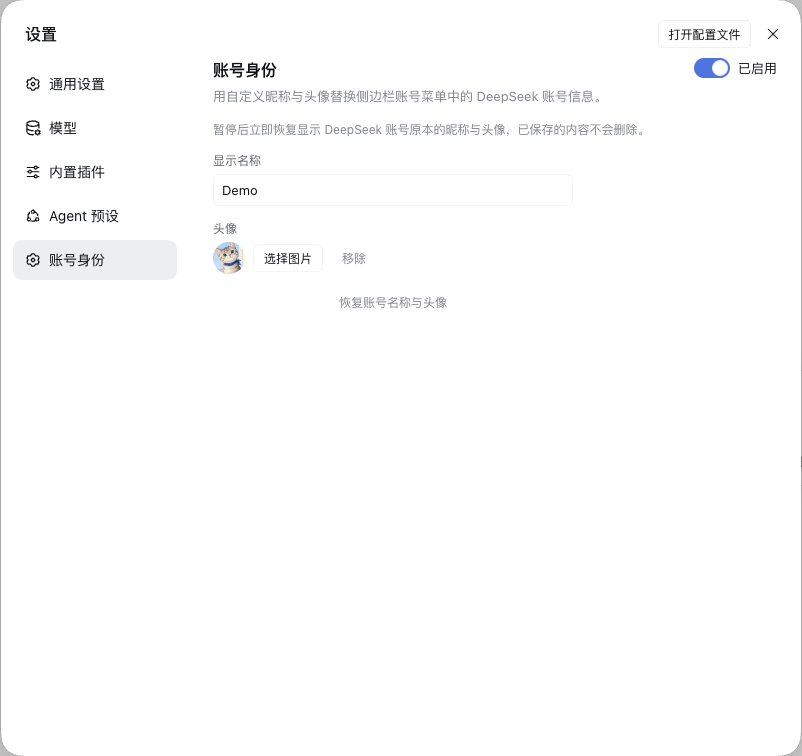
原生 DSH 界面示意,使用演示昵称与头像。
怎么安装
- 打开 DSH 侧边栏的 插件 页面,点击 添加插件。
- 将下面的安装地址粘贴到输入框中,完成安装。
- 确认“账号身份”已启用;如果 DSH 提示重启,按提示重启。
https://github.com/wysxxx/dsh-account-identity/releases/download/v0.2.0/dsh-account-identity-0.2.0.tgz
安装包也可以在 v0.2.0 发布页下载。
装好后在哪里使用
安装完成后,插件 页面的已安装列表中会出现 账号身份。使用入口在:
左下角账号菜单 → 设置 → 账号身份
- 填写显示名称,按 Enter 或点击输入框外保存。
- 点击 选择图片,拖动图片调整位置,再用滑块调整大小。
- 看一下圆框和右侧的小头像预览,满意后点击 使用此头像。
后续修改也在这个设置页完成。只想换头像,可以把显示名称留空;点击头像旁的 移除 可恢复账号头像。关闭右上角的开关可以暂停自定义,点击 恢复账号名称与头像 则会清除已保存的自定义内容。
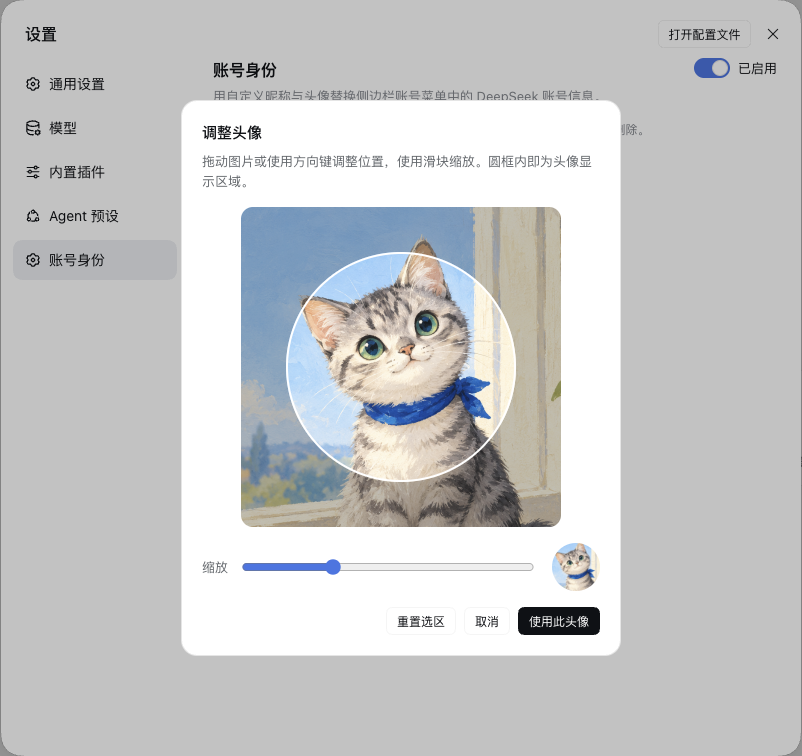
选好区域后再确认,点击“取消”或按 Escape 不会替换当前头像。示例图片由 ImageGen 生成,界面是插件的实际截图。
使用前了解
- 适用于使用 DeepSeek 账号登录的 DSH;已在 DSH 0.2.1-rc.3 验证。
- 名字和头像只改变 DSH 内的显示,不修改 DeepSeek 账号资料。
- 图片在本地裁切,不上传原图;显示设置保存在当前 DSH profile 中。
- 停用或卸载前,建议先在“账号身份”页暂停自定义显示。
安装文件在哪里?
以 macOS 默认 Desktop profile 为例,插件文件通常位于:
~/.dsh/profiles/desktop/node_modules/dsh-account-identity/
名称、裁切后的头像等设置保存在同一 profile 的 cordis.patch.yml 中。自定义 DSH 数据目录或使用其他 profile 时,路径会不同。日常使用直接打开 设置 → 账号身份 即可。
兼容性与已知限制
如果使用第三方主题或费用插件,界面的呈现可能不同;尚未逐一验证所有主题。侧栏收起时,部分费用组件会沿用紧凑图标视图,完整金额需展开侧栏查看。
自定义账号入口尚未覆盖官方赠金通知栈与意见反馈入口。图片格式、数据保存、主题适配、停用恢复及开发说明见 详细说明。
遇到问题,可到 Issues 提供 DSH 版本、复现步骤和去除个人信息的截图。
English
Set a separate display name and avatar for the DeepSeek Harness sidebar without changing your DeepSeek account profile. Choose a local image, pan and zoom the crop, preview it, then confirm to save.
Install the release package through Plugins → Add plugin, restart if prompted, then open Settings → Account identity. See details for data handling, compatibility and development notes.
License
MIT. Upstream code notices are included in THIRD_PARTY_NOTICES.md.
Versions
| Latest version | Published | Size |
|---|---|---|
| 0.2.0 | — | — |
Comments
Loading…
Similar plugins
by acebang0303
One-click create, update or remove the DeepSeek Harness desktop shortcut with switchable custom icons and a draggable whale button.
★ 2
NOASSERTION
JavaScript
Aug 18, 2026
dsh plugin --profile web add dsh-quick-launchby xingyingyuzhui
Claw identity files for DeepSeek Harness. 把 SOUL / AGENTS 等人设打进提示词。
★ 0
MIT
JavaScript
Aug 19, 2026
dsh plugin --profile web add dsh-agent-identityby xingyingyuzhui
Claw identity files for DeepSeek Harness. 把 SOUL / AGENTS 等人设打进提示词。
★ 0
MIT
JavaScript
Oct 10, 2026
dsh plugin --profile web add dsh-agent-identityby 1739321142
DeepseekHarness类DevTools自定义美化
★ 0
JavaScript
Aug 15, 2026
dsh plugin --profile web add dsh-beautify-pluginby nullifyi
DeepSeek Harness plugin: VS Code-style sash dividers in the left sidebar, per-row compact mode with auto-shrinking content, and per-block collapse into icons above the avatar.
★ 0
MIT
JavaScript
Oct 21, 2026
dsh plugin --profile web add dsh-sidebar-widthby dsh-plugin-lab
DSH plugin: shows your DeepSeek account balance at the bottom of the left sidebar (native UI)
★ 4
MIT
TypeScript
Oct 20, 2026
dsh plugin --profile web add dsh-ds-balance