

dsh-session-navigator
Manifest validSession navigator & turn minimap for DeepSeek Harness: proportional rail, hover preview card, turn stepper.
dsh-session-navigator
Session navigator and turn minimap for DeepSeek Harness.
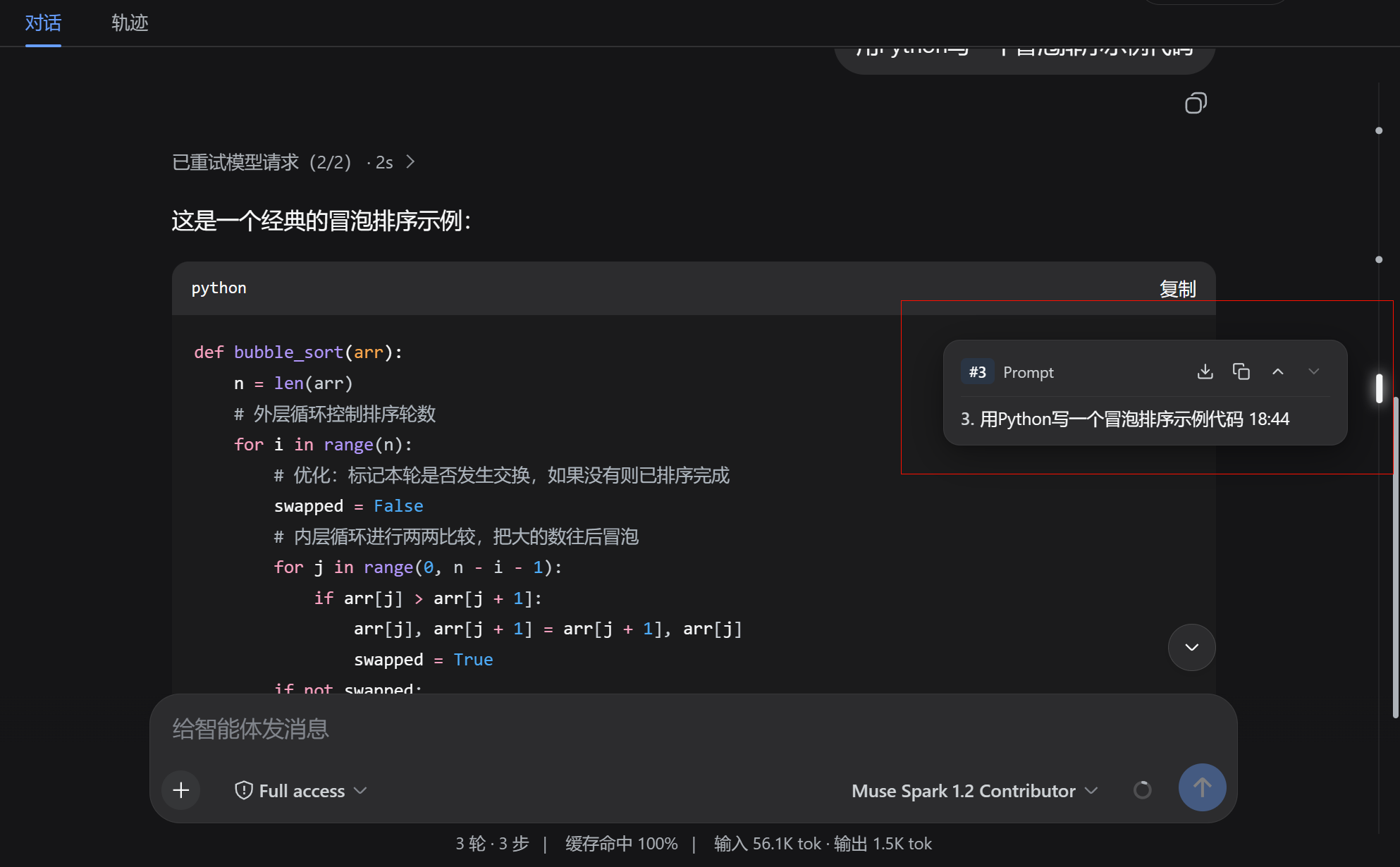
dsh-session-navigator brings a sleek, full-height turn minimap and navigation rail to the Harness Web UI: inspect every user turn proportionally along the conversation stream, hover to view message previews with quick action buttons (copy, export markdown, jump between turns), drag the unified scroll thumb, and smoothly navigate long conversations — with zero modification to official packages.
What it solves
In multi-turn, long agent conversations (dozens of rounds of prompt-response pairs and tool executions), scrolling through massive outputs to locate a specific turn or prompt is tedious. Official DSH lacks a conversation minimap or quick turn outline. This plugin provides a non-intrusive full-height rail along the right edge of the chat stream:
long conversation stream (50+ turns of code / tool outputs)
  -> full-height navigation rail on the right edge
  -> hover any turn marker: floating preview card with turn #, prompt snippet, and Q&A status
  -> quick actions on card: export turn to Markdown, one-click copy, previous/next turn stepper
  -> click marker or card: smoothly scrolls to the target message with highlight pulse
  -> unified draggable scroll thumb replaces redundant native scrollbars
Features
- Full-height minimal rail: A clean 1px vertical axis anchored seamlessly to the conversation scrollport without bulky capsules, completely blending into the UI.
- Proportional turn markers: Automatically maps each user turn to its real physical height offset in the scroll container.
- Active turn indicator: Visual vertical pill highlighting the currently viewed turn with smooth scroll tracking (ScrollSpy).
- Unified draggable scroll thumb: Smooth draggable viewport scrollbar that cleanly hides duplicate native browser scrollbars.
- Floating preview card:
- Turn number badge (e.g.
#2 Prompt/Q&A). - Export Markdown: Download the turn's prompt and response as a standalone
.mdfile. - One-click Copy: Copy full turn text with instant green checkmark confirmation.
- Turn Stepper: Previous (
▲) and Next (▼) buttons to step through conversation rounds. - 3-line truncated prompt snippet with bold numbering.
- Turn number badge (e.g.
- Smooth jump & pulse: Clicking any marker or card scrolls smoothly to the target bubble with a focus glow wave animation.
- Zero core modification: Pure bundle plugin (
dsh.bundlepatch layer); mounts via officialshell.overlayslot without patching or modifying core packages.
Installation
# one line, from a git source
dsh plugin --profile web add github:wuxiangru915/dsh-session-navigator

# restart the web server, then hard-refresh the page
Local development:
dsh plugin --profile web add /path/to/dsh-session-navigator
The repository ships plain-JS lib/ artifacts with no build step, so git-source installs work without any build tooling on the user's machine.
Usage
Web UI
Open any conversation in DSH Web:
- Navigation Rail: On the right edge of the conversation, turn markers appear proportionally along the vertical rail.
- Hover Preview: Hovering over any marker displays the floating preview card with turn summary and action buttons.
- Click to Jump: Click any marker or preview card to jump directly to that turn.
- Turn Actions: Use the card's header buttons to export markdown, copy content, or step between turns.
- Drag to Scroll: Drag the viewport thumb along the rail to scroll the conversation.
Architecture
lib/
├── index.js   Host half: empty cordis plugin entry
└── client.js  Browser half: __ModuleLoader__ bundle registering shell.overlay slot
cordis.patch.yml   dsh.bundle patch layer — one insert row drives both halves
assets/
└── session-navigator.png   Preview screenshot
browser (shell.overlay slot)
  -> scans [data-conversation-scroll] and [data-chat-anchor-key]
  -> computes proportional turn markers & scroll spy
  -> renders full-height rail + preview card + smooth scroll controller
Roadmap
- Full-height minimal navigation rail
- Proportional turn markers & active pill indicator
- Floating preview card (export MD, copy text, prev/next stepper)
- Single unified draggable scroll thumb
- Smooth scroll with highlight pulse animation
- Filter markers by search keywords
- npm release (
@dsh-plugin/dsh-session-navigator)
Requirements
- DeepSeek Harness >= 0.1.0-rc.5 (Cordis 4.x)
- Node.js >= 22
License
Comments
Loading…
Similar plugins
by xiaheng1
Turn histogram navigation rail for DeepSeek Harness Web with mixed, DeepSeek, and Codex visual variants.
★ 0
MIT
TypeScript
Aug 21, 2026
dsh plugin --profile web add dsh-turn-navby wang122818
Turn-based navigation rail for DeepSeek Harness Web conversations
★ 0
MIT
JavaScript
Aug 18, 2026
dsh plugin --profile web add dsh-conversation-navigatorby 1622352030
Session-stall watchdog for DeepSeek Harness: releases a hung turn in place instead of restarting the app.
★ 0
MIT
JavaScript
Sep 24, 2026
dsh plugin --profile web add dsh-session-rescueby SocFeng
DSH WebUI session query navigation with a faint conversation-edge rail, a hover list of real user queries, and click-to-jump back to the matching bubble.
★ 1
MIT
JavaScript
Aug 26, 2026
dsh plugin --profile web add dsh-query-jumpby kiligzzz
Piano-key style in-conversation navigation bar for the DeepSeek Harness web GUI: one key per user message, hover preview tooltip, click-to-jump across full history. Official dual-face dsh plugin, no d
★ 6
MIT
JavaScript
Aug 30, 2026
dsh plugin --profile web add @kiligzzz/dsh-session-navby ManoloRemiddi
Responsive steering during model output in DeepSeek Harness; preserves queued follow-ups and running tools.
★ 1
MIT
JavaScript
Sep 14, 2026
dsh plugin --profile web add dsh-steering