
oh-story-dsh
Identified★ 423A DSH plugin for novel writing and short-drama production, powered by Oh Story and Drama Skills.

Oh Story DSH
小说、短剧、互动游戏与视频解说创作工作台,装进 DeepSeek Harness。





What Is This
oh-story-dsh is a community plugin for DeepSeek Harness (DSH) and is not affiliated with DeepSeek. Install it and DSH Web gains four creation workbenches: novel, short drama, game, and video recap. Agents, sessions, models, permission approvals, and Chat remain fully DSH-native; the plugin only adds creation Skills, specialized Roles, a project file protocol, and workbench UI — it does not ship a second Agent runtime or project database.
| Workbench | Upstream capability (pinned version, bundled with the plugin) | Primary entry points |
|---|---|---|
| Novel | Oh Story 0.7.10 · 13 Skills · 7 Roles | /story, /story-long-write, /story-review |
| Short Drama | Drama Skills 0.7.0 · 11 Skills | /short-drama, /short-drama-write, /short-drama-storyboard, /short-drama-edit |
| Game | NovelToGame 0.3.1 · 7 Skills · Playable Jin Ping Mei sample | /novel-to-game quick, /game-build, /game-qa |
| Video | video-recap-skills 0.5.0 · 6 Skills | /video-recap, /video-script |
Latest version v0.1.9 (2026-09-10). See CHANGELOG.md and Releases for changes; see the FAQ section 「What to do after upgrading to a new version」 for upgrade steps.
The Four Workbenches
All four animated demos below show the packaged plugin installed in the official DSH Web, captured from native integration test recordings; the Chat, model, usage, and timing panels on the right are all DSH's own.
Novel
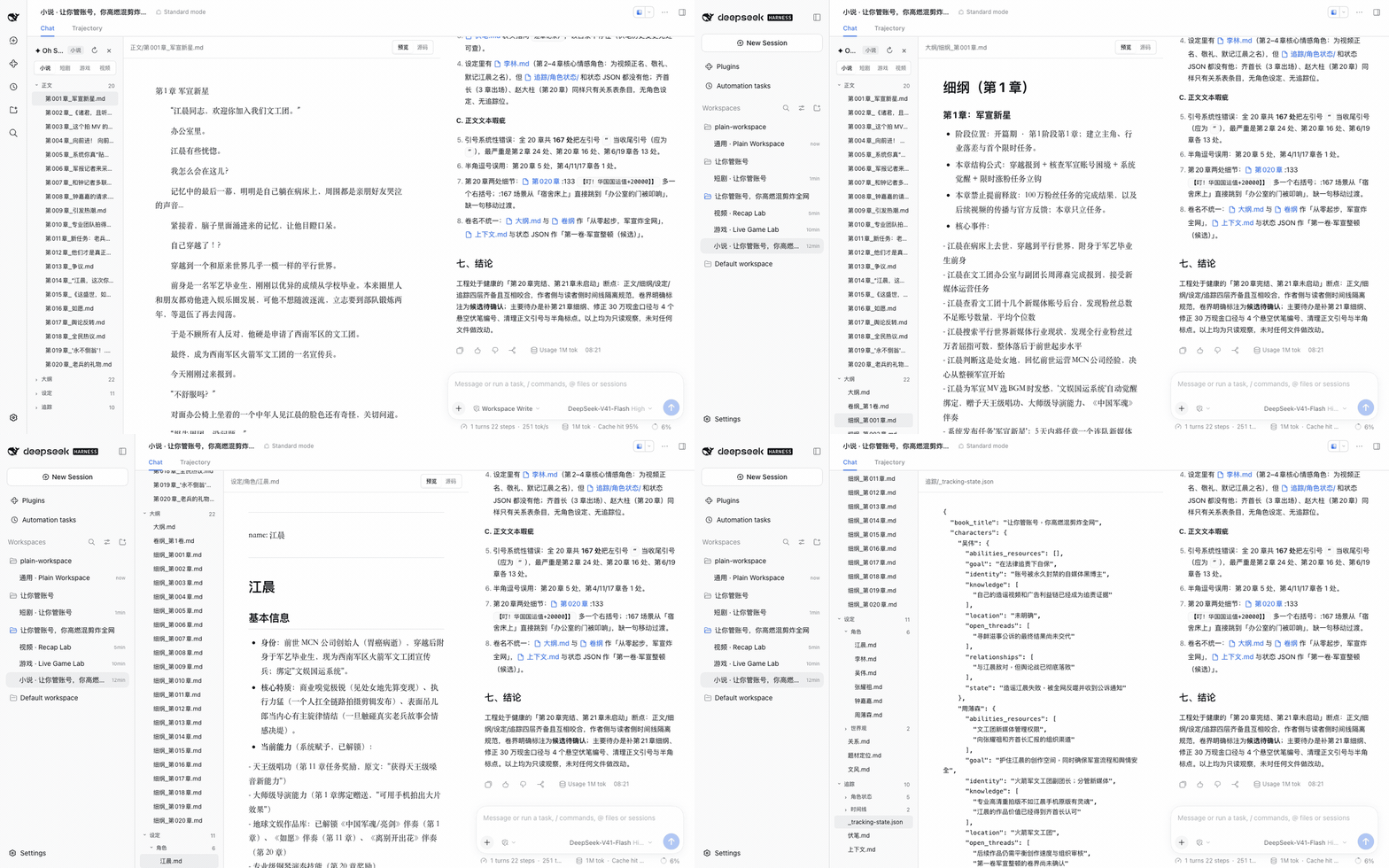
Three-pane layout: file tree, editor, Chat. The editor follows the Agent's file writes; clicking a filename in Chat opens it in the editor. Covers long-form, shorts, topic selection, chart scanning, deconstruction, import, review, de-AI, and covers.
Short Drama
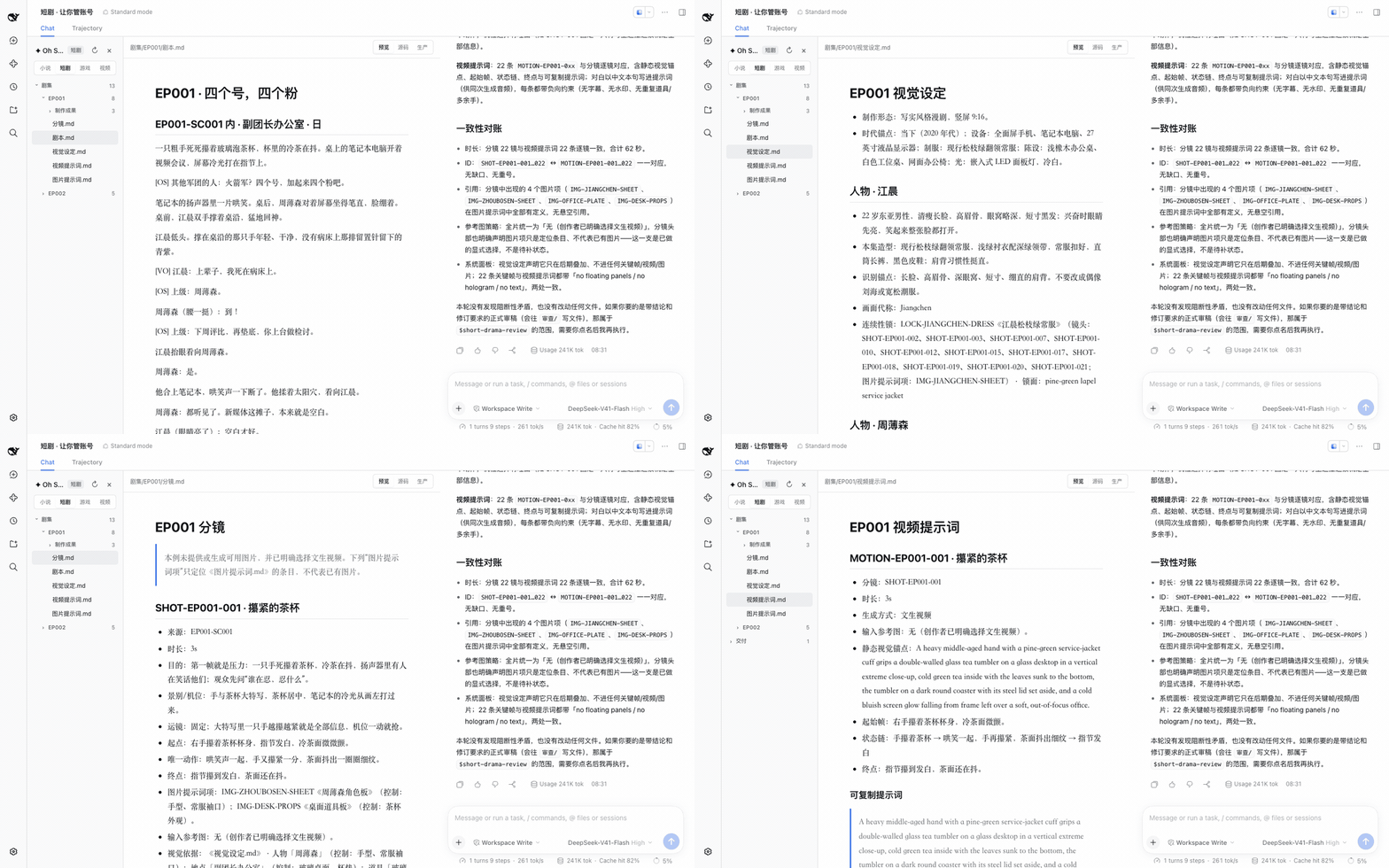
Each episode has up to five Markdown files: 剧本.md, 视觉设定.md, 分镜.md, 图片提示词.md, 视频提示词.md. The "Production" view projects them into a shot board, asset board, task/version list, final-cut sequence, and relationship canvas, and flags duplicate IDs, dangling references, and format errors in place. Image, video, and music generation tasks are previewed first and only executed after confirmation; the final cut is rendered by /short-drama-edit according to 《剪辑单.md》 into 剧集/<EP>/制作成果/成片/.
Game
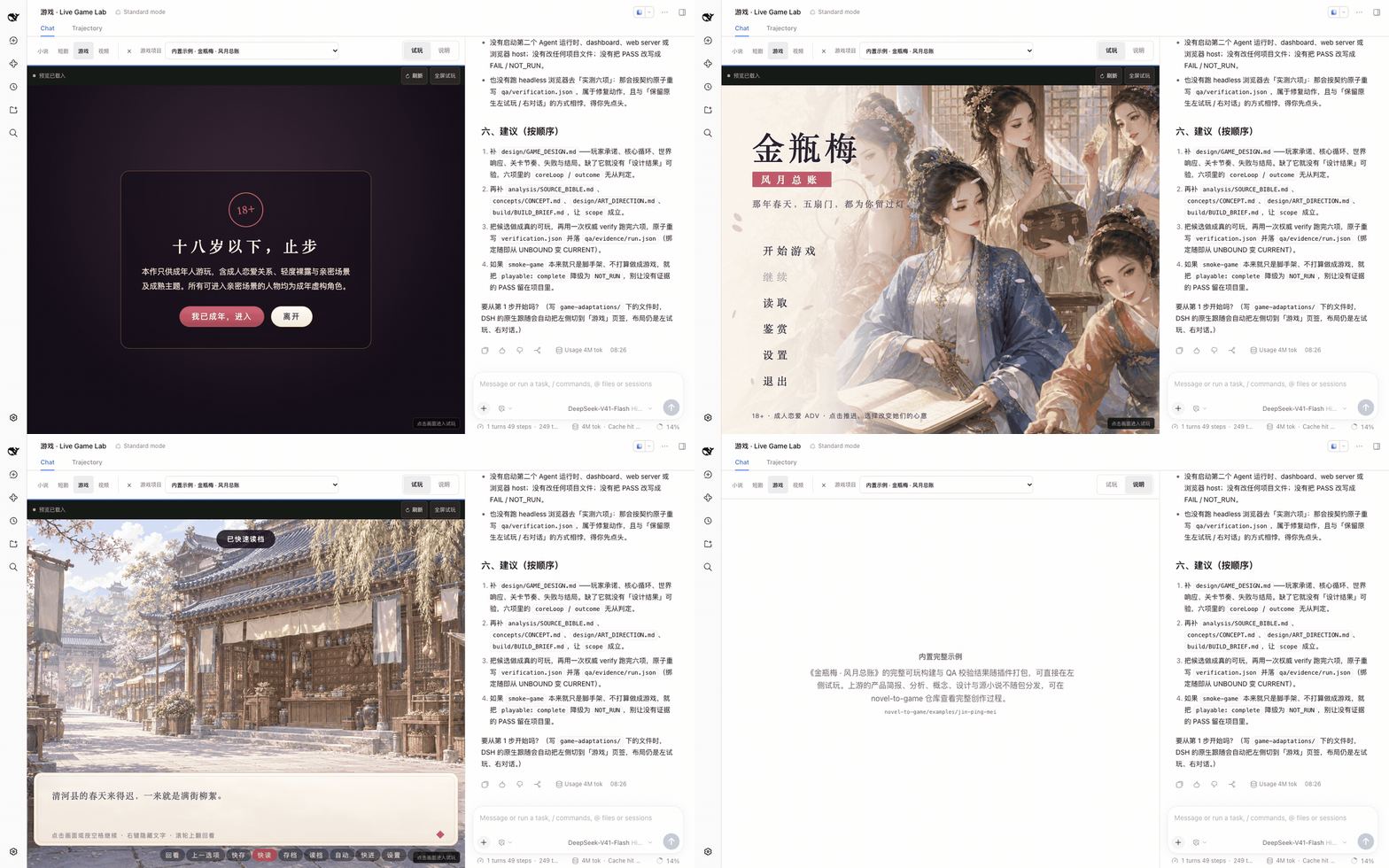
Live play testing on the left, Chat on the right. Output from /novel-to-game quick is written to game-adaptations/<project>/; once build/app/index.html is ready it automatically appears in the project list, where you can refresh, go fullscreen, and switch between projects. Games run in an isolated origin with an iframe sandbox.
Video Recap
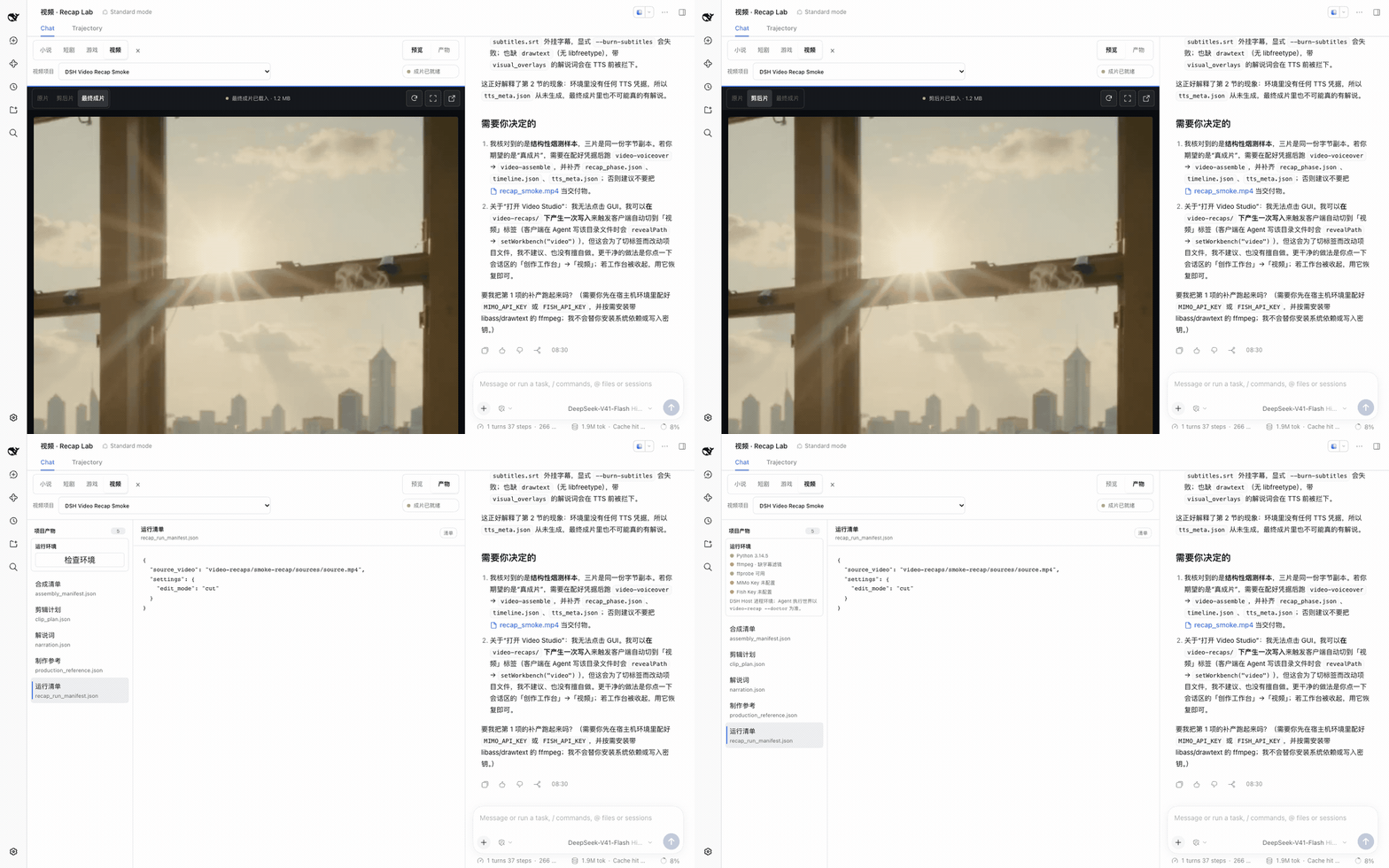
Left-side preview, right-side Chat. Projects live under video-recaps/<project>/: the source footage in sources/, working artifacts in work/, and deliverables in outputs/. You can switch between the source, the cut, and the finished piece to review stage prompts, run checklists, and QC artifacts; videos are previewed via HTTP Range streaming.
Rules shared by all four workbenches
- Files are the creative truth: workbenches only project the project's files, with no parallel database; editing a file is changing that layer's decision. Unsaved manual content won't be overwritten by a concurrent Agent write.
- Confirm before spending: any task calling a provider API shows its exact content in the UI first and only runs after explicit confirmation; keys live only in host env vars, and the plugin just reports whether they are set.
- No hijacking other scenes: layout is only taken over when the current workspace actually has a creative project; it can be collapsed anytime, and afterward the session returns to DSH's native form, with the choice remembered per workspace.
The boundaries and protocols of each workbench are documented in the architecture guide.
Installation
Node.js 24+ is required. The install command provides pnpm on the fly, so it also runs on machines that only have Node.js installed:
npx -y --package pnpm@11.7.0 --package @deepseek-ai/dsh@0.1.5-rc.1 dsh plugin --profile web add @oh-story/dsh@0.1.9 &&
npx -y @deepseek-ai/dsh@0.1.5-rc.1 web
Keep the terminal running; the browser usually opens by itself. If it doesn't, copy and open the full http://127.0.0.1:3080/?token=... link printed in the terminal — the first authentication requires the token in that link. Closing the terminal stops the service. Use the same dsh version for both installation and startup.
Before starting AI creation, add a Provider and fill in the API Key under DSH's "Settings → Models", or set the environment variable DEEPSEEK_API_KEY before starting. If you only want to browse existing works, choose "Configure later" during the first-run onboarding.
从 GitHub Release 安装预构建包
The prebuilt packages in GitHub Releases run the same test suite:
npx -y --package pnpm@11.7.0 --package @deepseek-ai/dsh@0.1.5-rc.1 dsh plugin --profile web add https://github.com/zenstory-ai/oh-story-dsh/releases/download/v0.1.9/oh-story-dsh-0.1.9.tgz &&
npx -y @deepseek-ai/dsh@0.1.5-rc.1 web
视频工作台的宿主机依赖
The video pipeline also requires Python 3.10+ and ffmpeg/ffprobe with the libass subtitles filter on the host (on macOS: brew install ffmpeg; on Debian/Ubuntu: sudo apt install ffmpeg). Video narration additionally uses MIMO_API_KEY (Fish Audio TTS also needs FISH_API_KEY).
配置媒体生成 API(短剧生产需要)
DeepSeek writes the script, storyboard, and prompts; image, video, and music generation are handed off to the "Production" stage of the short-drama pipeline via the short-drama-produce Skill, which in turn calls the provider APIs below. Write the keys into the host's environment variables before starting DSH:
| Capability | Provider | Required env vars | Optional |
|---|---|---|---|
| Images | GPT Image 2 | OPENAI_API_KEY | OPENAI_BASE_URL |
| Video | Seedance (Volcano Ark) | ARK_API_KEY, SEEDANCE_MODEL | SEEDANCE_BASE_URL, SEEDANCE_ALLOWED_RATIOS, SEEDANCE_MIN_DURATION/SEEDANCE_MAX_DURATION |
| Video | MiniMax H3 | MINIMAX_API_KEY, MINIMAX_VIDEO_MODEL, MINIMAX_VIDEO_RESOLUTIONS | MINIMAX_VIDEO_BASE_URL, MINIMAX_VIDEO_RATIOS, MINIMAX_VIDEO_MIN_DURATION/MINIMAX_VIDEO_MAX_DURATION |
| Music | MiniMax Music | MINIMAX_API_KEY | MINIMAX_BASE_URL |
export OPENAI_API_KEY=...            # 图片
export ARK_API_KEY=... SEEDANCE_MODEL=...   # 视频,模型/Endpoint ID 以账号开通的为准
npx -y @deepseek-ai/dsh@0.1.5-rc.1 web
Configure only what you actually use: without video keys you can still write storyboards and generate keyframe images. The "Production" view shows at the top whether each provider is configured and which variable is missing. On startup, the plugin registers its four built-in adapters into a credentials-free config file (by default under oh-story-dsh-<uid>/ in the system temp directory, readable/writable by the current user only; the "Generation environment" entry shows the full path), and the Agent references it directly when running production_tool.py run; if you write your own adapters or change timeouts, set the file path in OH_STORY_DRAMA_ADAPTER_CONFIG. For each provider's parameters, resolution, and duration constraints see the bundled short-drama-produce/references/providers/. Novel covers use whichever image generation tool is visible in the current Preset.
装进独立 profile,按需启动
Whichever profile the plugin is installed into, every Session in that profile will load the creative Skills. To keep the stock web profile clean, install the plugin into a dedicated profile:
npx -y --package pnpm@11.7.0 --package @deepseek-ai/dsh@0.1.5-rc.1 dsh plugin --profile story add @oh-story/dsh@0.1.9
A new profile has no UI by default. Edit ~/.dsh/profiles/story/package.json and change dsh.profile.bundles to:
"bundles": [
  "@deepseek-ai/dsh-base",
  "@deepseek-ai/dsh-web-app",
  "@oh-story/dsh"
]
@deepseek-ai/dsh-web-app is DSH's bundled Web UI package and must be loaded before the creative plugin. After that, the two profiles can run simultaneously on different ports, while models, credentials, workspaces, and session history are managed centrally by DSH:
npx -y @deepseek-ai/dsh@0.1.5-rc.1 web                          # 原版 DSH
npx -y @deepseek-ai/dsh@0.1.5-rc.1 --profile story --port 3081  # 创作工作台
Start Creating
On first launch you'll see the DSH home page. Click + (Add workspace) next to Workspaces on the left, pick a folder to store your works, then select that directory under Choose workspace below; DSH opens a blank session. If the directory already contains a creative project, the "Novel / Short drama / Game / Video" workbench tabs appear; for an empty directory, DSH keeps its native Chat — type /story, /short-drama, /novel-to-game quick, or /video-recap to start, and once the Agent writes the first creative file, the workbench shows up automatically.
Copy and tweak the request below; replace the bracketed parts, then send.
Start a new book:
Start a [genre/subject] book. Split established facts from open questions in my material; plan one bounded opening: core conflict, perspective limits, three-chapter changes, open items. No auto body text; leave genre trade-offs, motivations, long-term direction to me.
Have a draft; first round discusses continuation only:
I want to plan the next scene of this owned or authorized novel. Only read the [chapter file] and [setting file] I named in the current workspace; [ending fragment] is unfinished, don't count it as a full chapter. First list known facts relevant to the next scene, what the perspective character currently knows, and what's missing or conflicting. Then give two continuation directions, each stating what the character wants, the resistance, and the visible change the action causes; don't reveal [secret] early, stop at [scene boundary]. This round is a Chat reply only; do not create, move, or rewrite any file.
Short drama, game, video narration — just state the goal:
用 /short-drama 初始化一个都市打脸题材的短剧项目,竖屏 9:16,只写第 1 集,先不生成任何媒体。
用 /novel-to-game quick 把 [小说文件] 改编成可玩游戏,平台、类型和引擎由你推荐,首个构建控制在 15 分钟以内。
给 /path/to/video.mp4 做一个 3 分钟中文解说成片,保留关键原声,字幕烧进画面。
See what it produces
Excerpts from the bundled sample projects (synced from the demo of oh-story-claudecode and a public example of drama-skills); omissions are marked with "…".
Continuation Uses State Cards, Not Chat Memory
写第 21 章之前,追踪/上下文.md 长这样,下一章只读它:
## 当前位置
- 当前章:第20章
- 场景:火箭军文工团,钟嘉嘉送来老兵书法礼后
……
## 活跃伏笔
- F016|钟嘉嘉并非普通军报实习生,她的军方家庭背景仍未完全公开|埋第7章|回收章未定|高
……
## 连贯性风险
- 第21章尚无细纲,不能直接写正文。
The last line is a hard gate. Writing prose without a detailed outline is rejected on write by DSH's tools/pre-execute hook:
Oh Story 阻止写入第 21 章:未找到对应的 大纲/细纲_第XXX章*.md。请先完成细纲。
One Shot Governs Five Docs, Each at One Layer
视觉设定.md locks the cross-shot-invariant styling; the lock face pastes straight into prompts; 分镜.md writes only start, end, and rationale; 视频提示词.md writes only the motion between the two points:
- 连续性锁:LOCK-JIANGCHEN-DRESS《江晨橄榄绿立领常服》(镜头:SHOT-EP001-002、SHOT-EP001-003、SHOT-EP001-007)· 锁面:olive-green stand-collar service dress
## SHOT-EP001-002 · 把空白交到他手里
- 来源:EP001-SC001
- 时长:8s
- 起点:材料在周薄森手下,茶缸停在旧茶渍旁。
- 终点:纸角抵住江晨指尖;周薄森说出“基本还是空白”。
- 视觉依据:《视觉设定.md》·人物「江晨」……;道具「缺口搪瓷茶缸」(控制:右侧把手缺瓷、深灰铁胎)。
## MOTION-EP001-002 · 把空白交到他手里
> …… The middle-aged officer pushes the paper stack about twenty centimeters across the glass desk while speaking calmly.
> The young man does not reach for it until the paper touches his fingertip. ……
原文:剧本.md · 视觉设定.md · 分镜.md · 图片提示词.md · 视频提示词.md。
Mistakes get called out
把这集样例故意改坏三处(来源指向不存在的场景、视频提示词指向不存在的镜头、图片提示词 ID 重复),「生产」视图报的是原因和行号:
SHOT-EP001-002 的来源 EP001-SC009 在剧本中不存在。            分镜.md:21
MOTION-EP001-003 指向不存在的 SHOT-EP001-030。                 视频提示词.md:29
IMG-JIANGCHEN-SHEET 在当前集内重复,后出现的条目会遮蔽前一条。   图片提示词.md:3
QA records for the bundled game
The qa/verification.json for "Jin Ping Mei · The Romance of the Chamber", besides the six checks, also notes what it does not prove:
"checks": { "launch": "PASS", "render": "PASS", "input": "PASS", "coreLoop": "PASS", "outcome": "PASS", "restart": "PASS" },
"limitations": [ ……
  { "scope": "体验判断", "reason": "证据只证明可运行、可输入、可走完、可重开及布局约束,不把主观趣味或长期平衡宣称为确定结论。" }
]
FAQ
Do I have to install the plugin to write novels with DeepSeek?
For discussing an outline or polishing a self-contained text, plain model chat is enough — just put the result back into your draft yourself. Install DSH plus this plugin only when you want to keep creating around a local works directory and view files in the workbenches. If you'd prefer an account-based web project, ZenStory hosted workbench is an option; see writing-environment comparison for the concrete differences.
I use Claude Code or Codex — should I install this too?
No need. The four pipelines are each independent skill repos; install them directly into your coding Agent of choice: oh-story-claudecode, drama-skills, novel-to-game, video-recap-skills. This plugin is the DeepSeek Harness packaging of those four skill sets, plus the four workbenches that only exist in DSH Web.
Do I need an API Key to browse existing works?
不需要。首次引导选择「稍后配置」,打开作品目录就能浏览文件;开始 AI 创作时再配置模型。
How much do Tokens cost?
The plugin itself makes no model calls; usage is whatever DSH shows under each reply — this repo publishes no stats. Two things noticeably increase usage: the Skills text loads with every Session of the profile, so coding sessions carry it too — installing into a dedicated profile avoids that; and flows like /story-long-write spin up specialist Roles, each of which is a separate sub-Agent invocation.
Does DeepSeek generate images or video itself? What can I do without a video key?
No. DeepSeek only writes the script, storyboard, and prompts; media is generated by short-drama-produce calling GPT Image 2, Seedance, MiniMax H3, or MiniMax Music. Keys go into the host's environment variables before DSH starts — set only the ones you actually use. Without a video key you can still complete all five documents and generate keyframe images.
Storyboard/Design Done — Where Do the Cut and Build Come From?
The finished short-drama cut is rendered by /short-drama-edit per 《剪辑单.md》; configure the media generation APIs and produce per-shot assets first; the game build comes from /game-build, and once build/app/index.html is ready it lands automatically in the Game workbench's project list.
After Installing, Do Ordinary Coding Sessions Also Go Three-Pane?
Yes, before 0.1.7 (#29). Now the layout is only taken over when the current workspace actually has a creative project; otherwise the plugin doesn't appear in the UI at all; the "Collapse creative workbench" in the workbench title bar collapses it anytime, and the choice is remembered per workspace.
A long reply in the right-side Chat is hidden behind the input box below?
Reported in #3 and #26; since 0.1.6 the body re-anchors to the bottom when the window size changes, and 0.1.8 fixed the last trigger case. If you can still reproduce it on 0.1.9+, open an Issue with the version number and window width.
Installation reports pnpm not found on PATH?
DSH's plugin add needs pnpm internally, and running npx @deepseek-ai/dsh ... plugin add on its own won't fetch it for you. Re-run the full install command above with --package pnpm@11.7.0, confirm the installation succeeds, then start it up.
Browser Didn't Open, or Asking for Auth After Opening?
Open the full link with ?token=... printed in the terminal — the first authentication requires the token in that link; if the port is occupied, use web --port 3081 and visit the newly printed link.
I don't see the "Novel / Short drama / Game / Video" tabs?
First add a works directory and open a session. For an empty directory, run a creative command in Chat first — the workbench appears only after the Agent generates the first creative file; a collapsed workbench can be restored with the "Creative workbench" button in the session area. If an existing work still doesn't show up, check that installation and startup use the same profile, then restart DSH and refresh the page. If you installed into a dedicated story profile but there's no Web UI, it's because the new profile is missing @deepseek-ai/dsh-web-app — see the collapsible note in the installation section.
Does it work on Windows?
Yes. The types, assets, unit tests, and build gates run in CI on both macOS and Windows; the integration tests that package it into the official DSH Web run on Linux. The video pipeline requires Python 3.10+ and ffmpeg with libass on any platform.
What to Do After Upgrading?
Re-run the install command with the new version after @oh-story/dsh@, then restart DSH; keep install and start on the same dsh version. Skills and Roles ship with the plugin, no per-project redeployment. Existing short-drama projects: two tightenings — since 0.1.5 each shot in 《分镜.md》 must write a "visual rationale" and every REF-* slot must declare its 用途; since 0.1.7 each shot's "来源" must start with a scene ID that truly exists in 《剧本.md》. Per-version changes: CHANGELOG.md.
Further Reading
- Writing Novels with DeepSeek: pick a works directory, configure the host model, then state the subject, perspective, and stopping point for this round.
- Import & Continue: separate finished chapters, unfinished fragments, must-keep settings, and next-segment scope.
- Short Drama Character Consistency: separate identity, styling, and per-shot state.
- Game Choices with Consequences: spell out action cost, visible change, and follow-through.
- Original Audio vs. Narration: list key lines, visual grounds, and gaps needing explanation first.
- Writing-Environment Comparison: when plain chat, the DSH plugin, or the hosted workbench fits.
- Architecture Guide: what DSH vs. the plugin owns, and the protocol boundaries of the four workbenches.
- Validation Guide: what each test layer covers, and which evidence doesn't enter the Pull Request CI.
Contributing & Chat
- GitHub Issues: Bug, output-quality case, feature request — please include the plugin version, DSH version, and repro steps.
- Before changing code, read CONTRIBUTING.md:
pnpm verifyis the quality gate for every Pull Request, andpnpm test:dshpackages the plugin, installs it into an isolated official DSH Web, and runs it once.
Thanks
- DeepSeek Harness: provides the native plugin runtime, Agent, sessions, permission approval, and Web workbench base.
- LINUX DO: thanks to the community for the discussion, feedback, and open-source support.
Changelog · Contributing Guide · Architecture Guide · Security Policy
ZenStory AI Projects
Oh Story DSH is part of ZenStory AI — a set of open-source, agent-facing story creation, adaptation, and production tools (GitHub org: zenstory-ai). Projects in the same org:
| Project | Purpose |
|---|---|
| oh-story-claudecode | Web-novel writing skill pack: charting, breakdown, writing, de-AI-ifying, cover art |
| drama-skills | AI short-drama / comic-drama creation skill collection: script, assets, storyboard, image/video prompts, standalone review |
| novel-to-game | Agent skills for source-faithful adaptation with a designated runtime and QA via run evidence |
| video-recap-skills | Turn supported video files into Chinese narration; optionally export editable Jianying/CapCut drafts |
| oh-story-dsh | DeepSeek Harness community plugin with novel, short-drama, game, and video-narration workbenches (this repo) |
| zenstory | Conversation-as-creation AI novel-writing workbench (app.zenstory.ai) |
Comments
Loading…
From the same category
by Devin-AXIS
Enterprise-grade, local-first Agent Workbench for people and agent teams. A unified multi-engine workspace for Codex Harness, DeepSeek Harness, and OpenCode, with unified plugins and Skills, multi-age
★ 6.6k
↓ 510/wk
NOASSERTION
TypeScript
Oct 4, 2026
dsh plugin --profile web add deepseek-idesignby NanmiCoder
AgentTeams plugin for DeepSeek Harness
★ 1.9k
↓ 13.9k/wk
MIT
JavaScript
Sep 29, 2026
dsh plugin --profile web add @nanmicoder/dsh-agent-teamsby Clearailhc
ClearAI is a native DSH plugin that brings the Epistemic Loop to DeepSeek Harness.
★ 1.3k
↓ 1.3k/wk
Apache-2.0
JavaScript
Oct 3, 2026
dsh plugin --profile web add clearai-dshby tong-io
Modality-First GenAI Platform
★ 1k
↓ 640/wk
AGPL-3.0
TypeScript
Oct 2, 2026
dsh plugin --profile agent add dsh-tongflowby LiPu-jpg
dsh-Openwrite:OpenWrite 的 DeepSeek Harness 小说创作插件,含统一创作 Agent、90 个小说工具、原生工作台与标准审稿 DAG
★ 779
↓ 505/wk
Apache-2.0
TypeScript
Oct 2, 2026
dsh plugin --profile agent add dsh-openwriteby ZJU-LLMs
An LLM-powered multi-agent framework for simulating interactive, evolving story worlds.
★ 422
Apache-2.0
Python
Aug 19, 2026