
dsh-minimax-quota
IdentifiedShows the remaining MiniMax coding-plan quota (5-hour window and weekly window) below the chat composer, with the detail on click.
@woaicarlos/dsh-minimax
在 DeepSeek Harness 的对话输入框下方,显示 MiniMax 编程套餐(Coding Plan)剩余额度:5 小时滚动窗口和周窗口各剩多少百分比。点击后弹出详情面板。同时,插件会探测 MiniMax 新发布的模型,把它们自动补进你的 pi-ai 模型列表。
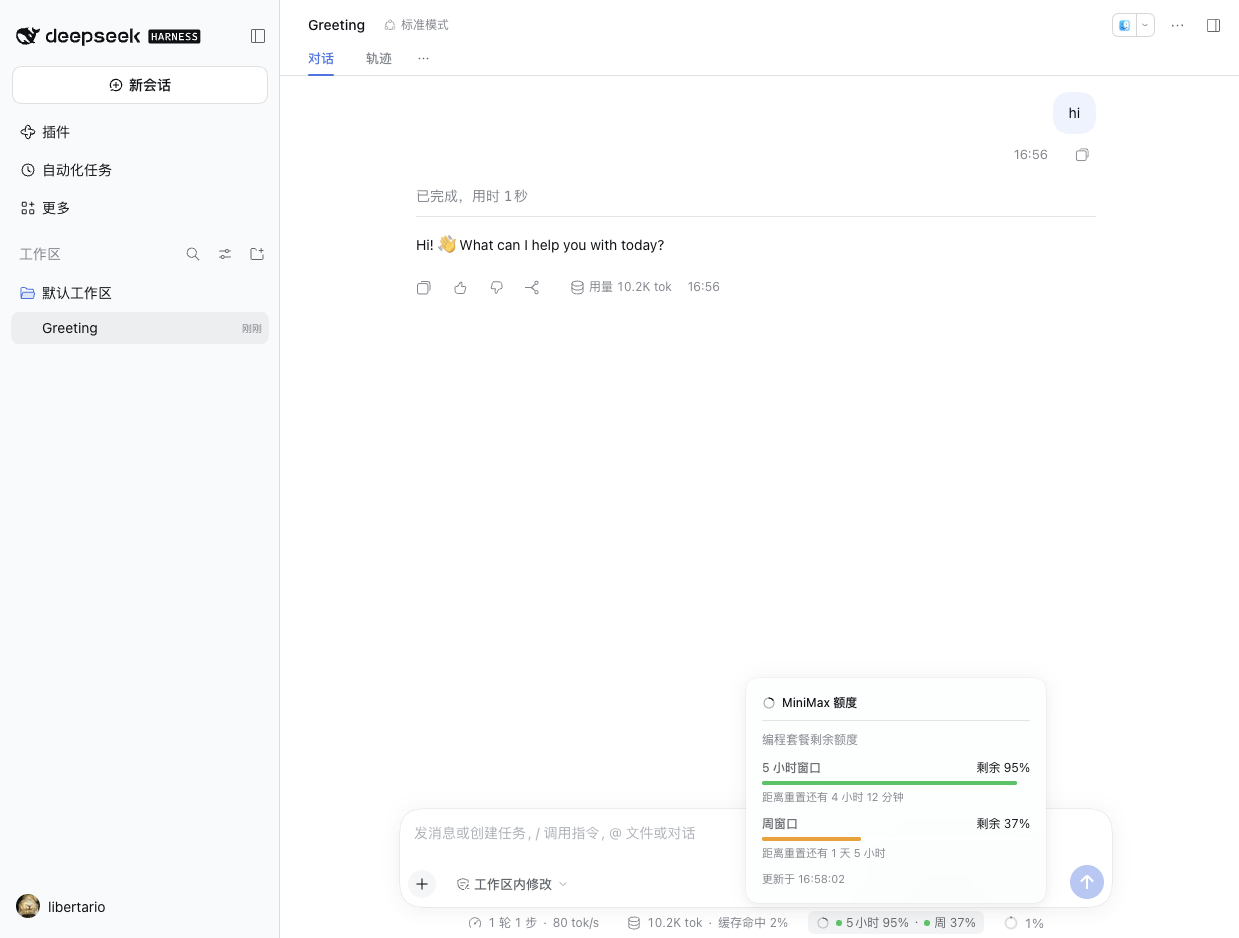
- 只在当前会话选中 MiniMax 系列模型时出现(provider 或模型名含
minimax)。 - 药丸显示
5小时 95% · 周 37%,两个数字各带一个状态圆点:绿(>40%)、橙(≤40%)、红(≤15%)。 - 点击弹出面板:每个窗口的剩余百分比、进度条、距离重置还有多久、数据更新时间。
- 支持明暗主题;界面文案走 Harness 的 locale 服务(内置中英文)。
- 还会自动把 MiniMax 新发布的模型补进配置里的模型列表 —— 只追加:不删除、不重排;条目本身按原样写回,除非 profile override 里没写过自己的 MiniMax 模型列表(见下文「模型自动补充」)。
安装
插件通过 GitHub 仓库分发,不依赖 npm。包名是 @woaicarlos/dsh-minimax(npm 上的 @woaicarlos
作用域尚未开通,这个名字先占住,将来真要发到 npm 时直接用);仓库名仍然是 dsh-minimax-quota ——
安装、克隆和社区目录条目用的都是仓库名,不受包名改动影响:
dsh plugin --profile <你的 profile> add github:woaiCarlos/dsh-minimax-quota
或者克隆后从本地目录安装:
git clone https://github.com/woaiCarlos/dsh-minimax-quota.git
dsh plugin --profile <你的 profile> add file:./dsh-minimax-quota
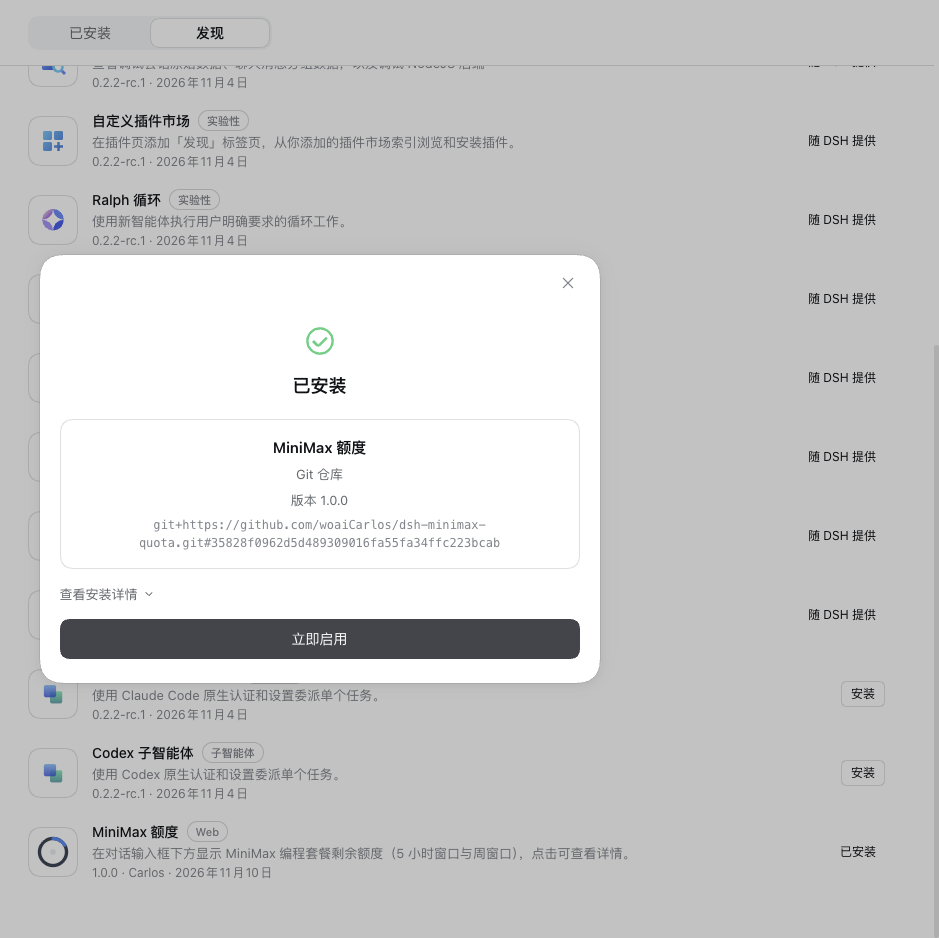
装完后在 插件 → 已安装插件 里能看到「MiniMax 额度」,开关打开即生效;重启 Harness 也生效。
如果你的 Profile 里还没有 MiniMax 路由,先在 设置 → 模型 里加一个 MiniMax 供应商并填入 API Key,插件才有额度可读。
出现在插件市场里
插件已经收录在本地插件市场的「发现」标签页里(索引条目带 commit 锁定的 GitHub 源,点一下就能装)。
如果你想让它出现在社区插件市场(awesome-dsh-plugin 目录,第三方市场按这个目录做发现),需要给 awesome-dsh-plugin 提一个 PR, 只加一个文件即可:
# data/plugins/woaiCarlos__dsh-minimax-quota.yml
url: https://github.com/woaiCarlos/dsh-minimax-quota
name: woaiCarlos/dsh-minimax-quota
category: usage
description:
  en: 'Shows the remaining MiniMax coding-plan quota below the DeepSeek Harness chat composer, and keeps the profile''s MiniMax model list current by appending newly released models.'
  zh: '在对话输入框下方显示 MiniMax 编程套餐剩余额度,并把新发布的模型追加到配置的模型列表里。'
icon: https://raw.githubusercontent.com/woaiCarlos/dsh-minimax-quota/main/assets/icon-180.png
现成的文件在 catalog/awesome-dsh-plugin.yml,直接复制改名即可。
仓库已经打了 dsh-plugin topic。
该目录的 CI 会检查仓库至少存在满 1 天,本仓库创建于 2026-11-10 09:04 UTC, 所以 PR 需要在 2026-11-11 09:04 UTC 之后提交。
另外,本地市场索引的生成脚本 plugin-market/generate-index.mjs 支持 Git 源的条目
(输入 git-plugins.json),用 DSH 自带的索引校验器校验后才写出 index.json。
发版
插件的分发渠道就是这个 Git 仓库,不是 npm。改完代码直接提交、发版即可:
git commit -am "..." && git push
插件市场索引里的版本条目用 commit SHA 锁定,所以每次发版后把
plugin-market/git-plugins.json 里的 commit 更新成新的 SHA,再重新生成索引:
cd plugin-market
DSH_MARKET_ON_DEMAND="$PWD/on-demand.json" node generate-index.mjs
如果以后还想发到 npm
仓库里已经备好了 npm 官方的 **Trusted Publishing(OIDC)**工作流
(.github/workflows/publish.yml),CI 里不保存任何长期 npm token:
一次性配置(npmjs.com 的包设置页):
发布时用的包名是 @woaicarlos/dsh-minimax。
| 字段 | 值 |
|---|---|
| Select your publisher | GitHub Actions |
| Organization or user | woaiCarlos |
| Repository | dsh-minimax-quota |
| Workflow filename | publish.yml |
该工作流目前是手动触发(workflow_dispatch),因为包还不在 npm 上,
自动触发只会在每次打 tag 时失败。发包成功后可以改成 tag 触发:
on:
  push:
    tags:
      - 'v*'
  workflow_dispatch:
首次发布(包还不存在,Trusted Publisher 还没法配)用一次性验证码:
npm publish --otp=<验证器 App 的 6 位码>
你的 API Key 会不会泄露
不会。 具体说:
-
仓库里没有任何密钥。 插件源码只出现一个凭据引用名
MINIMAX_CN_API_KEY,它是「查哪个钥匙」的名字,不是钥匙本身。发布前已对整个目录做过密钥扫描,sk-…形式的实际密钥一个都没有。 -
密钥只存在于宿主进程。 读取密钥的是 Host 半侧,通过
ctx.credentials.resolve('MINIMAX_CN_API_KEY')从 Harness 的凭据存储里取,取到的值只用来拼Authorization: Bearer …请求头发给 MiniMax,不会出现在路由返回的 JSON 里。 -
浏览器全程拿不到密钥。 浏览器只请求同源路由
/plugin/minimax/status,拿到的只有百分比和重置时间戳:{ "ok": true, "intervalRemainingPercent": 95, "weeklyRemainingPercent": 37, "intervalResetAt": 1794316261854, "weeklyResetAt": 1794407213154, "intervalStatus": 1, "weeklyStatus": 1, "fetchedAt": 1794300583689 }路由路径在服务端注册,密钥不会随响应下发。
安装后会自动识别吗
会,前提是你的 MiniMax Key 是用「标准方式」配置的——因为 Harness 自己的凭据存储就是按环境变量名寻址的:
| 你怎么配的 Key | 插件能不能读到 |
|---|---|
| 在 设置 → 模型 里给 MiniMax 填了 Key | ✅ 能,无需额外操作 |
启动前 export MINIMAX_CN_API_KEY=sk-… | ✅ 能 |
项目目录 .env 或 ~/.dsh/.env 里写了 | ✅ 能 |
| 存在别的名字的环境变量里 | ❌ 需要改配置,见下 |
原因是 Harness 的 模型设置页 在你给 minimax-cn 这条路由填 Key 时,写入的引用名是按路由 id 推导出来的:
minimax-cn → MINIMAX_CN_API_KEY
正好就是本插件查找的名字,所以你只要在模型设置里配好了 MiniMax,装上插件就能直接用,插件自己不会去猜别的 key。
查找顺序(Harness 凭据存储的固定优先级,第一个有值的胜出):
1. 已存储的凭据文件   ~/.dsh/.credentials.yaml   ← 模型设置页写的就是这里
2. 启动时的环境变量   MINIMAX_CN_API_KEY=… dsh
3. 项目目录的 .env    <启动目录>/.env
4. 家目录的 .env      $DSH_HOME/.env
换一个引用名
如果你把 Key 存在了别的环境变量名里,改插件配置即可,在 cordis.patch.yml 里:
- insert:
    - id: minimax
      name: '@woaicarlos/dsh-minimax'
      config:
        credentialRef: MY_MINIMAX_KEY
配置
| 字段 | 默认值 | 含义 |
|---|---|---|
credentialRef | MINIMAX_CN_API_KEY | 要读取的凭据引用名。凭据存储里的引用名:字母、数字和下划线,且不能以数字开头。 |
工作原理
index.js    Host 半侧:解析凭据 → 调 MiniMax → 通过同源路由 /plugin/minimax/status 返回额度
client.js   浏览器半侧:在对话输入框下方注册一个药丸,点击弹出详情面板
locale/     中英文文案
模型自动补充
插件会探测 MiniMax 新发布的模型,把它们追加到 pi-ai 配置的 providers.minimax-cn.models 里。
每个新模型都会实测:是否还能调用、单次最大输出是多少、是否支持思考。
你已有的条目不会被删除、不会被重排 —— 插件只追加;条目的值也不会被改写,除非 profile override 里没写过自己的 MiniMax 模型列表(见下一段)。手动删掉的模型也不会被加回来。
写回时有几处需要说明:pi-ai schema 解析出来的路由级默认值(defaultContextWindow、defaultMaxTokens 等)
会随这次写入一并落到 profile patch 的那条路由上;这次写入写进 patch 的是整张生效的 providers 表,
所以你其它每一条 provider 路由(包括只在继承层里配置过的那条)也会一起写进去并各自带上 schema 解析出来的默认值,
而当 profile override 自己没写过 MiniMax 模型列表时,写回的是生效投影里已经带着物化 compat 块的条目。
模型条目本身按原样写回 —— 但这只在 profile override 自己写过 MiniMax 模型列表时成立。
同步的节奏
| 时机 | 会发生什么 |
|---|---|
| 插件启动后 | 等 profile 加载完,自动同步一次(最多重试 5 次) |
| 每 24 小时 | 自动扫描一次 MiniMax 的模型列表,有新模型就追加 |
| 面板里的「立即同步」 | 立刻同步一次,成功或失败都会在面板上给出提示 |
安静的一天只花 1 次模型列表请求:已追加过的模型、以及 MiniMax 已下线的模型,都记在插件自己的状态文件里,不会再探测。 MiniMax 已下线的模型只探测一次就记下结论,所以它不会每天再花两次请求。
状态文件
插件的簿记写在 profile 目录下的一个文件里,不落在你的 profile patch 里:
<profileDir>/dsh-minimax-state.json
{ "addedModels": ["MiniMax-M3.1-Flash"], "retiredModels": ["MiniMax-M2"], "lastSyncAt": 1760000000000 }
addedModels 记着插件追加过哪些模型 —— 你手动删掉的模型因此不会被加回来;retiredModels 记着 MiniMax 已经下线的模型。
删掉这个文件等于忘掉这些记录:手动删掉的模型会在下次同步时重新出现,已下线的模型也会被重新探测一次。
文件名里的 dsh-minimax 是改包名之前的旧包名,故意没有跟着改。这个文件是你自己的数据:
一旦改名,插件就会读不到它,于是忘记自己追加过哪些模型,你手动删掉的模型会被悄悄加回来。
换包名不会换这个文件,升级到新版本也不用改它。
数据来源
MiniMax 官方没有公开这个接口,是从其控制台前端产物里逆出来的(未文档化,可能变动):
GET https://api.minimaxi.com/v1/coding_plan/remains
Authorization: Bearer <你的 Key>
关键字段:
| 字段 | 含义 |
|---|---|
model_remains[].current_interval_remaining_percent | 5 小时窗口剩余百分比(已经是剩余值,不要再减 100) |
model_remains[].current_weekly_remaining_percent | 周窗口剩余百分比 |
model_remains[].end_time / weekly_end_time | 两个窗口的重置时间(epoch 毫秒) |
model_remains[].current_weekly_status | 1 = 正常,2 = 周额度已用尽,3 = 该套餐没有周额度(此时不显示周那一档) |
base_resp.status_code | 0 = 成功。这个接口鉴权失败也返回 HTTP 200,所以必须看 body 里的这个字段 |
代码里配了三个等价路径互相兜底(coding_plan/remains、api/openplatform/coding_plan/remains、token_plan/remains),因为路径随时可能变。
一些实现细节
- Host 半侧声明了
inject: ['webServer', 'credentials', 'settings', 'profileContext']。 这是必需的:webServer服务由 web 应用包提供,可能晚于本插件加载;不声明依赖的话插件会在启动时抢跑,拿不到服务就静默跳过,路由注册不上(表现为界面显示「无法连接」)。profileContext同样要声明:插件的簿记文件放在 profile 目录里,没有这个服务,插件会忘掉自己追加过哪些模型,于是你手动删掉的模型会被悄悄加回来。 - 额度每 60 秒刷新一次,鼠标移到药丸上或点击时也会重新拉一次。
- 只在选中 MiniMax 模型时显示;没有套餐额度(比如按量计费的账号)时整个药丸隐藏,不会显示空读数。
- 额度那部分是纯展示:不写任何会话事件,不改当前选中的模型,不参与 prompt。模型补充只往 profile 的 MiniMax 模型列表末尾追加条目。
- 每次同步都会在 Host 日志里记一行,写明这次追加了几个模型;同步失败也会记下来(失败原因记在 Host 日志里,浏览器只看到一个固定提示)。
已知限制
- 只支持 MiniMax 国内版(
api.minimaxi.com)。国际版api.minimax.io是另一套账号体系,密钥不通用。 - 走的是未公开接口,MiniMax 改路径后需要更新
index.js里的QUOTA_ENDPOINTS。 - 纯按量计费(BYOK)账号没有套餐额度,插件会自动隐藏。
License
MIT
Comments
Loading…
Similar plugins
MiniMax token-plan quota dock for the Web UI: a drop-shape 5h-usage % chip in the conversation input area, click for a detail panel listing every model's 5h & weekly usage and reset countdown, auto-hi
★ 0
dsh plugin --profile web add mmx-quota-toolby fuqiancheng
Command Code balance and quota panel: a status row under the composer showing the available balance and the 5-hour, weekly and monthly windows.
★ 3
↓ 672/wk
MIT
JavaScript
Oct 31, 2026
dsh plugin --profile web add dsh-commandcode-quotaby ColorlessBoy
Shows the remaining OpenCode Go quota (5-hour, weekly, monthly) in the DeepSeek Harness Web composer dock.
★ 0
MIT
JavaScript
Oct 24, 2026
dsh plugin --profile web add dsh-opencode-usageby sxwer001
Quota ring in the DSH composer bar that tracks OpenCode Go and 14 other coding-plan quotas or balances, cycles 5-hour weekly and monthly windows on click, and colours itself by urgency.
★ 1
MIT
JavaScript
Nov 7, 2026
dsh plugin --profile web add dsh-coding-plan-quotaby pythoner1984
One-line notice at the top edge of the DSH window with your DeepSeek balance, the ChatGPT/Codex five-hour and weekly remaining quota and their reset times, and how many quota-reset cards are left plus
★ 0
MIT
JavaScript
Oct 30, 2026
dsh plugin --profile web add dsh-plugin-openai-quotaby Jovan1666
Command Code plan quota in your DeepSeek Harness (dsh) sidebar: 5-hour, weekly and monthly credit windows with reset countdowns. Works with Go, GOAT, Pro, Max and Provider plans.
★ 1
↓ 353/wk
MIT
JavaScript
Oct 26, 2026
dsh plugin --profile web add dsh-commandcode-quota