
dsh-perch
Manifest validA Dynamic-Island-style status panel that lives in the macOS notch and lists running turns, background jobs and subagents, with a completion banner and a spoken reminder.
栖岛 Perch
A Dynamic-Island-style status panel for DeepSeek Harness that lives in the macOS notch, not inside the DSH window.
Collapsed, it merges with the camera housing: a pixel creature in the left wing, the running-task count in the right wing. Hover it, click it, or press ⌥⌘P and it unfolds into the task list. When a task finishes it shows a completion card, posts a system notification and can speak the reminder out loud.

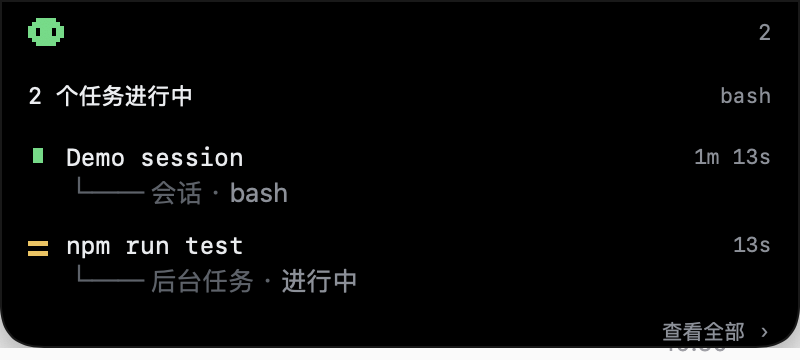
What it shows
Everything is derived from projections DSH's browser half already maintains — no session event is ever appended, nothing is polled:
| Row kind | Source |
|---|---|
| Session | catalogued sessions whose turn is open (running projection, the binding's snapshot, or an open turn/start in the event window) |
| Job | the jobs client service roster (whole-set replacement stream) |
| Subagent | catalogue rows with origin: 'subagent' |
Each row shows the readable title, the elapsed time and the current action (tool name, step ordinal or "working"), folded from turn/start, step/start, tool/call and tool/result.
Requirements
- macOS 13 or newer. The screen-level panel is a small AppKit helper (no Dock icon, no focus stealing).
- DSH 0.2.2 or newer, desktop profile.
- The helper is bundled prebuilt; rebuilding it needs the Xcode command line tools.
Install
From the DSH plugin manager:
- Copy this repository's absolute path and add it as a local bundle (Plugins → Add plugin), or install it with
install_bundle, or install straight from the market entry. - The plugin row appears under Plugins; the notch panel shows up immediately.
The plugin launches the helper on startup (open -g overlay/PerchOverlay.app). If you quit the helper, restart DSH or launch it again by hand.
Settings
Right-click the notch panel → 设置… / Settings…:
- system notification banner on/off
- spoken reminder on/off
- voice per language (the system's installed voices; enhanced/premium ones sound better)
- speech rate
- one reminder line per language, picked by DSH's active UI language
- restore defaults
Everything applies immediately — no restart. Settings are stored in the helper's UserDefaults (local.perch.overlay); the bundle patch only seeds the first run.
The completion banner is posted by the DSH page itself (Notification API), because macOS refuses notifications from an ad-hoc signed helper. That means System Settings → Notifications → DeepSeek Harness must allow notifications, or the banner stays silent. The spoken reminder does not need any permission.
Configuration
cordis.patch.yml carries the seed values (config.notify, config.text, config.overlay). overlay: false disables the screen-level panel entirely.
config:
  overlay: true
  notify:
    system: true
    voice: true
  text:
    zh: 任务完成
    en: Task complete
The patch is composed at DSH startup: edit it, then restart DSH. Runtime edits can leave the row unaddressable.
How it is built
| File | Role |
|---|---|
client.js | Browser half: aggregates running work, posts presentation-ready JSON to 127.0.0.1:47823, posts the completion banner, serves nothing to the DOM |
index.js | Host half: launches the helper, forwards config.notify to it, retries + 30s heartbeat |
overlay/main.swift | The AppKit helper: notch-shaped panel, NSTrackingArea hover, ⌥⌘P hotkey, right-click menu, settings window, TTS, POST /state + GET /settings |
locale/*.json | Plugins page metadata (zh/en) |
icon.svg | Original pixel-notch icon |
Rebuild the helper after editing overlay/main.swift:
cd overlay
swiftc -O -swift-version 5 -target arm64-apple-macos13.0 main.swift \
  -o PerchOverlay.app/Contents/MacOS/PerchOverlay
codesign --force --sign - PerchOverlay.app
Helper log: ~/Library/Logs/PerchOverlay.log (trimmed at 256 KiB) — useful to see settings, state, speech lines.
Limitations
- The panel is drawn below the camera housing, not over it: the notch's pixels are physically unavailable.
- macOS reserves Siri's natural voices for Siri; they are filtered out because selecting one silently falls back to the default voice.
- Clicking a row brings DSH to the front. A separate process cannot deep-link to one session.
- The helper is ad-hoc signed, so macOS does not let it post notifications; that is why the banner comes from the DSH app instead.
License
MIT. The pixel creature, markers and icon are drawn for this project.
Comments
Loading…
Similar plugins
by aa2246740
Native macOS Notch for DSH sessions, inline answers and animated task status
★ 8
↓ 354/wk
MIT
Swift
Nov 4, 2026
dsh plugin --profile web add dsh-notch为模型展示交付成果和下达精细微调指示的dsh desktop面板
★ 0
MIT
JavaScript
dsh plugin --profile web add dsh-plugin-middle-panelby chenvinc
Mirrors DeepSeek Harness task state (failed, waiting for your answer, finished) into the macOS Atoll Dynamic Island as one status light with three counts.
★ 0
MIT
JavaScript
Oct 26, 2026
dsh plugin --profile web add dsh-2-atoll-noticeDesktop and webhook alerts on macOS, Linux and Windows when an agent finishes a turn, errors, or waits for approval — zero-dependency native notifications (osascript / notify-send / PowerShell toast)
★ 2
↓ 562/wk
MIT
JavaScript
dsh plugin --profile web add dsh-notificationby CarbeneLee
Native macOS notifications for DSH: task completion, failures, approval requests, questions and plan reviews. A small bundled helper app lets banners use the DSH icon and opens DSH on click; the notif
★ 0
MIT
JavaScript
Nov 16, 2026
dsh plugin --profile web add dsh-mac-notifyby chendaleiQ
Codex-style macOS notifications + Dock unread badge for the DeepSeek Harness desktop app (click the banner to jump back to the session)
★ 0
MIT
JavaScript
Nov 8, 2026
dsh plugin --profile web add dsh-plugin-desktop-notify