

dsh-workflow
Discovered把 plan → work → code → work → review → work → plan 这条角色链,从"靠模型自觉"变成可执行、可审计的轮次状态机:唯一 T0、按签名计数的失败、分层证据、阻塞式门禁、结构化交付。
dsh-workflow · 角色链的工作流插件
给 DeepSeek Harness 用的两个 bundle,把 plan → work → code → work → review → work → plan 这条角色协作链从"团队约定"变成"可由机器执行的纪律"。
用户 ↔ plan → work → code → work → review → work → plan → 用户
每轮六步:核对基线 → 收敛方案与授权 → 连续实施(唯一 T0)→ 限定修正(失败/重试/重启累计计数)→ 独立终审(分层证据不得互相扩大)→ 交付并关闭(版本 / 结果 / 未覆盖项 / 费用 / 停自有服务)。
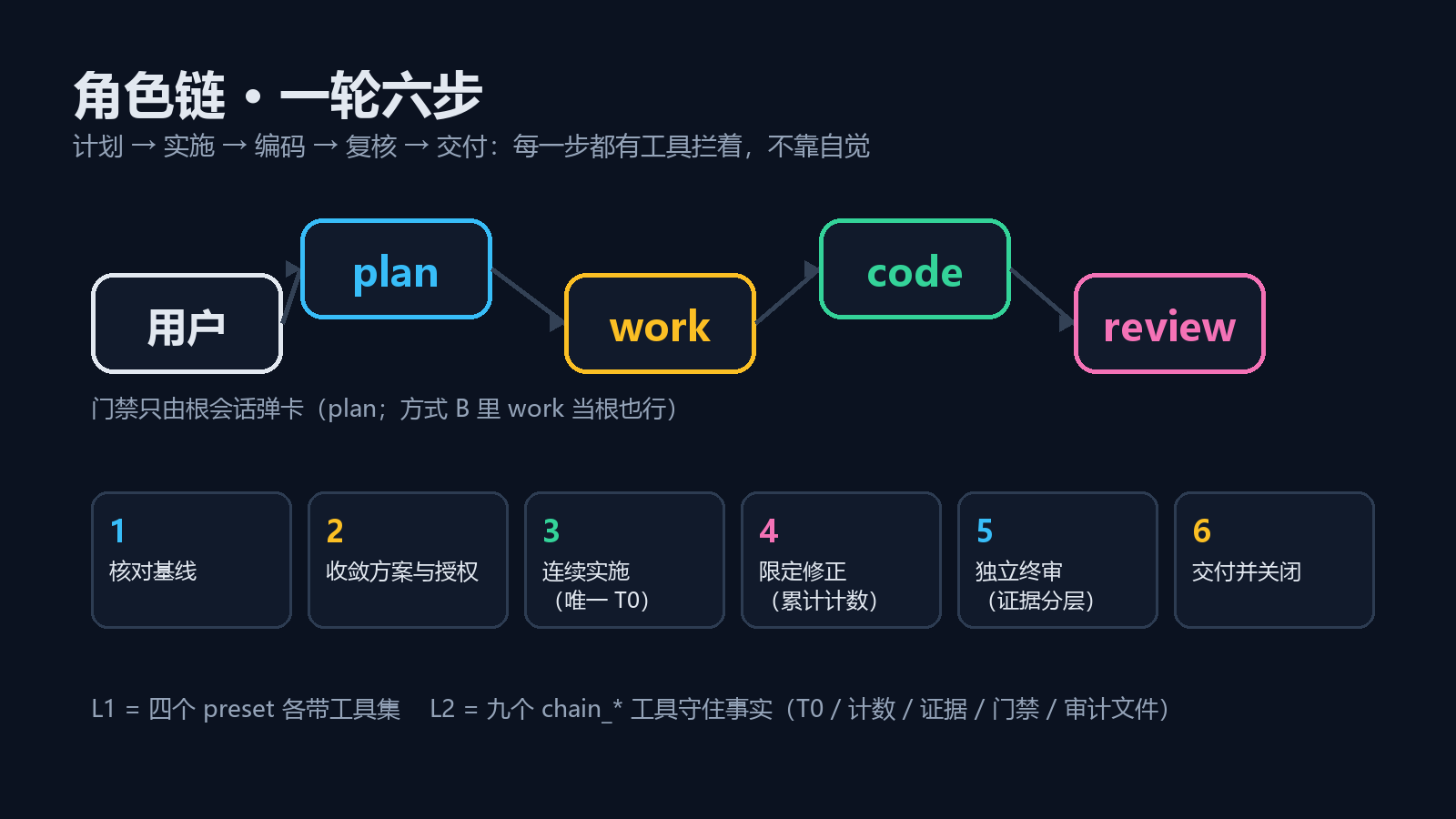
两个部分
| 目录 | 是什么 | 状态 |
|---|---|---|
plugins/l1-presets/ | 纯配置:四个 preset(plan / work / code / review)的人设与工具矩阵,外加 protocol/ROUND-PROTOCOL.md 可抄进项目 AGENTS.md。零宿主代码 | v1.0 已装 |
plugins/l2-protocol/ | 协议插件:9 个 chain_* 工具 + 轮次状态机,把 T0 唯一、计数越限、证据分层、门禁阻塞、收尾校验变成硬约束,并把每轮落盘成审计文件 | v0.1(P0)已装,21 条自测通过 |
分开是有意的:L1 决定"谁有什么工具",L2 决定"事实必须成立"。L2 依赖 L1(按角色判定),L1 不依赖 L2(不装 L2 也能用,只是纪律靠自觉)。
装
顺序:先 L1,后 L2,然后新开会话(preset 与工具集在会话创建时冻结)。
从本仓库直接装,不需要发布到 npm(#path: 选子包):
plugin_manager install_bundle target: github:Weihao654/dsh-workflow#path:/plugins/l1-presets
plugin_manager install_bundle target: github:Weihao654/dsh-workflow#path:/plugins/l2-protocol
本地开发时也可以直接指向目录:
plugin_manager install_bundle target: <本仓库>/plugins/l1-presets
plugin_manager install_bundle target: <本仓库>/plugins/l2-protocol
两者都是普通 DSH bundle(dsh.bundle.patch 指向各自的 cordis.patch.yml),安装后可在插件列表确认 fiberPhase: active。详细前置、卸载与验证见各自 README。
角色→模型(plan 用强模型,code 用便宜模型)
子代理默认继承父代理的模型,所以四个角色本来共用一个。要分工,在项目里放一张表:
<项目根>/.dsh/role-chain.json
{
  "roleModels": {
    "plan": { "provider": "deepseek-account", "model": "deepseek-flash", "reasoningEffort": "high" },
    "code": { "provider": "openai", "model": "gpt-6-luna" }
  }
}
改完下一轮请求就生效:L2 用 agent/request 瀑布按 session.header.agentPreset 认出角色,查表换 provider / model。你在输入框手选过模型的会话,它不会再覆盖。表写坏了只是路由停用,chain_status.roleModels.errors 会说明原因。
不想手写 JSON 也行:在 plan 会话里调 chain_role_models({ set: { code: { provider: "openai", model: "gpt-6-luna", reasoningEffort: "low" } } }) 即可(原子写入,非法输入拒绝且不动原文件)。图形界面还没做,原因与代价见 plugins/l2-protocol/DESIGN.md §17。
装了 L2 之后,新建会话的预设菜单只保留 DSH 自带的几项 + plan;work / code / review 只由 plan 派发,不再出现在菜单里(Settings → Agent Presets 页里仍可见)。
一眼看懂差别
不装 L2 时,"这一轮只有一个 T0"是一句提示词,模型忘了就忘了;
装了 L2,chain_freeze_baseline 第二次调用直接抛 BASELINE_ALREADY_FROZEN,且 T0 是插件自己跑 git rev-parse HEAD 得到的,不听模型自述。
同理:同一个测试失败第 3 次会 exceeded,越限的轮子 chain_close_round 关不掉(除非有用户批准的 force 门禁),关掉的轮会自动产出 .dsh/rounds/<roundId>.json。
诚实声明
- "角色看不见不该有的工具"在 L1 是结构性的(工具没挂),在 L2 的 P0 是代码拒绝(
ROLE_DENIED)——迁移计划见plugins/l2-protocol/DESIGN.md§15。 work的只读是软的:它需要 shell 跑验证命令,所以仍能重定向写文件。- 门禁弹卡这一条只能在你自己的会话里验证,步骤见
plugins/l2-protocol/ACCEPTANCE.md。
关键词
deepseek-harness dsh cordis plugin agent-preset workflow round audit role-chain subagent
Comments
Loading…
Similar plugins
by gulagala001
Resumable JavaScript workflows with native DSH subagents, jobs, token budgets and worktree isolation.
★ 2
MIT
JavaScript
Oct 24, 2026
dsh plugin --profile web add dsh-workflow-plusby M1r0er
Per-workspace gate that hides the tool schemas and system prompt sections of selected plugins from the model in directories that do not need them.
★ 0
MIT
JavaScript
Oct 22, 2026
dsh plugin --profile web add dsh-workspace-gateby 82c86b8z86-stack
Engineering workflow layer for DeepSeek Harness (dsh): a disciplined-engineer agent preset with five gated phases — requirements clarification, plan approval, TDD, parallel subagent execution, and ver
★ 4
MIT
JavaScript
Oct 11, 2026
dsh plugin --profile web add dsh-engineering-workflowby bauerelizabeth07139
DeepSeek Harness plugin that bundles the simple-plan skill: plan, execute with worker subagents, verify every deliverable with memoryless verifier subagents, and fix in at most three cycles. The Skill is shipped by the bundle, so there is nothing to copy into a skills directory.
★ 0
MIT
JavaScript
Oct 8, 2026
dsh plugin --profile web add dsh-simple-planPlan Checkup for DeepSeek Harness: checks each step of a plan with Jev or a local LLM before you approve it, and marks the results on the plan review card.
★ 0
dsh plugin --profile web add dsh-plan-checkupby kongbai9420
DeepSeek Harness 主从协作团队插件:主控架构统筹,子模型并行执行,闭环严苛验收
★ 3
MIT
JavaScript
Oct 27, 2026
dsh plugin --profile web add dsh-boss-worker