
dsh-restart-button
Manifest validDSH desktop (Windows) titlebar menu: a Restart button that closes and relaunches the whole app - shell + Host. Plugin-only, no app.asar patching.
dsh-restart-button
给 DSH 桌面端(Windows) 的标题栏菜单栏加一个「重启」按钮:点一下,整个应用(Electron shell + DSH Host + 渲染进程 + 插件守护进程)退出并自动重新打开。

为什么需要它
DSH 桌面端的「应用」菜单是 Electron 主进程 用原生 Menu 弹出的(applicationItems(),打包在 app.asar 内)。菜单里本来就有一项「重启应用与 Host」,但它被 development(!app.isPackaged)门槛挡住,正式安装包里看不到。
而 DSH 插件运行在 Host 子进程 里:
"DeepSeek Harness.exe" --expose-internals "...\app.asar\dsh\node_modules\@deepseek-ai\dsh-desktop-host\lib\index.js" ...
这个子进程:
- 拿不到
app.relaunch()/app.quit()—— 那是主进程的 API; - 没有任何往原生菜单插项的扩展点 —— 菜单项列表硬编码在主进程里;
- 没有「请求主进程重启」的 IPC 通道 —— IPC 只允许主进程 → Host 单向指挥(
shutdown/quit-inspection/update-tasks)。
所以插件只能从外面把应用关掉再拉起来。这正是本插件做的事:不改 app.asar、不依赖桌面端版本、装一次就一直在。
工作原理
host 半边(host.js)
| 方法 | 路径 | 说明 |
|---|---|---|
| GET | /restart-button/status | 可用性 + 进程信息(exe、appName、workdir、mainPid、hostPid、electronVersion、logPath) |
| POST | /restart-button/restart | 安排一次重启,立刻返回 { ok, via, dryRun, delayMs, scriptPath, logPath } |
POST /restart 的动作序列:
- 把一段 VBScript 助手脚本写到
%TEMP%\dsh-restart-button-<random>.vbs; - 用一段隐藏的 PowerShell 只做一件事:通过 WMI(
Invoke-CimMethod -ClassName Win32_Process -MethodName Create)以wscript.exe //B //Nologo <脚本>创建它 —— WMI 创建的进程挂在WmiPrvSE.exe名下,不属于本应用的进程树,因此第 4 步「按 exe 路径杀掉整个应用」不会把助手自己一起杀掉(WMI 不可用时退化为spawn(..., { detached: true, stdio: "ignore" })); - 助手先睡
1500ms,让 HTTP 响应先回到页面(否则页面会看到连接被掐断);host 侧waitForHelperStart()同时轮询日志里的helper started,2s 内没出现就返回helper-did-not-start(页面提示失败并可重试); - 按 exe 路径枚举并终止该应用的所有进程:主进程 + Host + 渲染/GPU 进程 + 用同一个 exe 以 Node 模式跑的插件守护进程(例如
billion-context的... start --host 127.0.0.1 --port 18789),轮询 30s、每 3s 重试终止; - 从主进程原始命令行里取出参数(正常情况下为空),再用 WMI
Win32_Process.Create(CommandLine+CurrentDirectory)重新启动同一个 exe。
为什么用 VBScript 而不是 PowerShell:v1.0.1 及以前助手是 PowerShell,
Start-Process启动的应用会继承那个 PowerShell 的控制台,于是重启后桌面上多出一个 shell 窗口,里面滚着 main 进程的Checking for update…、host 的dsh web: …banner 和插件日志。DeepSeek Harness.exe是 GUI 子系统程序,本身不申请控制台;改成wscript(同为 GUI 子系统)且助手内部只用 WMI(不用taskkill/Start-Process)后,整条重启链路不再产生任何控制台窗口。顺带两个坑:powershell -WindowStyle Hidden挡不住 Windows Terminal 给控制台程序开标签页;CREATE_NO_WINDOW也无法经 WMI 传给Win32_Process.Create(三参重载返回21/WBEM_E_INVALID_PARAMETER)。
日志写在 %TEMP%\dsh-restart-button.log,每次重启的完整决策链(helper started (wscript)、目标 PID 列表、是否 dry-run、重启命令行)都在里面。
client 半边(client.js)
Windows 的「应用 / 编辑」菜单栏不是原生菜单条,而是桌面端 preload 画在页面里的 DOM(div[data-windows-menu],open shadow root)。client 半边在这个菜单栏里追加第三个按钮「重启」:
- 点击 → 确认气泡(中英双语,跟随
document.documentElement.lang); - 确认 →
POST /restart-button/restart→ 全屏遮罩 + 每 2s 轮询/status(探不通 = Host 已退出,说明重启已生效); - 25s 内仍能探通则提示失败并可重试;
- 2.5s 内找不到菜单栏(例如跑在
dsh web里)→ 退化为右下角浮动按钮#dsh-restart-button-floating。
安全边界
两个路由都带栅栏,只接受:loopback Host + 非 cross-site + origin 同源或 dsh-app://app 的请求(与官方插件 isTrustedApiRequest 相同的判定口径)。
安装
前置:DSH 桌面端(Windows)。profile 目录默认
%USERPROFILE%\.dsh\profiles\desktop。
方式 A:用 dsh-super-injector(最省事,热装配免重启)
如果你装了 dsh-super-injector(DSH 插件运行时注入器),直接注入本目录的绝对路径:
dev_inject_plugin dir=<本插件目录绝对路径>
或写进 profile(重启后仍在):
dev_install_package dir=<本插件目录绝对路径> profile=desktop
⚠️ 两种注入方式与 bundle patch 的正式条目不要同时存在:
dev_install_package会先建一个临时 entry(幽灵),而cordis.patch.yml的正式 entry 后加载时会因为路由重复报webserver: duplicate prefix route "/restart-button"。处置:清掉幽灵 entry 后让正式 entryrefresh(),或干脆重启一次应用(正式条目会正常加载)。
方式 B:手动装进 profile
-
把插件目录放进 profile 的
node_modules(目录拷贝或 junction 均可):mklink /J "%USERPROFILE%\.dsh\profiles\desktop\node_modules\dsh-restart-button" "C:\path\to\dsh-restart-button" -
编辑
%USERPROFILE%\.dsh\profiles\desktop\package.json:{ "dependencies": { "dsh-restart-button": "link:C:\\path\\to\\dsh-restart-button" }, "dsh": { "profile": { "bundles": [ // ... 其它 bundles ... "dsh-restart-button" ] } } } -
重启 DSH(关掉桌面端再打开,或重启
dsh web)。
方式 C:从 GitHub / tgz 安装
在 profile 目录里用 DSH 捆绑的 pnpm 安装,再把包名加进 dsh.profile.bundles,然后重启:
# 直接从 GitHub
pnpm add "dsh-restart-button@github:wangbofan/dsh-restart-button"
# 或从打包产物
pnpm add "file:C:\path\to\dsh-restart-button-1.0.0.tgz"
卸载
从 dsh.profile.bundles 与 dependencies 里删掉 dsh-restart-button,删掉 node_modules 下的链接,重启 DSH 即可(插件不写任何其它位置,除 %TEMP% 下的脚本与日志)。
使用
标题栏菜单栏:应用 | 编辑 | 重启 → 点「重启」→ 确认气泡 → 应用关闭并自动重新打开。
位置说明:原生「应用」下拉的菜单项列表在 Electron 主进程内,插件无法插入菜单项,所以按钮做在菜单栏上、紧邻「应用」。
配色(跟随 DSH 主题)
弹窗、遮罩、按钮全部使用 DSH 自己的语义 token(--dsw-alias-*),因此和原生菜单一样随外观切换:浅色主题下是「近黑按钮 + 白字」,深色主题下是「近白按钮 + 深字」。没有写死颜色(var() 逗号后的值只是 token 缺失时的兜底)。
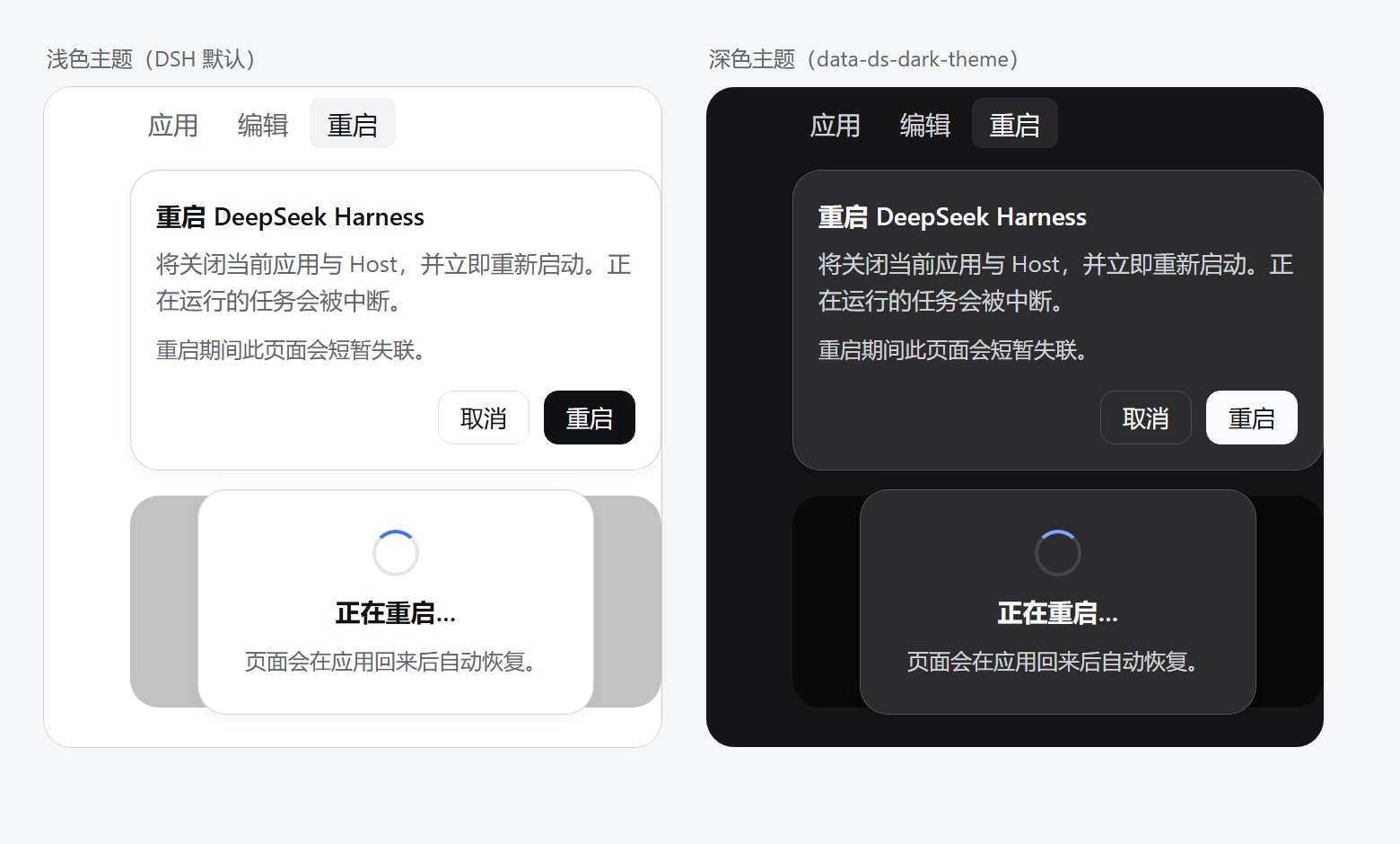
| 元素 | token | 浅色(DSH 默认) | 深色 |
|---|---|---|---|
| 菜单栏「重启」按钮 | 继承 preload shadow root 里 button 的样式:interactive-bg-hover + label-primary | 文字 #61666b;悬停底 rgba(38,49,72,.06)、文字 #0f1115 | 文字 #cfd3d6;悬停底 rgba(255,255,255,.08)、文字 #f9fafb |
| 弹窗背景 / 边框 | bg-layer-2 / border-l4 | #ffffff / rgba(0,0,0,.16) | #2c2c2e / rgba(255,255,255,.2) |
| 弹窗阴影 / 圆角 | elevation-panel / radius-lg | 与 DSH 浮层一致 | 与 DSH 浮层一致 |
| 主按钮「重启」 | button-primary-fill + label-primary-foreground | 底 #0f1115、字 #ffffff | 底 #f9fafb、字 #0f1115 |
| 主按钮悬停 | button-primary-hover | #43454a | #ebeef2 |
| 次按钮「取消」 | label-primary + border-l3 | 字 #0f1115、边 rgba(0,0,0,.12) | 字 #f9fafb、边 rgba(255,255,255,.16) |
| 重启遮罩 | bg-mask-1 | rgba(0,0,0,.24) | rgba(0,0,0,.5) |
| 浮动兜底按钮 | button-floating-fill + border-l3 | 底 #ffffff、字 #0f1115 | 底 #2c2c2e、字 #f9fafb |
| 转圈 | state-business-primary | #4176e6 | #7aaaff |
v1.0.0 曾用
--dsw-alias-brand-primary当主按钮底色:深色主题下它是近白色(#f9fafb),而文字写死#fff—— 按钮上的字几乎看不见。现已改成 DSH 原装的button-primary-fill+label-primary-foreground配对。
配置
| 环境变量 | 作用 |
|---|---|
DSH_RESTART_BUTTON_DRY_RUN=1 | 演练模式:助手只把将要终止的 PID 与重启命令行写进日志,不真的杀进程。也可以不设环境变量、临时用 POST /restart-button/restart?dryRun=1 演练一次 |
代码内常量(host.js):ROUTE_PREFIX = "/restart-button"、HELPER_DELAY_MS = 1500。
自测
GET /restart-button/status 会打印主进程 PID 与 exe 路径,把它们喂给自测脚本(用 DSH 捆绑的 node,本机 node 不在 PATH 时):
& "$env:USERPROFILE\.dsh\dsh-runtimes\dsh-primary-runtime\dependencies\node\bin\node.exe" `
  tools\self-test.mjs <mainPid> "C:\Users\22437\AppData\Local\Programs\DeepSeek Harness\DeepSeek Harness.exe"
它跑 8 项断言,整个过程不碰正在运行的应用:
- 生成的助手源码里不含
powershell/Start-Process/taskkill/cmd.exe; - 用与插件完全相同的 WMI 方式启动 wscript 助手;
- 读日志断言
helper started (wscript)与targets: <pids>; - dry-run 走到
dry run: would start: <exe>; - 启动前后
conhost进程数必须不变(证明没创建控制台宿主 —— 这正是 .vbs 助手的意义); - 用 VBS 的
Win32_Process.Create(助手重启应用所用的同一个原语)创建进程写文件,断言成功。
实测输出(本机 8 个同 exe 进程):
helper started (wscript) target=16852
targets: 5168, 16852, 19352, 3296, 18780, 20500, 15968, 9348
dry run: the application is left running
dry run: would start: C:\...\DeepSeek Harness\DeepSeek Harness.exe
conhost before=5 after=5
launchapp returned 19868
配色自测:tools/theme-preview.html 把 DSH 两套 token 值内联进去、复用 client.js 的 CSS 渲染浅/深两版弹窗,用无头 Edge 截图即得 assets/theme-preview.png:
& "C:\Program Files (x86)\Microsoft\Edge\Application\msedge.exe" --headless=new --disable-gpu --hide-scrollbars `
  --force-device-scale-factor=2 --window-size=780,470 --screenshot=assets\theme-preview.png tools\theme-preview.html
兼容性与限制
- 仅 Windows 桌面端;
dsh web下capabilities()会返回available: false(reason: "not-supervised"),client 半边退化为浮动按钮但点击会提示不可用。 - 不是优雅关闭:按 exe 路径硬杀进程树,正在跑的任务会被中断(确认气泡里有提示)。
- 不修改
app.asar,桌面端更新后依然有效。 - 重启后窗口位置/会话由桌面端自己恢复;本插件不保存任何状态。
License
MIT © wangbofan
English (brief)
dsh-restart-button adds a Restart button to the DSH desktop titlebar menu bar (Windows). The native「应用」dropdown is built inside the Electron main process and has no plugin extension point, and plugins run in the Host child process with no way to call app.relaunch(). So the Host half (host.js) exposes POST /restart-button/restart, which writes a VBScript helper and creates it as wscript.exe //B //Nologo <script> through WMI (so it lives outside the app's process tree), waits 1.5s, kills every process of the app by executable path, and relaunches the exe through WMI only. The helper is deliberately not PowerShell and never calls taskkill/Start-Process: those are console programs, and a console started by the helper is inherited by the relaunched app, which leaves a stray shell window full of Checking for update… / dsh web: logs (fixed in 1.0.2). The client half (client.js) appends a「重启 / Restart」button to the titlebar menu bar (an open shadow root rendered by the desktop preload) with a confirm popover. Every color comes from DSH's own --dsw-alias-* tokens, so the popover follows the shell theme (near-black button with white text in light mode, near-white button with dark text in dark mode). Windows only; hard restart (running tasks are interrupted); no app.asar patching.
Comments
Loading…