

dsh-emacs
Discovered★ 41An Emacs client for DeepSeek Harness
dsh-emacs — an Emacs client for DeepSeek Harness
dsh-emacs brings DeepSeek Harness
(dsh) into Emacs: streaming replies, tool calls, thinking blocks, slash
commands, file/session references, and model selection. It uses Emacs
built-ins (Emacs 27.1+) with no third-party dependencies.
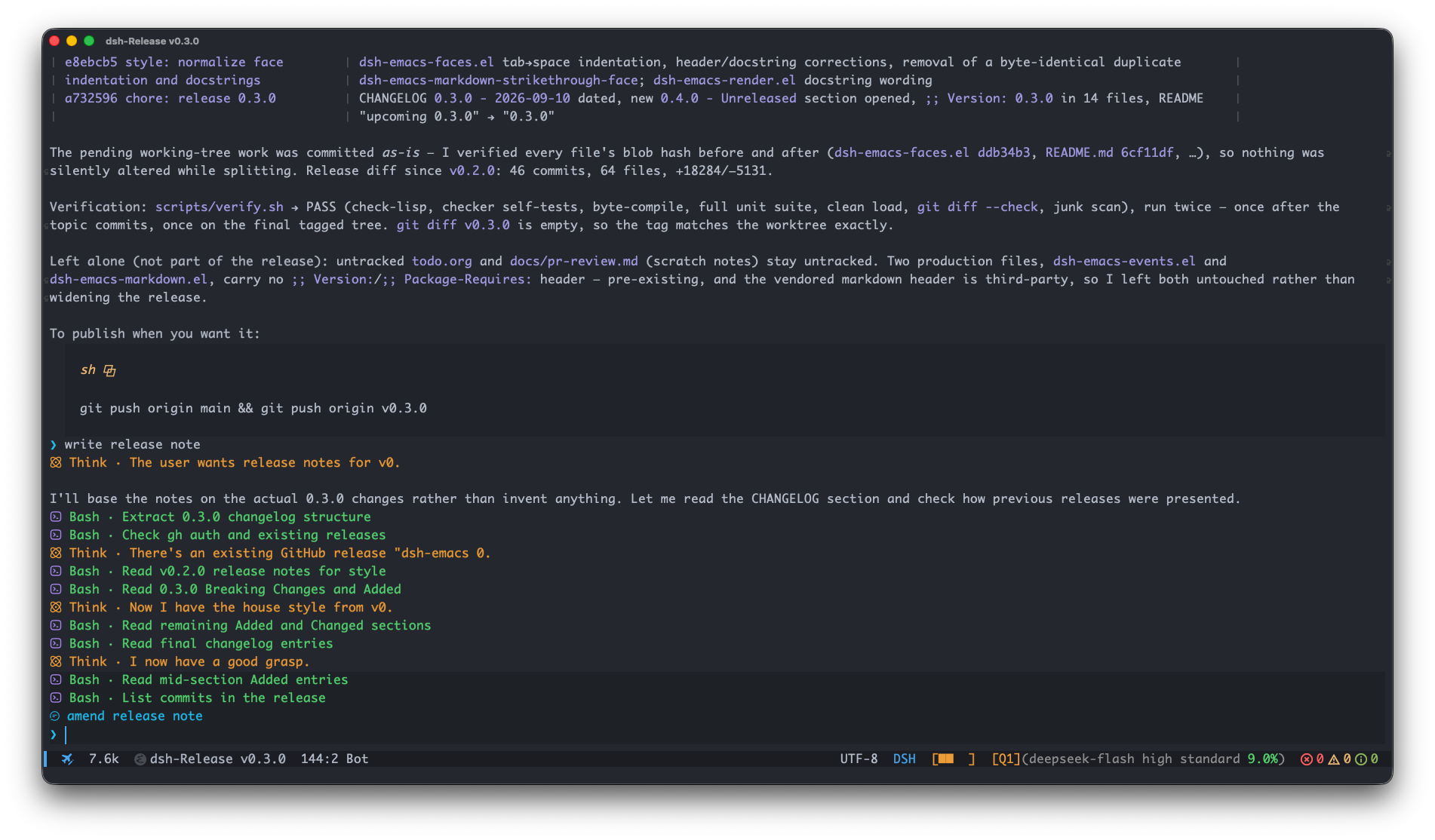
0.4.1 targets the dsh 0.1.5 wire protocol (server 0.1.5-rc.1 or newer).
Quick start
You need Emacs 27.1+ and a provider/model configured in dsh to send messages. dsh-emacs can install and start the dsh server for you; provider credentials and model configuration remain in dsh. For an existing local or remote server, set its address as described in Server setup before connecting.
-
Clone the repository:
git clone https://github.com/vritser/dsh-emacs.git ~/dsh-emacs -
Add this to your Emacs configuration and evaluate it, or restart Emacs:
(add-to-list 'load-path (expand-file-name "~/dsh-emacs")) (require 'dsh-emacs) -
Run
M-x dsh-emacsto open the session list. If no local server is running, dsh-emacs starts one, offering to install the CLI if it is missing. On a fresh dsh setup, useM-x dsh-emacs-open-webto configure your provider and model before sending a message. -
Press
cin the session list to create a session. UseC-c C-min the chat buffer to choose a model if needed. -
Type after the
❯prompt and pressC-c C-cto send your first message.
For an optional use-package setup, see
Example configuration.
Using it
Session list
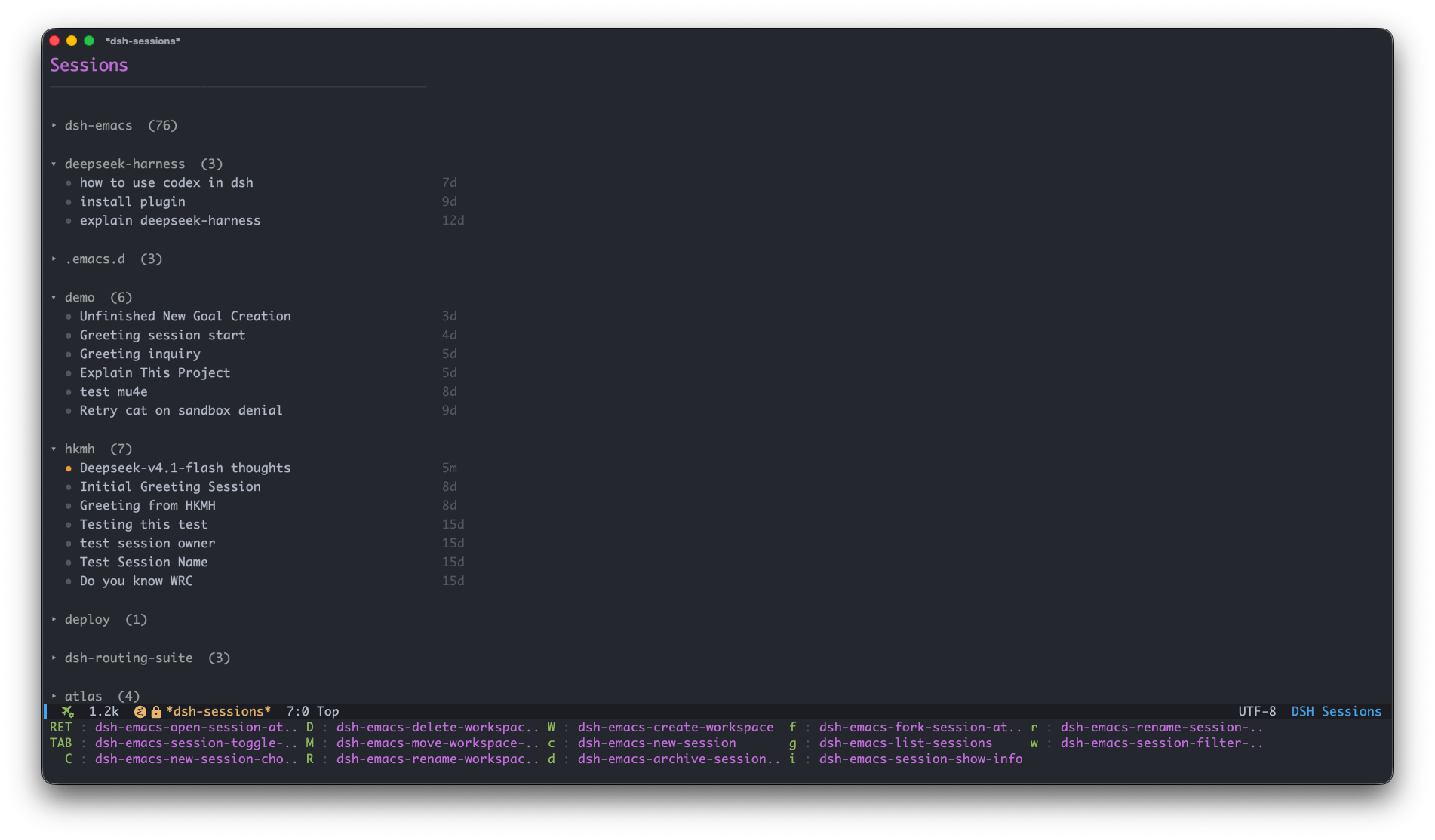
M-x dsh-emacs opens your sessions, grouped by workspace. Press c to
create a session or RET to open one. See
Session and workspace controls
for list management and navigation.
Inside a chat buffer
| Key | What it does |
|---|---|
C-c C-c | Send input or interrupt; see below |
C-c C-b | Interrupt the running turn |
C-c C-q | Manage the pending queue |
C-c C-g | Open the goal-action prefix |
C-c C-m | Switch model / reasoning effort |
C-c C-a | Attach an image |
C-c C-s / C-c M-s | Switch session in this workspace / across all |
C-c C-r | Refresh |
C-c C-o | Load older messages above the current transcript |
C-c C-w | Copy (region → code block → message at point → last reply) |
C-c C-f | Toggle mode-line stats |
C-c C-! | Stop the tracked local shell process |
M-p / M-n | Previous / next input |
TAB | Complete a slash command |
Sending during a running turn: by default, C-c C-c queues a non-empty
message for the next turn. C-u C-c C-c steers the running turn instead;
C-c C-c with empty input interrupts it. Configure this with
dsh-emacs-busy-enter-behavior. The C-c C-q queue menu acts on the
highlighted item; x deletes all pending items.
Type @ to choose file, directory or session references: @src/ drills
into a directory and @session-title mentions another session. See
@ references.
Type /, then press TAB to complete a slash command. Automatic
popups depend on your completion front-end and its settings: corfu/company
can provide them with auto completion enabled; stock completion,
vertico and icomplete require TAB. See
Slash commands.
The composer shows the current goal and the next pending message above ❯.
Hover over the preview for its full text, or use C-c C-q to manage pending
messages. Goal shortcuts and inline controls are described in
Goal actions.
Answering questions
Agent ask prompts are answered in one minibuffer read. The question text is
the prompt, the options are the completion candidates (each one carries its
description as an annotation), and the question detail shows in the echo area.
- Single choice: pick a candidate,
RETaccepts it. Empty input skips the question. - Multiple choice: type the options comma-separated —
2,3oralpha,beta— andRETsubmits them (completing-read-multiple, Emacs' standard comma-separated input path). An unambiguous prefix works too (alph), and an ambiguous one is left as your answer text rather than guessed. - Anything that names no option is taken as your answer text, like at any Emacs completion prompt — there is no separate "type an answer" step, and a partly-matched answer is never silently trimmed.
C-c C-sskips the question (empty input does the same);C-gabandons the whole group.
Nothing is toggled in place and the reader never reopens: one read per question, so the menu cannot flicker or reorder.
(setq dsh-emacs-question-help-display 'echo-area) ; default; nil hides the detail
Try M-x dsh-emacs-question-preview locally, without contacting a server.
See Question prompts for details.
Workspaces
Workspaces group sessions by project/directory.
New sessions use the current workspace when created from a workspace header,
its empty New Session row, or an existing chat. Without that context, a
local server can use the Emacs project of the current buffer's directory,
creating its workspace on first use. This detection is controlled by
dsh-emacs-new-session-auto-project and does not run for remote servers.
Otherwise the new session uses the current buffer's directory.
Local shell commands
Enter !git status and press C-c C-c to run a command locally in the
session's workspace directory. Output appears in the transcript, including
while a model turn is running. C-c C-! stops the tracked shell process.
Shell output is not sent to the model or saved in server history; refreshing
the transcript removes it. With attachments, a leading ! is caption text
sent to the model. See Shell commands for multiline
scripts, shell selection and process handling.
Models & presets
Configure providers, models and agent presets in dsh, through
M-x dsh-emacs-open-web or dsh's own configuration files. Use C-c C-m to
select a session's model and reasoning effort.
dsh-emacs-default-preset selects the preset for new sessions; nil uses the
host default. dsh-emacs-default-model is a display fallback for the mode
line and does not select the model used by a session. See
Model picker for details.
Server setup
By default dsh-emacs manages a local server. To use one you run yourself, set
dsh-emacs-base-url to its address. Remote addresses, including HTTPS and
URLs with user:pass@ Basic auth, never trigger a local server start. Set
dsh-emacs-server-auto-start to nil to disable automatic startup locally.
For a server dsh-emacs starts, launch-token authentication is automatic.
For a server you started yourself, provide the launch token from the URL it
prints (dsh web: …/?token=…). You can set dsh-emacs-server-auth-token to
the token, or paste the whole URL into dsh-emacs-base-url.
If a reverse proxy also requires Basic authentication, include its separate
credentials as http://user:pass@host:port; the dsh launch token is still
required. RPC authentication failures report HTTP 401 instead of asking for
a username and password, and clear the rejected cookie before the next attempt.
When prompted for an external server's token, a successful answer is saved for reuse. After a server restart, the previous token may be stale and need replacing. See Server options.
Streaming and appearance
Replies and thinking appear as they arrive. Large Markdown regions finish styling while Emacs is idle; see Markdown responsiveness for tuning options.
Use M-x customize-face or custom-set-faces to change the appearance.
UI styling lists the active faces and explains rendering;
the streaming performance audit records
measurements and remaining limits.
Documentation
- Customization — configuration examples and options
- @ references — file, directory and session mentions
- Slash commands — catalog, completion and execution
- Shell commands — local
!commandexecution - Model picker — models, providers and reasoning effort
- Mode line — status, context usage and pending queue
- UI styling — faces and Markdown rendering
- Development & testing — workflow and verification
- Architecture — module ownership and event flow
- RPC protocol — methods, events and projections
- Fragment extension API — snapshots and card styling
- Changelog
Contributing
Development workflow and commit conventions are in AGENTS.md.
Keep pull requests focused on one topic; for non-trivial work, open an issue
first to align the scope. Run scripts/verify.sh before pushing. It checks
syntax, checker self-tests, byte compilation, the full unit suite, silent
loading, diff whitespace, and generated-file cleanup.
Acknowledgments
The UI mirrors dsh web, including its tool icons, session list and context meter. Markdown rendering and folding build on agent-shell; mode-line stats and compact token formatting follow pi-mono.
License
GPL-3.0-or-later — GNU General Public License v3 or later.
Comments
Loading…
Similar plugins
by SchrodiL
Desktop launcher for Deepseek Harness as a Chrome APP
★ 0
↓ 49/wk
JavaScript
Aug 20, 2026
dsh plugin --profile web add dsh-chrome-app-launcherby openma-ai
mcp apps support plugin for dsh (DeepSeek Harness)
★ 3
↓ 85/wk
MIT
TypeScript
Aug 22, 2026
dsh plugin --profile web add @openma/dsh-mcp-appsby AndPuQing
Extended Agent Client Protocol server bundle for DeepSeek Harness (dsh)
★ 0
TypeScript
Oct 29, 2026
dsh plugin --profile web add dsh-acp-plusby sublatesublate-design
Windows environment diagnostics for DeepSeek Harness
★ 0
MIT
TypeScript
Aug 14, 2026
dsh plugin --profile web add dsh-doctor-windowsby EricXu20266
DeepSeek Harness (DHS) Electron GUI client — webui to gui, kernel untouched
★ 8
↓ 11/wk
MIT
TypeScript
Aug 18, 2026
dsh plugin --profile web add dsh-discoveryby imaginevoldermert
A minimal Windows launcher plugin for DeepSeek Harness
★ 0
MIT
TypeScript
Aug 23, 2026
dsh plugin --profile web add dsh-minimal-launcher-plugin