
dsh-pancha
Manifest validDisk review canvas: agent-written semantics, human decisions, previewed cleanup with undo.
盘查 · Pancha
把磁盘变成一张可审查、可批注、可执行的盘面。
Agent 负责看懂每个目录,你负责做决定,执行前一定先预览。
English | 中文
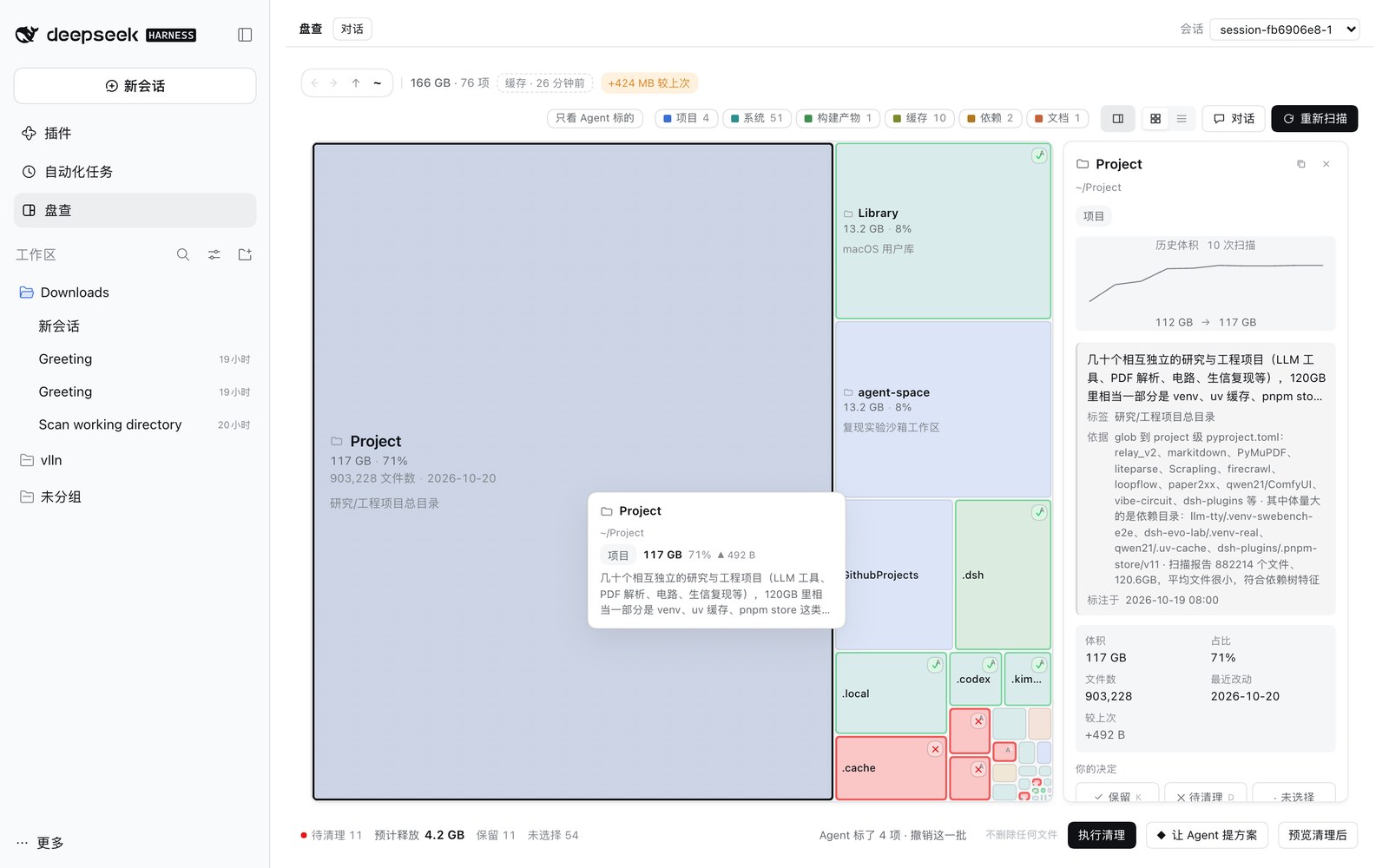
Finder 和 SpaceSniffer 只回答「哪个文件夹大」,不回答「它是什么、删了会怎样」。 真要清理时,你得自己翻进去看、自己判断、自己记住哪些不能动——一次只能处理一个目录。
盘查把这一步交给工具:Agent 为每个目录写一句语义(是什么、能不能清理、依据是什么), 你只需要在盘面上做决定。和「让 Agent 直接删」的区别是——它没有执行权,只能写标记, 真正移动文件必须由你点「执行清理」。
30 秒安装
在 dsh web 里:打开 Plugins → 添加插件,输入 github:vlln/dsh-pancha,点安装。
用 CLI:
dsh plugin --profile web add github:vlln/dsh-pancha
- 生效:装完刷新页面,无需重启宿主。
- 前置:dsh
0.2.x(在0.2.1-rc.1上验证)。 - 卸载:
dsh plugin --profile web remove dsh-pancha。 - 装不上时:先在 Plugins 页看是否显示「加载失败」,多半是 dsh 版本不匹配。
装好后左侧栏会出现 盘查,Plugins 页的「已安装插件」里也能看到它和图标。 第一次打开会自动建一个一次性会话并扫描主目录,几秒后出现方块。
用起来
看
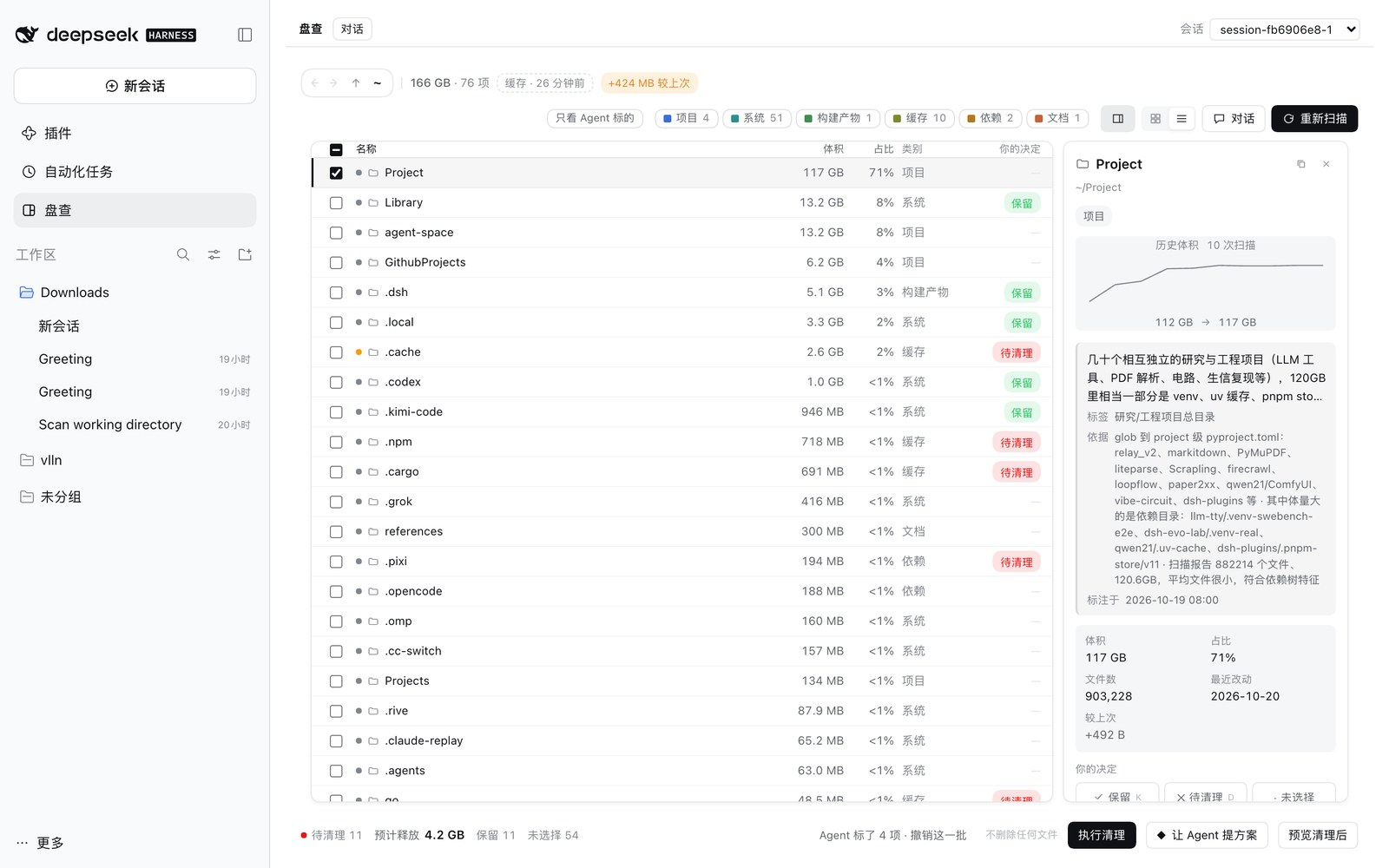
树图按体积占位,facet 色条告诉你这一层被归成了哪几类;点开方块,右侧显示语义、依据和历史体积曲线。 列表视图把 1 像素以下的小项也列出来,方便逐项过。
定
K保留、D待清理、空格循环三态,Backspace清除;多选时作用于全部。- 方块立刻变样:保留是绿框 ✓,待清理是红底 ✕,Agent 标的还会带一个小
A。 - 你的决定优先于 Agent 的语义;它只能写「异议」,不能改你的决定。
执行
点 执行清理 → 逐项预览(源是否还在、目标是否冲突)→ 确认后移到废纸篓。
macOS 拒绝写废纸篓时退到 $DSH_HOME/trash/<时间戳>/,界面会写明去向。
成功后记成一批,点「撤销这批」可以移回。
让 Agent 参与
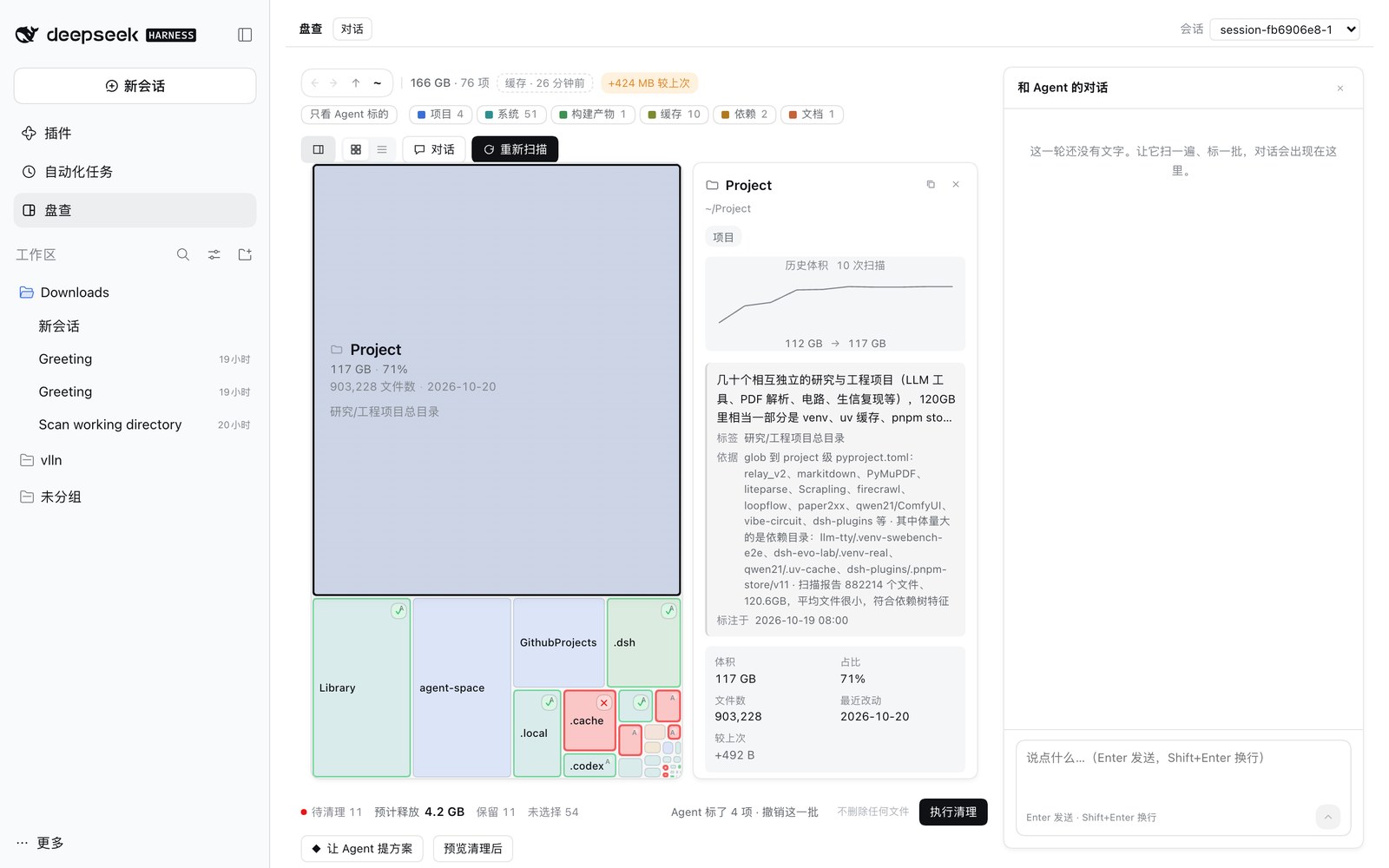
扫描结束后自动补语义,扫描过程中也会先对已读到的部分动手;点 让 Agent 提方案 让它挑一批最有把握的。 右上角 对话 打开抽屉,可以直接问它、看它这一轮做了什么。
Agent 能力
| 工具 | 说明 |
|---|---|
disk_canvas_scan | 扫描一个目录(默认主目录)的直接子项,返回体积最大的若干项 |
disk_canvas_state | 读当前盘面:计划、条目、你的决定;wait:false 可在扫描中读 |
disk_canvas_claim | 给某个路径写一条语义(一句话 + 类别 + 依据) |
disk_canvas_mark | 直接标一批决定(和用户按键是同一份数据),只补没决定的 |
disk_canvas_object | 对你不同意的决定写一句异议,不改决定 |
disk_canvas_history | 读账本里的历史扫描与增量 |
约束来自投递消息里的提示词:只分析、标注、预览,不直接改动文件。这是软约束—— 默认会话本身仍有文件/命令工具;要工具级隔离,需要自己加一个受控 preset。
安全与数据
- 扫描只读
readdir/stat,不跟随符号链接,不修改任何文件。 - 执行只做「移动到废纸篓」,没有删除接口;逐项检查冲突,单项失败不影响其它项。
- 扫描快照、决定、Agent 语义存在
$DSH_HOME/data/dsh-pancha/ledger.json,只在本机,不上传。 - 没有遥测;只有你绑定的会话会把扫描结果摘要发给模型。
兼容性
| dsh 版本 | 状态 |
|---|---|
0.2.1-rc.1 | ✅ 已验证(2026-10-20) |
其它 0.2.x | ⚠️ 未验证——升级后若侧栏入口消失或面板空白,多半是 client 槽位改名 |
官方 Desktop 未验证;web 与 desktop 的安装互不相通,各装一次。
已知限制
- 只扫描当前层的直接子项,逐层下钻;不建全盘索引。
- 执行只有「移动」一种动作,没有重命名 / 归档 / 压缩。
- 废纸篓权限随宿主环境而异;被拒时走插件回收目录,恢复入口是「撤销这批」。
- Agent 语义是「一句结论 + 依据」,不保证正确;决定权在用户。
插件管理
装/卸/启停用官方 CLI:dsh plugin --profile web add|remove dsh-pancha;已装插件在侧边栏 Plugins 页
里查看与配置。Desktop 上从应用内的 Plugins 页安装与管理。
反馈
- Bug / 想法:Issues
- 喜欢的话给个 ⭐:vlln/dsh-pancha
许可
MIT
Comments
Loading…
Similar plugins
by kllilizxc
Cover your desk in AI agents. Every sticky note is a tool, a teammate, or a task getting done.
★ 0
MIT
TypeScript
Sep 13, 2026
dsh plugin --profile web add @dsh-workbench/pluginby wuxiangru915
Incremental diff reviewer for DSH: after approving a batch, only new changes since the checkpoint are shown, with a Web review panel and `/review` command that inject feedback back to the agent.
★ 1
MIT
TypeScript
Aug 21, 2026
dsh plugin --profile web add @dsh-plugin/dsh-review-loopby juanbaiing
在 DSH agent 回答之前,把「你可能已经忘了」的东西重新摆到它眼前。零第三方依赖;判断全部由可核对的规则完成,不做生成式推理(语义那几段用本机 bge-m3 算向量)。
★ 0
MIT
JavaScript
Oct 17, 2026
dsh plugin --profile web add dsh-alert-injectby 9087
Make every agent edit approvable in DeepSeek Harness: full-diff review, per-file / per-block keep & revert, undo/redo.
★ 14
↓ 1.1k/wk
MIT
TypeScript
Oct 19, 2026
dsh plugin --profile web add dsh-diff-approvalby dygin
dsh agent context make recover or reedit
★ 4
↓ 202/wk
Apache-2.0
TypeScript
Sep 1, 2026
dsh plugin --profile web add dsh-recover-contextReusable subagent definitions managed from a Settings page and dispatched through a single delegate_agent tool; ships with a built-in read-only Explorer preset and a nested-delegation policy toggle.
★ 0
dsh plugin --profile web add dsh-custom-subagents