

deepseek-mods
DiscoveredMods and skills for DeepSeek Harness: an editable system prompt in the chat header, full Russian localization, a mod manager, and a skill-authoring toolkit with a bundled checker. Every claim verified
Harness Mods
Plugins for an agent harness — the
agent harness whose browser UI is the dsh web GUI.
Repository: https://gitverse.ru/ubikon/dsh-mods
Three mods live here:
| Mod | What it does |
|---|---|
| system-prompt-mod | A Промпт / Prompt button in the chat header that opens the live system prompt, lets you edit it, and applies the result on the next model request — no restart. |
| locale-ru | Russian localization for the whole GUI: 42 namespaces, 1257 strings, selectable in Settings → General → Language. |
| skill-manager | A Skills tab in Settings → Plugins, after Mods: every skill this harness resolves, with the description the model is matched against and a one-line summary for a person. Pause a skill and the model stops being offered it on the next request — no restart. |
| mod-manager | A Mods tab in Settings → Plugins: what is installed, whether the page was actually served it, and turn-off / turn-on / remove — without a restart. |
Русская версия этого файла: README.ru.md.

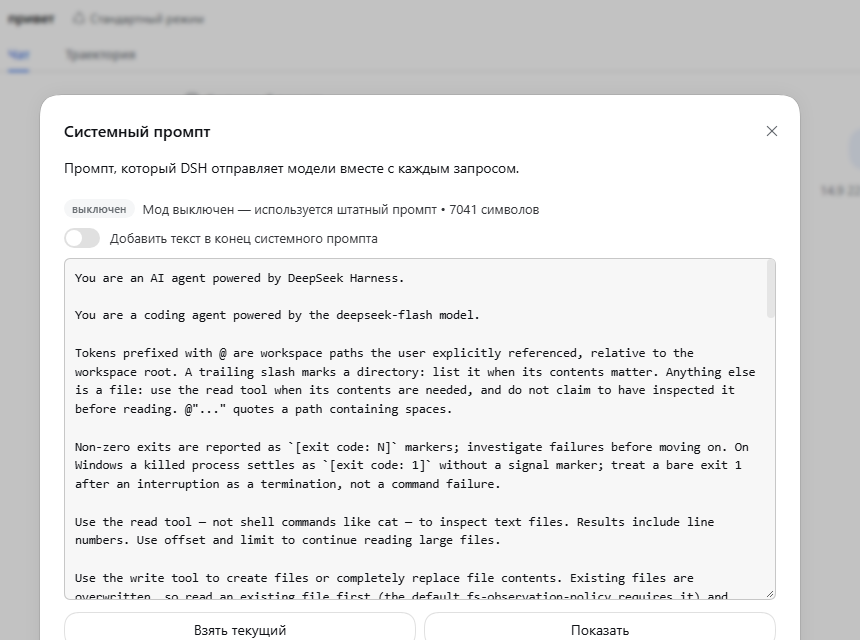
The Промпт control sits with the session header actions; the dialog shows
the prompt the model actually receives — assembled in the live agent's scope,
with {{model}}, {{cwd}} and preset layers already resolved.
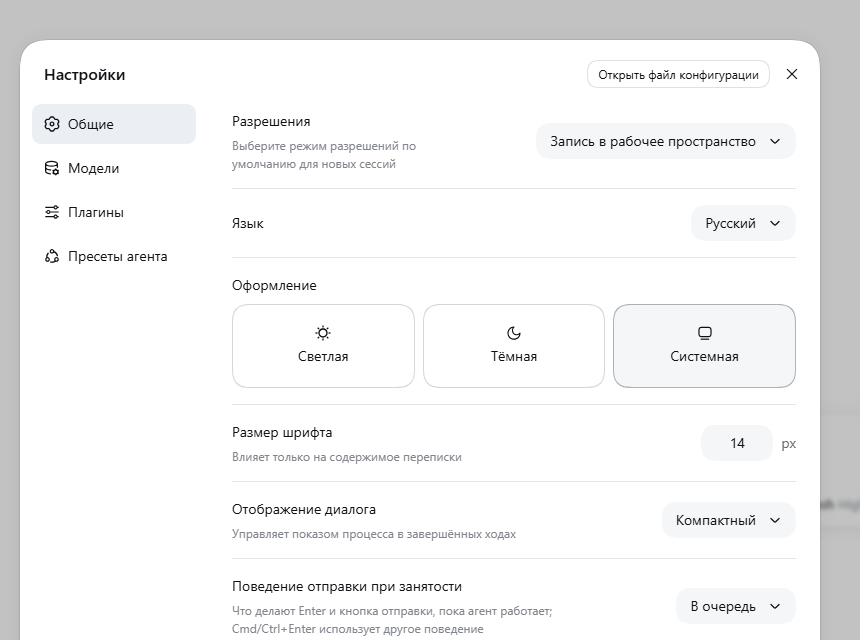
The language pack adds Русский to Settings → General → Language.
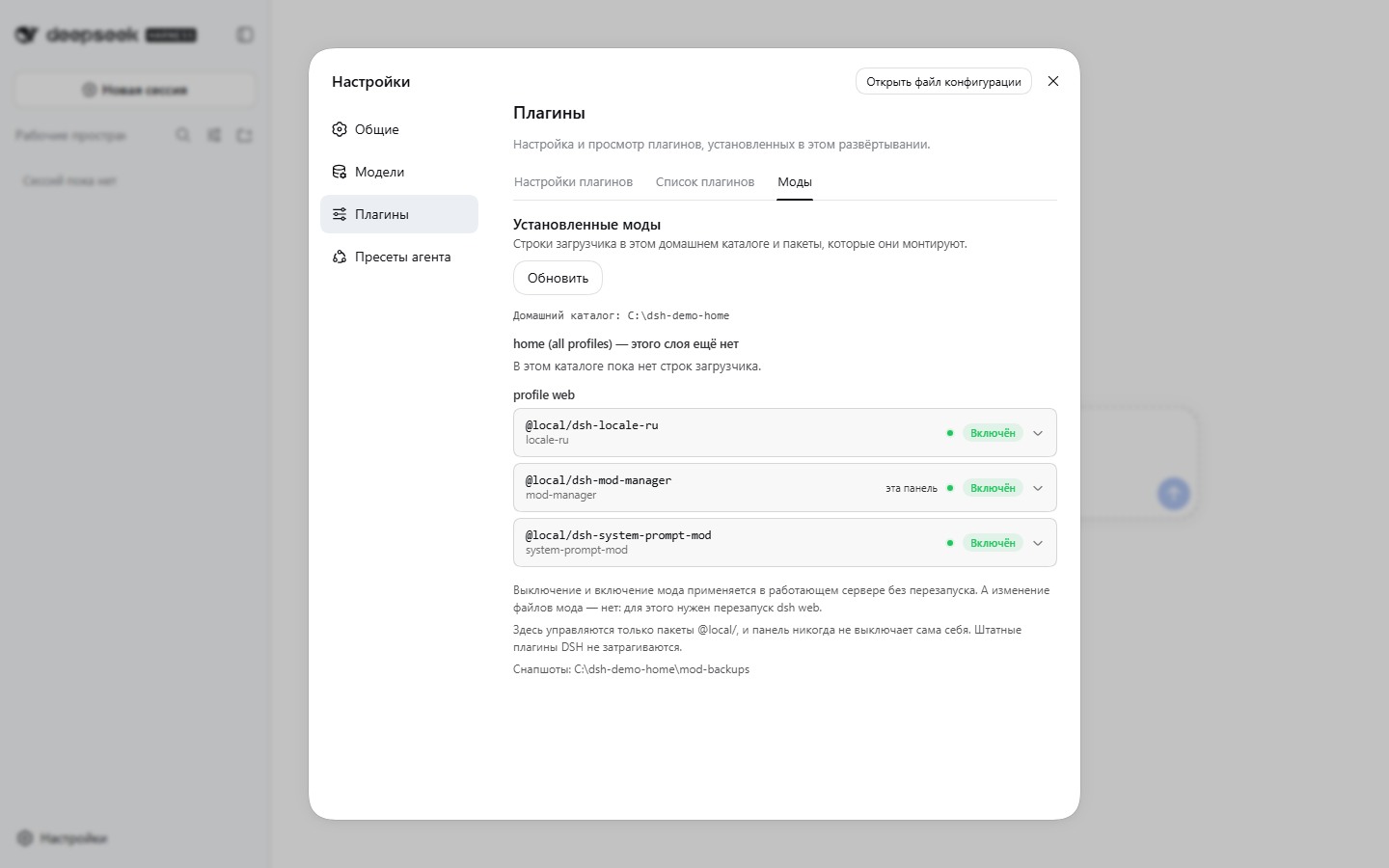
Before: every loader row, whether this page was served it, and what can be done with each one.
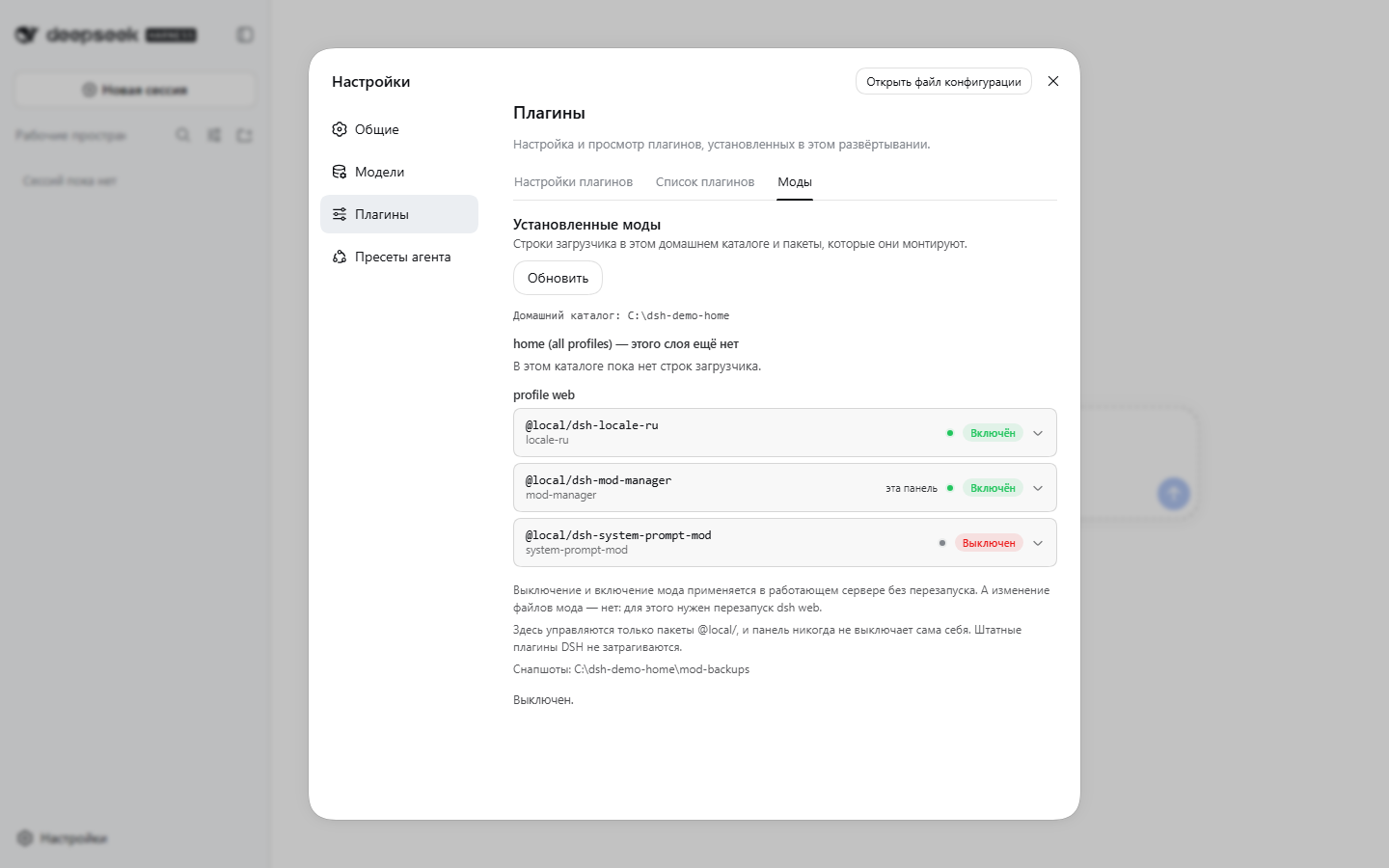
After: the prompt mod turned off from this panel. Its row left the patch file, its host route stopped answering, the badge reads "off" and the button became "turn on" — with no restart. Turning it back on restores the row the same way.
What is different here
Most collections list what they contain. This is what is different about this one, written so that it can be checked rather than believed.
| Verification with the evidence published | Every claim in these docs was measured, and docs/VERIFICATION.md is the table: what was run, what it returned, and — the column most projects leave out — what was not covered. |
| Honest failure paths | A mod that will not install says which check failed and what to do about it. The mirror script refuses to push a token saved for the wrong host. The skills checker reports what it cannot prove as a warning instead of a failure. |
| Bilingual from the start | Every user-facing file exists as X.md and X.ru.md. The Russian pack is a generated bundle of 1257 strings with its own test, not a hand-edited translation. |
| Tests that are allowed to fail | A browser test here caught a re-render loop that a naive stub could not see; the stub was fixed, not the test. When a check asserts something inconvenient, the check is examined rather than lowered. |
| No build step | Plain JavaScript packages. No compiler, no bundler, no network access at install time. |
What this repository does not claim is that any of it is a new idea. Plugin managers exist elsewhere. What is uncommon is the verification discipline — and the Russian localization, which a scan of the main harness catalogues found to be an empty niche.
Requirements
- An agent harness installed and able to run
dsh web. Tested against 0.1.5-rc.2. - Node.js — the same runtime the harness itself runs on.
- git, to clone (skip it and download the ZIP instead — the installer does not need git).
- No build step, no compiler, no network access at install time.
The mods are plain JavaScript packages. The harness is pre-1.0 and its plugin API moves quickly, so read Compatibility before upgrading the harness.
Install
git clone https://gitverse.ru/ubikon/dsh-mods.git dsh-mods
cd dsh-mods
node tools/install.mjs
That URL is the repository's home. A clone from any mirror or fork works the same — nothing in the project depends on where it was cloned from.
Then reload the Web GUI (F5) — the browser roster is composed when the page loads.
That is the whole installation. The script copies both packages into
$DSH_HOME/profiles/node_modules/@local/ (default ~/.dsh) and adds one loader
row per package to $DSH_HOME/profiles/web/cordis.patch.yml, leaving any
existing content in that file untouched.
Re-running is safe and, when nothing changed, a genuine no-op: a package whose
installed copy already matches this checkout is left alone, the rows are checked
without duplication, and no backup is written. When an installed package
differs — you pulled a new version — that package is replaced and the previous
copy plus the mod state is snapshotted into
$DSH_HOME/mod-backups/<timestamp>/ first, which is what makes a rollback
possible.
Options:
node tools/install.mjs --lang ru        # Russian console output
node tools/install.mjs --profile tui    # a profile other than `web`
node tools/install.mjs --home-level     # rows also go to $DSH_HOME/cordis.patch.yml (all profiles)
node tools/install.mjs --dry-run        # report what would change, write nothing
node tools/install.mjs --backup-only    # snapshot what a re-install would replace, then stop
node tools/install.mjs --uninstall      # remove the packages and their rows
--backup-only writes a snapshot only when there is something to preserve. When
the installed packages already match this checkout it says so and creates no
directory at all, rather than naming a path that does not exist.
Verify
With dsh web running:
node tools/boot-check.mjs
GET / -> 200 (28171 bytes)
boot rows referencing /client.js: 168
  OK   dsh-system-prompt-mod
  OK   dsh-locale-ru
The probe reads the browser-session signing secret from your own harness home, mints the same cookie the GUI uses, and reports which client rows the served boot graph carries. It never prints the secret.
Using the mods
System prompt
Open a session and click Промпт (Prompt) in the session header, next to the
other header actions. The dialog shows the prompt the model actually receives —
assembled in the live agent's scope, so {{model}}, {{cwd}} and preset layers
are resolved.
- Взять текущий / Load current copies the live prompt into the editor.
- Показать / Show reveals the prompt read-only.
- The switch chooses append (your text is added after the deployment prompt) or replace (your text becomes the entire system prompt).
- Сохранить и применить / Save and apply writes the change; it takes effect on the next model request.
The override is stored in $DSH_HOME/system-prompt-mod.json and applies to every
agent. While the mod is disabled — which is the default — the prompt is
untouched.
A text containing a {{variable}} group is rejected on save: the harness
interpolates those strictly and offers no escape syntax, so such a prompt would
break every later request. The editor explains this instead of accepting it.
Russian
Settings → General → Language → Русский. The switch is instant, and the
choice is persisted in $DSH_HOME/settings.yaml.
A browser that asks for Russian (Accept-Language: ru) gets the Russian UI
immediately, without visiting Settings — the harness takes the locale from the
browser until an explicit choice is stored.
Anything not translated falls back to English per key, so a partial or outdated pack degrades gracefully instead of leaving blanks.
Skills
Skills are not mods: no install, no restart, no plugin row. A skill is a folder
of instructions an agent reads when a task matches it, and several harnesses —
this one and others — read the same SKILL.md format.
| Skill | What it does |
|---|---|
| create-a-skill | Teaches an agent to write a good skill, and to measure whether it works. Assembled from every skill about skill authoring published in a repository with 5000+ stars, then extended with what none of them had: a bundled checklist runner (scripts/check-skill.py, standard library only) and a measured evaluation protocol. |
Copy the folder into your harness's skills root and it is live — see Where it goes for the harness's seven roots and the conventions of other harnesses.
Plain text, no binaries, nothing to build. The one Python file is a checker that reads the standard library and nothing else, so the skill stays usable in any harness even if you delete it.
Uninstall
node tools/install.mjs --uninstall
Removes the packages and the rows this installer added, and restores the patch file to its shipped empty form. Reload the page afterwards.
How the mods are wired
This matters for updates, so it is worth knowing:
-
A harness profile is a directory under
$DSH_HOME/profiles/<name>/holding apackage.json(the bundle list) andcordis.patch.yml(your own patch layer). -
A profile plugin is an npm-shaped package placed in the profile's
node_modules, plus one row in the patch layer:- insert: - id: locale-ru name: '@local/dsh-locale-ru' -
A package becomes a browser plugin by declaring
dsh.clientin itspackage.jsonand exporting a./clientbundle in the format the harness's client module system serves:window.__ModuleLoader__.load({ id: "@local/dsh-locale-ru", factory: (require) => { /* … */ return module.exports } }) -
$DSH_HOMEis not part of the harness installation. Updating or reinstalling the harness replaces the installation; it leaves the home — your sessions, settings, profiles and these mods — in place.
The one operation that can drop the mods is installing profile dependencies
(dsh plugin --profile web …), because that runs pnpm, which removes packages
the profile manifest does not list. Re-run node tools/install.mjs afterwards.
Repository layout
packages/
  system-prompt-mod/   dual-face plugin: host half + browser half
    lib/index.js       host: prompt section + /api/system-prompt.mod route
    lib/client.js      browser: header button + editor dialog
  locale-ru/           browser-only plugin
    lib/client.js      GENERATED by tools/build-locale.mjs
    i18n/en|ru/        translation sources, one file per locale namespace
tools/
  install.mjs          install / uninstall / backup
  boot-check.mjs       verify the served boot graph
  build-locale.mjs     rebuild the language pack from i18n/
  extract-locale.mjs   pull the shipped dictionaries out of a harness installation
  dev/                 development and verification harness (see tools/dev/README.md)
docs/
  AI-INSTALL.md        install runbook for an AI agent
  AI-PROMPT.md         prompt + reference for having an AI build a new mod
  VERIFICATION.md      every check that was run, and what was not covered
  PUBLISH.md           how to publish this repository (GitHub, GitVerse)
  ROADMAP.md           mod ideas that are not built yet
  screenshots/         images used by this file
.github/workflows/
  ci.yaml              checks that need only Node — runs on GitHub and GitVerse
AGENTS.md              what an agent working here should know — loaded automatically
Adding a mod is a matter of dropping a directory into packages/:
tools/install.mjs discovers packages there at run time, uses the directory name
as the loader row id, and reads the package name from its manifest.
For AI agents
This repository is written to be operated by an agent as well as a person:
AGENTS.md— loaded automatically by the harness when an agent works in this directory: the rules, the layout, and the command cheat sheet.docs/AI-INSTALL.md— a step-by-step install runbook with a check after every step and a troubleshooting table.docs/AI-PROMPT.md— a ready-to-paste prompt for having an AI build a new harness mod: the reconnaissance procedure, the extension points, the exact client bundle format, the verified APIs, the pitfalls, and the deliverable checklist.
Both documents exist in Russian too: docs/AI-INSTALL.ru.md, docs/AI-PROMPT.ru.md.
Every check that was run against these mods — and everything that was not
covered — is written down in docs/VERIFICATION.md.
Compatibility
The mods bind to the harness's plugin APIs at a specific version:
| Mod | Depends on |
|---|---|
| system-prompt-mod | the conversation.session.header.utilities slot, ctx.slots, ctx.systemPrompt.section, ctx.connection.fetch.register, ctx.agents.get, and the Modal/Button/Switch/Tag primitives |
| locale-ru | ctx.locale.addLanguage, ctx.locale.register(namespace, locale, dict), and the shipped namespace key sets |
The harness is pre-1.0 and states in its own onboarding notice that core plugins and foundational APIs will keep changing. If a future version renames one of these, a mod stops loading — gracefully: the language pack falls back to English, and the prompt mod simply never registers its route, so the GUI itself keeps working. Fixes are usually a line or two; the installer is also the recovery path after any harness upgrade.
Namespaces or keys added by a newer harness stay English until the pack is rebuilt
with tools/build-locale.mjs after re-extracting with tools/extract-locale.mjs.
Development
node tools/extract-locale.mjs              # shipped dictionaries -> locale-en.json
node tools/build-locale.mjs                # i18n/ru/*.json -> lib/client.js
node tools/dev/test-host.mjs               # 11 unit checks on the prompt host half
node tools/dev/test-client.mjs             # 6 checks on the prompt browser bundle
node tools/dev/test-locale-ru.mjs          # language pack contract
The unit tests need the harness packages (@deepseek-ai/*) resolvable from the
repository, so they run on a machine that has the harness installed; see
tools/dev/README.md.
License
MIT. The Russian dictionaries are translations of the harness user interface, which is MIT-licensed; the original English strings remain the property of their authors.
Comments
Loading…
Similar plugins
by BOWLUNA
A custom agent mode for DeepSeek Harness (dsh): an editable system prompt that takes effect on the next step, per-row plugin switches, and a settings page.
★ 3
↓ 4.4k/wk
MIT
JavaScript
Sep 28, 2026
dsh plugin --profile web add dsh-custom-modeSkill routing for DeepSeek Harness: embeds skills and each user task with a local model, keeps the clearly-relevant skills with a gap-based selection rule, and auto-injects their full bodies into the
★ 0
NOASSERTION
TypeScript
dsh plugin --profile web add dsh-skill-routerby Zenjibad
Auto-inject user-chosen skills (e.g. caveman, ponytail) into DeepSeek Harness sessions: every prompt or once at session start, with a settings page and a composer indicator.
★ 3
MIT
TypeScript
Sep 13, 2026
dsh plugin --profile web add skill-injector-pluginby MJorgin
Task-to-skill pairing for DeepSeek Harness — pours the minimal set (usually one; zero when plain tools suffice), prefers workflow skills over hand-composed atomics. Laziness ladder, quarantine → SkillSpector scan → explicit human approval, never auto-installs. 任务配技能 · 懒惰阶梯 · 安全酒窖 · 绝不自动安装
★ 1
MIT
Python
Aug 17, 2026
dsh plugin --profile web add skill-bartenderby Epiphany-Leon
Multi-Agent collaborative skill forging system for DeepSeek Harness — distill conversational experience into verifiable, reusable Agent Skills.
★ 0
MIT
TypeScript
Sep 6, 2026
dsh plugin --profile web add dsh-skill-forgeImport, install and invoke Agent Skills in DeepSeek Harness from Codex, Claude Code, OpenCode, GitHub or npm — composer-side ⚡ picker inserts /skill-name into the draft, and a Skill 管理 settings page o
★ 0
dsh plugin --profile web add dsh-any-skills