

turnwire
DiscoveredSelf-hosted agent sessions across terminal, browser and phone. Continue tasks and handle approvals remotely through local access, temporary or named tunnels, or your own encrypted Relay. Powered by De
English · 中文
Turnwire


One agent session, continued across your desktop browser, terminal, and phone: the host does the work, the phone lets you jump in and approve at any time.
How it fits together
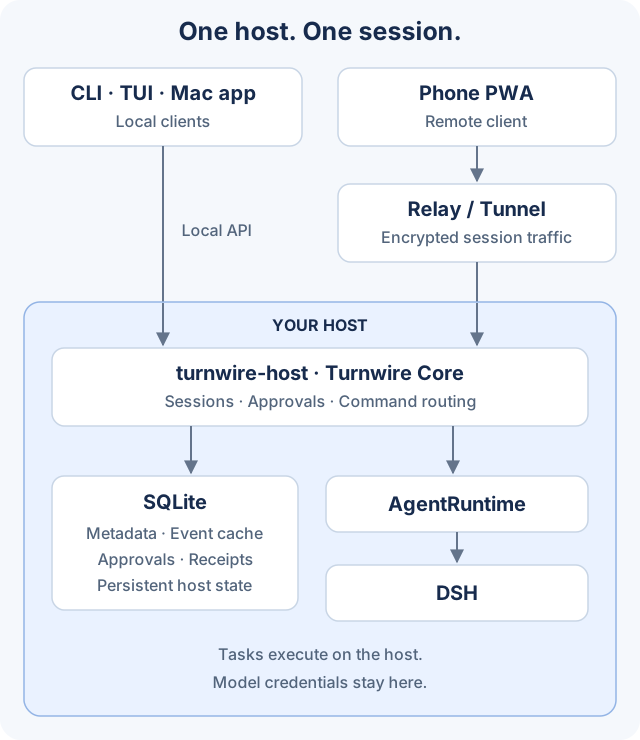
- Clients: Use a desktop browser, CLI, interactive terminal (TUI), or phone PWA; an optional native desktop client is also available. Clients access the same host and session state. See client capabilities and platform requirements.
- Remote connection: The phone reaches the host through a Relay or a configured tunnel. Paired session traffic is encrypted; the Relay forwards ciphertext.
- Host and state:
turnwire-hostruns Turnwire Core. SQLite stores metadata, cached events, approvals, and command receipts. - Task execution: Turnwire Core delegates tasks through the
AgentRuntimeinterface to DSH. Model credentials and task execution stay on the host.
What it gives you
- No disconnection when you leave the computer: See the live progress of the same session on your phone and send your next idea back to the host; a message either queues until the current turn ends or steers it directly.
- Approvals happen on your phone: An operation that needs a green light pops up on your phone; a single approval or rejection covers it, and the outcome stays in the inbox for later review.
- One shared state across clients: Desktop, browser, terminal, and phone access share sessions, history, approvals, and model selection rather than keeping separate records. See capability coverage for client-specific gaps.
- The host decides the models: You can switch a session's model and reasoning effort from the phone too, and only models actually registered by the host runtime are listed.
- It runs on your own machine: Remote connections go through a temporary tunnel or a Relay you deploy yourself; the host dials out, so you never expose the daemon port to the public internet.
Three things to look at before you start
Honest up front, so you do not discover them halfway through:
- The npm preview is published:
turnwire@nextinstalls without repository access. It is not a stable release or a signed native desktop installer; source repositories remain private. - You need an always-on host. Choose a machine that meets the host requirements — if it is asleep, the phone cannot connect. Host and optional native client platform support are separate; neither implies support for every operating system.
- You need model credentials, and they stay on the host only. The API key is read by DSH on the host and does not enter a client, the Relay, or a tunnel process.
Minimum deployment requirements
The smallest working deployment is one execution host + Turnwire + DSH + model credentials. Connect a browser or terminal to that host; Relay, containers and a native desktop application are not prerequisites.
| Requirement | What to prepare |
|---|---|
| Execution host | A machine that can keep the process running and meets the current package/runtime requirements; a browser client's platform is not the host requirement |
| Software | Node.js (minimum in the generated requirements below) and npm; first startup can guide DSH installation, or explicitly connect an existing instance |
| Network | npm registry access for initial acquisition and access to your configured model service for real tasks; local use needs no public ingress |
| Configuration and data | User-writable configuration, state, data and cache locations, plus the project workspace; model credentials remain on the host |
| Client | A working browser or terminal; the execution host must remain online for remote access |
No universal CPU, memory or disk minimum has been measured. Resource use depends on DSH, project size and concurrency; do not treat an invented hardware number as a guarantee. See quickstart for persistence, ports and actual platform constraints.
Choose a deployment method
All four methods use the same execution host; choose how clients reach it.
| Deployment method | What you need | How to use it |
|---|---|---|
| Local | Execution host and local browser/terminal; no public endpoint | Run npx turnwire@next --open and use the authenticated local connection |
| Temporary tunnel | Execution host and an available tunnel provider | In remote-access settings choose localhost.run, cpolar or Cloudflare and enable temporary access; pair the remote client. Addresses can change, requiring re-pairing |
| Named tunnel | An existing Cloudflare tunnel, fixed public hostname and private tunnel credentials | Configure the tunnel name, hostname and credentials, enable it, then pair clients using the fixed address |
| Self-deployed Relay | Your own server, HTTPS address and Relay connection key | Deploy Relay and PWA, configure the address/key on the host, then pair clients. Recommended for persistent remote access and required for push |
Relay and tunnels do not replace the execution host. npm/npx are installation choices; foreground/background execution and reusing DSH are runtime choices, not additional deployment methods. See quickstart for host setup and detailed steps.
Getting started
Recommended: npm preview
Choose an execution host that meets the current package and runtime requirements, with Node.js 22.13+ and npm. The published npm preview needs no repository access, source build or system-service setup:
npx turnwire@next
# Or install persistently:
npm install -g turnwire@next
turnwire --open
Release channels: pushes to main publish previews to npm next. Only an explicit stable GitHub Release publishes to npm latest; a main push does not promote a stable release. Use turnwire@next for the current preview rather than a pinned preview version. These are Turnwire channels, separate from the DSH runtime's channels.
The source repository remains private; npm installation does not require access. The preview is not a stable release or a signed native desktop installer. This entry point does not imply support for every operating system; package constraints and runtime requirements still apply.
Keep the terminal open: the preview runs in the foreground and installs no system service. Model credentials are prompted for privately and stay on the host. An explicitly configured existing DSH is reused; otherwise the launcher offers installation of npm latest, resolved to an exact version and validated in isolation. Local use needs no Relay; phone access is configured separately.
After stopping your own foreground instance, turnwire start --update-dsh stages and checks a managed DSH update before switching. It does not downgrade, hot-replace an active runtime, or update external DSH. Ordinary startup does not silently update existing installations.
See quickstart, npm installation and release, and DSH compatibility and limits. The runtime compatibility matrix tests configured host environments against baseline/latest/next; it is not a guarantee of compatibility with every future upstream change.
Alternative: background host
For a host that runs in the background, see service setup in the quickstart. Check its platform requirements and safety boundaries before installing; phone access remains a separate explicit configuration step.
Start the execution host
Local use: start the host → open local Web or a terminal. Remote use: start the host → configure remote access → pair and connect. Remote users need not install a native client or complete a task in a local browser first. On a headless host, use --no-open and continue directly to remote access setup.
- Run
node --versionandnpm --versionto check prerequisites, thennpx turnwire@next --open. - Follow prompts to install missing DSH and privately enter model credentials. For existing DSH, configure the explicit connection first using quickstart.
- Wait for startup.
--openattempts to open authenticated local Web. If browser launch is unavailable, use--no-open, note the printed address, and runnpx turnwire@next connectfor local connection details. That output contains credentials: do not publish it. - In another terminal, run
npx turnwire@next statusto inspect the running host and runtime.npx turnwire@next doctor --jsonchecks the environment offline; it is not a live health check. - Local users can now select a project workspace, create a session and send a task in Web or the terminal. Remote users can perform this verification after configuring remote access and pairing. Connecting to the host does not prove model credentials work; a real task validates model-service access.
If the default Web port is occupied, use npx turnwire@next start --port 9900 --open. Keep the host running. Ctrl-C stops its owned processes, never an external DSH.
Contributors with access to the private repository can follow Developing from source to build, run an offline Demo, or connect a real model through DSH. The Demo needs no model credentials and does not call a model, run a shell, or modify files.
Optional access clients (independent choices, not deployment steps)
Clients let you view sessions, send tasks and handle approvals. They connect to the same execution host rather than maintaining independent task state; multiple clients can be used together.
| Client | How to use it | Connection requirements |
|---|---|---|
| Web / PWA (desktop or phone browser) | Open the launcher's local Web, or the configured HTTPS Web endpoint remotely; optionally add it to the home screen | Local authentication for local use; pair remote clients using remote access setup |
| Terminal (CLI / TUI, including scripts) | After npm installation, run turnwire --help; without a global installation, use npx turnwire@next --help | A running host and appropriate connection permissions; see CLI reference |
| Native desktop client (optional) | Build and use it according to client documentation | Meet that client's build, platform and signing requirements, then connect to the host |
The execution host runs tasks; tunnels and Relay provide remote connectivity. Neither is a client.
Configure remote access (when needed)
Prerequisites are a running execution host, host-management permission and the configuration for your chosen remote endpoint—not a completed client-selection step. Local-only users can skip this section. After configuring the endpoint, remote users can pair using a phone or another device's browser; no native app installation is required.
The local address 127.0.0.1 refers only to that machine itself, and 127.0.0.1 on your phone is the phone itself — so a remote connection must have a public channel. Three options:
| Approach | How it works |
|---|---|
| Temporary tunnel | Choose localhost.run, cpolar, or Cloudflare and click "Enable temporary access"; you do not need a server of your own. cpolar requires an account Auth Token the first time. The address changes the next time the daemon starts, so you have to pair again |
| Cloudflare named tunnel | Use a tunnel and fixed domain that already exist under your own Cloudflare account, so the address does not change across restarts; you need the tunnel name, the public domain, and the tunnel credentials file |
| Self-hosted Relay | Fill in the server's HTTPS address and the Relay connection key and click "Save and connect"; recommended for long-term use, and also the prerequisite for phone push |
Once the channel is ready, generate a pairing QR code, then open the deployed PWA on your phone and paste the pairing code. The pairing link puts the key in the URL fragment, and the page removes it immediately after receiving it; by default it is kept only for the current browsing session, and only checking "Remember this trusted device" saves it persistently.
Networks in mainland China may be unable to reach the Cloudflare temporary tunnel, or may see latency and instability — it is kept as a quick-try option. For long-term use, prefer a self-hosted Relay verified on the actual networks of your host and phone; a free Quick Tunnel is not the same as the Cloudflare China Network (that is a separately subscribed enterprise service).
What you can do on your phone
- Continue the same session: watch live progress, send follow-up instructions, stop a running turn
- Handle approvals and the inbox: approve / reject, and review operations already handled or expired
- Switch a session's model and reasoning effort: the small chip above the input box, listing only models registered by the host runtime
- When sending while a session is running you can choose to queue (wait for the current turn to end) or steer (guide the current turn directly), and the message is marked with which one you used
- When a session is archived you can still view its history, and unarchive it to continue when you need to
Known limitations
- The host must be awake and online: if the host is offline, the phone sees no progress.
- Phone push requires a self-hosted Relay: temporary addresses do not support long-term push (
turnwire notifications statuswill tell you plainly). - Changing the address means pairing again: a temporary tunnel changes its address on every restart.
- The native app is ad-hoc signed: suitable only for personal use or internal distribution.
- Without model credentials you can only run the Demo, and cannot perform real coding tasks.
Going deeper
| Document | Contents |
|---|---|
| CLI reference | Every turnwire command and option |
| Developing from source | Building, connecting a real DSH, how to verify, project structure |
| Capability parity across clients | Each capability's coverage in each client and where the code belongs |
| Self-hosted Relay + PWA | Fixed-domain deployment, notes on networks in mainland China |
| One-click Relay deployment | Install a server from the deployment form in one step |
| Developing Turnwire with Turnwire | Development host auto-update and safety points |
| DSH interface notes / Protocol and state boundaries | Runtime contract and RPC boundaries |
| Verification record | Verified and unverified conditions, listed one by one |
| Contributing / Security policy | Development constraints, verification requirements, and vulnerability reporting channels |
Current status and boundaries
The current delivery includes one-time pairing, per-connection ECDH session encryption authenticated by device credentials, staged connection recovery, a persistent approval inbox, Web Push, and a configurable TLS LAN listener. Start with a dedicated data directory and create client pairings from the host. Keep pairing credentials private. The Relay's connection routing is still in memory, while push keys and the delivery queue are persisted.
It does not yet include Codex / Claude adapters, team accounts, native iOS, auto-update, or release signing. "Which things were verified only under specific conditions" is governed by the verification record.
License
Apache License 2.0 — see LICENSE and NOTICE for details. You may freely use, modify, and distribute it (including commercially), provided you keep the copyright and license notices; this project provides no warranty.
Comments
Loading…
Similar plugins
by JUANWANG-BUAA
Auditable, token-gated DeepSeek Harness remote gateway: mobile QR access, per-device sessions, Host/Origin rewrite, settings/credentials/directory support.
★ 46
MIT
TypeScript
Sep 26, 2026
dsh plugin --profile web add dsh-full-remoteby omdsh-plugins
Remote control for the DeepSeek Harness: a second front door on its own port, behind device pairing and a tiered method allowlist, so a phone on your tailnet can watch a session, approve what it asks
★ 0
MIT
TypeScript
Sep 3, 2026
dsh plugin --profile web add @omdsh-plugins/omdsh-remctrlby sorsama
Authenticated remote access for a DeepSeek Harness web profile: TLS, QR/passcode device pairing, password sign-in, and per-device revocation in front of an untouched loopback harness.
★ 8
↓ 158/wk
MIT
TypeScript
Aug 28, 2026
dsh plugin --profile web add dsh-relayPhone and remote access to the DSH Web UI: scan a LAN QR code, or reach your PC from anywhere through a self-hosted relay server you run yourself instead of a cloudflared tunnel. Per-device credential
★ 0
dsh plugin --profile web add dsh-pocket-relayby RyensX
Provides a secure reverse proxy, enabling DeepSeek Harness to be accessed remotely and to converse with AI anytime, anywhere.
★ 0
MIT
TypeScript
Aug 26, 2026
dsh plugin --profile web add dsh-remote-gatewayby slywalker2006
Server-grade gateway that turns DeepSeek Harness into a multi-tenant platform: remote access + auto HTTPS, subuser permissions & quotas, sandbox enforcement, encrypted auth, audit log.
★ 66
GPL-3.0
TypeScript
Sep 29, 2026
dsh plugin --profile web add dsh-passwords