

dsh-ds-peak-valley
Manifest validPeak/off-peak (文峰/文谷) badge for the DeepSeek Harness composer dock - computed locally from the browser clock, no API calls, no tokens
@ttxl314/dsh-ds-peak-valley
English | 中文
A tiny client-only plugin for DeepSeek Harness (DSH): it pins a peak / off-peak badge
(文峰 / 文谷) next to the session stats line at the bottom of the conversation
(1 轮 · 68 步 | LLM ...), and keeps it in sync with Beijing time.
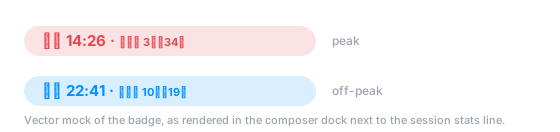
What it shows
| State | When (Beijing time) | Color |
|---|---|---|
| 文峰 peak | Mon–Fri 09:00–12:00 and 14:00–18:00 | red #e5484d |
| 文谷 valley | every other moment (nights, lunch break, weekends) | blue #0091ff |
Badge anatomy:
文峰 14:26 · 距下谷 3小时34分
└─┬─┘ └─┬─┘   └───┬───┘ └──┬──┘
state  Beijing   next switch  time left
       clock     direction    (h/min)
距下谷(blue) — the schedule is about to drop into 文谷 at 12:00 / 18:00.距下峰(red) — the schedule is about to enter 文峰 at 09:00 / 14:00.- Hovering the badge reveals the full window description and the exact Beijing timestamp.
The windows follow the footnote of the official pricing page: https://api-docs.deepseek.com/zh-cn/quick_start/pricing/.
Install
Requirements: a DSH installation with a web or desktop profile, Node.js ≥ 18.
Clone the repository, then register it as a tree-outside bundle of the target profile:
git clone https://github.com/ttxl314/dsh-ds-peak-valley.git

dsh plugin --profile web add link:<path-to-clone>
Or edit the profile manifest by hand (typically $DSH_HOME/profiles/web/package.json):
{
  "dependencies": {
    "@ttxl314/dsh-ds-peak-valley": "link:<path-to-clone>"
  },
  "dsh": {
    "profile": {
      "bundles": [
        "@deepseek-ai/dsh-base",
        "@deepseek-ai/dsh-web-app",
        "@ttxl314/dsh-ds-peak-valley"
      ]
    }
  }
}
Restart DSH afterwards; the badge appears in the composer dock next to the stats line.
To uninstall, drop the package from dependencies and from dsh.profile.bundles.
Behavior
- Registers into the
conversation.composer.dockslot (id: ds-peak-valley,order: 1), so it sits on the same row as the session stats strip. - Fully self-contained: Beijing time is derived from the browser clock with
Intl.DateTimeFormat(Asia/Shanghai), then re-rendered once a minute. - No configuration, no commands, no slash commands, no settings to toggle.
How it works
lib/index.js    host entry — a no-op apply(); it exists so the package stays a
                loader entry that dsh-client-modules can scan for dsh.client
lib/client.js   browser bundle — the badge component and the schedule math
cordis.patch.yml  bundle patch — inserts the plugin row into the profile tree
computeStatus(date)→"peak" | "valley", from the weekday plus the minute of day.nextTransition(date)→{ kind, minutes }, the next 峰↔谷 boundary and how far away it is (weekends collapse into one long valley, so the next change is Monday 09:00).- The timezone is hard-coded to
Asia/Shanghaibecause the pricing schedule is defined in Beijing time; the machine's own timezone is irrelevant. - The bundle registers with
window.__ModuleLoader__.load({ id })and thatidmust equal the package name: the host composes the browser boot graph per package name, so a bundle that registers under any other id silently never mounts.
Privacy
The badge is computed entirely on the client: no HTTP requests, no telemetry, no API key, no token consumption, and no repository or session data is read. Nothing leaves the page.
Development
node test/self-test.mjs # or: npm test
The self-test loads lib/client.js against a stub window.__ModuleLoader__ and a stub
react, then asserts:
- status boundaries (09:00 / 12:00 / 14:00 / 18:00, weekends),
- the next-transition countdown (including Fri 18:00 → Mon 09:00),
- the compact
h小时m分countdown formatting, - a render smoke test of the badge for both states.
CI runs the same suite on Node 18/20/22 (see .github/workflows/test.yml).
Compatibility
Written against the DSH client plugin API: the conversation.composer.dock slot,
the react seed module and window.__ModuleLoader__ with dsh.client.platform = "web".
Verified against DSH 0.2.1-rc.5 on both the desktop and the web profile. If a future DSH release renames the slot or the
loader entry point, only lib/client.js needs adjusting.
Troubleshooting
- Badge missing — check that the package name in
dependenciesmatches@ttxl314/dsh-ds-peak-valleyexactly, that it is listed indsh.profile.bundles, and that thelink:target still exists after moving the checkout. - Wrong state — the plugin trusts the local clock. Make sure the system time is synchronized, then check the hover tooltip, which prints the computed Beijing timestamp.
- Badge missing after renaming the package — the bundle registers under the package name,
so a rename must update
package.json,cordis.patch.ymland theidinsidelib/client.jstogether;npm testfails until they agree.
Changelog
See CHANGELOG.md for the release history.
License
MIT — see LICENSE.
Unofficial community plugin; not affiliated with or endorsed by DeepSeek. If DeepSeek
changes its peak/off-peak windows, update PEAK_WINDOWS / PEAK_WEEKDAYS at the top of
lib/client.js.
Comments
Loading…
Similar plugins
by moonmoonCL
Provider-aware DeepSeek peak/off-peak badge for DSH. 在输入框工具栏显示 DeepSeek 峰谷时段,只在选中的模型属于 DeepSeek provider 时出现。
★ 0
MIT
JavaScript
Oct 19, 2026
dsh plugin --profile web add dsh-provider-peakby wenxiuncle
DSH 插件:DeepSeek API 峰谷时段角标,显示当前高峰/低谷与倒计时 适配Deepseek Harness 桌面版 | Peak/off-peak badge for DeepSeek Harness
★ 0
MIT
JavaScript
Oct 8, 2026
dsh plugin --profile web add dsh-offpeak-alertby tuoLuoSuan
Peak / off-peak billing badge for the DeepSeek API - click to see which rate you are on right now. A DSH plugin.
★ 0
MIT
JavaScript
Oct 7, 2026
dsh plugin --profile web add @tuoluosuan/dsh-peak-badgeby 1134478268-dev
DeepSeek Harness 峰谷时段 + 用量/费用指示器(随时区自适应、中英双语)· Peak/off-peak timing with token usage and spend tracking for the DSH Web UI.
★ 1
MIT
JavaScript
Oct 3, 2026
dsh plugin --profile web add dsh-peak-clockby zi7tian
DeepSeek Harness (dsh) web plugin: shows whether DeepSeek API pricing is peak or off-peak, plus a countdown to the next switch, below the composer.
★ 0
MIT
JavaScript
Oct 28, 2026
dsh plugin --profile web add dsh-deepseek-billing-periodby ZiqiaoFang
DeepSeek Harness 的峰谷指示器 + 当日已用金额:峰时「梁文峰」、谷时「梁文谷」,峰谷时段与价目表自动跟随官方定价页。A peak/off-peak tide + today-cost plugin for the DSH Web GUI.
★ 0
MIT
JavaScript
Sep 16, 2026
dsh plugin --profile web add dsh-liangwen-tide