

dsh-tmp-wks
Manifest validStop leaving DSH to make a temp folder. One-click throwaway workspaces with optional cleanup · Say goodbye to manually creating directories—DSH one-click temporary workspace with controllable deletion
DeepSeek Harness Temporary Workspaces



DeepSeek Harness Temporary Workspaces (dsh-tmp-wks)
English | 中文
Why you need it
You just want to ask a quick question, but you have to leave DSH, create a folder, come back and point at that directory, then delete it by hand afterwards. Forget to clean one up, and several sessions start contaminating each other.
Temp workspaces collapse all of that into a single click:
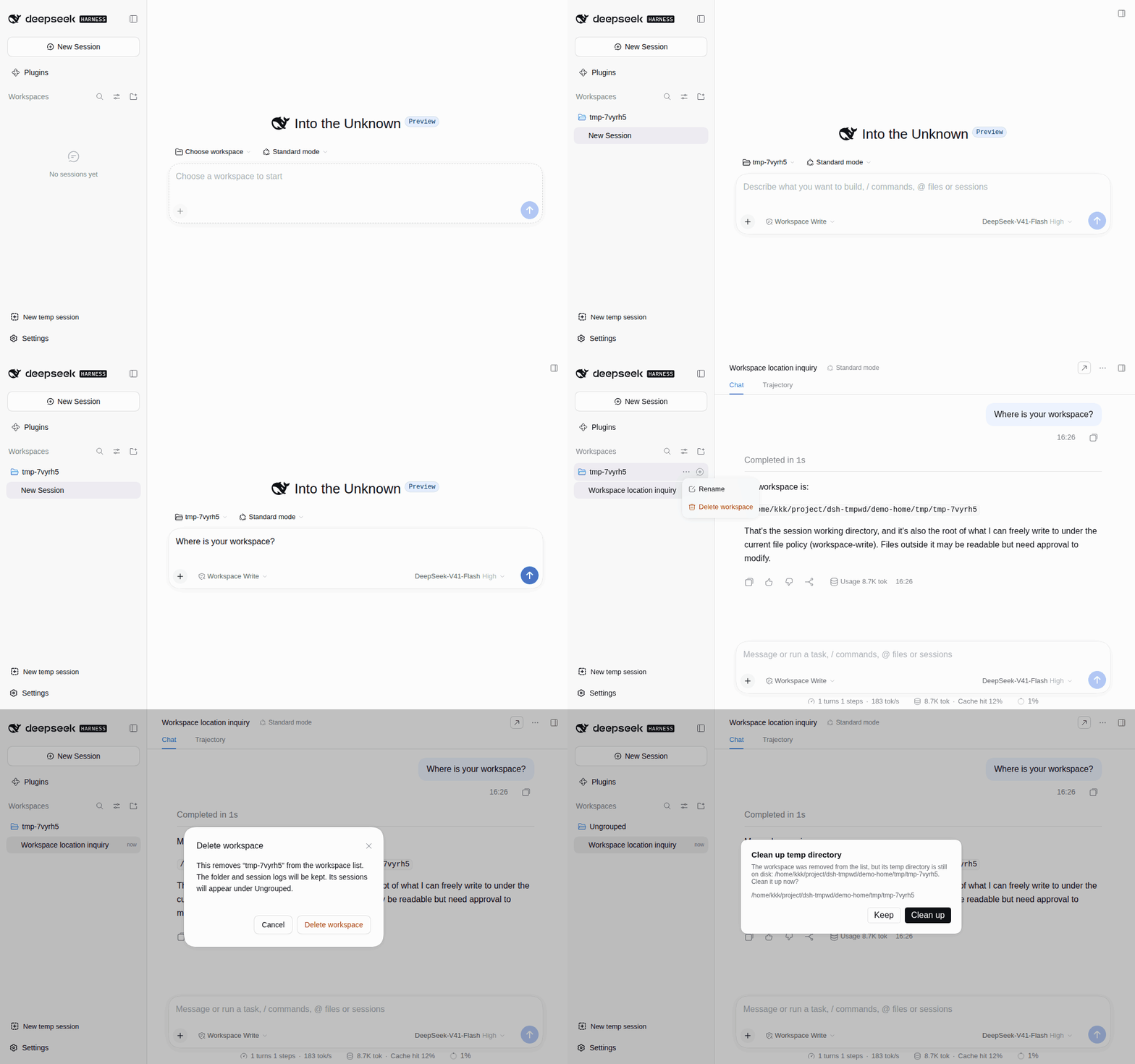
- One-click setup: click once and a throwaway workspace is created on the spot, with a session already started in it.
- Deletion under control: deleting asks whether to delete the temp directory on disk too, and keeps the files by default. That prompt can be turned off.
- Works on both clients: available in DSH Web and the DSH desktop client, from a single install.
Install
dsh plugin --profile web add @cliven/dsh-tmp-wks
A "New temp session" button then appears at the bottom of the sidebar; click it to create a temp workspace and start a session. Right-click the button to open the management panel, which handles the temp directories on disk.
Temp workspaces are created under the operating system temp directory by default ($TMPDIR on Linux/macOS, %TEMP%/%TMP% on Windows), for example on Linux:
/tmp/tmp-k7mq2z
Storage location, name prefix, and the delete confirmation are configurable on the Plugins page in the sidebar. Leave the location empty to use the system temp directory, enter a relative path to resolve it against the DSH home, or an absolute path to use it as-is. The plugin only deletes directories it created.
License
Comments
Loading…
Similar plugins
by Aeroscis
Temporary task mode for DeepSeek Harness (dsh) — one-click disposable working dir + session, no long-lived workspace bound.
★ 0
MIT
JavaScript
Oct 1, 2026
dsh plugin --profile web add @aeroscis/dsh-temptaskby Momojie-S
DSH 插件: 子agent会话清理 —— 会话自清 + 运维侧跨workspace大扫除(归档可逆/可彻底删除)
★ 0
MIT
TypeScript
Oct 12, 2026
dsh plugin --profile web add @momojie-s/dsh-subagent-cleanupby oneirictouch
左侧边栏的“资料浏览器”和主工作区的“文本编辑器”,页签方式展示,适合讨厌工作区被过度分割的人。
★ 0
MIT
TypeScript
Sep 18, 2026
dsh plugin --profile web add dsh-explorer-editorAdds a Session without workspace entry to the DSH Workspace picker, creates isolated date-organized directories, and keeps started sessions resumable under Ungrouped.
★ 2
↓ 301/wk
MIT
TypeScript
dsh plugin --profile web add dsh-projectless-sessionby yzxxy010
Adds a workspace-write++ permission that keeps file tools inside the workspace while skipping the Windows process sandbox for wildcard-allowlisted executables such as Git Bash.
★ 7
MIT
JavaScript
Sep 7, 2026
dsh plugin --profile web add dsh-workspace-write-plusby azazo1
通过 dsh-open CLI 在 DSH Desktop 或 Web 中打开指定目录对应的工作区.
★ 0
MIT
TypeScript
Oct 8, 2026
dsh plugin --profile web add dsh-open-dir