
dsh-dumate-gateway
Manifest valid★ 1Use locally running OpenAI-compatible model services (DuMate first) from DeepSeek Harness. Plugin: provider route, loopback gateway, sidebar dashboard.
dsh-dumate-gateway
English | 中文


Bring locally running OpenAI-compatible model services into DeepSeek Harness — starting with the DuMate desktop app — without hand-editing a provider profile for every restart.
Unofficial and not affiliated with Baidu. It only talks to services already running on your own machine.
Status: discovery, forwarding, the local gateway and a sidebar panel work
What works today:
- the package installs into a DSH profile as a bundle;
- the model selector lists the live DuMate model table with real context windows, read from the
file DuMate writes on every launch — curated to chat models by default (43 raw rows collapse to
17 chat models on the author's install), with
models.mode: allto see everything; - chat completions stream back with reasoning and text as separate blocks, usage before finish;
- function calling passes through:
toolsgo upstream and atool_callsreply is folded back into one call per tool, even though DuMate splits a call over several SSE fragments with drifting indices (seedocs/DETAIL.md); - image input works for the models that accept it: an attached image is read from DSH's
attachment service and sent as an
image_urlpart, so a vision model really sees the picture (the harness otherwise only hands adapters an opaque id, and images used to reach DuMate as[image attachment]text); - when DuMate is not running, one placeholder model explains how to start it;
- a loopback HTTP gateway serves the same upstream to ordinary clients;
- a right-sidebar panel is a small dashboard: upstream status, today's tokens with an in/out
proportion bar and a seven-day paired chart, a first-token latency sparkline, a test box with a
one-click connection probe, quick copy actions, and two closed drawers (models, diagnostics) — all fed over the host's same-origin
/api/dumate-gateway/statusroute (no CORS or CSP surprises), refreshed every 15 seconds; - the panel can send one small test message — pick which model it uses from a dropdown — and
keeps a local usage ledger: today's requests, tokens in and out, and errors, in
~/.dsh/dumate-gateway/usage.jsonfor seven days, never sent anywhere. The latency sparkline lives in the page'slocalStorage, not in that file; - a one-click Probe answers "is it connected right now?" with a 16-token ping, reporting the model it reached and first-token/total latency — or the exact reason it failed, without spending a real completion;
- headless mode starts only the two DuMate binaries the gateway needs — about 59 MB instead of a gigabyte — and starts nothing until a person presses Start headless; stopping it kills a pid only after confirming that pid still runs the DuMate image, and a panel warning appears when the desktop app and these two processes are up at once, since both write one data directory.
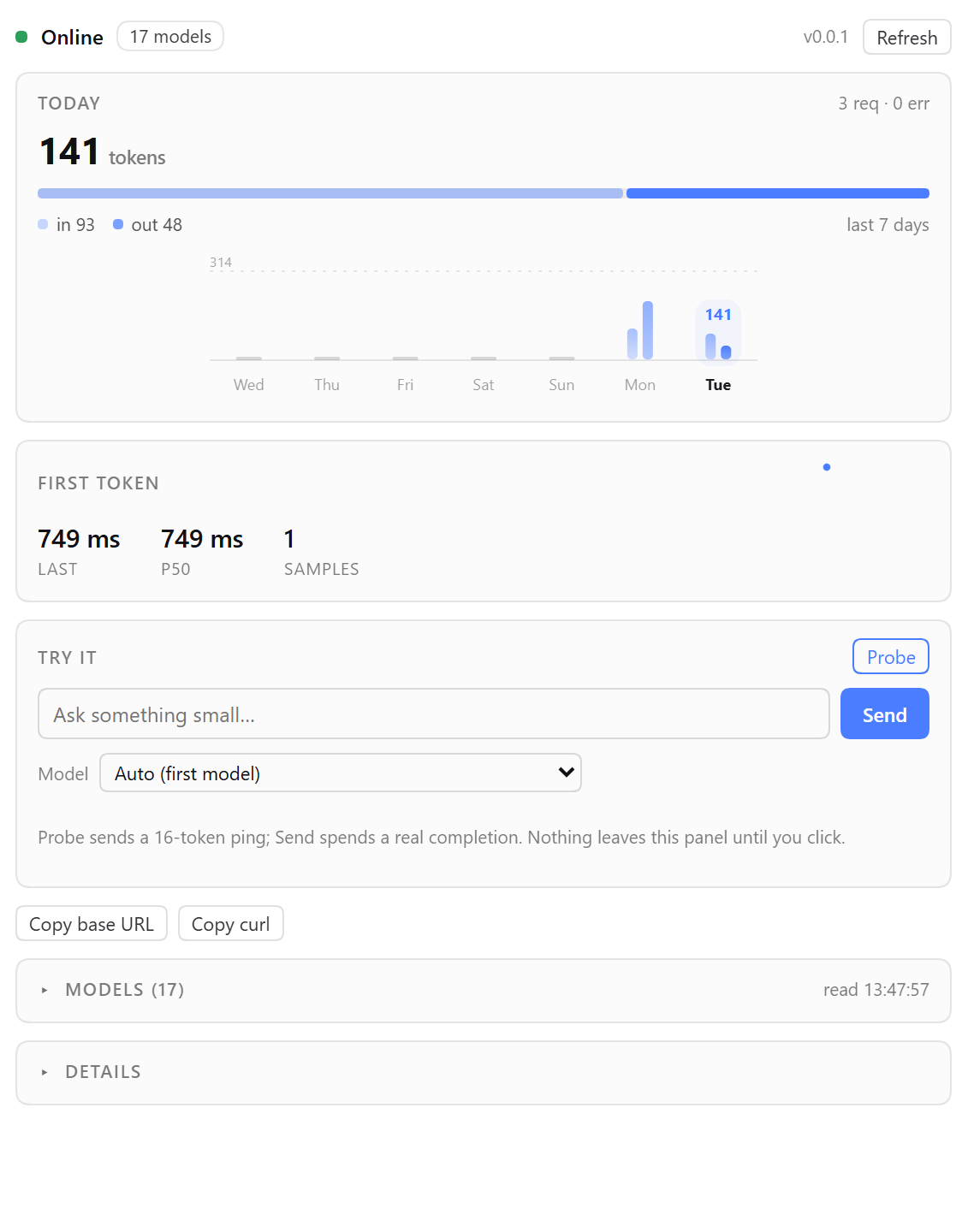
The test message and the Probe are the only things in the panel that spend quota, and only when a person presses Send or Probe; everything else is local bookkeeping.
The first install needs one restart of DSH. After that, the panel picks up client-side changes on a page refresh, and host-side changes by toggling the plugin off and on in Plugins.
Account safety
This plugin is built to look exactly like you typing in DuMate, and to add no hidden traffic:
- the gateway binds
127.0.0.1only and is never exposed to the network; - the panel refreshes itself every 15 seconds by asking the host, which reads DuMate's state file and opens one TCP connection — no inference request, no token spend, no upstream polling;
- the only requests that reach the model service are your own chat turns; there is no retry loop,
no keepalive and no scheduled job (a
429/quota error is surfaced to you as-is, never retried); - credentials stay in DuMate: the plugin reads
baseURLand the model table fromopencode.json, where the key is the literalnokey, and it never echoes a key.
Do not point batch jobs or unattended automation at http://127.0.0.1:7321: that is what turns
ordinary personal usage into the traffic pattern that gets an account flagged.
Install from the DSH Discover index
DSH ships no central plugin index: Plugins → Discover lists only the index sources a person adds.
This repository publishes one, so the plugin shows up there with its icon, description and version:
https://raw.githubusercontent.com/titor-jz/dsh-dumate-gateway/main/market/index.json
Plugins→ Experimental plugins → switch on Custom plugin indexes.- Open the Discover tab → Add index source → paste the URL above.
- Select DuMate gateway → Install. It installs
dsh-dumate-gateway@0.0.2from npm.
Without an index you can still install it directly: Plugins → Add plugin → paste
dsh-dumate-gateway (npm), or git+https://github.com/titor-jz/dsh-dumate-gateway.git, or point the
dialog at a local checkout.
Install
DeepSeek Harness → Plugins → Add plugin → paste dsh-dumate-gateway (npm) or pick this
directory. Host-only bundle: no build step, no dependencies, no install scripts. The HTTP gateway
starts with the plugin on http://127.0.0.1:7321.
Use it from other clients
curl -s http://127.0.0.1:7321/health
curl -s http://127.0.0.1:7321/v1/models

curl -N http://127.0.0.1:7321/v1/chat/completions \
  -H 'content-type: application/json' \
  -d '{"model":"deepseek-v4-flash-0731","messages":[{"role":"user","content":"hi"}],"stream":true}'
Anthropic-shaped clients (for example Claude Code pointed at the gateway) can call
POST /v1/messages; thinking blocks are not forwarded, text and stop reasons are.
Optional: a provider row on Settings → Models
That page lists providers that need an API key or a base URL, and it only renders rows backed by a
settings namespace (llm-deepseek or llm-pi-ai); a plain adapter route such as this plugin's
gateway provider is filtered out, and a third-party namespace would render read-only anyway. So
the supported way to get an editable row there is the page's own custom-provider flow:
- Settings → Models → Add model provider → Custom model API.
- API address
http://127.0.0.1:7321/v1, protocolopenai-completions. - API key: any placeholder such as
nokey— the loopback gateway does not check it unlesshttp.tokenis configured. - Press the discovery button; the model list comes from
GET /v1/models.
Trade-off: DSH then talks to the gateway through its own pi-ai adapter, not through this plugin's adapter, so the model selector shows both groups — the "DuMate gateway" group (curated, no key needed) and the custom provider you added. Use the plugin group for everyday work; the custom row is there when you want the gateway managed from that page.
Set http.token in the plugin config to require Authorization: Bearer <token> (or x-api-key)
on every route except CORS preflight. The gateway only listens on 127.0.0.1, and only echoes CORS
for loopback origins, so the DSH web UI can read it without opening the port to the network.
Run without the DuMate window (headless)
The desktop app is an Electron shell around two binaries that do the real work. This gateway needs only those two, so it can start them itself — 2 processes and about 59 MB instead of 14 processes and about a gigabyte — with the window never opening. Streaming behaves exactly the same.
headless:
  enabled: true         # offer the panel's Start button, and start on load
  autoStart: false      # true → start it on plugin load; false → only the button does
  baseProxyPort: 53231  # any two free loopback ports
  mainServerPort: 53232
  stopOnUnload: false   # true → unloading the plugin also stops the backend
What it does, and what it deliberately does not:
- it reuses the account you already signed in with, by reading
auth.json— it never asks for credentials and cannot work on a machine that never signed in to DuMate; - it starts
dumate-base-proxy.exeanddumate-main-server.exefrom the installed app, with the working directory the backend expects; nothing is downloaded, patched or modified; - it does nothing while the desktop app is running: the app wins, and headless owns separate ports;
- a failed start is not retried on every message (one attempt per minute at most), so a chat retry never becomes a spawn storm.
Start or stop it from the panel card; nothing is launched on page load or on the first chat request unless autoStart is set to true. The two log files
land in ~/.dsh/dumate-gateway/logs; errors from a failed start are shown in the panel verbatim.
Configuration
http:
  enabled: true          # the loopback gateway on 127.0.0.1:7321
  port: 7321
  token: null            # non-null → require Bearer / x-api-key
requireReachable: true   # false → forward even when the TCP probe fails
models:
  mode: curated          # curated (chat models only) | all (raw table, DuMate internals included)
  exclude: []            # extra keys to hide, case-insensitive substring match
headless:
  enabled: false         # true → the panel can start DuMate's two background binaries
  autoStart: false
  baseProxyPort: 53231
  mainServerPort: 53232
  stopOnUnload: false
DuMate mixes its public chat models with internal plumbing (routing helpers, validators, embeddings,
an OCR endpoint, six auto-router levels). curated hides those; hiding a model never disables it —
an id you type or configure still forwards.
Why a bundle
The plugin registers a provider route (gateway) on the host's LLM service. The route advertises
its catalog, resolves per-model capacity, and streams chunks in the harness StreamChunk protocol,
so nothing outside this package needs to know how a given local service spells its wire format.
Known limits
- No Responses API, no Gemini
/v1beta. - DuMate rate-limits a user's rapid requests; a burst can surface
429 RATE_LIMITfrom the gateway. - The DuMate port changes on every launch; the plugin reads it from the live config file, so nothing needs configuring — but a stale config left by a crashed run is ignored as soon as a newer one exists.
License
MIT
Comments
Loading…
Similar plugins
by pigman18
Exposes every model of every provider configured in DeepSeek Harness through one OpenAI-compatible endpoint on a fixed loopback port, with a sidebar page for the base URL, key, port and model ids.
★ 0
MIT
JavaScript
Nov 13, 2026
dsh plugin --profile web add dsh-openai-gatewayby CARVIN94
An AI routing gateway that runs as a DSH plugin. Adds a Routing System sidebar panel for suppliers, account pool, fallback combos and API keys, and serves an OpenAI-compatible endpoint at http://local
★ 16
↓ 603/wk
MIT
TypeScript
Nov 4, 2026
dsh plugin --profile web add dsh-router-coreby Wei894348
Self-hosted gateway plugin for DeepSeek Harness: registers a local WorkBuddy / CodeBuddy account pool as OpenAI-compatible model providers, with a web settings panel and a task-automation engine.
★ 3
MIT
JavaScript
Oct 31, 2026
dsh plugin --profile web add dsh-plugin-wb2api-uiby publieople
DSH plugin: searchable/filterable model manager for OmniRoute (or any OpenAI-compatible gateway) — provider directory, modality discovery, multi-select enable.
★ 0
MIT
JavaScript
Sep 7, 2026
dsh plugin --profile web add @dsh-external/dsh-omniroute-modelsDSH plugin: matches a model you declared on a custom gateway to the capability metadata it should have — context window, output cap, reasoning levels and image support — by looking the bare model name
★ 0
MIT
JavaScript
dsh plugin --profile web add dsh-model-metadataby AbyssWhalen
把本机 AI 桌面客户端(Qoder / WorkBuddy)里已登录的模型反向代理进 DeepSeek Harness — bring the models of local AI desktop clients into DeepSeek Harness as extra providers.
★ 0
MIT
JavaScript
Nov 1, 2026
dsh plugin --profile web add dsh-agent-bridge