

cloudq-for-dsh
Manifest valid★ 6Tencent CloudQ integration: AIOps chat mode with usage, inspiration, artifact and architecture panels.
dsh-cloudq




English | 简体中文
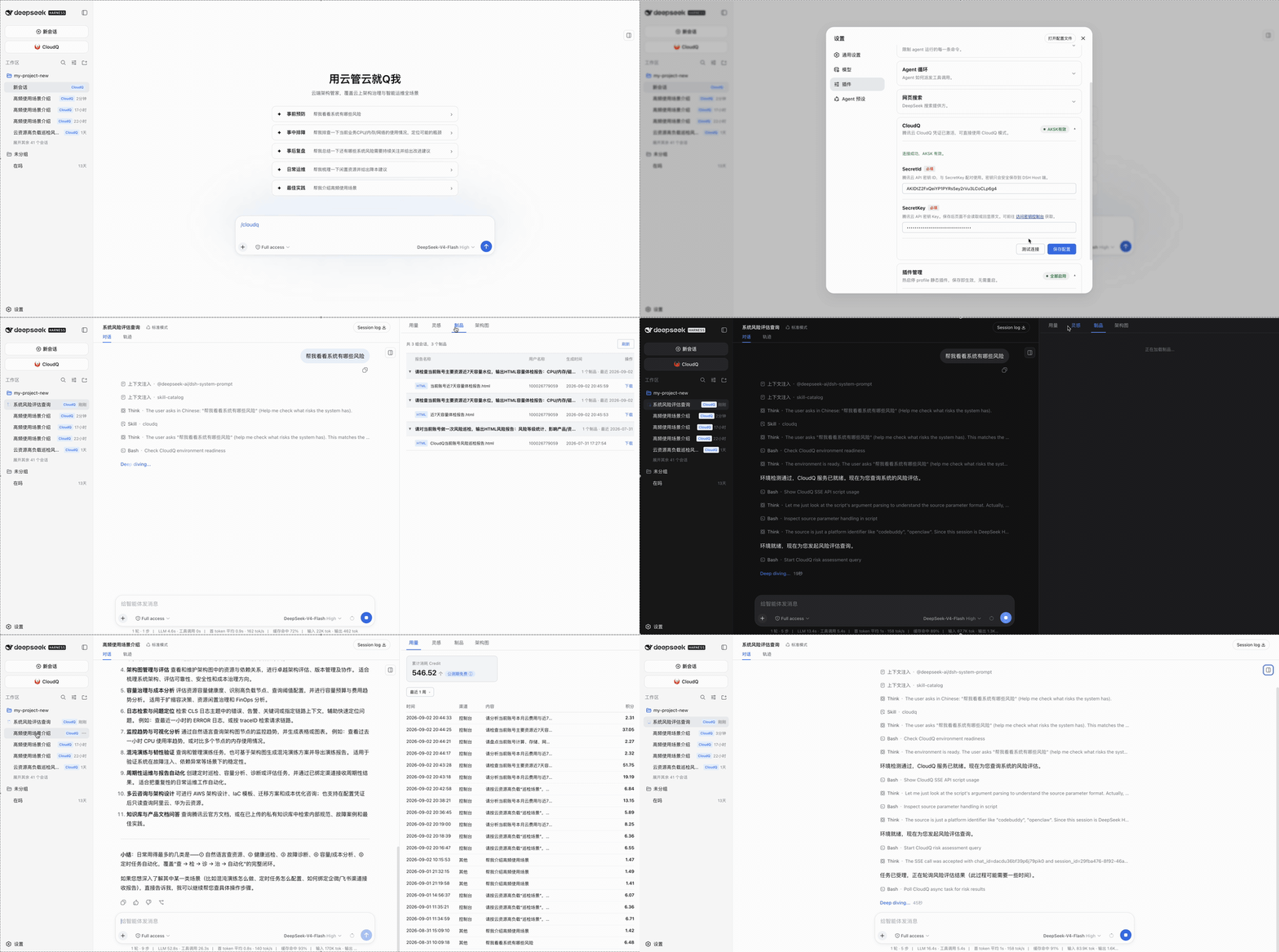
CloudQ integration for DeepSeek Harness. It adds a CloudQ mode to the Web profile, bundles the cloudq skill, and provides CloudQ usage and architecture views, local credential setup, and plugin management.
Demo
Requirements
- Node.js
>=22.19.0 - DeepSeek Harness
0.1.1-rc.2or a compatible newer0.1.xrelease pnpmavailable to thedsh plugincommand- macOS, Linux, or Windows
- Optional: the CloudQ conversation mode is driven by the bundled skill and needs Python 3 available as
python3; the settings, usage, inspiration, artifact, and architecture panels do not require Python
Install
dsh plugin --profile web add dsh-cloudq
Restart the Web profile after installation:
dsh --profile web
Open the URL printed by DSH. The conversation input area and sidebar will expose the CloudQ entry. You can also invoke the bundled skill explicitly with /cloudq.
Upgrade and remove
dsh plugin --profile web update dsh-cloudq
dsh plugin --profile web remove dsh-cloudq
Restart the Web profile after changing the installed package set.
Usage
- Open Settings → Plugins and expand the CloudQ card.
- Enter your Tencent Cloud
SecretIdandSecretKey(available from the CAM console). - Click 测试连接 to validate the pair, then 保存配置. The card shows AKSK有效 once the credential is active.
- Click 进入 CloudQ 模式 in the conversation input area — or type
/cloudq— and start asking cloud operations questions, e.g. “帮我看看系统有哪些风险”.
How it works
flowchart LR
  U["User"] --> W["DSH Web Profile"]
  W --> P["dsh-cloudq plugin"]
  P --> CL["client end<br/>sidebar / panels / settings"]
  P --> HOST["host end (Node)<br/>credentials / usage / artifacts / architecture / self-update"]
  CL -- "/api/dsh-cloudq/*" --> HOST
  HOST -- "TC3-HMAC-SHA256 signing<br/>in-process, no external runtime" --> TC["Tencent Cloud Advisor API"]
  P --> SK["bundled cloudq skill"]
  SK -- "CloudQ conversation mode<br/>agent executes" --> PY["Python helpers"]
  PY --> TC
  style HOST fill:#ddf4ff
  style SK fill:#dafbe1
  style TC fill:#fff1e5
Credentials
The settings card accepts a Tencent Cloud SecretId/SecretKey pair.
- Credentials are stored locally at
~/.tencent-cloudq/credential.jsonwith owner-only permissions. - Panel APIs sign and call Tencent Cloud in-process (native Node implementation); secrets never pass through any subprocess or appear in process lists.
- Browser APIs return only credential state and masked identifiers; local credential paths and secret values are not returned.
- Use the logout action to remove the stored credential.
Follow least-privilege: grant only the permissions required for the CloudQ operations you intend to run. The bundled skill can invoke read and write cloud-management operations; review each action before approving it.
Security model
- Host APIs accept only loopback, same-origin requests.
- JSON request bodies are limited to 64 KiB.
- Unexpected internal errors are not returned to the browser.
- Remote values are inserted with DOM text nodes rather than HTML injection.
- Download links require HTTPS.
- No credentials, tokens, or local environment files are included in the npm package.
Report security issues through GitHub Issues without including live credentials.
FAQ
Can't install or update to the latest version? (24-hour supply-chain cooling period)
pnpm 11 only installs versions that have been published for at least 24 hours. Right after a release, pin the version explicitly:
dsh plugin --profile web add dsh-cloudq@0.3.0
or wait for the cooldown to expire and the bare command will resolve to the newest release.
Does it work on Windows? Do I need Python?
Yes. The settings, usage, inspiration, artifact, and architecture panels are a native Node implementation and need no Python on any of macOS / Linux / Windows. Only CloudQ conversation mode is driven by the bundled skill and requires python3.
Where is my AK/SK stored? Is it safe?
At ~/.tencent-cloudq/credential.json (owner-only permissions). Panel APIs sign in-process; credentials never pass through a subprocess or appear in process lists. The 退出登录 action removes it.
Why does 测试连接 fail?
On 0.3.0+ the panels no longer depend on Python. If it still fails, make sure the key belongs to the current account and that Smart Advisor (CloudQ) is enabled for it.
Development
pnpm install
pnpm run lint
pnpm run typecheck
pnpm run test:all
pnpm run build
pnpm run check:client
npm pack --dry-run --registry=https://registry.npmjs.org/
The npm package ships prebuilt Host and Web client artifacts, the bundle patch, the runtime logo, and the bundled skill. Registry installation runs no build scripts.
Repository layout
src/                         Host and Web client source
skills/cloudq/               Bundled CloudQ skill and Python helpers
assets/cloudq.png            Runtime logo served by the Host
scripts/                     Build and release checks
tests/                       Unit, integration, and package-contract tests
cordis.patch.yml             DSH bundle layer
Release
Source is reviewed and versioned in TencentCloud/cloudq-for-dsh. An npm version is published to the official registry only after the repository checks and the package-install smoke test pass.
More documentation
- Changelog:
CHANGELOG.md - Development & maintenance guide:
DEVELOPMENT.md
License
MIT. See LICENSE.
Compatibility
Versions
| Latest version | Published | Size |
|---|---|---|
| 0.1.0 | — | — |
| 0.1.1 | — | — |
| 0.1.2 | — | — |
| 0.1.3 | — | — |
| 0.1.4 | — | — |
| 0.1.5 | — | — |
| 0.1.6 | — | — |
| 0.1.7 | — | — |
| 0.1.8 | — | — |
| 0.1.9 | — | — |
| 0.2.0 | — | — |
| 0.2.1 | — | — |
| 0.3.0 | — | — |
Comments
Loading…
Similar plugins
Interactive terminal chat app for dsh: streaming conversation, tool cards, jobs panel, full-text search, trajectory replay, multi-session tabs, and A2A dispatch (Ink-based).
★ 0
↓ 15/wk
dsh plugin --profile web add dsh-tui-appby HiQ-AI
基于 DeepSeek Harness 的钉钉群聊常驻个人助理插件
★ 6
↓ 58/wk
NOASSERTION
JavaScript
Oct 8, 2026
dsh plugin --profile web add dingtalk-dsh-assistantChatGPT-style side chat for the DSH Web GUI: ask small questions about the current topic in a floating side panel, answered by an independent lightweight session over the official /api RPC — the main
★ 0
dsh plugin --profile web add dsh-quick-askby g-yixuan
Codex-style side chat + selection annotations for DSH web.
★ 31
↓ 2.4k/wk
MIT
TypeScript
Oct 30, 2026
dsh plugin --profile web add dsh-sidenoteFloating desktop chat panel for DeepSeek Harness — global-hotkey access to sessions, models, and tool approvals while you work in other apps. MacOS/Windows.
★ 1
MIT
TypeScript
dsh plugin --profile web add dsh-quorfloatby AprilCrystal
ChatGPT-desktop-style model selection and thinking-level control for the DeepSeek Harness Web composer, with an animated fast-mode particle trail
★ 2
MIT
JavaScript
Oct 18, 2026
dsh plugin --profile web add dsh-client-ui-gpt-helper