
dsh-version-history
Manifest validSidebar panel for local git repositories: tags as a version timeline with the files and commits each tag brought, a disk health and SMART column beside it, LAN git sharing over Smart HTTP, and a card
dsh-version-history(GIT管理)
DeepSeek Harness(DSH)侧边栏插件:把本机 git 仓的版本变化、磁盘健康 / SMART、局域网共享、GitHub 推送收在一个面板里。
- 侧边栏入口
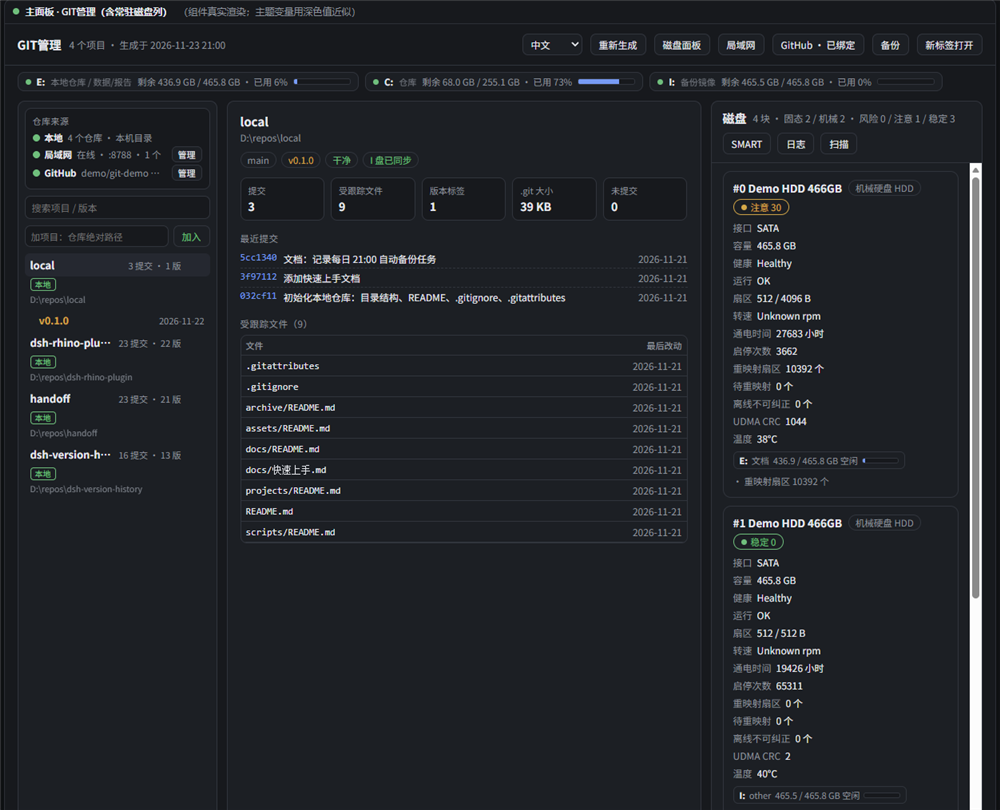
GIT管理(sidebar.panellistidversion-history,order 21);主面板三栏 —— 左「仓库 / 版本」、中「提交明细」、右「磁盘」。 - 顶栏按钮:
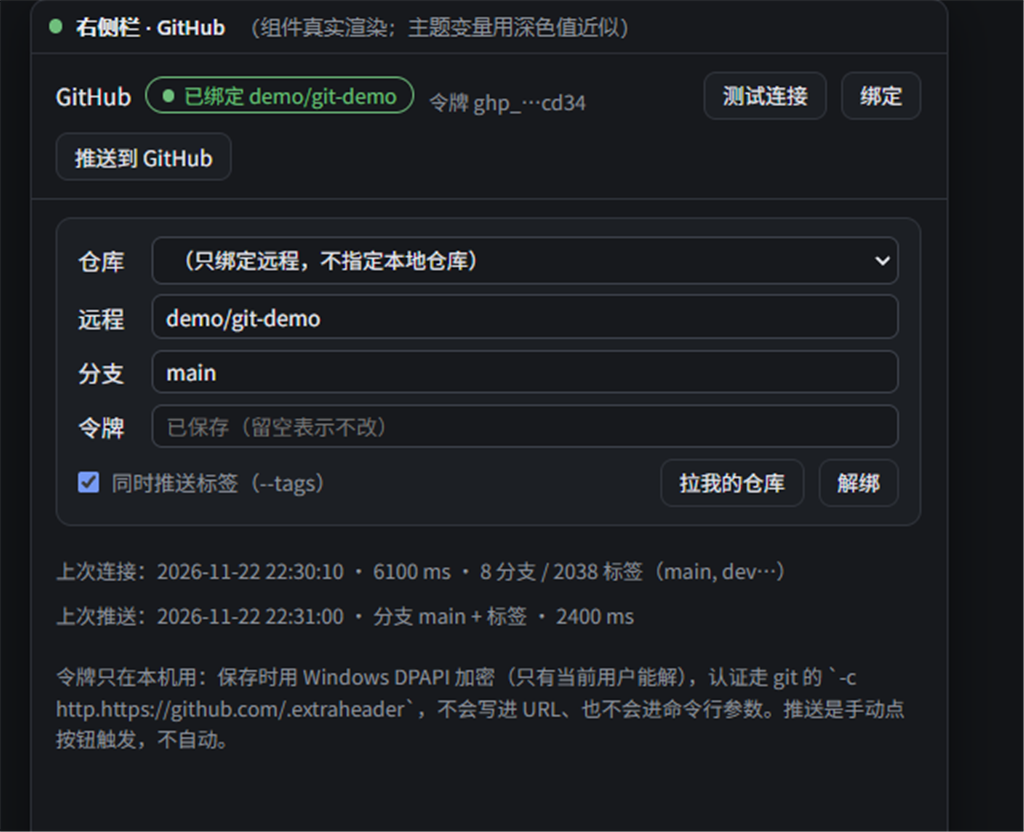
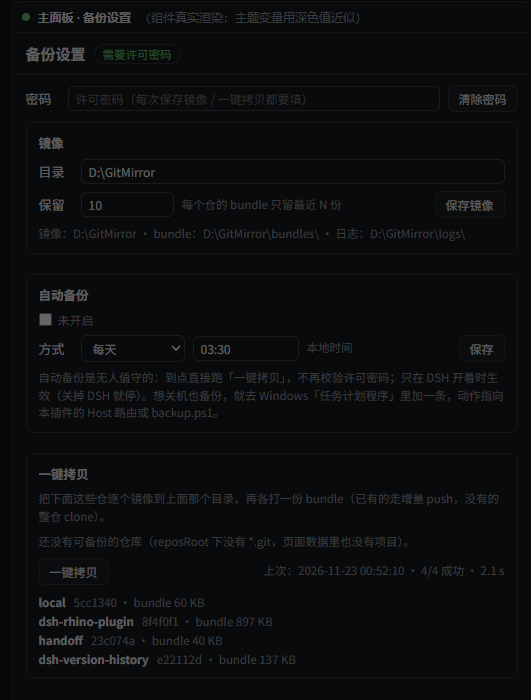
重新生成/磁盘面板/局域网/GitHub/备份/新标签打开—— 其中「磁盘面板 / 局域网 / GitHub」会先在面板内切子视图(带「← 返回」),同时尽量把右侧栏那一页也打开。 - 备份:面板内「备份设置」区块 —— 设镜像目录 + 一键拷贝(镜像并打 bundle),可加一道许可密码(scrypt 哈希,首次打开问一次,也可以选择不设)。
- GitHub 状态自动标记:左栏每个仓库行名下面一行是徽章 ——
本地/局域网+GitHub 已同步/GitHub 领先 N/GitHub 落后 N/GitHub 未推送/GitHub 分叉。自动探测:origin是不是 github.com、远端同名分支 sha 与本地 HEAD 的关系(Host 侧算,3 分钟缓存,没联网就静默不显示)。 - 仓库行右键菜单:在左栏项目行上右键 → 「推送到私有仓库」/「推送到公开仓库」(在对应可见性下建仓,已存在则复用;推当前分支 + 标签,回显 URL)/「复制仓库路径」/「取消」。仓有未提交改动或还没有版本标签时,先弹确认框再推(0.1.15)。
- 推送保护锁:备份设置里可勾「禁止推送」,锁上后所有 GitHub 推送被 Host 侧拒绝(423),默认不锁。
- 纯前端 fetch 本包 Host half 的同源路由取数,不拉 iframe(能吃到 DSH 的主题变量与 locale)。
- 界面语言:顶栏右侧的下拉框切
中文/English,默认中文;选择记在浏览器localStorage['dsh-vh-lang']。 英文模式只翻界面文案(字典 + 带数字的规则),1 commits这类会改成单数;仓库名、路径、提交信息、卷标等数据保持原样。
安装
方式 A:从 Release 的 tarball 安装(推荐,不需要 clone)
每个版本都挂了 dsh-version-history-<版本>.tgz 附件,是 npm 布局(包根在 package/),所以既能给 DSH 装,也能给 npm/pnpm 装。
$ver = '0.1.10'   # 换成你要的版本
$url = "https://github.com/Tanjintao2/dsh-version-history/releases/download/v$ver/dsh-version-history-$ver.tgz"
$tmp = Join-Path $env:TEMP "dsh-vh-$ver"

New-Item -ItemType Directory -Force $tmp | Out-Null
Invoke-WebRequest $url -OutFile (Join-Path $tmp 'pkg.tgz')

# 解包 → 得到 <tmp>\package\(Windows 10/11 自带 tar)
tar -xzf (Join-Path $tmp 'pkg.tgz') -C $tmp
然后交给 DSH 装(plugin_manager 收目录,不认 .tgz 本身):
plugin_manager: action=install_bundle, target=<tmp>\package
plugin_manager: action=set_plugin,   target="include:dsh-version-history", enabled=false
plugin_manager: action=set_plugin,   target="include:dsh-version-history", enabled=true
install_bundle会把包复制进<DSH_HOME>\profiles\<profile>\node_modules\dsh-version-history\,并在该 profile 的补丁层写一行。set_plugin false → true只是让 host half 重新 import;client half 改动要刷新 DSH 窗口(或重启)才换 JS。- 装完侧边栏应出现
GIT管理;自检:GET http://127.0.0.1:<DSH 端口>/version-history/health返回{"ok":true, ...},里面列的就是这次真正生效的路径(对不上说明 profile 补丁层有覆盖)。
怎么确认装的是哪个版本:看已装目录 node_modules\dsh-version-history\package.json 的 "version"(/version-history/health 不回版本号,只回路径)。
想钉旧版本就把
$ver改成0.1.4之类;Release 附件长期保留。 有 npm 的环境也可以直接npm i <下载下来的 .tgz>(只是装进普通 node_modules,不会自动注册到 DSH)。
方式 B:从源码目录安装(开发/改名改代码时用)
# 装(给本目录绝对路径)
#   plugin_manager: action=install_bundle, target=<本目录>
# 改完 host half 重载
#   plugin_manager: action=set_plugin, target="include:dsh-version-history", enabled=false → true
# 改完 client half:DSH 窗口刷新页面
装完要配的(可选)
插件默认从 ~/.dsh-version-history 派生所有路径,开箱即用;若你的脚本/报告在别处(例如 D:\scripts、D:\reports),按下面「配置(可移植)」那节在自己的 profile 补丁层覆盖,不要改包内文件。
备份(镜像 / 一键拷贝 / 许可密码)
主面板顶栏「备份」→「备份设置」:
-
镜像:填镜像根目录(绝对路径,例如
D:\GitMirror)→「保存镜像」。目录不存在会建;界面回显派生的bundles/、logs/。 -
一键拷贝:把下面列出的仓逐个镜像过去(已有的
git push --mirror,没有的git clone --mirror),再各打一份bundles/<名字>-<yyyymmdd-HHmmss>.bundle;每个仓只保留最近保留 N 份(默认 10)。 要备份的仓 =reposRoot下的裸仓 +data.json里列出的项目仓(按名字去重)。 -
许可密码:第一次打开会问「要不要设密码」——
- 设了:以后每次「保存镜像」「一键拷贝」都要输入,否则 Host 侧直接拒绝(
needPassword/badPassword); - 不设:写
passwordMode:'none',之后不再询问;也可以随时在这个区块里补设或清除。 密码用scrypt加盐哈希存在reports/backup.json,不存明文、不回显。
- 设了:以后每次「保存镜像」「一键拷贝」都要输入,否则 Host 侧直接拒绝(
-
自动备份:这块是 0.1.6 新增的「自动备份」卡——
- 勾上开关 = 到点自动跑一次「一键拷贝」;节奏选
每天 HH:mm或每隔 N 分钟(5–1440)。 - 无人值守:
auto触发时不校验许可密码(手动点「一键拷贝」仍然要输)。 - 由 Host 侧定时器驱动(每 60 秒看一眼到点没,启动后 15 秒补看一次), 只在 DSH 开着时生效;要 7×24 请在 Windows「任务计划程序」里另加一条。
- 上次自动运行时间与成功/失败会显示在这张卡上(
backup.json的auto.lastRunAt/auto.lastOk)。
- 勾上开关 = 到点自动跑一次「一键拷贝」;节奏选
-
推送保护(0.1.15):同一区块里的「禁止推送」锁(默认关)。锁上后 Host 侧拒绝一切 GitHub 推送/发布 (
POST /dsh-vh/gh的push/publish直接返回 423 + 说明),远端收不到任何东西;想推时回来解锁。 这个开关不校验许可密码(免得忘了密码解不开)。
每天 21:00 的计划任务(外部
backup.ps1)仍然独立运行;面板里这个按钮是手动补一次,覆盖全部项目仓。
每天 21:00 的那个 Windows 计划任务(也覆盖全部仓库)
GitBackup-Local(任务计划程序,每天 21:00)现在跑的是 D:\scripts\backup-all.ps1:
读 D:\reports\repos.json 加上 D:\repos\*.git 去重,逐仓 push --mirror(没有就 clone --mirror)
bundle create --all,bundle 按名字轮转保留最近-Keep(默认 10)份,日志D:\GitMirror\logs\backup-all.log, 最后跑一次visualize.ps1 -NoOpen刷新页面(面板与离线页读同一份data.json)。
# 手动跑一次(不开页面)
powershell -NoProfile -ExecutionPolicy Bypass -File D:\scripts\backup-all.ps1
# 只看会做什么
powershell -NoProfile -ExecutionPolicy Bypass -File D:\scripts\backup-all.ps1 -DryRun
面板里的「自动备份」是DSH 进程内的定时器(只在 DSH 开着时生效);21:00 这条是系统级任务,关机不跑但开机后按计划继续,两者互不冲突。
配置(可移植)
代码里没有任何个人绝对路径。 目录默认从 ~/.dsh-version-history 派生:
~/.dsh-version-history/
├── reports/     data.json、health.json、smart.json、repos.json、github.json、backup.json、history.html
└── scripts/     visualize.ps1、disk-health.ps1、disk-health-admin.ps1、smart-launch.ps1、dpapi.ps1
优先级:插件 config > 环境变量 > 上面的默认值。
| 环境变量 | 作用 |
|---|---|
DSH_VH_ROOT | 根目录(自动派生 reports / scripts / repos) |
DSH_VH_REPORTS | 只改 reports 目录 |
DSH_VH_SCRIPTS | 只改脚本目录 |
DSH_VH_REPOS_ROOT | 局域网服务对外提供的裸仓目录(默认 <root>/repos) |
DSH_VH_GIT | git 可执行文件(默认 git,走 PATH) |
DSH_VH_LAN_PORT | 局域网 Smart HTTP 端口(默认 8788) |
DSH_VH_REPOS | 预置仓库清单(分号或逗号分隔的绝对路径),只在 repos.json 还不存在时生效 |
需要指到别处(例如本机把脚本放 D:\scripts、报告放 D:\reports),在自己的 profile 补丁层覆盖 config,不要改本包:
- id: dsh-version-history
  name: dsh-version-history
  config:
    dataPath: 'D:\reports\data.json'
    reportPath: 'D:\reports\版本历史.html'
    scriptPath: 'D:\scripts\visualize.ps1'
    reposPath: 'D:\reports\repos.json'
    healthPath: 'D:\reports\health.json'
    healthScript: 'D:\scripts\disk-health.ps1'
    smartPath: 'D:\reports\smart.json'
    smartScript: 'D:\scripts\disk-health-admin.ps1'
    smartLauncher: 'D:\scripts\smart-launch.ps1'
    smartStatePath: 'D:\reports\smart.state.json'
    smartLogPath: 'D:\reports\smart.log'
    githubPath: 'D:\reports\github.json'
    dpapiScript: 'D:\scripts\dpapi.ps1'
    reposRoot: 'D:\repos'
    gitExe: 'D:\git\tools\git\cmd\git.exe'
    lanPort: 8788
依赖的外部脚本(本包不含)
本包只编排,不生成数据。脚本由你自备,契约如下:
| 脚本 | 调用方式 | 契约 |
|---|---|---|
visualize.ps1 | -NoOpen(刷新按钮) | 生成 data.json;repos.json 是它读的仓清单 |
disk-health.ps1 | -Out <healthPath> | 写盘健康 JSON;必须显式给 -Out,否则只打 stdout |
disk-health-admin.ps1 | -Out <smartPath> -Log <smartLogPath> | 采集 SMART;有管理员权限才拿得到 NVMe 寿命等存储栈计数器,否则降级标 elevated=false |
smart-launch.ps1 | 无参 | Start-Process -Verb RunAs -Wait 拉起上面的 admin 脚本,把 phase / exitCode / error 写进 smart.state.json(UAC 取消也落原因) |
dpapi.ps1 | -Mode Protect(明文走 stdin)-Mode Unprotect -B64 <ciphertext> | 用 Windows DPAPI(CurrentUser) 加解密;GitHub 令牌只以密文落盘 |
路由(Host half,前缀 /version-history)
health、data.json、report、refresh、repos、repos/add、repos/remove、disks.json、disks/scan、smart.json、smart.state.json、smart.log、smart/scan、lan.json、lan/start、lan/stop、lan/firewall、github.json、github/test。
写操作走 POST /dsh-vh/gh(body action ∈ bind | unbind | test | push | repos)—— DSH 的 webServer.resource 路由只放行 GET,POST 必须在宿主层被 405 之前另开一条普通 handler。
目录
lib/index.js      Host half(路由、磁盘/局域网/GitHub 编排)
lib/paths.js      可移植默认路径(环境变量 → PATH_DEFAULTS)
lib/client.js     Client half(slots 注册 + 三栏面板 + 子视图)
lib/lan.js        局域网 Smart HTTP(git-upload-pack / git-receive-pack)
lib/github.js     GitHub 绑定 / 测试 / 推送 / 列仓
locale/*.json     插件元数据(meta.title = GIT管理)
docs/DETAIL.md    设计细节、数据流
docs/screenshots/ README 用截图
cordis.patch.yml  插件行(config 留空,用默认值)
自测与预览
$node = '<dsh 运行时>/node/bin/node.exe'
& $node selftest.mjs          # slot 注册
& $node selftest-panel.mjs    # 面板 / 磁盘 / 局域网 / GitHub 渲染断言
& $node selftest-lan.mjs      # 局域网 Smart HTTP 端到端(clone/push,临时仓)
& $node render-preview.mjs    # preview-main.html / preview-disks.html / preview-lan.html
& $node render-preview.mjs --github
License
MIT © 2026 Tanjintao2
Versions
| Latest version | Published | Size |
|---|---|---|
| 0.1.14 | — | — |
Comments
Loading…
From the same category
by awesome-dsh-plugin
A curated list of plugins for DeepSeek Harness (dsh) · DeepSeek Harness 插件精选列表
★ 25.5k
CC0-1.0
Python
Nov 23, 2026
by woniuniuniu
DeepSeek Harness 自媒体工作台插件:一句话记灵感,一键生成脚本、封面、配图和分镜
★ 1.7k
↓ 5.6k/wk
MIT
JavaScript
Nov 18, 2026
dsh plugin --profile web add dsh-media-deskby 0xsline
DeepSeek Harness (DSH) ecosystem: curated plugins, tools, and infrastructure from dsh-external/hub and the public dsh-plugin topic.
★ 1.4k
CC0-1.0
Python
Nov 6, 2026
by keli-wen
Hire Google's Antigravity CLI (agy) as a fast Gemini staffer for Claude Code, OpenAI Codex, and DeepSeek Harness.
★ 917
MIT
JavaScript
Nov 19, 2026
dsh plugin --profile agent add agy-staffby SAOS-3624
Scene-aware storyboard for DeepSeek Harness: 9-16 numbered cells with timestamps + transcript + an audio envelope, packed into ONE image (384 tokens). Two tools: video_storyboard and video_zoom.
★ 594
↓ 17k/wk
MIT
JavaScript
Nov 23, 2026
dsh plugin --profile web add dsh-video-storyboardby omdsh-dev
DSH(DeepSeek Harness)插件:把 ego-lite 浏览器(给 AI Agent 用的 Chromium)接入 HARNESS——13 个结构化 ego_* 工具(文本语义快照、语义定位点击、表单填充、截图、CDP 控制、任务空间隔离),内置 ego 运行时,Linux + Chrome 开箱即用,无需克隆官方仓库或手动构建。
★ 570
↓ 13.5k/wk
NOASSERTION
TypeScript
Nov 23, 2026
dsh plugin --profile web add dsh-ego-browser