
DSH-No-Workspace
IdentifiedFree DSH from workspace constraints by giving each new chat its own directory.
DSH No-Workspace Chat
A DeepSeek Harness (DSH) plugin that automatically creates an isolated working directory for each new conversation.
English · 简体中文
What It Does
DSH No-Workspace Chat (@neoxuxo/dsh-no-workspace) removes the friction of having to create or pick a workspace before chatting in DeepSeek Harness (DSH):
- Instant isolated conversations: Click the global New Chat button in the DSH sidebar (or use the native shortcut) and start typing right away. The plugin automatically creates a dedicated directory
dsh-chat-<session-id>for the conversation. - Keeps your workspace list clean: Auto-created directories are saved as the conversation's native working directory and appear under Ungrouped, never cluttering your sidebar workspace list or workspace count. The top directory badge shows Not working in a workspace instead of exposing the internal folder name.
- Smart draft reuse & persistence: Clicking New Chat again while still in an empty draft reuses the current session without creating duplicate directories; a new directory is only allocated after you send the first message. Files on disk are preserved when you archive a chat or disable the plugin.
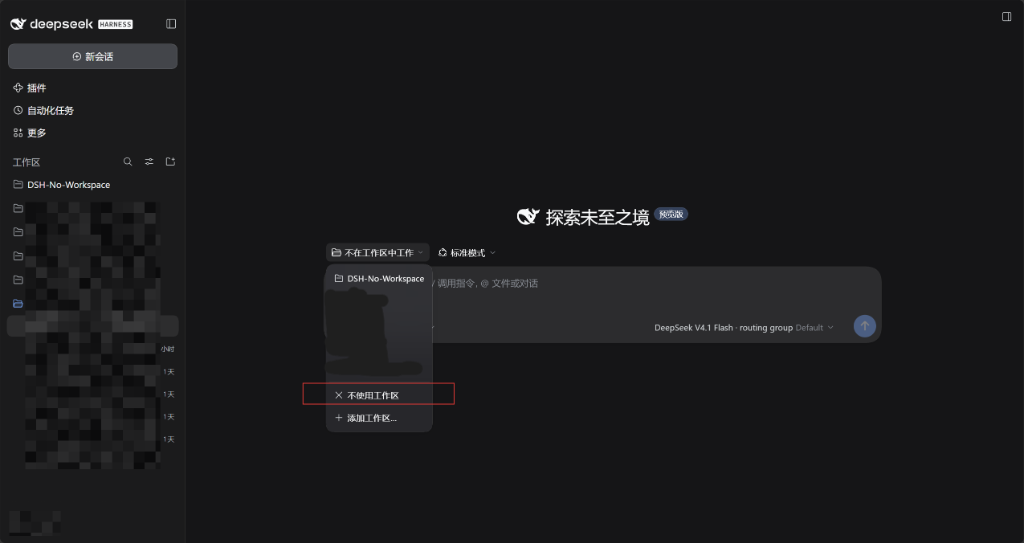
- Switch out of a workspace anytime: When a chat is currently inside a workspace, the workspace picker menu adds a Use no workspace option right above Add Workspace, switching the chat to a fresh isolated directory and focusing the input box.
Screenshots
-
Workspace picker menu & "Use no workspace" option
-
Automatic isolated directory (
dsh-chat-<session-id>) under Ungrouped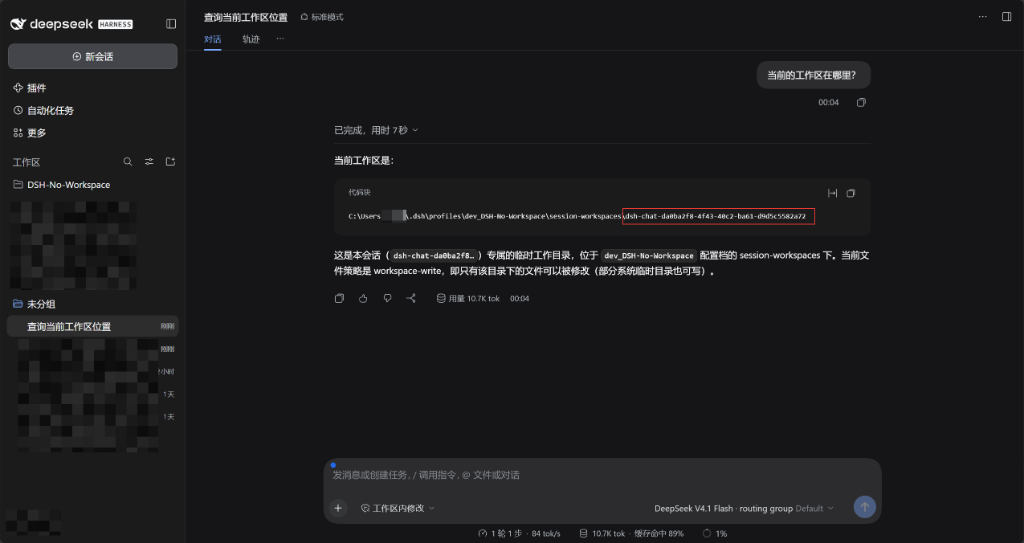
Environment & Requirements
| Item | Requirement / Details |
|---|---|
| Host Application | DeepSeek Harness (DSH), verified on DSH 0.2.2-rc.5 (Windows Desktop & CLI) |
| Plugin Architecture | Host service (Node.js / Cordis bundle via cordis.patch.yml) + Web client (@deepseek-ai/dsh-client-ui-workspace) |
| Build / Dev Runtime | Node.js (v22+ recommended), npm, TypeScript, esbuild |
Installation
Option 1: Install via DSH UI (Recommended)
- Open Plugins in DSH and click + Add Plugin.
- Enter the npm package name:
@neoxuxo/dsh-no-workspace - Click Install.
To update to a newer version later, uninstall the existing plugin first and then install it again.
Option 2: Install via CLI / Release Package
You can also install from npm or a .tgz archive downloaded from GitHub Releases using the DSH CLI:
# Install from npm
dsh plugin add @neoxuxo/dsh-no-workspace

# Or install from a downloaded .tgz package (use file:, not link:)
dsh plugin add "file:$(Resolve-Path '.\neoxuxo-dsh-no-workspace-<version>.tgz')"
If you are building from source:
npm ci
npm run build
npm pack --ignore-scripts
Configuration
Open Plugins → Workspace-free chat in DSH:
root: Absolute path on the host machine where conversation directories will be created (e.g.D:\DSH\Chats). When left empty, it defaults to<profile>/session-workspaces. Changing this setting only affects newly created conversations.
Project Structure
src/host/     Host-side (Node.js): entry point, Cordis service, directory allocation, errors
src/client/   Browser-side: entry point & modules (locale, identity, sessions, standalone,
              options, workspace-view, picker-menu, navigation)
types/        Ambient type declarations for host dependencies inside DSH
scripts/      Build script (esbuild bundler for client)
dist/         Compiled outputs: dist/host (tsc) & dist/client/index.js (esbuild)
test/         Unit/integration tests (test/client/) and E2E smoke tests (test/dev-*.mjs)
Development & Testing
npm run build      # Build both host (tsc) and client (esbuild)
npm run typecheck  # Strict TypeScript checks for both host and client configs
npm test           # Client unit tests + Cordis integration test
test/client/cordis.integration.test.mjsreads Cordis from DSH'sapp.asarand requiresELECTRON_RUN_AS_NODE=1with DSH's bundled Node executable (automatically skipped in standard CI environments whereDSH_INSTALL_DIRis unset).- After installing into a dev profile, run
npm run test:smoke(host-side verification) ornpm run test:browser(full Chromium E2E flow; setDSH_TEST_CHROMEif needed).node test/dev-smoke.mjs --default-rootverifies the defaultsession-workspacesfallback.
Known Limitations
- The Use no workspace menu item is cloned from DSH's native Add Workspace menu row with its icon replaced by
dsw-icon-close-outline-regular. This relies on DSH's internal DOM structure,data-iconnaming,conversation.input.focus(), and wrappinguiWorkspace.startSession/openWorkspace. These are internal DSH implementation details rather than public extension APIs and should be re-verified when upgrading DSH. - To customize the icon, update
NO_WORKSPACE_ICONinsrc/client/options.tsand rebuild (node test/icon-gallery.mjs icon.pngrenders all built-in DSH icons for reference).
License
This project is licensed under the Apache License 2.0 (Apache-2.0).
Comments
Loading…
Similar plugins
by SpookySandwich
DSH 免工作区插件:不选工作区也能直接开始对话,独立会话在侧边栏平铺显示,原生工作区界面保持不变。Start chatting without picking a workspace; standalone conversations list flat in the sidebar.
★ 5
↓ 1k/wk
MIT
JavaScript
Nov 22, 2026
dsh plugin --profile web add dsh-plugin-no-workspaceStarts chats without selecting a project folder, with a persistent per-chat working directory and native Harness session storage.
★ 0
dsh plugin --profile web add dsh-plugin-projectlessby Irrow627
DSH-plugin: open the session's workspace folder, a terminal, or VS Code straight from the conversation header — plus a settings dialog for their order and visibility.
★ 0
JavaScript
Nov 17, 2026
dsh plugin --profile web add dsh-quick-actionsAdds a Session without workspace entry to the DSH Workspace picker, creates isolated date-organized directories, and keeps started sessions resumable under Ungrouped.
★ 2
↓ 150/wk
MIT
TypeScript
dsh plugin --profile web add dsh-projectless-sessionby lixiangzhong
Pin workspaces whose sessions are running or waiting for your reply to the top of the DSH sidebar.
★ 0
MIT
JavaScript
Nov 2, 2026
dsh plugin --profile web add @lixiangzhong/dsh-active-chatby Castor6
Codex-style project-less chats for the DeepSeek Harness: a new chat with no project gets its own local working directory, and keeps DSH's native new-chat screen
★ 0
MIT
JavaScript
Oct 8, 2026
dsh plugin --profile web add dsh-auto-workspace