

dsh-agnes-image
Manifest validAgnes image & video generation for DeepSeek Harness: two agent tools, an AI prompt optimizer and a sidebar panel — poster-first cards, honest progress. No API key shipped. / DSH's Agnes image and video generation plugin: two A
dsh-agnes-image
English · 中文
Agnes image and video generation for DeepSeek Harness. It adds two agent tools (agnes_generate_image, agnes_generate_video), an AI prompt optimizer, and a sidebar panel with four tabs: Images, Videos, Library, Settings. Progress reporting is honest, cards are poster-first, and files are handed off to the desktop.
The plugin ships without an API key. Install it, open the panel's Settings tab, paste your Agnes key once and save. Only then do the generation buttons light up; until then they are disabled and explain why. Credentials live in your own %DSH_HOME% data directory, never in this repository.
Both halves are hand-written against the official DSH bundle format. There is no build step: index.js is the host half, and client.js is the browser bundle.
Agnes APIs used:
| Purpose | Model | Endpoint |
|---|---|---|
| Image generation | agnes-image-2.5-flash | POST https://api.agnes-ai.cn/v1/images/generations |
| Video generation | agnes-video-2.5-flash (default; 720P only) | POST https://api.agnes-ai.cn/v1/videos, poll GET https://api.agnes-ai.cn/agnesapi?video_id=&model_name= |
| Prompt optimization | agnes-3.0-flash | POST https://api.agnes-ai.cn/v1/chat/completions |
Screenshots
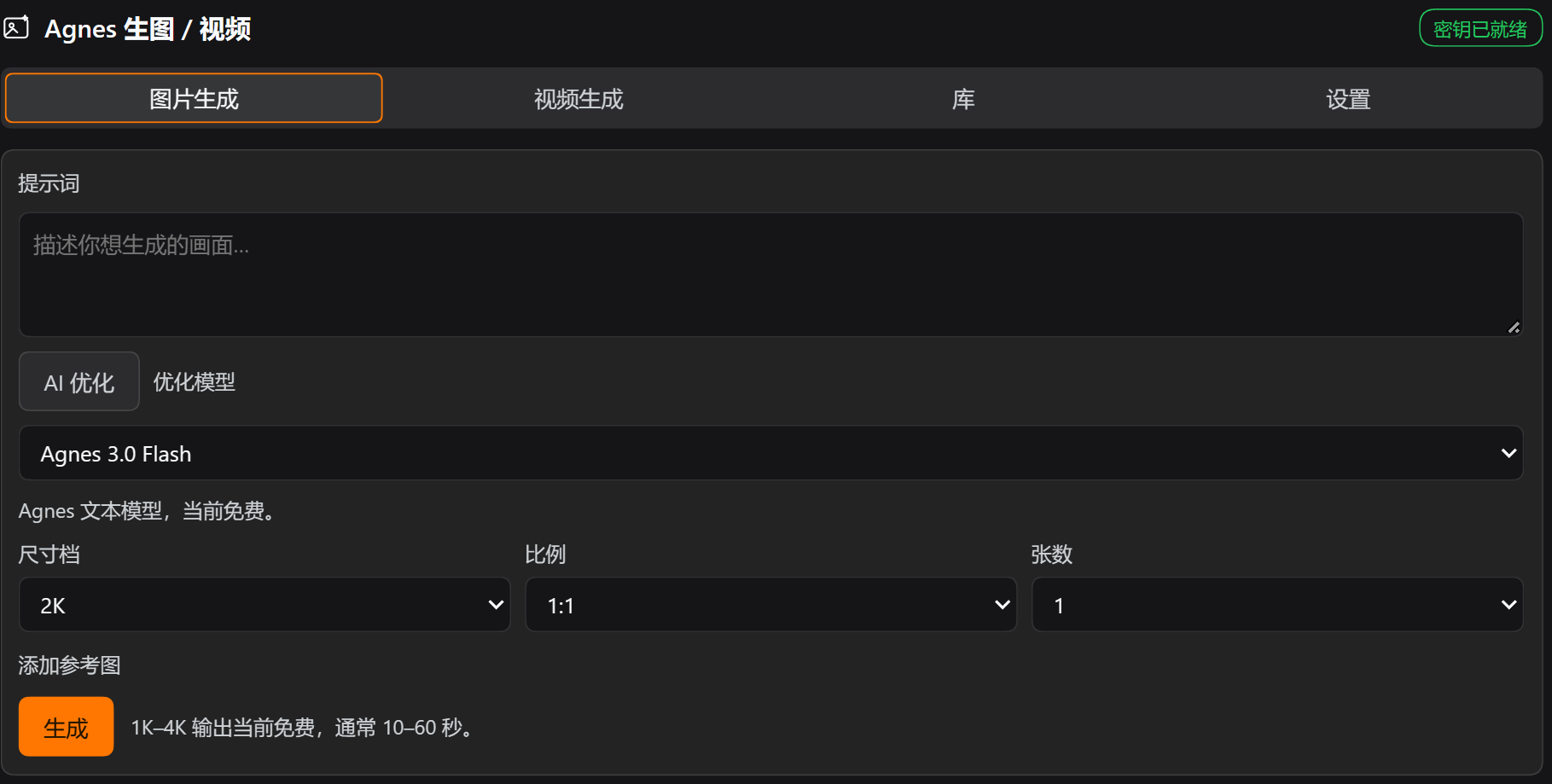
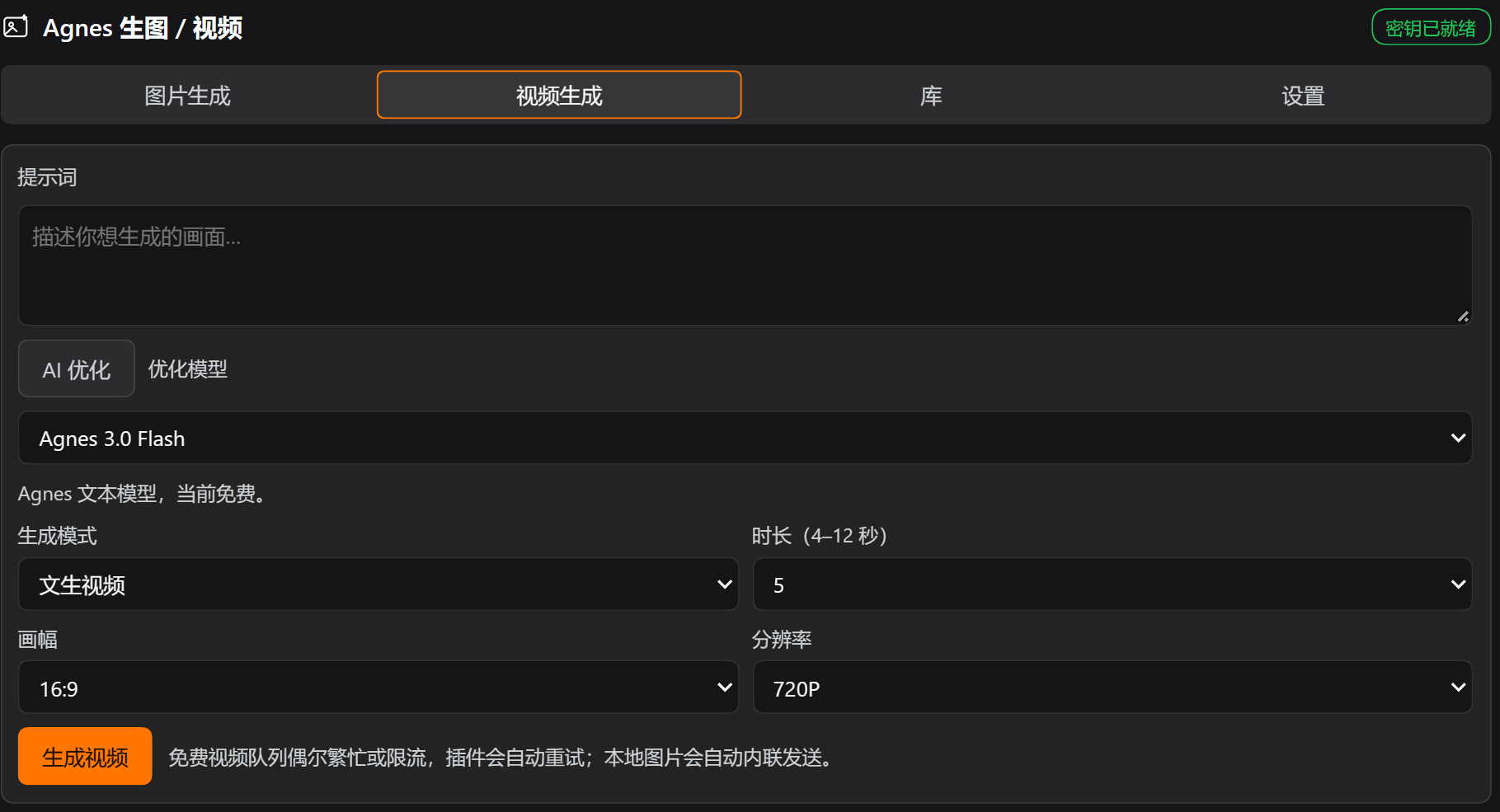
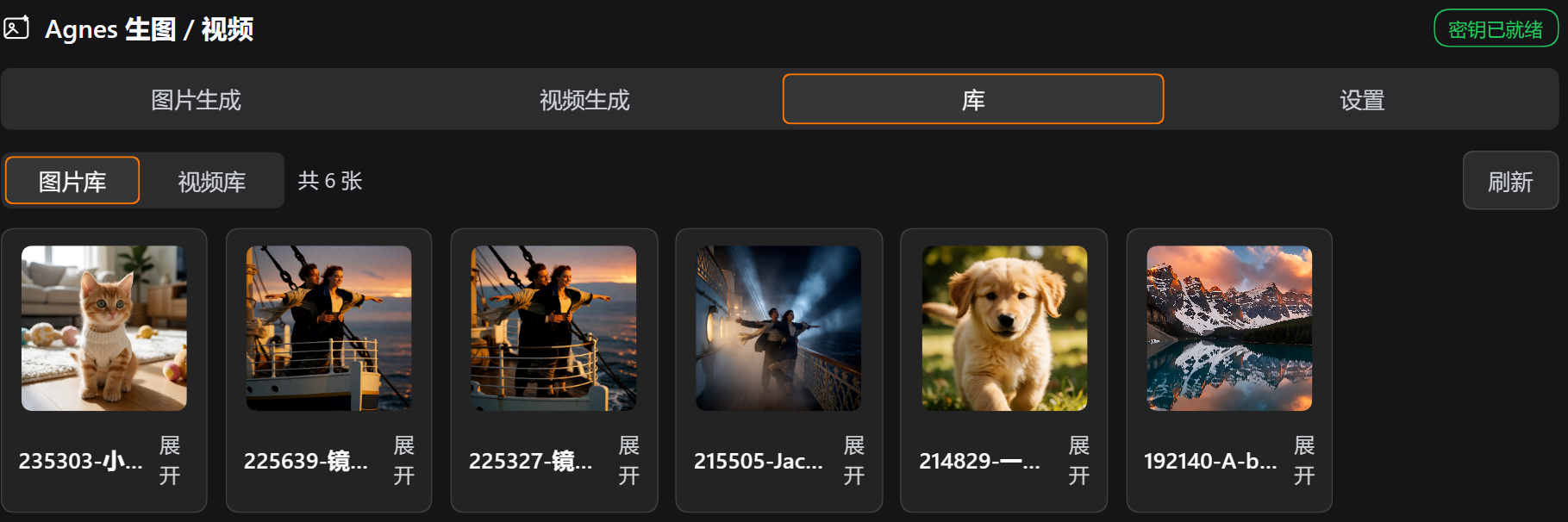
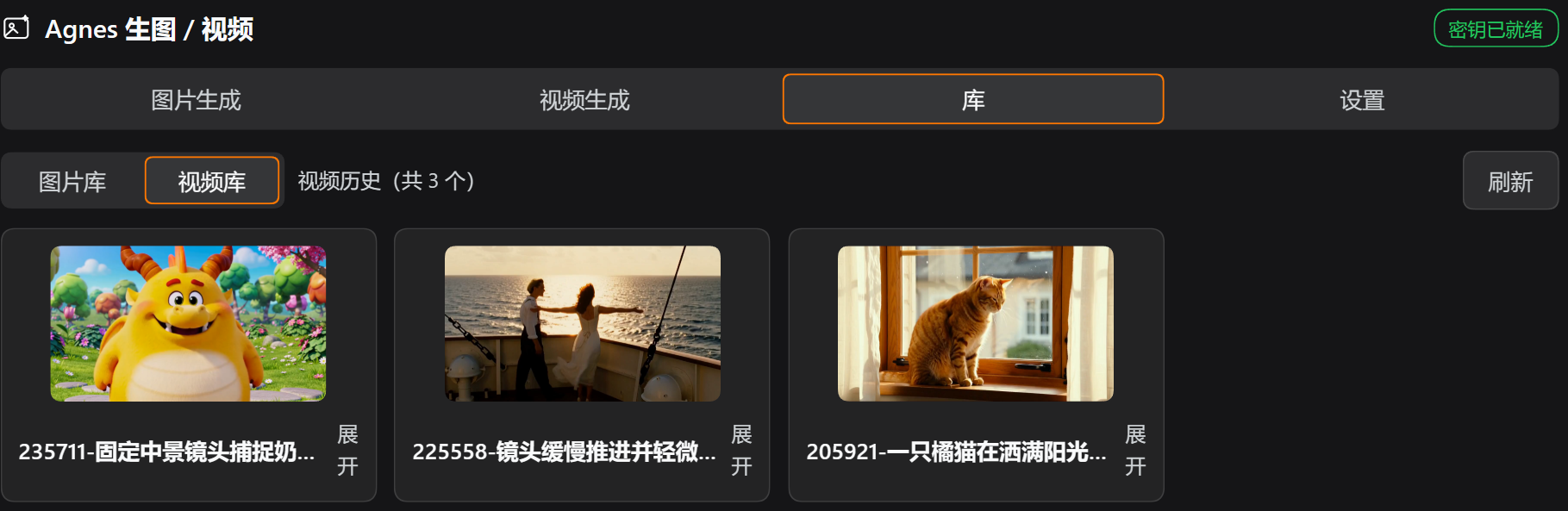
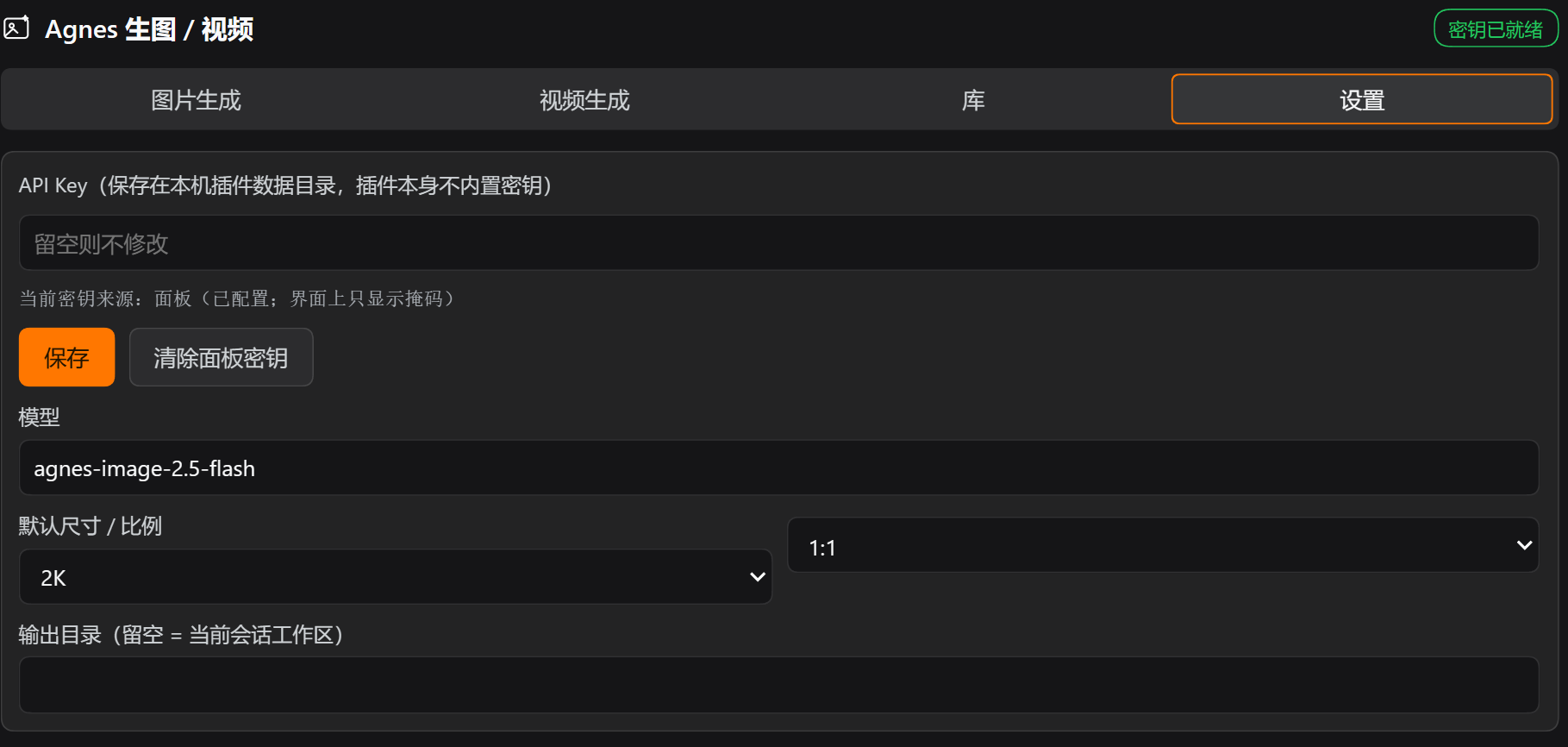
Real panel in a desktop profile, captured from the running harness.
| Images tab | Videos tab |
|---|---|
 |  |
| Image library | Video library, posters |
|---|---|
 |  |
Files
| File | Role |
|---|---|
package.json | bundle manifest: dsh.bundle.patch + dsh.client (platform web) + exports["./client"] |
cordis.patch.yml | bundle patch layer. One insert row with id: agnes-image, which is also the settings namespace. No credential is written here. |
index.js | host half: Config, key resolution (panel only), Agnes calls, disk output, tool registration, /api/agnes-image/* routes (video, video covers, prompt optimize, local file open) |
client.js | browser half: sidebar.panellist icon plus the whole main page (Images / Videos / Library / Settings) |
icon.svg | sidebar icon |
Documentation
Longer notes live in docs/:
- Index
- Install · Usage · Configuration · Architecture · Contributing
- 中文版:docs/index.md · README_ZH.md
Capabilities
1. Agent tool agnes_generate_image
Call it straight from a conversation.
Parameters: prompt (required), size (1K/2K/3K/4K), ratio (1:1, 3:4, 4:3, 16:9, 9:16, 2:3, 3:2, 21:9), count (1–4), reference_images (image-to-image or composition: a public HTTPS URL or a data:image/...;base64 string).
It returns absolute paths on disk, for example:
Agnes generated 1 image (agnes-image-2.5-flash, 2K 1:1).
Saved to disk — absolute paths:
  C:\...\default-workspace\agnes-images\2026-10-16\190212-测试:一只戴宇航头盔的柴犬.png  (836.9 KB)
2. Agent tool agnes_generate_video
This one blocks: create task, poll, download. The default ceiling is 15 minutes.
Parameters: prompt (required), mode (text / keyframe / reference), seconds ("4"–"12", default "5"), size (720P; with agnes-video-2.5 also 1080P/1K/2K), aspect_ratio (16:9/9:16/1:1/4:3/3:4/21:9), first_frame / last_frame (keyframe mode), images[] / audios[] (reference mode), seed.
Agnes enforces the per-mode media rules, and this plugin validates them locally before the request, then re-throws the upstream error verbatim. text carries no media. keyframe needs at least one frame and no images or audios. reference needs at least one image or audio clip and no first or last frame. In reference mode local file paths are inlined into data: URLs automatically: single file under 15 MB, edge length 256–5760 px, and anything outside that errors. Public HTTPS URLs are accepted too.
3. AI prompt optimizer
Both prompt boxes, image and video, have an AI Optimize button. It hands the current prompt to a language model and shows a rewrite card first. The card holds only the rewritten prompt, expanded in place right under the prompt box and above the button. The original stays in the input above, the card does not repeat it, and it has no card title. Adopt writes it back, Discard throws it away, Retry asks again. The rewrite keeps subject and intent and only adds visual detail: composition, light, palette, material, mood, style. It follows the input language. The video side additionally asks for motion, camera movement and pacing.
Two backends, picked from a dropdown and persisted to settings:
| Backend | Behavior |
|---|---|
agnes (default) | agnes-3.0-flash via Agnes Chat Completions, same key as generation |
dsh | Reuses the harness' current conversation model (agentDefaultModel.currentSelection()). If the host has no LLM service or the profile has no model configured, the option shows as unavailable and nothing else is affected |
4. Sidebar panel
Four tabs, left to right: Images, Videos, Library, Settings. The panel shares the same host code path as the tools, so behavior is identical.
- Images: prompt, size, ratio, count, optional reference images. Thumbnails appear immediately.
- Videos: prompt, mode, seconds, aspect ratio, resolution. Keyframe mode reveals first/last frame inputs, reference mode reveals image and audio rows. After submit the button area shows queue and render progress and polls automatically. On completion it never plays in the panel; it shows a poster plus "Open with default app". History is not on this tab. Everything is collected in the Library.
- Progress bar: a running image job shows an indeterminate striped bar plus elapsed seconds. Image generation is a single call with no percentage, so no number is invented. A running video job shows the real upstream percentage (0/10/70/100), plus status and elapsed seconds, for example
Rendering: in_progress · 10% · 84s elapsed. When the upstream percentage has not moved for more than 12 seconds, which is very common because the 10% step alone can sit for two minutes, the bar switches from a fill to flowing stripes and the caption becomesUpstream still reports 10% — rendering · 132s elapsed. It says where the number comes from instead of faking motion or inventing digits, and snaps back to a real fill the moment upstream jumps to 70 or 100. The bar occupies the slot where the old status card was. - Library: a segmented switch at the top toggles Image library and Video library. Each has its own count and refresh button. Both render as small card grids, about 116 px per image column and 182 px per video column. Videos show a poster only and never play here.
- Cards carry a thumbnail by default. Collapsed, a card shows a thumbnail on top and the file name below, 96×96 for images and 160×90 for video posters. Clicking the file name or the chevron expands the card to reveal the prompt, size, ratio, duration, bytes and the action buttons. Hovering the thumbnail scales it slightly, 1.03×, and draws an orange ring as a hint that it can be double-clicked.
- Opening local files: double-click the thumbnail or poster, or use "Open with default app" in the expanded area. The file goes to the desktop's default association, images to the image viewer and videos to the default player, which is semantically the same as double-clicking in Explorer. "Reveal in folder" selects the file instead. The expand button and the file name only toggle expansion; they never open files.
- Settings: API key (saved into the plugin data directory), model, default size and ratio, video and optimizer defaults, output directory. No key ships with the plugin. Without a key the image, video and optimize (agnes backend) buttons are disabled and a hint appears at the top of Settings.
- Action buttons. Per image: Insert into composer, copy path, open with default app, reveal in folder, delete. Per video: Insert link, copy path, open with default app, reveal in folder, delete.
Output layout:
- Images
<workspace>/agnes-images/<YYYY-MM-DD>/<HHMMSS>-<prompt slug>.<ext> - Videos
<workspace>/agnes-videos/<YYYY-MM-DD>/<HHMMSS>-<prompt slug>.mp4 - Video poster
<same dir>/<same stem>-cover.png, produced by the panel's frame grab
Repeated names within the same second get -2, -3. CJK prompts are preserved as-is.
Video posters: browser frame grab, no ffmpeg
Video cards must show something even when collapsed, but the plugin does not decode video on the host. The author's machine has no ffmpeg, and the core packages expose no host-side thumbnail service, so the frame grab happens in the browser:
- When a video task completes, on the poll that first yields
file, the panel builds a hidden<video>ingrabFrame(), waits forloadeddata, seeks tomin(0.2s, duration/2), and onseekedrunscanvas.drawImage()plustoDataURL('image/png'). Max width 640 px, 8-second timeout, and any failure resolves to an empty string. - The frame is posted to
POST /api/agnes-image/video-coveras{ file, dataUrl }. The host writes<same stem>-cover.pngnext to the video and recordscoverback intovideo-history.jsonand, for a matchingfile, intovideo-tasks.json. - Cards prefer
record.coveras an<img>. Without a poster they fall back to the first frame of a<video preload="metadata" muted playsinline>, with no controls and never playing. If even that fails they show "No cover yet (double-click to open with the default player)".
A failed grab only logs console.warn('[agnes-image] cover capture failed:'). A missing poster never blocks anything. Refreshing the Library also back-fills at most 3 old records without a poster, each path attempted once and deduplicated with useRef(new Set()).
video-cover reuses the same safety boundary as /open: only a file recorded in video-history.json is accepted, otherwise 404 no history record for that file. The dataUrl must start with data:image/png;base64,, be non-empty, and be at most 6 MB.
Interaction & motion
All of it is CSS, and everything degrades to no animation when the OS asks for reduced motion (@media (prefers-reduced-motion:reduce)):
| Where | Effect | How |
|---|---|---|
| Tab switch (Images / Videos / Library / Settings) | 450 ms horizontal slide, 40 px, decelerating cubic-bezier(.16,1,.3,1) | The tab body remounts on a keyed wrapper and replays .dsh-agnes-slide / @keyframes dsh-agnes-slide-in. Direction follows tab order: moving forward (Library → Videos) enters from the right, moving back from the left. The left variant only changes animation-name via .is-left; duration and curve are shared. |
| Active-tab "top" ring | An orange inset-ring pill slides to the active tab in step with the body | .dsh-agnes-pill with transition: transform 450ms cubic-bezier(.16,1,.3,1). Width and offset are computed with calc() from the equal-width tab columns (translateX(calc(<i>*100% + <i>*gap))). No DOM measurement and no ResizeObserver, so it stays aligned when the sidebar is resized. |
| Library segmented switch | Same feel: body slides, pill slides | The key includes libraryKind, so direction follows the switch. It reuses the same pillStyle(). |
| Card expand / collapse | 200 ms true-height transition | The expanded area stays in the DOM, so its height is stable. The wrapper toggles .dsh-agnes-expand{grid-template-rows:0fr} against .is-open{grid-template-rows:1fr}, with overflow:hidden;min-height:0 on the child. No height measurement and no extra layout pass. |
| Thumbnail / poster hover | 1.03× scale and a 2 px orange ring | .dsh-agnes-media:hover. Under reduced motion only the transition is disabled; the affordance stays. |
| Indeterminate progress | Flowing stripes | .dsh-agnes-bar.is-indeterminate>i plus @keyframes dsh-agnes-bar-slide. Under reduced motion it is a static translucent bar. |
Horizontal overflow from the slide is clipped at the panel root with overflow-x:hidden, otherwise a horizontal scrollbar appears mid-animation. The pill is already in place on first render, so opening the panel never shows it sliding in from the first tab.
Tab switching only animates transform, never opacity. The tab body remounts, and starting from opacity:0 made tall form tabs flash the bare dark panel background for about 100 ms before growing in, which was far more jarring than the animation itself. It is fully opaque from frame one, direction comes from the 40 px offset alone, and there is no gap.
The collapsed expand area stays in the DOM but is neither focusable nor clickable. CardShell uses a ref + useEffect to set inert on the container while collapsed and remove it when expanded. That is the DOM API rather than a JSX prop, so React 18 and 19 behave the same.
Key policy: panel only, no shipped credential
The only source is the key saved in the panel's Settings tab, written to %DSH_HOME%\agnes-image\settings.json.
Config has no apiKey field and there is no environment-variable fallback. The plaintext key row and apiKeyEnv that early versions had are gone. resolveKey() reads the settings panel only. Without a key, status.hasKey === false and keySource === 'none', and every generation or optimize call on the agnes backend fails with:
No Agnes API key configured: open the panel Settings tab and save one first (the plugin ships without a key).
The reasoning: plugins get distributed and copied around, so a credential may only ever live in the user's own data directory, never inside plugin source. status reports just keySource (panel / none) and a masked keyHint holding the first six and last four characters. It never reports the full key.
Data files
| Path | Contents |
|---|---|
%DSH_HOME%\agnes-image\settings.json | configuration saved by the panel |
%DSH_HOME%\agnes-image\history.json | image history (newest first, capped by historyLimit) |
%DSH_HOME%\agnes-image\video-history.json | completed video history (newest first) |
%DSH_HOME%\agnes-image\video-tasks.json | video task table (deduplicated by videoId, last 100 kept). Polling resumes after a page reload. |
The task table is what makes "close the page and come back" work. The host remembers baseDir per videoId and downloads the mp4 into the original workspace when it finishes. The download happens exactly once.
HTTP routes
The panel uses these. Trust fence and cookie auth are automatic.
| Method | Path | Purpose |
|---|---|---|
| GET | /api/agnes-image/status | key source (panel/none), model, defaults, available options, optimizer and LLM availability |
| GET | /api/agnes-image/history?limit= | image history |
| POST | /api/agnes-image/generate | { prompt, size, ratio, count, referenceImages, sessionId, cwd } |
| POST | /api/agnes-image/settings | save configuration (clearApiKey: true clears the panel key) |
| POST | /api/agnes-image/delete | { file }, only a file recorded in history |
| POST | /api/agnes-image/open | { file, action: 'default'|'reveal' } → open with the OS default association / reveal in folder |
| POST | /api/agnes-image/video-create | { prompt, mode, seconds, size, aspectRatio, firstFrame, lastFrame, images, audios, seed, sessionId, cwd } → { ok, task } |
| GET | /api/agnes-image/video-status?videoId= | poll once: progress while queued/rendering, download + file when done |
| GET | /api/agnes-image/video-history?limit= | completed video history |
| POST | /api/agnes-image/video-delete | { file }, only a file recorded in history |
| POST | /api/agnes-image/video-cover | { file, dataUrl } → store the panel's PNG frame as <same stem>-cover.png and record it |
| POST | /api/agnes-image/optimize | { prompt, kind: 'image'|'video', backend: 'agnes'|'dsh', seconds, sessionId } → { ok, original, prompt, backend, model, notes } |
Routes are registered through ctx.connection.fetch.register, so the /api prefix gets authentication automatically. Do not switch to ctx.webServer.register, which bypasses it.
/open safety boundary
open only opens paths recorded in history, meaning the file field of history.json or video-history.json. Anything else returns 404 no history record for that file, otherwise the route would be a generic "open any local file" channel for the page. The host also stats the file to confirm it is still there, and first asks canOpenNativePath(). A host without a desktop session, meaning headless, answers this host cannot open local files (<platform>). Calls carry a 30-second timeout.
Pitfall: requestBody is required, even on GET routes
ConnectionFetchRoute.requestBody is typed 'buffered' | 'streaming' (ConnectionRequestBodyMode), and there is no "absent" member. createSharedFetchHandler's requestBodyMode returns it unchanged (dsh-client-connection/lib/index.js:610-613). The HTTP bridge, in the same file at :43-81, only special-cases bodyMode === "buffered". Every other value takes the streaming branch, which builds a Request with a body via Readable.toWeb(req). That is illegal for GET and HEAD, so new Request(url, { method: 'GET', body }) throws before any response exists, and the browser only sees 400 with an empty body and no content-type.
So every route here declares requestBody: 'buffered', including the GET routes. run.mjs carries regression assertions for this (requestBody declared … / bridge accepts …), so a route edit cannot silently drop it.
Video upstream rate limits (measured)
POST /v1/videosfrequently answers 429 (rate_limit_exceeded) or 503video_queue_fullon the free tier. This plugin retries 429/500/502/503/504 with exponential backoff, defaultvideoQueueRetries: 6and delaymin(30s, 5s × attempt).- Polling also eats 429s.
GET /agnesapiinterleaves 429s in practice, so polling treats 429/5xx/network errors as retryable, reportspendingand keeps waiting. It never marks the task failed, otherwise a perfectly healthy render would be reported as broken. - Three failure envelopes exist:
{"detail":…},{"code":…,"message":…}and{"error":{"message":…}}.videoErrorText()recognizes all three. agnes-video-2.5-flashsupports"720P"only. Any othersizeis normalized to720Plocally; upstream returns a hard 400size must be 720Pfor flash.id,task_idandvideo_idare the same task string in the create response. Polling usesvideo_id.
Prompt optimization: two backends and their limits
- The agnes backend uses
POST /v1/chat/completionswithtemperature: 0.7andmax_tokensset to ConfigoptimizeMaxTokens, default 900. It retries 429/500/502/503/504 up to 3 times at2000 ms × attempt, and shares the same envelope parser as image and video. - The dsh backend uses
ctx.llm.stream({ provider, model, messages, system, maxTokens, sessionId, purpose, signal }), with provider and model fromctx.get('agentDefaultModel')?.currentSelection(), the same usage as the coredsh-session-title-llmpackage. ABlockAssemblercollects the stream. Onlyfinish.kind === 'stop'counts as success;tool-callandmax-tokensare reported as failures. injectdeliberately omitsllm. A missing LLM service only disables the "DSH current model" optimizer option, andstatus.llmAvailable/llmRoutereport it honestly, instead of leaving the whole plugin pending and taking image and video generation down with it.- Input is capped at 4000 characters. Over that you get
prompt is too long to optimize (4000 characters max). The output strips ``` fences,优化结果:-style prefixes and paired quotes, collapses newlines into one line, and truncates atOPTIMIZE_MAX_CHARS(1200). - Config fields:
optimizeBackend,optimizeModel,optimizeMaxTokens,optimizeTimeoutMs(default 120 s). Switching backend in the panel writes to%DSH_HOME%\agnes-image\settings.json.
Panel CTA colors
Primary buttons (Generate / Generate video / Save) use a fixed fill of #ff7700 with dark ink text #1f1300 for contrast, about 8:1. White on orange is only about 2.7:1. Hover #e86b00, active #d96100 and the :focus-visible ring come from a <style> injected by apply(), with class .dsh-agnes-primary and idempotent dedup via data-plugin-css="dsh-agnes-image/button.css", mirroring the core dsh-client-ui-message-feedback/lib/client.js:12-20 approach. Inline styles cannot express :hover. The fill is also written inline so the button stays orange even if injection is blocked. The same stylesheet carries the progress-bar classes .dsh-agnes-bar: track --dsw-alias-bg-layer-2, fill #ff7700, indeterminate state animated by @keyframes dsh-agnes-bar-slide and degrading to a static bar under prefers-reduced-motion. Everything else uses --dsw-alias-* / --dsw-static-* theme tokens only.
Known limitations
- Tool results cannot render as inline image or video cards. The web client only renders image cards for the built-in
read_image, and third-partypresentResultis not consumed. Both tools therefore return local paths. To see an image in the chat, send@<path>or hand the path toread_image. The panel displays thumbnails and posters through the core routeapi/file?path=<absolute path>. Videos only offer "open with default app" when expanded, never in-panel playback. - "Insert into composer" writes plain text:
for images and[name](https://github.com/SZTMBABY/dsh-agnes-image/blob/HEAD/absolute path)for videos. DSH exposes no public API to attach media to the composer, so it is text, not an attachment. - The video tool is blocking.
textmode takes about 3 minutes and up, with progress sitting at 10 for a long time, and itstimeoutMsis 900000. The panel uses the non-blockingvideo-create+video-statusroutes, so closing the page does not affect the task; the host resumes from the task table. - Video reference limits come from upstream. Flash accepts ≤ 5 images and ≤ 3 audio clips, under 15 MB per file. Inlining local files as
data:URLs also bounds the request body. - How the browser bundle is picked up, measured: after editing
client.jsthe host recomposes the graph and serves a new rev without a restart, so a page refresh or the HMR receiver is enough. An already-loaded host module (index.js) cannot be hot-swapped, so host-half changes need a profile restart. - Every optimize click is a real upstream call. The
agnesbackend shares the key with generation and the free tier occasionally 429s, which the plugin backs off 3 times. Thedshbackend depends on the host LLM service plus a model configured in the profile. injectincludesconnection. In a headless profile without a web app the plugin stays pending and the tools are not registered either. For headless use, changeindex.js'sinjectto['tools'].- "Open local file" hands the path to the desktop session of the host machine. On Windows that is
explorer.exe <file>throughdsh-native-command'sopenNativeAssociatedPath. On a machine without a desktop, over remote sessions or inside a restricted sandbox, the route answersthis host cannot open local files (<platform>)or the underlying error. The file itself is still on disk and its path can be copied. - Card expanded and collapsed state lives in page memory only and resets to collapsed on refresh, where collapsed means thumbnail or poster plus file name. Double-clicking the thumbnail means "open", not "expand". The file name and the chevron only toggle expansion.
- A video poster comes from the browser, as described above. The video must have been played once in this browser for a poster to exist. Opening old records on another machine or browser shows only a first frame or the placeholder, never playback, when
<same stem>-cover.pngis missing. - The Library lists files recorded in this machine's history (
history.json/video-history.json). Deleting a file on disk leaves the entry, and opening it then errors. The card's Delete removes both the record and the file.
Install
Copy this directory into your DSH profile and register the bundle:
$src    = "<this repo>"
$profile = "$env:USERPROFILE\.dsh\profiles\desktop"
Copy-Item $src "$profile\node_modules\dsh-agnes-image" -Recurse -Force
# then add "dsh-agnes-image" to dsh.profile.bundles in $profile\package.json
Restart the profile, open the sidebar panel, paste your Agnes API key in Settings and save.
The plugin manager's install_bundle additionally runs pnpm add and updates pnpm-lock.yaml / pnpm-workspace.yaml. The manual install above only does the two steps. One note: a later pnpm install inside the profile may prune this unregistered node_modules directory. Re-run the copy, or use pnpm add <absolute path to this repo> to register it properly.
Rollback
- Remove
"dsh-agnes-image"fromdsh.profile.bundlesin$profile\package.json. - Delete
$profile\node_modules\dsh-agnes-image. - Restart the profile.
cordis.patch.yml inside the plugin directory is only referenced by this bundle's own patch layer, so it becomes inert once the bundle is removed. The profile's own cordis.patch.yml is never modified.
Development verification
The author's harness (run.mjs) loads both halves against the real @deepseek-ai/dsh-tools + schemastery and checks: both tools and all twelve routes registering, the requestBody contract and bridge compatibility, Config defaults including video and optimizer plus "Config carries no credential", two real generations written to disk, history, the panel-only key policy (with no key, all three entry points must refuse: status, routes and tools; after saving, keySource: 'panel'; after clearing, none rather than falling back to Config), settings persistence, the /open refusal paths (missing file → 400, unrecorded path → 404; the success path is deliberately untested because it would really launch a desktop app), the full /video-cover chain (unrecorded → 404, non-PNG data URL → 400, empty frame → 400, and a success path over a fake MP4 plus a planted history row → 200, PNG on disk, cover filled in history), delete safety, video parameter validation (mode/media/unknown task), prompt optimization (empty/too long/DSH backend unavailable/real Agnes rewrites for both image and video prompts), the client slot and dictionary contract (zh/en, 99 keys each), and source-level assertions for the motion layer and honest progress (dsh-agnes-slide + dsh-agnes-slide-in-left + the 450 ms SLIDE_MS / SLIDE_EASE / SLIDE_DISTANCE slide, the dsh-agnes-pill + translateX(calc( synchronized pill, dsh-agnes-expand with grid-template-rows:0fr / .is-open, the 1.03× .dsh-agnes-media hover, prefers-reduced-motion:reduce, VIDEO_STALL_MS + progressStamp + progress.upstreamStall, and the absence of any controls: true). That last group covers CSS and DOM behavior a headless run cannot execute, so the emitted code is asserted directly.
It also runs without a key. When no key is found, the real-upstream sections (tool calls, panel generation, prompt optimization, and video-create payload validation, which resolves the key before validating) are marked SKIP and the rest continues. An offline run yields 92 PASS / 0 FAIL with 6 sections skipped, while a run with a key in the panel executes everything and has measured 124 PASS / 0 FAIL / 0 SKIP, including real generation and disk output, delete, poster capture, both prompt rewrites, the 99-key dictionaries and the 8 motion assertions.
Real-upstream calls in the suite (2 generations, 2 optimizations) are wrapped in retryUpstream(), which retries only 429/5xx, up to 6 times, 20 s apart. The Agnes free queue fluctuates on a minute scale, and without retries a healthy plugin would be reported broken.
A separate end-to-end smoke run of the video path recorded a 4-second 720P task going queued → pending(0) → in_progress(10) → 70 → completed(100) in about 181 seconds, producing a 3.6 MB ftypisom MP4, with 429s interleaved during polling. That is exactly why 429 must be retryable during polls.
License
MIT. See LICENSE.
Comments
Loading…
Similar plugins
by Lennon-lylt
Agnes AI image/video generation plugin for DeepSeek Harness: agent tools plus a settings page.
★ 0
MIT
JavaScript
Oct 5, 2026
dsh plugin --profile web add dsh-agnesby LittleBeaverStudio
Agnes AI image and video generation plugin for DeepSeek Harness.
★ 4
MIT
JavaScript
Sep 11, 2026
dsh plugin --profile web add agnes-mediaby zmm863-commits
AI image and video studio as a floating DSH panel, so creation runs alongside the conversation instead of replacing it: text-to-image, image-to-image and multi-image composition at 1K-4K across eight
★ 17
↓ 883/wk
NOASSERTION
TypeScript
Oct 4, 2026
dsh plugin --profile web add dsh-agnes-studioby wumu1111111
DeepSeek Harness 全模态插件:图像理解 + 文生图/图生图 + 视觉桥,支持对话直接发图
★ 0
MIT
JavaScript
Aug 16, 2026
dsh plugin --profile web add dsh-agnes-omniby hoyyang
🎨 DeepSeek Harness 通用 AI 生图插件:任意 OpenAI 兼容生图网关/模型,设置页可视化配置,/dsh-image-gen 一句话出图
★ 1
MIT
JavaScript
Aug 20, 2026
dsh plugin --profile web add @dsh-external/dsh-image-genby shanliuling
AI image studio for DeepSeek Harness — generate, edit & compare images in chat, with 500+ prompts, gallery, multi-model workflows and ComfyUI.
★ 616
↓ 7.8k/wk
MIT
TypeScript
Oct 15, 2026
dsh plugin --profile web add dsh-image-gen