

dsh-freestyle-theme
Manifest valid★ 12DeepSeek Harness Theme Experience Plugin: OKLCH Theme Proposal + Theme Designer (Persistent Across Restarts)

dsh-freestyle-theme
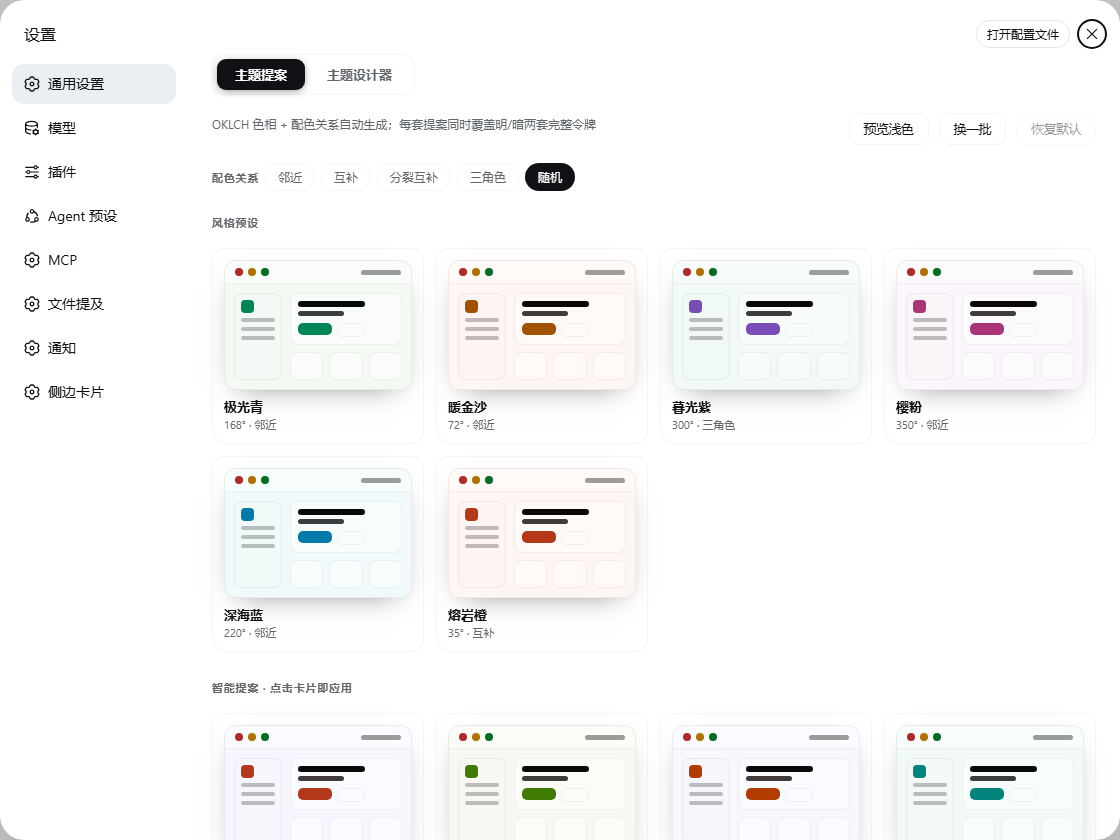
给 DeepSeek Harness 的全窗口主题工作室:四轴配色、真实组件预览、对比度体检、主题库与分享。





为什么做这个
DSH 的界面颜色来自 --dsw-* 令牌,壳里共定义 403 个;这个插件接管其中决定观感的 119 个(107 个 alias + 11 个 specific + menu-surface-fill),令牌一变,聊天、代码块、侧栏、弹层一起变。其余是结构层与静态调色板,改了只会让主题彼此不自洽,所以刻意不动。
- 四轴建模——品牌、中性、明度骨架、状态簇,每条轴有自己的彩度上限。
- 看得见才敢点——所有预览都是用真实令牌画出来的真实组件,不是色卡拼贴。
- 不牺牲可读性——21 组前景/背景配对逐条体检(WCAG + APCA),不达标给一键修复。
- 不留垃圾——材质轴(字体/圆角/阴影)只影响预览与导出 CSS,从不偷偷改宿主。

✨ 能力
| 能力 | 说明 | |
|---|---|---|
| 🎛 | 全窗口工作室 | 一键从设置行进入,⌘K 命令面板、⌘Z 50 步撤销、焦点陷阱与全键盘可达 |
| 🎨 | 四轴配色 | 品牌 / 中性 / 明度骨架 / 状态簇;3 条色彩通道各带色相、彩度、明度滑杆与独立锁定 |
| 🖼 | 真实组件画布 | 对话、列表、表单三视图,侧栏/气泡/代码块/diff/菜单/toast/tooltip 全用候选令牌上色 |
| 🔍 | 对比与检查 | 半透明分割滑块对比明暗;放大 50–150%;Inspect 模式悬停即显示该元素读到的令牌 |
| 👓 | 色觉模拟 | 红/绿/蓝锥与全色盲四种 SVG 滤镜,先看别人看到的 |
| ♿ | 对比度体检 | 21 对前景/背景,正文 7.0、次要 4.5、控件/图标 3.0,附 APCA Lc;一键按明度收敛修复 |
| 📚 | 主题库 | 12 套坐标预设 + 本地保存;宿主侧 ~/.dsh/freestyle-theme/themes.json 持久化 |
| 🖼 | 图片取色 | 中位切分量化 + 饱和度加权,图片不出浏览器,只把坐标送到引擎 |
| ✍️ | 一句话生成 | 有 LLM 时走模型生成,没有就本地 mood 词表兜底,永远不会卡住 |
| 🔗 | 分享码 | dsh-freestyle-theme://… base64url 短键载荷,280 字符内无损往返 |
| 🎞 | 克制动效 | 120 / 180 / 240 / 320ms 四档,prefers-reduced-motion 全线降级 |
🧭 工作室布局
┌──────────────────────────────────────────────────────────────────────────┐
│ 名称 · 7.4:1 ▸ 明暗 ▸ 撤销/重做 ▸ 生成 ▸ 分享 ▸ 应用            Esc 关闭 │
├──────┬──────────────┬────────────────────────────────────┬───────────────┤
│ 图标 │ 模板 12 套   │  对话 │ 列表 │ 表单      − 100% +  │ 检查器        │
│ 栏   │ 我的主题     │  ┌──────────────────────────────┐  │ 色彩 ▸ 3 通道 │
│ 72px │ 240px        │  │  真实组件画布(候选令牌上色) │  │ 对比度 21 对  │
│      │              │  └──────────────────────────────┘  │ 排版/圆角/阴影│
│      │              │  对比滑块 · 色觉模拟 · Inspect      │ 一键修复      │
└──────┴──────────────┴────────────────────────────────────┴───────────────┘
📐 四轴配色模型

| 轴 | 参数 | 彩度上限 | 负责 |
|---|---|---|---|
| ① 品牌 | th c1 l1 | 0.37(唯一不封顶的轴) | brand、link、button、focus 环 |
| ② 中性 | ths sc | 0.012 | 侧栏、输入、菜单的灰度温度 |
| ③ 明度骨架 | bg spread | — | 4 档 elevation、暗色跨度 ×1.6 |
| ④ 状态簇 | stateBoost | 0.16 | success / warn / error / info |
| 外观轴 | fontPair fontScale radius shadow | — | 仅预览与导出 CSS |
坐标 ──▶ 4 档 elevation ──▶ 107 alias + 11 specific + 1 surface = 119 令牌 × 明暗两套
12 套预设覆盖从极端低彩度到高饱和的完整区间:

♿ 对比度

- 21 对配对,含正文/次要/三级/说明、按钮、toast、tooltip、菜单、三态、diff、图标;不含独立大字档(阈值表预留)。
- 半透明底会先合成到它真正压在的那层,再算比值——不做假透明通过。
- 修复只动明度(
tx → l1 → bg → state),色相与饱和度是你选的,插件不改。 - CI 闸门:12 预设 × 2 模式 × 21 对全部过线才允许发版,最薄的一对也会打印出来。
🏗️ 架构

flowchart LR
  subgraph Host["Host 半面 · lib/index.js"]
    R1["GET/PUT /themes"] --> J[("~/.dsh/freestyle-theme/themes.json")]
    R2["POST /generate"] --> L["llm.stream"]
    R3["POST /name"] --> L
  end
  subgraph Client["Client 半面 · lib/client.js(零跨包依赖)"]
    S["settings.general.item 行"] --> W["工作室"]
    W --> P["palette · 119 令牌"]
    W --> C["contrast · 21 对"]
    W --> G["generate · 取色/生成"]
    W --> V["preview · 真实组件"]
    P --> O["theme.overrideTokens()"]
  end
  W -.fetch.-> R1
  W -.fetch.-> R2
  W -.fetch.-> R3
- 单一
overrideTokens出口:OverrideOwner保证同一来源只有一个覆写生效,关闭工作室即还原本地已应用主题。 - 分包构建:client bundle 的
require只有react与react/jsx-runtime,其余能力全部走 cordis service,构建期有纯净性校验。 - 宿主侧无第三方依赖:
node:fs/os/path/crypto四个内置模块,原子写 + 写队列 + 并发安全。
🧩 遵循的 DSH 插件规范(0.2.1-rc.2)
| 规范 | 本插件的做法 |
|---|---|
| 双面包 | dsh.bundle.patch 插行 + dsh.client.platform=web,lib/index.js 与 lib/client.js 各司其职 |
| 模块表 | 只用壳暴露的 11 个运行时模块(react、react-dom、cordis、zod、virtual、store、slots、primitives、dockkit…) |
| 服务依赖 | inject 只写 slots;theme/locale/llm 全部惰性解析,缺一个不拖垮整个插件 |
| 清单元数据 | locale/{zh,en}.json 的 meta.title/description 供插件管理页使用 |
| 图标 | exports["./icon"] + package.json.icon,2098 字节 SVG,远低于 256 KiB 上限 |
| 生命周期 | ctx.effect() 管样式与覆写;卸载即清理 <style>、监听器、覆写 |
| 明暗自适应 | 工作室自身 UI 全部使用 --dsw-alias-* 变量,不写死亮/暗色 |
📦 安装
1. 克隆并构建
git clone https://github.com/suzike/dsh-freestyle-theme.git
cd dsh-freestyle-theme
pnpm install
pnpm build            # lib/index.js + lib/client.js
pnpm test             # 50 项单测
pnpm check:tokens     # 令牌 / 对比度 / 分享码闸门
2. 挂载到 DSH profile
cp -r . ~/.dsh/plugins/dsh-freestyle-theme
// ~/.dsh/profiles/web/package.json
{
  "dependencies": { "dsh-freestyle-theme": "link:../../plugins/dsh-freestyle-theme" },
  "dsh": { "profile": { "bundles": ["dsh-freestyle-theme"] } }
}
# 让 profile 的 node_modules 认得它(Windows 用 PowerShell)
New-Item -ItemType Junction -Path ~/.dsh/profiles/web/node_modules/dsh-freestyle-theme `
         -Target ~/.dsh/plugins/dsh-freestyle-theme
3. 重启 dsh web
设置 → 通用 → 自由主题 → 打开工作室。
升级提示:包名就是加载器 id。从
@linxin666/freestyle-dsh-theme迁过来的,先删旧目录、改bundles条目,再重启。
🚀 使用
| 操作 | 效果 |
|---|---|
| 设置行缩略图 + 打开 | 进入工作室;缩略图实时反映已应用主题 |
| 设置行「随机」 | 直接抽一套提案并应用 |
⌘K | 命令面板:应用、保存、随机、修复、生成、分享、色觉模拟 |
⌘Z / ⇧⌘Z | 撤销 / 重做(50 步) |
⌘S | 保存到主题库 |
⌘+ / ⌘− / ⌘0 | 画布缩放 50–150% / 复位 |
Esc | 先关命令面板/弹窗,再关工作室 |
🗂️ 目录
src/
├── index.ts            Host:三条路由 · 原子写 · LLM 代理
├── node.d.ts           仅声明用到的那几个 node: 成员
└── client/
    ├── index.tsx       设置行 + 工作室挂载 + 首帧恢复
    ├── studio.tsx      工作室:画布/检查器/命令面板/分享
    ├── preview.tsx     用真实令牌画的三视图
    ├── palette.ts      四轴 → 119 令牌 · 预设 · 分享码
    ├── contrast.ts     WCAG + APCA · 21 对 · 一键修复
    ├── generate.ts     图片量化 / mood 词表 / 候选生成
    ├── styles.ts       1192 行 CSS · 动效刻度 · 明暗自适应
    ├── locale.ts       zh/en 键对齐的类型化字典
    └── services.ts     本地壳服务声明 · 存储 · fetch
tests/                  50 项:palette / contrast / generate / preview / studio / host
scripts/check-tokens.mjs 发布闸门:令牌存在性、对比度、分享码往返
docs/design-system.md   设计规范:配色、动效、交互、验收
✅ 质量护栏
pnpm typecheck     # tsc --noEmit,strict
pnpm test          # node --test "tests/*.test.mjs"
pnpm check:tokens  # 令牌 / 对比度 / 分享码
pnpm build         # 双面包
check:tokens 会做四件事:
- 令牌存在性——源码引用的每个
--dsw-*都必须在已装主题包里定义(需DSH_THEME_CLIENT指向.../dsh-client-ui-theme/lib/client.js)。 - 数量与成对——恰好 119 个(占壳的 30%),且每个都有 light/dark。
- 对比度闸门——12 预设 × 2 模式 × 21 对,正文类 ≥ 4.5、其它 ≥ 3.0。
- 分享码往返——编解码后坐标逐项相等。
🛠️ 开发
pnpm watch      # tsdown --watch,改完刷新页面
pnpm typecheck  # 类型
pnpm test       # 单测
pnpm build      # 产物:lib/index.js · lib/client.js
设计约定见 docs/design-system.md:色轴与上限、动效刻度、键盘与焦点、验收标准。
⚠️ 已知边界
- 材质轴不改宿主:壳的 theme 服务只接受令牌覆盖,圆角/阴影/字体族只影响预览与导出的 CSS。
- 浏览器内验证仍待补:本仓库的渲染断言走
react-dom/server,真实浏览器交互(拖拽、滤镜)建议装好后手动过一遍。 - LLM 功能可降级:没有可用模型时,命名改用「色名 · 度数」,生成改用本地词表。
📄 License
BSD-3-Clause © dsh-freestyle-theme contributors
Comments
Loading…
Similar plugins
 2
2No screenshots
by suzike
DeepSeek Harness 主题体验插件:OKLCH 主题提案 + 主题设计器(跨重启持久化)
★ 12
BSD-3-Clause
TypeScript
Aug 14, 2026
dsh plugin --profile web add @linxin666/freestyle-dsh-themeby YangAtC
DSH (DeepSeek Harness) 主题自定义插件:背景图 + 界面透明度调节,开箱即用
★ 0
MIT
JavaScript
Aug 17, 2026
dsh plugin --profile web add @yangatc/dsh-theme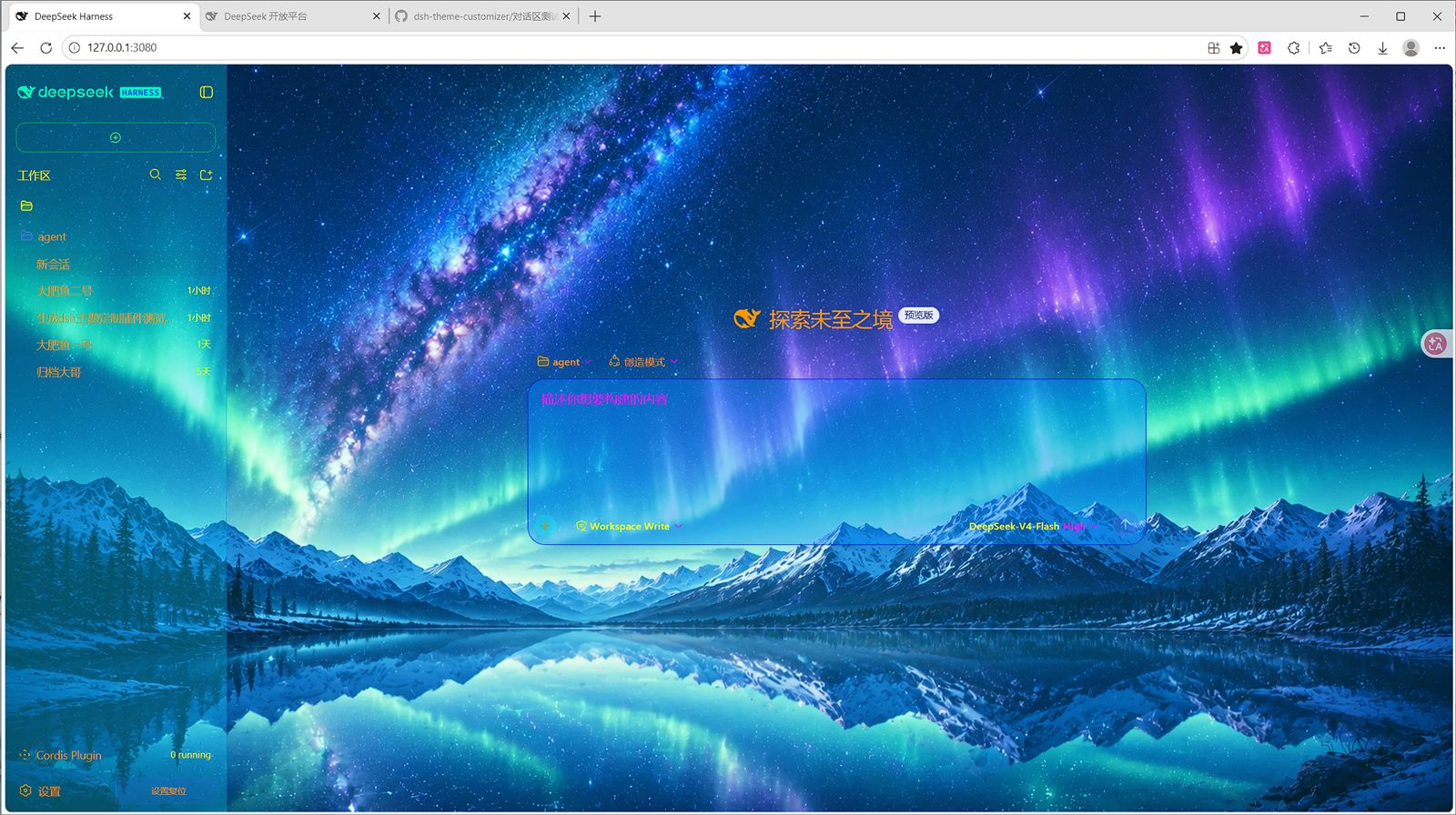 8
8No screenshots
by lxxz1918
DeepSeek Harness(DSH)Web 界面自定义主题插件:背景/文字/框线/细节全可视化调整,可导入导出预设,持久化保存。
★ 3
↓ 414/wk
MIT
JavaScript
Aug 27, 2026
dsh plugin --profile web add dsh-theme-customizer 6
6No screenshots
by Slymaster
Unofficial modular themes and starter kit for DeepSeek Harness.
★ 0
MIT
TypeScript
Aug 24, 2026
dsh plugin --profile web add dsh-theme-labby WuWL-98
deepseek harness 开发者预览版纸质仿claude主题
★ 3
MIT
PowerShell
Aug 15, 2026
dsh plugin --profile web add dsh-theme-paperby EdwardHamu
一个DeepSeek Harness 磨砂玻璃主题
★ 0
↓ 19/wk
TypeScript
Aug 22, 2026
dsh plugin --profile web add @edwardhamu/dsh-glassmorphism-theme