

DSH-FHL-Image-Plugin
Manifest valid★ 2Independent MIT-licensed DeepSeek Harness plugin for FHL Images generation, editing, worker pools, and chat-configured credentials.
DSH FHL Image 0.2.2
中文
这是什么
DSH FHL Image 是一个独立、MIT 许可的 DeepSeek Harness 社区插件,为 DSH
增加 FHL Images 生图、图片编辑、多参考图和 Worker 池能力。
这是社区项目,不是官方 DeepSeek 或 FHL 产品,也不是完整的 DSH 软件。 使用前必须先安装并能启动 DSH。
版本对应
| 插件版本 | 目标 DSH | 状态 |
|---|---|---|
0.2.2 | 官方桌面版 0.2.0-rc.2 包线 | 当前版本 |
0.2.1 | 官方桌面版 0.2.0-rc.2 包线 | 旧版本 |
0.1.0 | 旧 0.1.1-rc.1 包线 | 已不再支持 |
安装包:fhl-plugins-dsh-fhl-image-0.2.2.tgz(Release 附件,或本地
pnpm build && pnpm pack 生成)。.tgz 是插件包,不能双击运行。
下载直链:
https://github.com/supart/DSH-FHL-Image-Plugin/releases/download/v0.2.2/fhl-plugins-dsh-fhl-image-0.2.2.tgz
安装
一条提示词安装(推荐)
在自己的 DSH 会话里直接发送下面这段,Agent 会用插件管理工具下载安装:
请用插件管理工具安装这个 FHL 图像插件包:
https://github.com/supart/DSH-FHL-Image-Plugin/releases/download/v0.2.2/fhl-plugins-dsh-fhl-image-0.2.2.tgz

安装完成后打开它的启用开关,然后让我完全退出并重新打开 App。
之后新建会话,确认工具列表里有 fhl_image_configure、fhl_image_generate、fhl_image_edit。
⚠️ 必须用上面这条以
.tgz结尾的下载直链。 实测插件管理器只把「以.tgz结尾的 http(s) 直链」「本地绝对路径」「git 源」 「npm 包名」当作可安装来源,而本项目后三种都不可用: 仓库地址或.../releases/latest会被识别成 git 源,但本仓库不含构建产物lib/(已被.gitignore排除)且没有安装期构建脚本,装上去main指向的文件 不存在,插件无法加载;@fhl-plugins/dsh-fhl-image也未发布到 npm。
安装会改写 desktop profile 的 package.json、pnpm-lock.yaml 与
node_modules/,因此需要 danger-full-access 权限或当次授权。
图形界面手动安装
- 把 tarball 放到不含空格的目录(如
~/Downloads/),进入侧边栏「插件」页面, 选择安装并填入它的绝对路径。 - 安装完成后打开该插件的启用开关。
- 完全退出并重新打开 App。
- 新建会话,确认工具列表中有
fhl_image_configure、fhl_image_generate、fhl_image_edit。
桌面 App 独占管理 desktop profile,因此不要从外部 shell 对它执行 dsh plugin。
命令行版 DSH(进阶)
dsh plugin --profile fhl-image add /绝对路径/fhl-plugins-dsh-fhl-image-0.2.2.tgz
dsh --profile fhl-image --dump-config
dsh --profile fhl-image
完整步骤、验证判据与升级卸载见 安装说明。
已实现的工具
fhl_image_configure:用户明确要求时配置最多十个 Worker。fhl_image_generate:生成一至九张图。fhl_image_edit:使用一至十张有序参考图进行编辑或组合。
聊天配置生图 API
新建会话,先确认工具列表中有上面三个工具,然后发送:
我想配置 FHL 生图专用 API。请使用 fhl_image_configure 工具,并先告诉我需要如何提供一个或多个 Worker Key;不要调用生图工具。
Agent 询问后,把一个或多个 Worker Key 粘贴到聊天框,每个 Key 一行。配置阶段只应
调用 fhl_image_configure,成功后只根据脱敏的 Worker 数量确认配置。
聊天配置有一个重要边界:原始 Key 会随用户消息经过当前模型,并可能保留在 DSH 会话
历史中。不能接受这种传输方式的凭据,应改用 DSH 自身的凭据机制直接写入对应引用名
(FHL_IMAGE_API_KEY、FHL_IMAGE_API_KEY_2……)。插件配置项 apiKeyEnv 只是这些
引用名的前缀,不是环境变量。不要把 Key 发到 GitHub、Codex 主对话、截图、日志
或 Issue。
第一次生图和编辑
请使用 FHL 生图工具生成一张极简现代建筑的全彩效果图,生成 1 张,比例 16:9,2K。
有参考图时,把图片拖入聊天框:
请使用这张参考图进行编辑,保留主体特征,生成一张全彩效果图。
编辑时若省略 sources,插件会依次使用:当前用户消息里的图片 → 更早的用户上传
图片 → 本插件在同一会话、同一进程内生成的最近一张图。重启 App 后第三条记忆会
失效,此时请显式传入上一次结果中的 attachmentId。
结果通过 DSH 附件服务回到对话中。
覆盖插件配置
默认值写在 bundle 层里,不读取环境变量。需要修改时,在 profile 补丁层覆盖:
# ~/.dsh/profiles/desktop/cordis.patch.yml
- id: fhl-image
  name: '@fhl-plugins/dsh-fhl-image'
  config:
    baseURL: https://www.fhl.mom
    timeoutMs: 180000
    workerCooldownMs: 60000
GitHub 页面示例图
下面两张图来自本项目的实际使用界面:
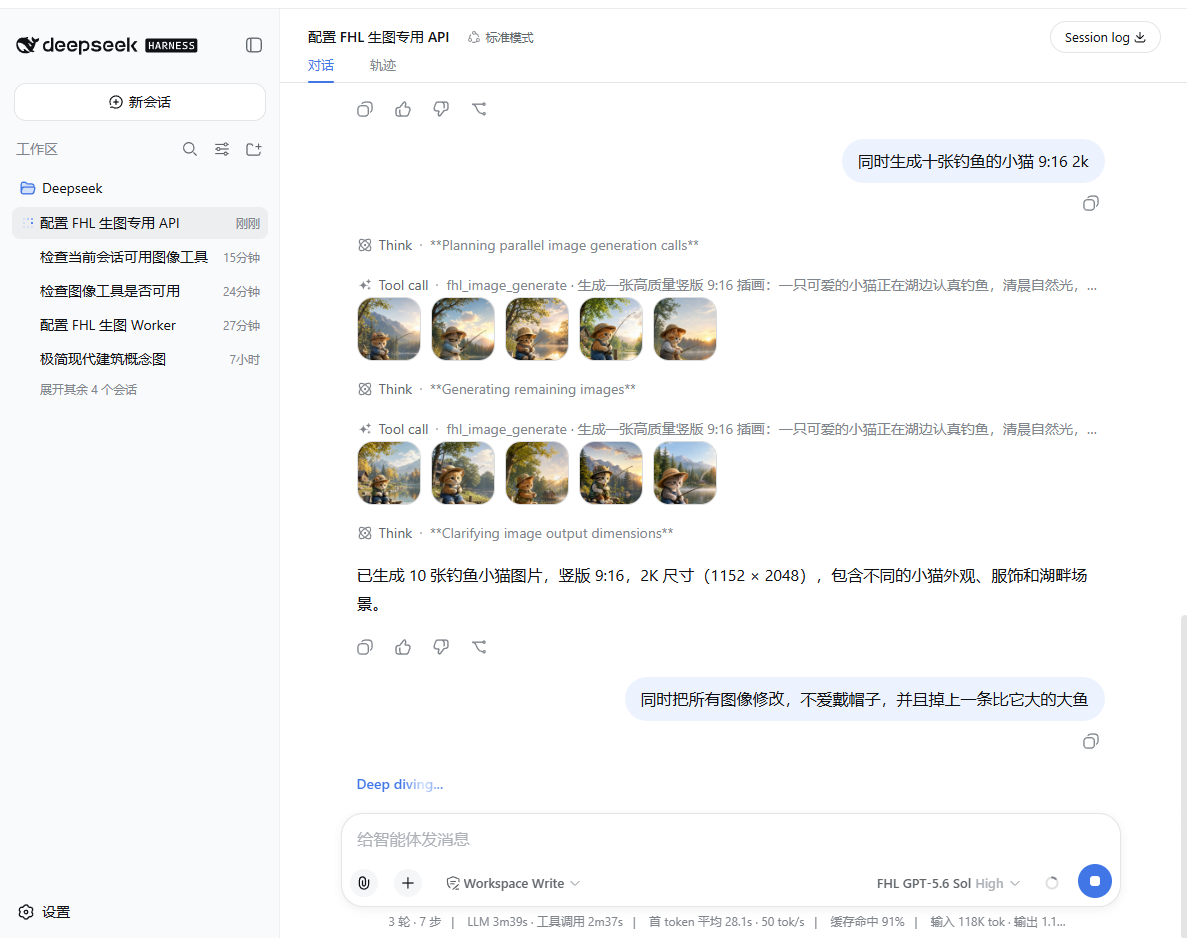
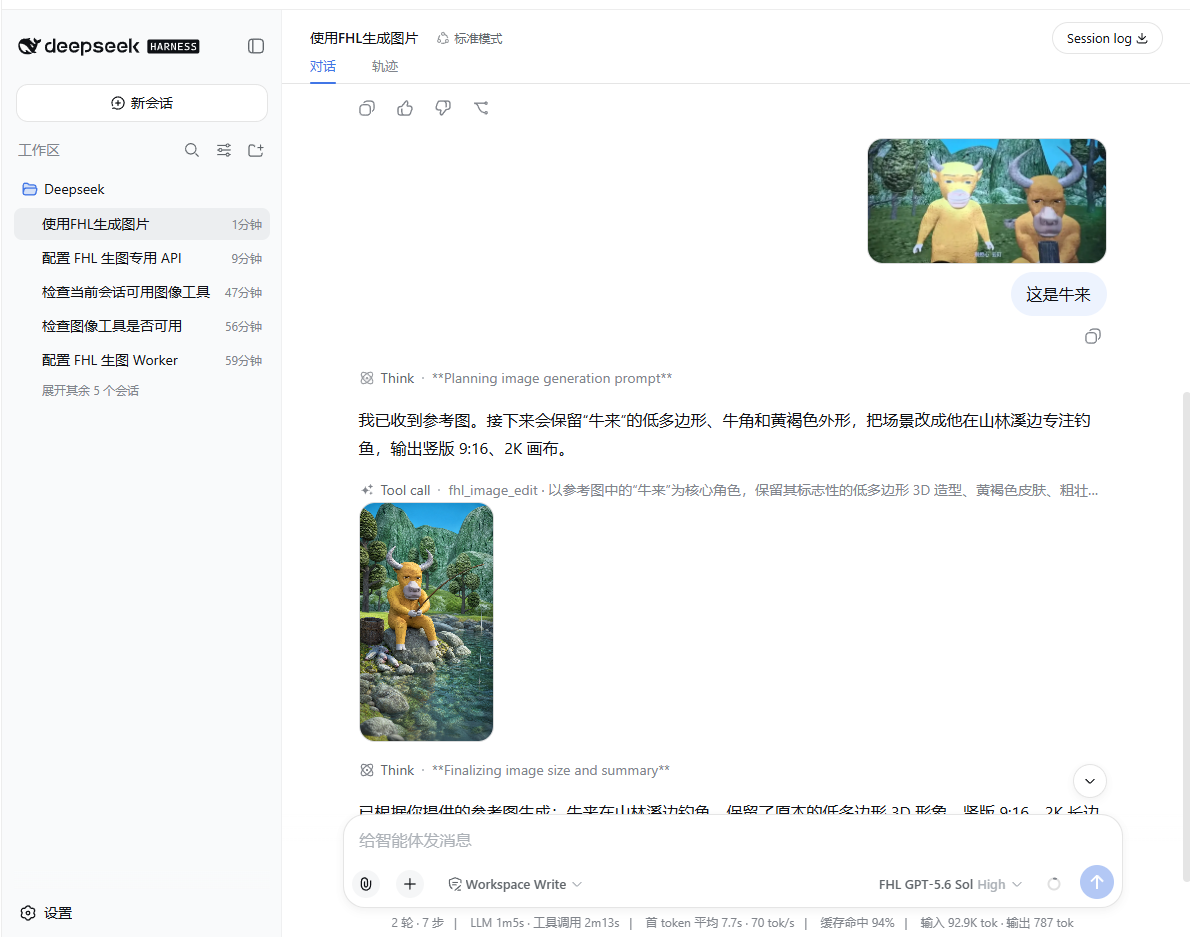
没有工具怎么办
- 确认插件在「插件」页面已安装且已启用。
- 完全退出并重新打开桌面 App(命令行版则停止旧 Host 后重启同一个 profile)。
- 新建会话,再检查三个工具。
旧进程可能仍然只暴露旧工具目录,修改插件或重新安装后必须重启。
如果安装报 incompatible-version,说明插件版本与当前 DSH 运行时不匹配:换用对应
版本的插件,而不是授予版本豁免。详见 故障排查。
详细文档
许可证与上游关系
本项目使用 MIT 许可证,是独立社区分发,不是官方 DeepSeek 产品。上游 DSH 源码、 whitecodex、FHL Harness 项目、Android 项目、已安装桌面版和旧数据均保持在项目外, 本项目不会自动修改它们。
English
Independent MIT-licensed DeepSeek Harness community bundle for FHL Images. It adds image generation, multi-reference editing, a bounded worker pool, and an Agent tool that can configure image workers from keys the user supplies in chat.
This is an independent community plugin. It is not an official DeepSeek or FHL product. DeepSeek Harness is in developer preview and plugin APIs may change between releases.
Version Compatibility
| Plugin | Target DSH | Status |
|---|---|---|
0.2.2 | Official desktop line 0.2.0-rc.2 | Current |
0.2.1 | Official desktop line 0.2.0-rc.2 | Superseded |
0.1.0 | Legacy 0.1.1-rc.1 line | Unsupported |
DSH 0.2 checks every @deepseek-ai/dsh* peer range against the running runtime
before installing a bundle and again at startup, so the declared ranges — not
the plugin version alone — decide whether installation is accepted.
Features
fhl_image_generate: one to nine image variations through the FHL Images API.fhl_image_edit: one to ten ordered reference images, with one to four independent edit variations.- Up to ten managed image workers addressed through the DSH credential provider
as
FHL_IMAGE_API_KEYthroughFHL_IMAGE_API_KEY_10. - Retryable worker cooldown, per-worker authentication isolation, cancellation, bounded responses, and credential redaction.
- Durable DSH attachment output so generated images appear in the conversation.
fhl_image_configure: configure one or more workers from a chat message.
Install
Download link:
https://github.com/supart/DSH-FHL-Image-Plugin/releases/download/v0.2.2/fhl-plugins-dsh-fhl-image-0.2.2.tgz
One-prompt install (recommended). Send this in your own DSH session:
Install this FHL image plugin bundle with the plugin manager tool:
https://github.com/supart/DSH-FHL-Image-Plugin/releases/download/v0.2.2/fhl-plugins-dsh-fhl-image-0.2.2.tgz

Then switch it on and tell me to fully quit and reopen the application.
Afterwards, start a new session and confirm the tool list contains
fhl_image_configure, fhl_image_generate and fhl_image_edit.
⚠️ Use the
.tgzdownload link above. The plugin manager accepts only a.tgz-suffixed http(s) URL, an absolute local path, a git source, or an npm package name — and for this project only the first two work. A repository URL or.../releases/latestis parsed as a git source, but this repository ships no build output (lib/is gitignored) and declares no install-time build script, somainwould point at a file that does not exist. The package is also not published to npm.
The install rewrites the desktop profile's package.json, pnpm-lock.yaml
and node_modules/, so it needs danger-full-access or a per-action approval.
Manual install via the GUI. Open the Plugins page in the sidebar, install the
.tgz by absolute path, switch the plugin on, fully quit and reopen the
application, then start a new session and confirm the three tools. The desktop
application owns its desktop profile, so do not run dsh plugin against it
from an external shell.
CLI profiles.
dsh plugin --profile fhl-image add /absolute/path/fhl-plugins-dsh-fhl-image-0.2.2.tgz
dsh --profile fhl-image --dump-config
dsh --profile fhl-image
See the install guide for verification criteria, upgrades, and removal.
Chat Configuration
I want to configure FHL image workers. Use fhl_image_configure first; do not call image tools.
For multiple workers, send one key per line. The Agent calls
fhl_image_configure, which stores the keys through the DSH credential provider
and returns only a masked worker count.
This mode is intentionally chat-based, so the original key is part of the user
message sent to the selected model and may be retained in the DSH session
history. A key that must never reach the model provider should be written into
the credential store directly under the reference name
(FHL_IMAGE_API_KEY, FHL_IMAGE_API_KEY_2, …). The apiKeyEnv config value is
only the prefix of those reference names; it is not an environment variable.
The plugin never includes key values in tool results, image artifacts, normal
diagnostics, or its own error messages.
Edit Sources
fhl_image_edit without sources resolves references in this order: an image
in the current user message, then the latest earlier user upload, then the
newest image this plugin produced earlier in the same session. The last one is
an in-memory, per-session cache and does not survive an application restart;
pass the attachmentId from a previous result explicitly in that case.
Real Usage Examples
Development
Requirements: Node.js >=22.19.0, pnpm 11, and the DSH 0.2.0-rc.2 package
line (the official desktop application ships it).
pnpm install --ignore-scripts
pnpm typecheck
pnpm test
pnpm build
pnpm pack:check
All tests use local mocks. They do not call FHL or another paid service. The
package has no install-time build script, so the published .tgz never requires
a build authorization.
API Defaults
- Base URL:
https://www.fhl.mom - Image model:
gpt-image-2 - Generation route:
/v1/images/generations - Edit route:
/v1/images/edits - Output: PNG
b64_json - Default quality policy: tested 2K matrix; 4K must be an explicit tool request
The DSH Agent chooses the tool. The plugin does not call the image API on startup and does not retry a completed successful image request.
Scope And Limitations
- This is a Host/Cordis bundle and does not ship a custom DSH settings-card UI; per-profile configuration goes through a patch layer.
- API key configuration is model-mediated chat configuration, or a direct write into the DSH credential store.
- The plugin does not download or execute arbitrary remote plugins.
License
MIT. See LICENSE.
Comments
Loading…
From the same category
DeepSeek Harness plugin for Reactive Resume: bridges your resumes and job applications into a Harness session over MCP.
★ 41.7k
↓ 242/wk
MIT
Aug 24, 2026
dsh plugin --profile web add dsh-plugin-reactive-resumeby Tencent
Let AI agents use your real, logged-in browser without interrupting your work. CLI + extension for browser automation across any shell-capable AI agent.
★ 8.9k
↓ 7.5k/wk
MIT
TypeScript
Oct 15, 2026
dsh plugin --profile terminal add @wxg-prc-cpg/browser-skill-dsh-pluginby yjh051108
dsh-routing-suite — injector + router-standard kit: install the runtime injector first, then the task-aware reasoning-mode router preset (measured P1-P23).
★ 7k
MIT
JavaScript
Sep 18, 2026
dsh plugin --profile web add @dsh-external/dsh-super-injectorby dsh-market
The plugin market inside DeepSeek Harness — browse, search, one-click install · DSH 可视化插件市场
★ 6.6k
↓ 160k/wk
MIT
TypeScript
Oct 14, 2026
dsh plugin --profile web add dshmarketby Q00
Agent OS: the agent gets smarter on its own. We just hold the line: Interview-gated, staged evaluation, budgeted evolution loop. MCP server, 14 runtimes: Claude Code, Codex CLI, Gemini CLI, OpenCode,
★ 6.2k
MIT
Python
Oct 14, 2026
by superdesigndev
OpenRouter for agent tools. Join community here: https://discord.gg/6mQYYfFMAn
★ 5.3k
NOASSERTION
Python
Oct 15, 2026
dsh plugin --profile web add treg-dsh