

dsh-todo-board
Manifest valid★ 4Cross-session TODO board as a draggable floating panel: tasks are grouped by working directory and reorderable by drag, each one carries a run mode (remind only, continue in the current session, or op
dsh-todo-board
A cross-session TODO board for DeepSeek Harness — hand the agent one task at a time, and it picks up the next one by itself.
DeepSeek Harness(DSH)的跨会话 TODO 板 —— 一次只派一件事,干完它自己去拿下一件。



它解决什么 / Why
让 AI 干完一件事之后,自己去待办板里找同一目录下还没做完的下一件继续干 —— 不用你盯着逐个验收,也不用一次性把一堆任务塞给它、结果每件都做得半吊子。
Let the agent finish one thing, then look up the next unfinished task in the same working directory and keep going. No babysitting each step, no dumping a pile of tasks on it at once and getting five half-done jobs back.
安装 / Install
dsh plugin --profile web add dsh-todo-board          # 发布到 npm 之后 / once published to npm
dsh plugin --profile web add <git-url-or-path>       # 或直接从仓库/目录安装 / or from a repo or local path
安装后重启 Profile(重新执行 dsh web)才会装载 —— 本插件是 host 组合里的一行,不是运行时热加载。
Restart the profile afterwards (dsh web again): the plugin is a row in the host composition, not a runtime hot-load.
卸载 / Uninstall:
dsh plugin --profile web remove dsh-todo-board
快速上手 / Quick start
-
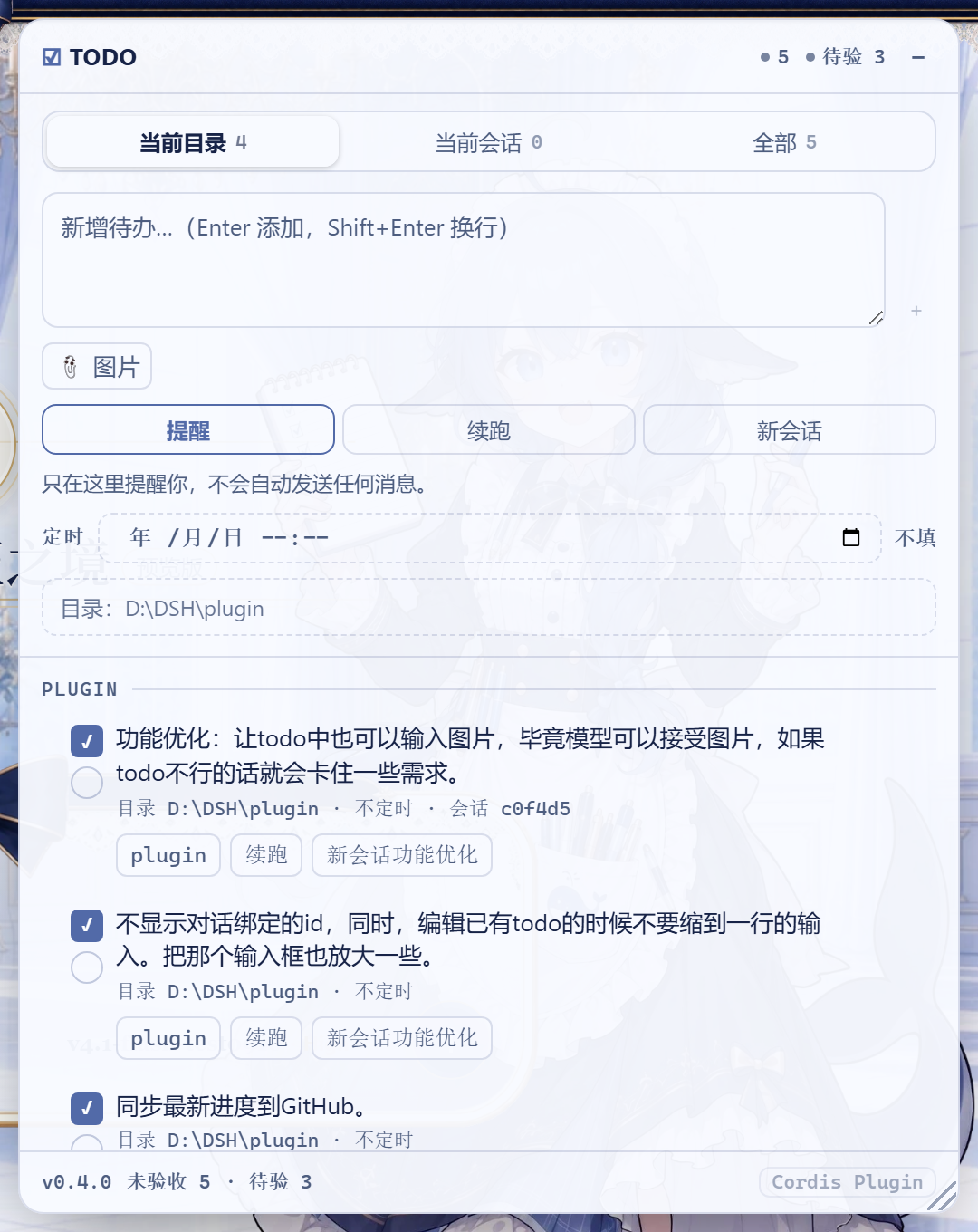
右上角出现浮窗,输入一条待办,选执行模式,点「添加」。
-
让 AI 去做这件事。它做完会调用
todo_board action=done给自己打左勾,然后查同目录下一条。 -
你验收后点右勾;底部「清理已验收」批量清掉。
-
Type a task into the floating panel, pick a run mode, hit add.
-
Let the agent work. When it finishes it calls
todo_board action=doneto tick its own box, then looks for the next task in the same directory. -
After you verify, tick the right-hand box; "清理已验收" clears the verified ones.
三档执行模式 / Run modes
每条待办在新增时必须选一档(默认「提醒」)。Each task carries exactly one mode, chosen when you add it.
| 模式 | 行为 | Behaviour |
|---|---|---|
| 提醒 | 不自动做任何事,等你在浮窗里点 ▶ | Nothing automatic; you press ▶ when you want it |
| 自动续跑 | AI 回合结束时,把同目录下一条待办注入当前会话继续跑 | At turn end, inject the next task in the same directory into the current session |
| 自动新会话 | AI 回合结束时,新建一个同目录会话并执行该待办 | At turn end, create a new session in the same directory and run the task there |
新增框里的「目录」一行决定这条待办归属哪个目录:它决定分组标题、决定「当前目录」筛选里能否看到它,也决定回合结束后由哪个会话来接续它。留空 = 跟随当前会话的工作目录(该框的提示文字会写明这一点)。
The composer's 目录 field decides which directory a task belongs to: it drives the group heading, whether the 当前目录 filter shows it, and which session picks it up at turn end. Empty means "follow the current session's working directory" — which is what the field's placeholder now says, instead of showing a dim path that looks like an already-filled value.
派发顺序 = 面板里从上到下的顺序。拖动行首 ⠿ 调整,顺序持久化。
Dispatch order is the panel's top-to-bottom order. Drag the ⠿ handle to change it; the order is persisted.
「自动新会话」第一次派发时创建会话,并把它绑定到这条待办上:之后 ▶ 或回合结束自动接续都复用同一个会话,不会一次运行开一个会话。绑定会话已不在(比如你把它删了)时,下一次派发才会再开一个新的;想手动换一个新会话,点行上的 会话 … ✕ 解绑即可。
A 自动新会话 task opens its session once and binds it to the row: later ▶ presses and turn-end handoffs reuse that same session instead of opening another. Only a dead binding (the session was removed) — or clicking the 会话 … ✕ chip to unbind — makes the next dispatch open a fresh one.
新会话会被登记进待办目录所属的工作区,侧栏里和手动开的会话一样归组(不是「未分组」)。
任务状态 / Task states
每条待办的状态由 host 从实时会话列表推导(不落盘,避免与实际时间戳不一致)。每一行都带且只带一个状态标签,因为需要靠推断才知道的状态等于看不见:
| 状态 | 面板标签 | 含义 |
|---|---|---|
| 未派发 | 未派发(稍暗) | 还没交给任何会话;▶ 可点 |
| 已派发 | 已派发(绿) | 已交给会话,目标会话还活着 |
| 进行中 | 进行中(蓝) | 目标会话此刻正在跑 |
| 已完成 | 已完成(绿字) | AI 打了左勾,或你打了右勾 |
| 目标会话丢失 | 目标会话丢失(红) | 派发时找不到目标会话,悬住了 |
强调程度分级,所以一屏普通待办不会吵:只有 进行中 和悬住的行显眼。已完成 的划线只跟验收走(那是你自己勾的),所以 AI 勾完但你没验收的行会显示「已完成」而依然清晰可读。
「悬住」的原因不止一种,面板会按实际原因显示:目标会话丢失(会话不在了)、图片被拒(模型不接受图片——会话是好的,别冤枉它)、建会话失败、预设解析失败、服务不可用。悬住的行 tooltip 里会写清原因和出路。
▶ 只能在「未派发」时点击。 已经派发过的待办重复派发只会产生重复工作,而无处可去的待办应该先改模式或换目录,而不是被塞给"当前恰好开着的"那个会话。
Every task's state is derived host-side from the live session list (never persisted, so it cannot drift from the timestamps it describes). Every row carries exactly one state chip, because a state you have to infer is a state you cannot see:
| State | Chip | Meaning |
|---|---|---|
| 未派发 pending | 未派发 (dimmed) | Never handed to a session; ▶ is live |
| 已派发 dispatched | 已派发 (green) | Handed over, target session still alive |
| 进行中 running | 进行中 (blue) | The target session is working on it right now |
| 已完成 done | 已完成 (green text) | The agent ticked it, or you verified it |
| 目标会话丢失 lost | 目标会话丢失 (red) | Dispatch found no session to land in |
Emphasis is graded, so a board of ordinary rows stays quiet: only 进行中 and a stuck row shout. The strikethrough stays tied to verification (your own tick), so an AI-finished row reads 已完成 while remaining legible.
A parked row is labelled by its actual cause — 目标会话丢失 (the session is gone), 图片被拒 (the model refuses images; the session is fine, so don't blame it), 建会话失败, 预设解析失败, 服务不可用. The row's tooltip names both the cause and the way out.
▶ only works while a task is 未派发. Re-dispatching a task that was already handed over just duplicates work, and a task with nowhere to go should be re-targeted rather than pushed into whatever session happens to be open.
目标会话丢失时不会静默卡死。 派发失败不会盖上「已派发」的戳(那会让调度器和回合结束钩子同时跳过它,从此再也不会重试)。取而代之的是记录 lostAt,并按退避自动重试:首次 1 分钟后,逐次翻倍,最多半小时一次。改执行模式、换目录、解绑会话都会立刻清掉这个标记让它重新排队。卡住的待办也不会挡住队列后面的条目。
任何派发失败都不会让 host 卡死。 所有失败路径(找不到会话、新建会话失败、preset 解析失败、图片被拒)都记下 lostAt 并进入退避。这不只是为了显示好看:一条永远「到期」却又从不留下任何状态戳的待办,会让调度器的重试链纯靠微任务自我循环——事件循环一次都跑不到,整个 host 冻结。tools/retry-loop.mjs 是这条性质的回归守卫,已并入 npm test。
A stranded task no longer dies silently. A failed dispatch no longer stamps dispatchedAt — that stamp means "already sent", and both the scheduler and the turn-end hook skip on it, so stamping it retired the task forever while it never actually ran. It records lostAt instead and retries with backoff: one minute, then doubling, capped at half an hour. Changing the mode, the directory, or the session binding clears the marker and re-queues it immediately. A stranded row never blocks the rows behind it.
And no dispatch failure can freeze the host. Every failure path (no session, session creation failed, preset resolution failed, images refused) records lostAt and backs off. That is not just cosmetic: a row that stays permanently "due" while recording no state stamp at all makes the scheduler's retry chain re-enter through microtasks alone — the event loop never runs and the whole host freezes. tools/retry-loop.mjs guards that property and runs as part of npm test.
图片附件 / Attached images
待办可以带图片(最多 4 张,PNG / JPG / WebP / GIF)。图片存进 DSH 的附件库,派发时作为真正的图片和提示词一起发给模型——不是把文件名写进文字里。
A task may carry images (up to 4; PNG / JPG / WebP / GIF). They are stored in DSH's attachment store and dispatched as real images alongside the prompt — not as filenames written into text.
-
新增框里点「📎 图片」选图,带缩略图预览,可逐张移除;行上显示缩略图,点击放大,✕ 移除单张。
-
上限、媒体类型与归一化都用 harness 自己那套(同一条
attachments.saveImage通路),不是本插件自己定的规则。 -
图片字节由本插件自己的
GET /dsh-todo-board/image?id=…提供:harness 自带的图片读取是会话作用域的(只认会话日志里引用过的附件),而待办的附件存在板上,所以板自己当权威——没被任何待办引用的 id 一律 404。 -
目标模型必须支持图片:派发前会查模型是否声明了
image。文本模型(如deepseek-v4-flash)会直接提示「目标会话的模型不接受图片输入」,而不是让适配器抛UNSUPPORTED_CONTENT。这是 DSH 的模型声明问题,不是插件的限制。 -
Pick images with the composer's 📎 button; the row shows thumbnails, click to enlarge, ✕ to drop one.
-
Limits, media types and normalization come from the harness' own attachment admission.
-
Bytes are served by this plugin's
GET /dsh-todo-board/image?id=…, because the shipped image route is session-scoped and would refuse an attachment no session log references. The board is the authority instead: an unreferenced id is a 404. -
The target model must accept images. Dispatch checks the model's declared modalities first and reports a clear message for a text-only model. That is a DSH model-declaration matter, not a plugin limit.
定时执行 / Scheduled execution
每条待办都可以带一个本地时间(YYYY-MM-DDTHH:mm,分钟精度)。到点之前这条待办不会被派发;到点之后 DSH 按它自己的模式执行它 —— 就像你此刻按了 ▶ 一样。
Any task may carry a local time (YYYY-MM-DDTHH:mm, minute precision). Before that minute the task is not dispatched; when it arrives, DSH runs it in its own mode, exactly as if you had pressed ▶ at that moment.
-
新增框里的「定时」一行用浏览器的时间选择器挑时间;留空 = 立即可执行。
-
列表里的待办也能改定时:没定时的行显示
🕓 不定时,点一下就地展开时间选择器;已定时的行点时间标签打开同一个选择器(带着当前时间),改完Enter/✓保存、Esc取消。标签旁的✕单独取消定时。 -
行上的定时标签显示时间,已到点会变黄。
-
每行只把同一件事说一遍:目录在标题下的小字里给完整路径(行下方的目录标签已去掉),定时在下方标签里(小字里的「定时 / 不定时」已去掉)。
-
提醒模式到点只弹一条桌面通知(需要浏览器通知权限),不会自动给模型发消息;自动续跑/自动新会话到点才真正派发。 -
定时只判一次:派发过(或被提醒过)就不再重复触发。错过的时间(DSH 当时没运行)会在下次启动后立刻补上。
-
时间用主机本地时区解释;面板存的就是你选的那一刻。
-
The composer's 定时 row uses the browser's own picker; empty means "runnable now".
-
A task already on the list can be rescheduled: an unscheduled row shows
🕓 不定时— click it to open a picker in place; a scheduled row opens the same picker seeded with its current time.Enter/✓saves,Esccancels, and the✕beside the chip clears the time. -
The row chip shows the time and turns yellow once due.
-
Each fact is stated once per row: the directory appears as a full path in the small print under the title (its chip is gone), the schedule lives in the chip below (its small-print duplicate is gone).
-
提醒mode only raises a desktop notification at that minute (browser permission required);自动续跑/自动新会话dispatch for real. -
A time fires once: a dispatched or reminded row never fires again. A time missed while DSH was not running fires on the next start.
-
Times are interpreted in the host machine's local zone — the board stores the instant you picked.
双勾选 / Two checkboxes
| 勾 | 谁勾 | 含义 |
|---|---|---|
| 左(方框) | 模型自己调 todo_board action=done,也可手点 | AI 已完成,等你验收 |
| 右(圆框) | 只有用户 | 已验收,真正了结 |
只有右勾才把待办从未完成列表里移除。系统提示段落明确禁止模型代勾右勾。
Only the right-hand box closes a task. The prompt section explicitly forbids the model from ticking it.
面板操作 / Panel
-
折叠为一行:标题栏右侧的
–把整板收成一行 ——TODO · 未完成数 · 下一条待办 · 待验 N,点这一行任意位置展开。平时挂着不占地方,扫一眼就知道还剩什么。 -
区块折叠:面板内部三个区块(新增待办 / 待办列表 / 面板)各自可折叠,点区块标题切换,
▾展开、▸已折叠。只留列表时最省空间;折叠状态记在localStorage,刷新后保持。 -
拖动 / 缩放:拖标题栏移动,右下角
◢缩放;位置与尺寸存进localStorage,刷新保留;双击标题栏或拖柄还原。窗口变窄时面板会自动收回视野内(含浏览器缩放),所以它不会被裁到屏幕外;窗口再拉宽时回到你放它的地方。就算位置是被更大的显示器存歪的,刷新一次即可恢复,不必手清localStorage。 -
筛选:当前目录 / 当前会话 / 全部,每段带未完成计数。
-
行内编辑:双击标题改名;点模式标签在 提醒 → 续跑 → 新会话 之间循环切换;点定时标签改时间(未定时的行显示
🕓 不定时,点它即可加上)。 -
多行输入:新增框自动增高(3 行起步,最高 180px),
Enter添加、Shift+Enter换行。 -
Cordis 入口:侧边栏底部的
Cordis Plugin按钮折起,入口移到本面板底部;点它打开原面板,面板出现在本面板正下方(右对齐、互不覆盖),拖动或缩放本面板时它会跟着走。找不到入口时按钮会变灰并给出提示。 -
Park as one line: the
–in the title bar collapses the whole board to a single line —TODO · open count · next task · 待验 N. Click anywhere on that line (or pressEnter/Space) to unfold; the line hugs its content instead of spanning the panel. It stays out of the way until you need it. -
Section folding: the composer, the list, and the footer each fold away from their own header (
▾open,▸folded); with only the list left the panel is at its smallest. The folded set is kept inlocalStorageacross reloads. -
Drag / resize: drag the title bar to move, the
◢corner to resize. Position and size persist inlocalStorage; double-click the title bar (or the grip) to reset. A narrower window pulls the panel back into view automatically (browser zoom included), so it can never be cropped off-screen, and widening returns it to where you put it. A layout stranded by a bigger monitor is recovered by a plain reload — nolocalStoragesurgery.
模型工具 / The todo_board tool
| action | 作用 |
|---|---|
list | 列出当前工作目录下未验收的待办(all: true 列全部目录),带 id、执行顺序与定时时间 |
add | 新增一条(追加到列表底部),可带 schedule |
done | 打左勾「AI 已完成」 |
reopen | 撤销左勾 |
note | 追加备注 |
schedule | 设置或取消某条待办的定时时间(schedule 传空字符串即取消) |
工具输出 schema 是 additionalProperties: false 的严格 JSON Schema,返回值只含声明过的字段。
数据 / Data
${DSH_HOME}/todo-board/board.json(默认 ~/.dsh/todo-board/board.json),原子写入(临时文件 + rename)。文件缺失时自动创建;读坏或写失败会在浮窗底部红字提示。待办板是全局的,面板内按目录分组。
会话生命周期 / Session lifecycle
「自动新会话」创建的会话走 ctx.root + agentPresets.mount():
- 归属应用根上下文而不是本插件行,因此停用 / 更新 / 卸载本插件不会连带拆掉这些会话;
setup里挂载 agent preset,与 api-proxy 创建会话的方式一致 —— 少了这一步新会话会没有工具和提示词;- 模型优先沿用来源会话的 provider/model,否则取
agentDefaultModel的当前选择。
结构 / Layout
package.json          dsh.bundle.patch → cordis.patch.yml;dsh.client.platform = web
cordis.patch.yml      向 profile 树 insert 一行 todo-board
lib/index.js          Host:板文件、todo_board 工具、回合结束钩子、提示词段落、/dsh-todo-board/api
client/client.js      Browser:shell.overlay 浮窗,走 fetch 访问上面的路由
tools/smoke.mjs       Host 半边自检(stub ctx + 临时 DSH_HOME)
tools/client-smoke.mjs  Browser 半边自检(极简 React hook 运行时 + DOM stub,折叠行为)
Host 半刻意不 import 任何 @deepseek-ai/*:profile 安装的插件从自身目录解析模块,harness 包在那里不可达,一切通过 ctx。
开发 / Development
npm run check   # node --check 两个入口
npm test        # host + client 两半 smoke 自检
改完客户端只需刷新页面;改 Host 半边需要重启 Profile。
已知限制 / Limitations
- 浮窗每 2.5s 轮询一次
/dsh-todo-board/api,不是推送。 - 待办板是全局单文件,不按目录分文件。
- 「自动新会话」需要待办上的目录路径可创建。
- 定时只支持单次的绝对时间,没有 cron / 周期规则;到点后「自动续跑」需要来源会话当时还在运行,否则按「没有可接续的活动会话」处理(改「自动新会话」可脱离会话存活)。
- Cordis 入口是 DOM 桥接:按该插件自己渲染的
data-cordis-badge属性定位,用带!important的规则覆盖它计算出的位置。DSH 升级若改了这套实现,桥接会失效——那时按钮会变灰并提示,不会静默失灵。
License
Compatibility
Versions
| Latest version | Published | Size |
|---|---|---|
| 0.4.1 | — | — |
| 0.5.0 | — | — |
| 0.6.1 | — | — |
| 0.11.2 | — | — |
| 0.11.3 | — | — |
| 0.11.4 | — | — |
| 0.12.0 | — | — |
| 0.13.1 | — | — |
| 0.13.4 | — | — |
| 0.13.5 | — | — |
Comments
Loading…
Similar plugins
by 1070296335-create
Session-based task board in the sidebar: drag sessions into todo/doing/review/done columns, create sessions with model and reasoning-effort selection, trash with restore, notes, export/import.
★ 7
MIT
JavaScript
Aug 17, 2026
dsh plugin --profile web add @dph/taskboardby LeslieWylie
Cross-session task queue with handoff notes: sessions and subagents push, claim, complete and cancel tasks on a shared file-backed queue, and leave a handoff summary for whoever picks up next.
★ 2
MIT
TypeScript
Aug 18, 2026
dsh plugin --profile web add dsh-task-relayby jing-hy
Project/task dual-mode workspaces for DSH: a task skips the workspace picker and gets a fresh scratch directory (D:\dsh_working\<name>-<timestamp>) per conversation, Codex-style; no-workspace sessions
★ 0
↓ 126/wk
MIT
JavaScript
Oct 11, 2026
dsh plugin --profile web add dsh-task-runnerby boogoo619
Workspace-wide sticky notes on an infinite canvas: notes are plain Markdown files, created manually, captured from conversations, or distilled by the AI, and can be handed back as context; ships 12 mo
★ 3
↓ 124/wk
MIT
JavaScript
Oct 2, 2026
dsh plugin --profile web add dsh-noteboardby liuyuguo99
Todo & task manager for DeepSeek Harness (dsh): list / board / calendar / gantt, subtasks, recurrence; the same data is exposed to the agent as tools and a slash command.
★ 0
MIT
JavaScript
Sep 21, 2026
dsh plugin --profile web add dsh-task-todoby He2way
DSH client plugin: flip the page over to a glass task console — live jobs, subagents, session and workspace cards, an infinite canvas that unrolls a card into its own controls, embedded web apps, and a conversation box that edits the canvas.
★ 0
MIT
JavaScript
Sep 22, 2026
dsh plugin --profile web add dsh-task-console