

dsh-moodboard
Identified★ 1Visual reference moodboard for DeepSeek Harness: drag-and-drop images with tags and notes, and pinned style guides the agent reads before it generates or restyles UI.
dsh-moodboard




A visual reference moodboard for DeepSeek Harness. Collect screenshots and inspiration images in the Web UI, tag and annotate them, pin the ones that define your app's visual language, and let the agent read that style guide before it generates or restyles UI.
Preview
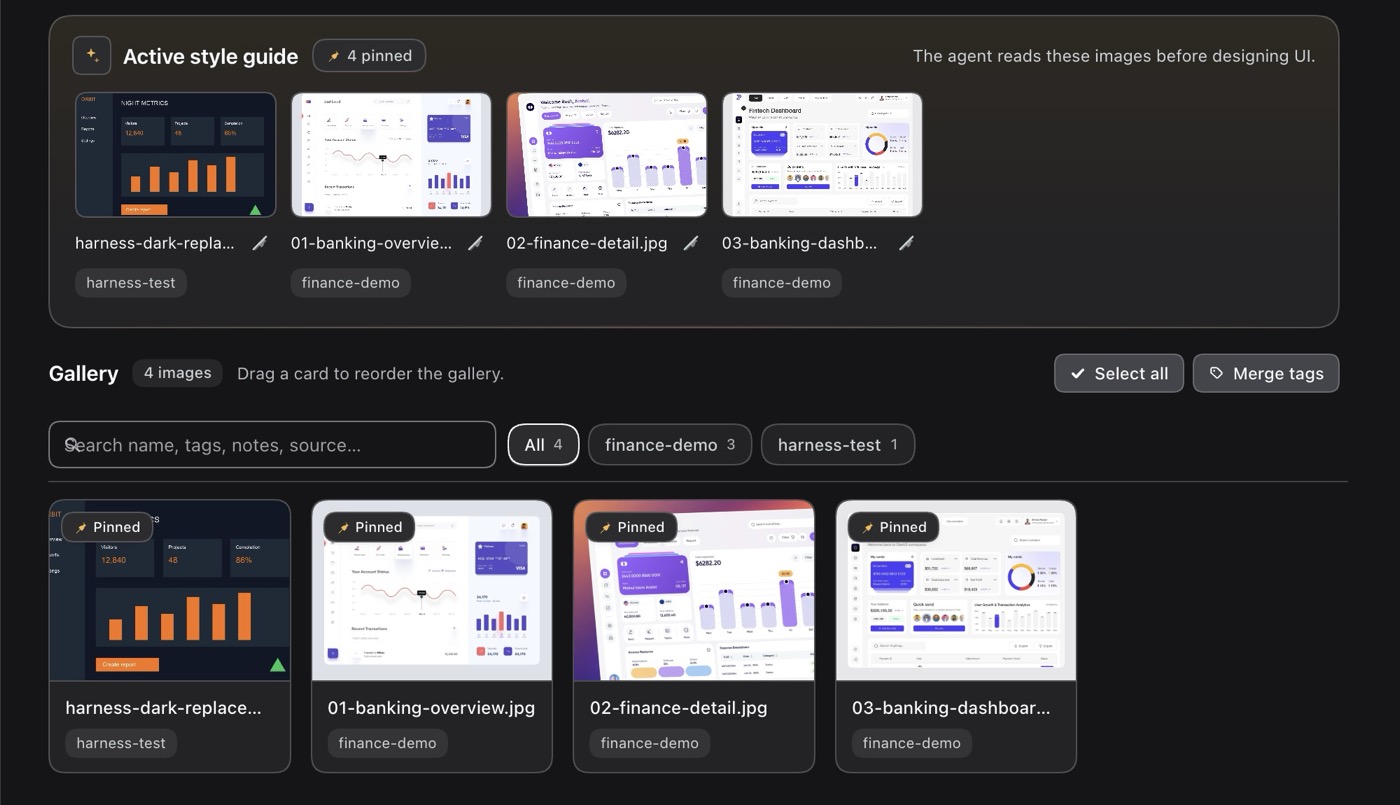
The screenshot below shows the plugin panel. For a local walkthrough after installation:
- Open Moodboard from the sidebar and add a reference image.
- Give it a tag and a note describing the styling you want, then pin it.
- Use the composer’s Moodboard button to add the reference directive to your draft. Review and send it when ready.
Install · Requirements · Agent API · Limits
Quick start
dsh plugin --profile web add dsh-moodboard
Restart the Harness (or refresh the Web UI). It adds a Moodboard entry to the sidebar.
More from this suite: Moodboard · Composer Predictions · Move to Workspace · Workspace Status · Prompt Rewrite
⭐ If this saves you a step, a star helps the next DSH user find it.
What you get
- Moodboard panel in the Web UI (sidebar icon): drag-and-drop, clipboard paste or file-picker upload; gallery of thumbnails with drag-to-reorder and multi-select bulk actions; tag filter; and an active style-guide strip.
- Modern, theme-aware UI: harness-native styling built entirely on DSH
theme tokens (surfaces, borders, text, buttons, inputs, links), with warm
accents kept to a subtle tint on the active style-guide surface and pinned
affordances. Includes a hero-style active style guide, sticky search/filter
toolbar, icon-only card actions with hover affordances, a floating
multi-select command bar, a sticky inspector footer and a bottom-sheet
inspector on narrow screens. Motion honours
prefers-reduced-motion; focus rings, live regions and labelled controls are preserved. - Capture: drop files from Finder, paste images with ⌘V/Ctrl+V, or use the Paste / Add images buttons. Every image is downscaled and stored durably.
- Organize: drag cards to set the gallery order, Shift/Cmd-click to select several, then pin, unpin, tag or remove them in one action.
- Find & inspect: search by name, tags, notes or source (combinable with the tag filter), and open any reference in a full-size lightbox with previous/next navigation and keyboard support.
- Keyboard & accessibility:
?opens the shortcuts list,/focuses search,⌘Aselects all,⌘⇧Ainverts,Alt+←/→reorders a focused card; controls keep visible focus rings, dialogs are labelled and keyboard-trapped, and selection/filter changes are announced through live status regions. - Tag smartness: autocomplete from the tags already on the board, and a tag manager that renames or merges a tag across every reference (with per-tag counts).
- Reuse: copy tags/notes/source from one reference and paste them into another.
- Per-image metadata: tags, notes, source URL, name — editable in a metadata panel, with pin / replace / remove actions.
- Active style guide: pin one or more references. The agent treats pinned images as the source of truth for typography, color, spacing, radius, iconography and component styling.
- Agent integration:
moodboardtool withactive/query/list/get/briefactions.activeandqueryreturn the reference images themselves as image content blocks, so the model analyses the actual pixels, plus tags, notes and source URLs.- A system-prompt section tells the agent the moodboard exists and to load it before designing UI.
- A compact Moodboard button in the composer inserts a directive into the draft that points the agent at the pinned references (it never sends).
- Persistence: metadata survives restarts in
<DSH_HOME>/moodboard/board.json; image bytes live in the durable attachment store (<DSH_HOME>/attachments/v1). Survives sessions, reloads and restarts.
Requirements
DeepSeek Harness >=0.2.1-rc.3 <0.3.0-0 with the Web profile (the Host half
needs attachments, tools, systemPrompt, webServer, and connection;
the browser half needs the slots and locale services).
Install
Renamed in 0.2.7. This plugin publishes as
dsh-moodboard. The earlier scoped name@stijnus/dsh-moodboardwas unpublished, so pins to it now return 404 — installdsh-moodboardand remove the old entry from your profile.
Unpublished earlier name aside, installation is one command:
From npm once a release is published, through the Plugins page or
plugin_manager install_bundle:
plugin_manager install_bundle target: "dsh-moodboard"
Manual equivalent (installs the package into a profile; the bundle still has to be enabled through the Plugins page):
dsh plugin --profile <profile> add dsh-moodboard
Reload the Web UI if the sidebar icon does not appear immediately.
Development
git clone https://github.com/Stijnus/dsh-moodboard.git
cd dsh-moodboard
npm test              # syntax checks + node:test smoke suite
npm run pack:check    # verify the published tarball file list
Install a local checkout into a profile for manual testing:
plugin_manager install_bundle target: "/absolute/path/to/dsh-moodboard"
The current build contract for the Host and Client halves is docs/CONTRACT.md.
Agent API
Tool moodboard
| action | meaning |
|---|---|
active (default) | pinned style guide, or the whole board when nothing is pinned. Returns metadata and the images themselves. |
query | filter by tag(s): tags: ["dark","typography"], match: "any" | "all". Returns matching images. |
list | metadata for every image, no image bytes (cheap overview). |
get | one image by id, with complete notes, tags and source URL. |
brief | text-only style brief (names, tags, notes, sources). |
includeImages: false suppresses image content blocks. Image content is capped
at 6 per call. active and query return abbreviated overviews with reference
IDs; use get for complete metadata, or list to find all reference IDs.
HTTP endpoints
The Host half serves one authenticated prefix route /moodboard (owner
session cookie required, same origin as the Web UI). The agent normally uses
the tool; these endpoints exist for the panel and for programmatic reads:
| Method + path | Purpose |
|---|---|
GET /moodboard/api/state | full board + guide summary |
POST /moodboard/api/images | upload { data, mediaType, name?, tags?, notes?, sourceUrl? } |
PATCH /moodboard/api/images/<id> | update name, tags, notes, sourceUrl, pinned, order |
POST /moodboard/api/images/<id>/replace | replace bytes, keep metadata |
DELETE /moodboard/api/images/<id> | remove |
POST /moodboard/api/images/reorder | set the complete gallery order { ids: [...] } |
POST /moodboard/api/images/bulk | bulk { ids, pinned?, addTags?, removeTags?, delete? } |
POST /moodboard/api/tags/merge | rename/merge { from, to } across the board |
GET /moodboard/api/active | active guide with tags/notes/sources/brief |
GET /moodboard/api/query?tag=…&match=any | tag lookup |
GET /moodboard/api/health | liveness + image count |
GET /moodboard/image/<id>?v=<attachmentId> | normalized image bytes for that revision |
All JSON responses use { ok: true, … } or
{ ok: false, error: { code, message } }.
Data
- Metadata:
<DSH_HOME>/moodboard/board.json(atomic writes; corrupt files are backed up asboard.corrupt-<timestamp>.jsonand the board starts empty). - Images: content-addressed in the harness attachment store. They are normalized on upload (WebP/JPEG, max edge 1600 px from the UI) and never deleted automatically; removing a board entry only removes the reference.
Visual language
Plugin chrome uses Harness theme tokens (--dsw-alias-*) so the panel follows
light/dark switching. Image thumbnails are the user's own artwork.
Limits
- Up to 200 images, 20 tags per image (48 chars each), 4000-char notes.
- Uploads are re-encoded client-side (max edge 1600 px, q 0.85) before upload.
- The HTTP endpoints are owner-authenticated for same-origin/browser callers.
A bash/curl caller has no session cookie — use the
moodboardtool instead.
Releases and provenance
Releases are tag-driven and published from GitHub Actions using npm
trusted publishing (OIDC). No long-lived npm token is stored in the
repository: npm only accepts a publish from this repository's release.yml
workflow at a tagged commit, and the short-lived credential minted for that run
cannot be reused elsewhere.
Every release from 0.1.1 onward is published with a provenance attestation
that binds the tarball to this repository, the workflow file, and the commit.
The npm package page shows the Provenance badge for those versions.
0.1.0 was published manually before the publisher was configured, so it has
no attestation.
Verify a release:
npm view dsh-moodboard@<version> dist.attestations
npm view dsh-moodboard@<version> dist.integrity
The attestation URL resolves to the signed in-toto statement; the matching Sigstore transparency-log entry is printed in the release workflow log. The one-time publisher setup, tag/release steps, and post-publish checks are in RELEASING.md; version history is in CHANGELOG.md.
License
MIT. Icon and panel screenshot: original artwork for this plugin.
If the saved board cannot be read or its recovery backup cannot be written, the plugin reports a storage error and blocks changes. Correct the storage problem and reload the plugin; existing board data is retained.
Comments
Loading…
Similar plugins
by Sal7one
Inspired By Calude design, A Deepseek harness Design Plugin!, Select elements, Use Open Router Vision agents, upload images and much more!! You can make quick changes with deepseek or invoke the Vision model with a prompt directly!
★ 3
MIT
JavaScript
Oct 22, 2026
dsh plugin --profile web add @sal7one/dsh-design-studioby CC19990113
Visual agent-orchestration canvas for DeepSeek Harness (dsh): compose LLM/MCP nodes into a DAG, run it from chat, and export the board as a DSH preset. Ships its own engine — install and run.
★ 3
↓ 118/wk
MIT
JavaScript
Oct 21, 2026
dsh plugin --profile web add dsh-plugin-agentflowby Cheyeah
DeepSeek Harness (DSH) Web 插件:拖放文件预览 / Markdown 渲染 / 文件盒 / 智能桌面截图(全屏·区域·窗口)/ 外挂识图与识别文本入库。完整开发历史含 21 个快照标签。
★ 0
NOASSERTION
JavaScript
Aug 28, 2026
dsh plugin --profile web add dsh-drop-previewby TonyKingWJX
DeepSeek Harness 模型与推理等级选择器 · 自绘滑杆 UI · 六种视觉主题
★ 4
↓ 378/wk
MIT
JavaScript
Oct 21, 2026
dsh plugin --profile web add dsh-thinking-barby Tasihi89
Visual conversation map for DeepSeek Harness — sessions as cards on a whiteboard: drag to arrange, double-click to chat, draw an edge to fork with injected context. ADHD-friendly spatial memory. · DSH
★ 103
MIT
JavaScript
Aug 23, 2026
dsh plugin --profile web add dsh-talk-mapby FuzzySoul
为DSH(DeepSeek Harness)量身打造的视觉插件,现已支持agent调用图片显示/Vision plugin for DSH(DeepSeek Harness),support Proactive Image Display.
★ 8
MIT
JavaScript
Aug 19, 2026
dsh plugin --profile web add dsh-free-vision