

dsh-quote-annotation
Identified★ 1Quote conversation text with optional annotations and send it to the model as structured reference context in DeepSeek Harness (DSH).
dsh-quote-annotation


Quote a passage from a DeepSeek Harness (DSH) conversation, attach an optional note, and send it with your next message as structured reference context. The quote never enters your draft and never shows up as raw JSON in Chat.
中文 · Changelog · Maintainer notes
Demo
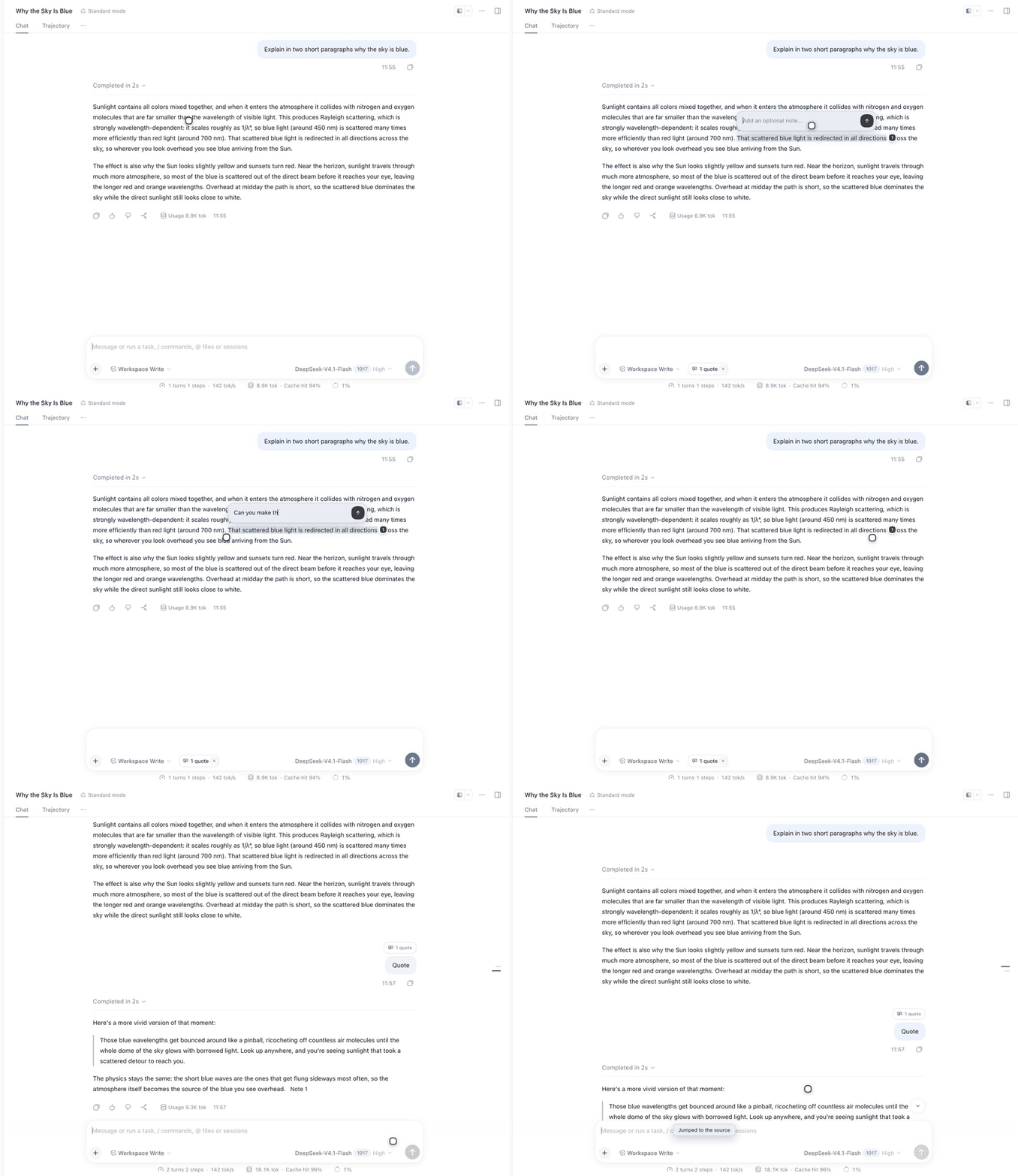
Select → Add to chat → optional note → send with the composer still empty. The reply keeps a Note N marker: hover to preview the quote, click to jump back to the source. The Chinese demo is here; step-by-step stills live in docs/media.

Features
- Select → Add to chat. A small action bar appears over the selection; the quote is stored immediately.
- Optional annotation. Add or edit a note at any time;
Enterconfirms,Shift+Enterinserts a newline. - Visible record. A pill in the composer tool row shows what is pending; after sending, a pill above your message keeps it.
- Quote-only messages. The send button enables even when the composer is empty.
- Inline markers. Once the turn completes, an
注释 Nmarker appears in the assistant reply at the paragraph that mentions the quote. Hover to preview, click to jump back to the source. - Survives restarts. Sent records are rebuilt from the Session log, so pills and markers come back after a Host restart.
- No editor mutation. No Lexical chips, no hidden text, no zero-width characters left in the model prompt.
- Zero dependencies, no build step. A plain ESM host plugin and a single browser module.
- Speaks your UI language. Copy follows the DSH UI locale: Chinese and English ship with the plugin, and every other language falls back to English. Switching the language in Settings updates the pills, cards, markers and composer live, without a reload.
UI copy is Chinese for a Chinese DSH UI (
添加到对话,N 条注释,注释 N) and English otherwise (Add to chat,N quotes,Note N).
How it works
selection ──► client ──► POST /dsh-quote-annotation/add
                              │
                              ▼
                       pending store (Host)
                              │
                    agent/pre-step (next user message)
                              │
                              ▼
        user message + hidden context message
        source.kind = "conversation-quote"
- The Host appends a hidden
user/messageafter the direct user message. Chat hides ordinary context nodes, so the raw reference block never renders in the conversation. source.referencescarries the quote, the optional annotation, and source metadata (nodeKey,anchorKey, turn, kind).GET /dsh-quote-annotation/sentbackfills sent records from the Session log, so historical quotes get pills after a Host restart.- Quote-only sends use an invisible draft token (
U+2063) to keep the native send button enabled. The Host strips it before the model step and falls back to(引用). - Sent pills sit above
[data-chat-flow-kind="user"][data-chat-turn=…]; the React tree is never overridden. - Inline markers are appended to the paragraph containing the quote (fallback: the last paragraph) and are idempotent per
turn:index.
Requirements
- DSH
0.2.xwith the Web client modules (DSH Desktop ordsh web), including@deepseek-ai/dsh-client-localefor the language switch. - A profile you can modify (
web,desktop, …). - Node.js
>=22.19.0for the Host.
Install
From GitHub:
dsh plugin --profile web add github:stickyfinger7/dsh-quote-annotation
Pin a release:
dsh plugin --profile web add github:stickyfinger7/dsh-quote-annotation#v1.1.0
DSH Desktop installs into its own profile:
dsh plugin --profile desktop add github:stickyfinger7/dsh-quote-annotation
From a local checkout (useful while developing):
git clone https://github.com/stickyfinger7/dsh-quote-annotation.git
dsh plugin --profile web add ./dsh-quote-annotation
Restart the profile once — Host routes and agent/pre-step load at Host startup — then refresh an open page.
Verify
- Select text in Chat → 添加到对话.
- Optionally annotate; press
Enter. - The composer tool row shows
N 条注释and the send button is enabled. - Send without typing anything else.
- A
N 条注释pill appears above the user message; click it to jump to the source. - After the reply completes,
注释 Nappears in the assistant text; hover to preview. - Chat must not render
## Quoted conversation references.
To disable the plugin without uninstalling, set disabled: true on the quote-annotation entry in the profile's cordis.patch.yml.
Configuration
Defaults live in cordis.patch.yml and can be overridden in the profile patch under the quote-annotation entry:
| Option | Default | Meaning |
|---|---|---|
maxQuotes | 8 | Pending quotes kept per session |
quoteMaxChars | 8000 | Max characters per quoted passage |
annotationMaxChars | 4000 | Max characters per annotation |
pendingTtlMs | 86400000 | How long a pending quote stays alive |
Compatibility
Tested with DSH 0.2.1-rc.3 (Web).
Client-side selectors:
[data-conversation-scroll][data-chat-flow-kind="user"][data-chat-turn][data-chat-node-key]/[data-chat-anchor-key]
Host-side contracts:
agent/pre-stepwaterfallctx.sessions.get(id).snapshotEvents()for historical backfill
It deliberately does not depend on conversation.draftContexts, native Lexical chips, or the reference pipeline.
Limitations
- Pending quotes live in Host memory; a Host restart clears them. Sent records are backfilled from the log.
- Sent-pill placement and inline markers are DOM enhancements: a DSH Chat DOM change may require selector updates.
- Inline marker placement is a paragraph heuristic. If the assistant paraphrases instead of quoting, the marker lands at the end of the reply.
- There is no native Lexical chip — that is the price of never mutating the editor.
- UI copy covers Chinese and English only; other locales fall back to English. Host-side copy follows the language of the last mutation, so a stale tab can briefly disagree.
Development
npm run check     # node --check on both sources
npm test          # node:test smoke tests
npx prettier@3 --write lib test
There is no install step: the plugin has no runtime or dev dependencies.
See AGENTS.md for the runtime model and the invariants to keep.
License
Comments
Loading…
From the same category
by awesome-dsh-plugin
A curated list of plugins for DeepSeek Harness (dsh) · DeepSeek Harness 插件精选列表
★ 21.6k
CC0-1.0
Python
Oct 30, 2026
by 0xsline
DeepSeek Harness (DSH) ecosystem: curated plugins, tools, and infrastructure from dsh-external/hub and the public dsh-plugin topic.
★ 1.3k
CC0-1.0
Python
Oct 16, 2026
by Yuuyuko-uu
DSH 鱼的记忆:给会话一份会淡忘的长期记忆,每条都带时间
★ 411
MIT
JavaScript
Oct 30, 2026
dsh plugin --profile web add dsh-fish-memoryby SAOS-3624
Scene-aware storyboard for DeepSeek Harness: 9-16 numbered cells with timestamps + transcript + an audio envelope, packed into ONE image (384 tokens). Two tools: video_storyboard and video_zoom.
★ 279
MIT
JavaScript
Oct 30, 2026
by pax-beehive
Open-source CLI, schemas, resolver, and DSH agent tools for DSH Plugin Hub
★ 276
MIT
TypeScript
Oct 20, 2026
by xiajiajun516
DeepSeek Harness (DSH) backup & restore plugin — export, import, migrate and sync your complete DSH configuration, plugins, MCP servers, skills and workspace. One-click migration to another machine.
★ 276
MIT
TypeScript
Oct 30, 2026
dsh plugin --profile web add dsh-config-manager