
dsh-status-lamp
Manifest validSidebar session-row status lamp: blue dot for idle, hollow ring for parked (manual, or automatic after 5 days without conversation), solid grey dot for archived; the first item under View options → Fi
Status light · dsh-status-lamp
A status light (status indicator) for the session rows in the DeepSeek Harness sidebar. It draws the two states DSH cannot show — idle and archived — and an on-hold state that is a subdivision of idle. Native pending / running / unread lamps are never touched.
English | 简体中文

What it adds
DSH leaves the leading cell empty for idle sessions, and archived rows also render blank there — so idle, on-hold and archived rows look identical. This plugin draws three dots instead:
- 🔵 idle — a session that is not doing anything
- ⚪ on hold — idle with intent: manually set aside, or automatically after 5 quiet days
- ⚫ archived — shown next to the relative time, because DSH hard-codes an empty leading cell for archived rows
An on-hold session is not running by definition. The moment it runs again — new conversation or a started task — the hold mark is released automatically, and the row shows the native running lamp (or, once it finishes, the blue idle dot).
The three lamps
| Lamp | State | Appears when | Renders in |
|---|---|---|---|
| 🔵 | Idle | native primary state is idle and the row is not on hold | leading cell |
| ⚪ | On hold | marked manually, or last activity ≥ 5 days ago; released as soon as the session runs | leading cell |
| ⚫ | Archived | the session is in DSH's archived set | left of the relative time |
Native pending / running / unread keep their own lamps. Holding never covers a running row, and running clears the mark.
State machine
GitHub renders the diagram below; npm shows it as a code block, where the static image docs/state-machine-en.png (light) or docs/state-machine-en-dark.png (dark) is the readable version.
stateDiagram-v2
    direction TB

    classDef idle fill:#e8f0fe,stroke:#2f6feb,stroke-width:1.5px,color:#1f2328
    classDef hold fill:#fdf4e3,stroke:#d99a2b,stroke-width:1.5px,color:#1f2328
    classDef archive fill:#eef0f3,stroke:#8b8f98,stroke-width:1.5px,color:#1f2328
    classDef native fill:#f5f7fb,stroke:#8fa3c8,stroke-width:1.5px,color:#1f2328

    state "Idle (blue dot)" as Idle
    state "Native (running / pending / unread)" as Native
    state "On hold (hollow ring)" as OnHold
    state "Archived (solid dot)" as Archived

    class Idle idle
    class OnHold hold
    class Archived archive
    class Native native

    Idle --> Native: 1 run / approval / unread
    OnHold --> Native: 1 same, clears mark
    Native --> Idle: 2 finished / read / approved
    Idle --> OnHold: 3 Hold (manual or >= 5 days)
    OnHold --> Idle: 4 Resume
    Idle --> Archived: 5 Archive
    OnHold --> Archived: 6 Archive (mark kept)
    Archived --> Idle: 7 Unarchive: no mark and < 5 days
    Archived --> OnHold: 8 Unarchive: mark or >= 5 days
    Archived --> Native: 9 Unarchive: running / unread
Colour key: blue = idle, amber = on hold, grey = archived, pale blue-grey = native states (the plugin stays out).
Decision order
1. native pending / plan review / question -> native amber dot   (plugin stays out)
2. native running / running subagents      -> native animated ring (plugin stays out)
3. native unread completion                -> native green dot   (plugin stays out)
4. manual hold mark                        -> ⚪ on hold
5. last activity >= 5 days, not woken      -> ⚪ on hold
6. everything else                         -> 🔵 idle
- "Last activity" is
updatedAtfrom DSH's session list snapshot; the plugin never reads conversation content. - Holding is a visual state. It does not stop a task and it does not keep a task from starting.
Install
Requires DSH 0.2.2-rc.1 or newer and the profile you actually run (desktop for the desktop app, web for the web build).
Option 1 — npm (recommended)
dsh plugin --profile desktop add dsh-status-lamp
Option 2 — GitHub (pin a commit for production)
dsh plugin --profile desktop add github:SpokAtom/dsh-status-lamp
# pinned: dsh plugin --profile desktop add github:SpokAtom/dsh-status-lamp#<commit>
Option 3 — a local directory (development)
dsh plugin --profile desktop add "D:\path\to\dsh-status-lamp"
Restart the app afterwards; the desktop profile reads its bundles at startup. The web build only needs a refresh.
Verify: the Plugins page lists a "Status light" entry, and idle session rows show a blue dot.
Usage
1. Hold and resume a session
- Right-click the session row, or click the
…button at its end. - Pick Hold session — the leading cell becomes a hollow grey ring.
- Pick Resume session from the same menu to restore the blue dot.
Resuming remembers when the session was woken, so the five-day rule does not immediately put it back on hold.
2. Automatic suspension after 5 quiet days
A session whose last activity is at least five days old turns into a hollow ring without a refresh — a background clock recomputes it.
The threshold is one constant; change it and reinstall:
// client.js
const AUTO_HOLD_MS = 5 * 24 * 60 * 60 * 1000; // 7 days: 7 * 24 * ...
3. A running session is never on hold
The hold is released as soon as DSH reports the session as running, so the mark can never disagree with reality. Running sessions do not offer the hold action in their menu at all.
4. Show or hide on-hold and archived sessions
- Click the sliders icon in the "Workspaces" header to open the view options.
- The Filter sessions section now holds exactly two checkboxes: On hold and Archived; the shipped filter rows are hidden.
- It is multi-select:
- neither checked → only the other sessions are listed (on-hold and archived rows are hidden);
- check On hold → on-hold rows are added back;
- check Archived → archived rows are added back;
- both checked → nothing is hidden.
- The choice is stored in browser local storage.
If a shipped filter was left in a non-default state (for example Only archived), opening this menu once resets it to All conversations so the checkboxes stay truthful.
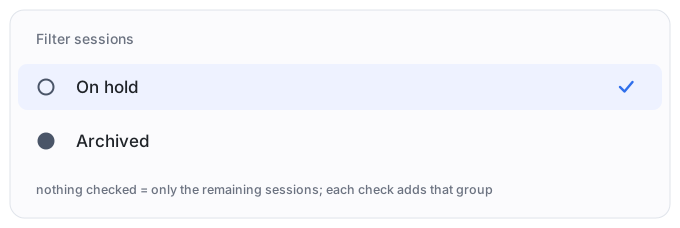
The switch lives in browser local storage and survives restarts.
5. Archived rows
Use DSH's own archive action (session row menu → Archive). Archived rows get the solid grey dot.
Data and configuration
| Data | Location | Shape |
|---|---|---|
| hold marks / wake timestamps | browser localStorage → dsh.status-lamp.hold.v1 | { "explicit": ["sessionId"], "awake": { "sessionId": timestamp } } |
| filter switch | browser localStorage → dsh.status-lamp.filter.v1 | hide or show |
| threshold | AUTO_HOLD_MS in client.js | reinstall after editing |
Clear every manual mark:
localStorage.removeItem('dsh.status-lamp.hold.v1')
Compatibility
- Developed and verified on DSH 0.2.2-rc.1 / rc.3,
desktopprofile, Windows. package.jsondeclares"engines": { "dsh": ">=0.2.2-rc.1" }.- Official extension points only:
sidebar.session.row.leading,sidebar.session.row.trailing, the session-row menu viactx.contextMenus, and the Clientlocale/contextMenus/sessionsservices. - The filter row is a DOM-level addition: DSH's view-options menu has no plugin slot, so the plugin clones a native row into the "Filter sessions" section while the menu is open. If a DSH upgrade changes that menu, the item disappears silently; the native UI is never broken.
Troubleshooting
| Symptom | Likely cause | Fix |
|---|---|---|
| No blue dots | plugin disabled, or added to another profile | check the Plugins page and the profile the app runs |
| A on hold session shows a blue dot | it is running or has unread results | expected: running releases suspension, native lamps win |
| No "Hide archived and on hold" item | the DSH version changed the menu structure | update the plugin; meanwhile use the native "Hide archived" filter |
| Ticking the switch changes nothing | no archived or on hold sessions in this view | expected |
| Manual marks gone after restart | site data cleared / different browser | marks are browser-local; automatic suspension is unaffected |
| An empty workspace header remains | the filter hides rows, not group headers | known limitation |
Permissions and privacy
- No network requests; nothing is uploaded.
- No writes to the Host or to session logs; archive membership and timestamps come from DSH's own list snapshot.
- Only browser local storage holds the hold marks and the filter switch.
Development
index.js               Host half (empty; keeps the bundle valid)
client.js              all logic: two row seats, hold menu action, filter row
cordis.patch.yml       bundle patch inserting the status-lamp row
locale/{zh,en}.json    Plugin Manager title and description
test/smoke.mjs         node:vm smoke test (npm test)
test/integration.mjs   jsdom integration test for the injected menu rows
docs/                  bilingual diagrams
DESIGN.md              design notes and trade-offs
Reinstall after editing client.js — a linked install does not hot-reload:
plugin_manager: remove_bundle dsh-status-lamp -> install_bundle "D:\dsh space\plugins\dsh-status-lamp"
License
MIT
Comments
Loading…
Similar plugins
Floating task-status lamp for DeepSeek Harness: green running, orange approval, blue question, grey idle — a borderless always-on-top window outside the DSH app.
★ 0
MIT
PowerShell
dsh plugin --profile web add dsh-float-lampPer-session status labels (built-in active/done/paused plus custom) shown in the sidebar, conversation header, and hover card, with editable colors.
★ 0
↓ 60/wk
dsh plugin --profile web add dsh-session-statusA status bar for the DSH sidebar. While a session runs, its row becomes a green card with a progress bar driven by an estimate of how long the turn will take (drifting dotted track), plus a live perce
★ 0
dsh plugin --profile web add dsh-session-bar把左侧会话列表中正在等待审批(待审核)的那一行用红色呼吸动画高亮。
★ 0
dsh plugin --profile web add dsh-pending-review-glowby WhatCannotBeSaid
DSH plugin: colors sidebar session rows by their official status in an Evangelion-flavored palette - orange = pending interaction, red = selected session, purple = finished but unviewed, rainbow title = pinned.
★ 0
MIT
JavaScript
Oct 20, 2026
dsh plugin --profile web add dsh-session-eva-statusby devzer0o0
Replaces the colored status dot in each DSH sidebar session row with the Grok Bot avatar, whose own expressions show the session's state: idle, thinking, streaming, running tools, waiting for your app
★ 2
NOASSERTION
JavaScript
Nov 10, 2026
dsh plugin --profile web add dsh-grok-buddy