
dsh-obsidian-bridge
IdentifiedConnect a local Obsidian vault to DeepSeek Harness: local Markdown indexing with keyword search by default and optional hybrid or semantic search through `obsidian_*` agent tools (hybrid and semantic
Obsidian Vault Studio
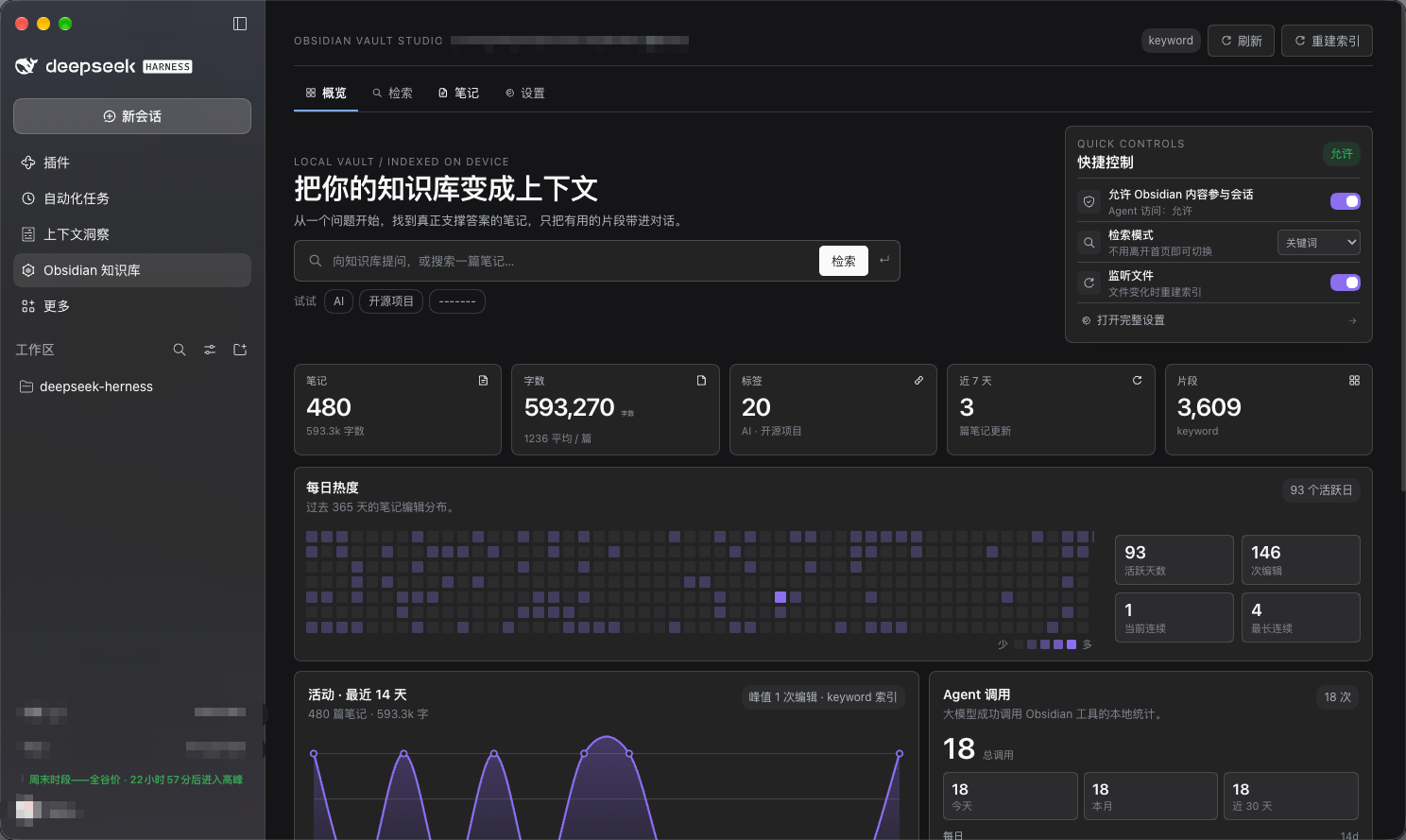
Connect a local Obsidian vault to DeepSeek Harness. After you grant access, the model can search your notes, read relevant passages, build grounded context, and create or append notes through a proposal-first workflow. The index, embeddings, and statistics stay on your machine.


What it does
- Local index — parses Markdown, frontmatter, tags, headings, and modification times without uploading the whole vault.
- Practical retrieval — keyword search by default, with English prefix matching and live results; optional OpenAI-compatible or Ollama embeddings enable hybrid and semantic modes.
- Conversation access switch — model access is off by default. When off, every
obsidian_*Agent tool is denied; your own search and note browsing keep working. - Safe writes — the model can only propose a create or append. Nothing is written until you approve; writes are backed up and can be undone. There are no delete, move, rename, or overwrite tools.
- Dashboard — note, word, tag, and chunk counts; a daily heatmap; a 14-day activity curve; Agent call counters; recent notes and tag distribution.
- Local by design — index, vectors, settings, and usage counters all stay on your machine.
Install
Requirements
- DeepSeek Harness 0.2.x desktop, with third-party plugin installation enabled
- A local Obsidian vault
Install source
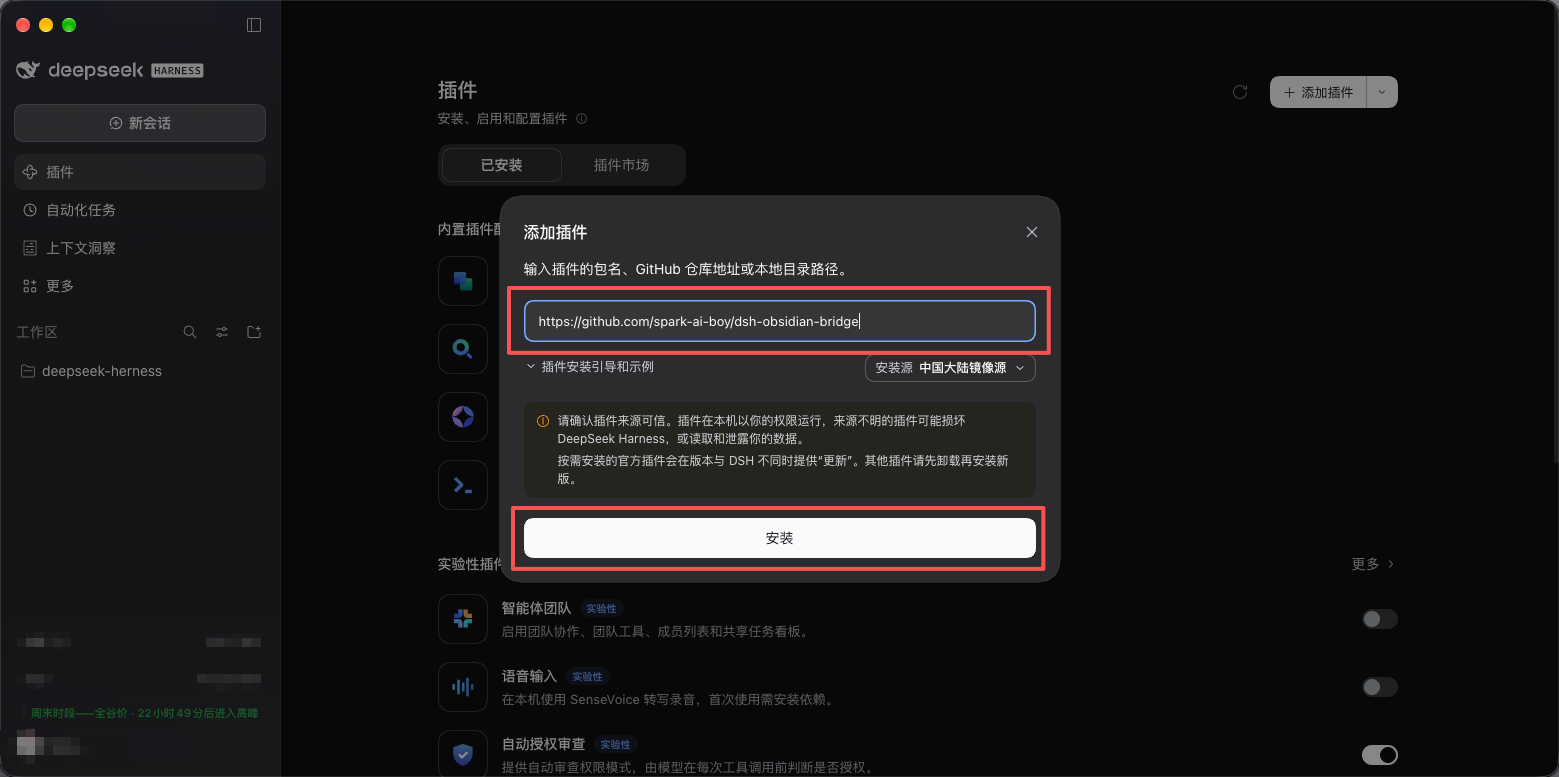
DeepSeek Harness can install the plugin from either a GitHub repository or an npm package:
- GitHub repository:
https://github.com/spark-ai-boy/dsh-obsidian-bridge - npm package:
dsh-obsidian-bridge
Steps
- Open Plugins in the DeepSeek Harness sidebar.
- Choose Add plugin → Install third-party plugin.
- Enter either the GitHub repository URL or the npm package name above, install it, then click Enable.
- Open Obsidian Vault Studio in the sidebar.
First run
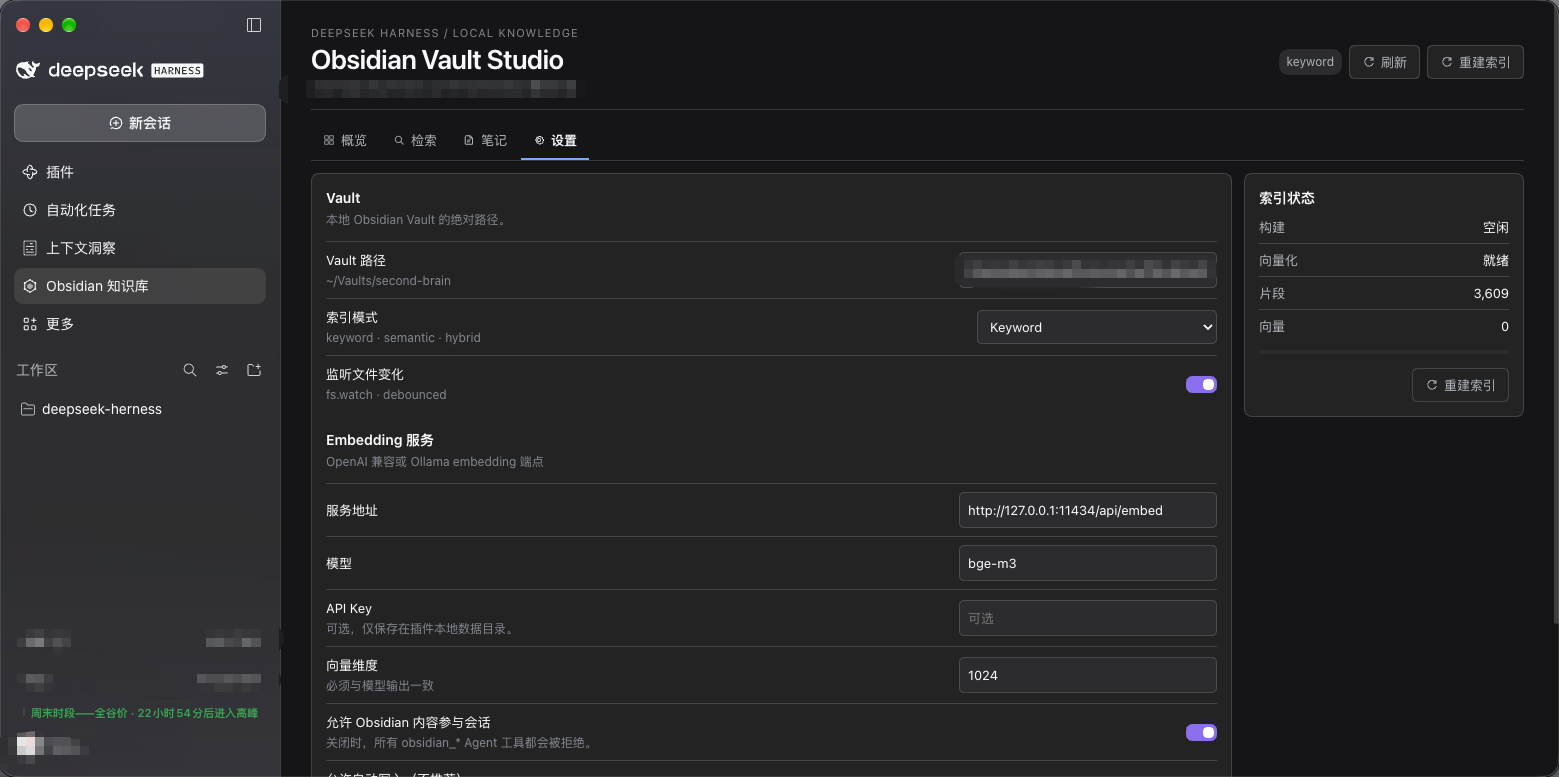
- Open Settings, choose your vault path, and click Save.
- Click Rebuild index. The dashboard and search become available once the first index completes.
- Retrieval mode defaults to Keyword; no extra setup is needed.
- For semantic or hybrid search, enter an OpenAI-compatible or Ollama embedding endpoint, model, and dimensions in Settings. Click Test connection, save, then rebuild the index.
- The Allow vault context in conversations switch on the dashboard is off by default. Turn it on when you want the Agent to use the vault; when off, every
obsidian_*tool call is denied.
Usage
Dashboard
The home page shows note, word, tag, 7-day update, and chunk counts; a 365-day heatmap; a 14-day activity curve; Agent call counters; recent notes; and tag distribution.
Search
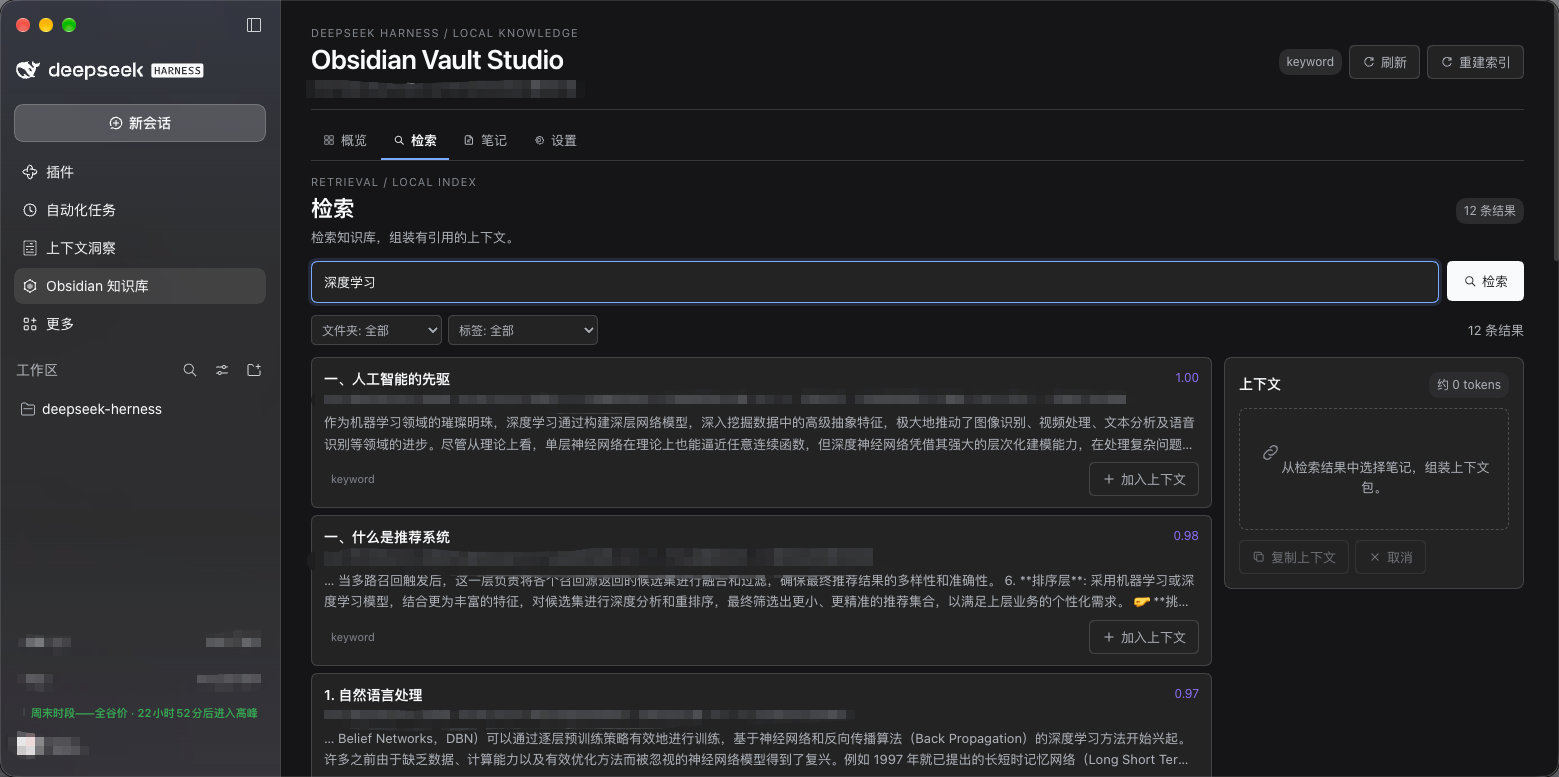
Type a keyword or prefix on the Search page; results update as you type. Filter by folder or tag, add passages to the Context tray, then copy a source-attributed context packet or let the Agent search through tools.
Notes
Browse and read notes on the Notes page. Model writes follow a proposal flow:
- The model proposes new or appended content.
- The page shows the target path and a diff.
- Nothing is written until you approve.
- Writes can be undone and are backed up.
Use in a conversation
- Turn on Allow vault context in conversations on the dashboard.
- Ask the model to search your notes, for example:
- "Find my notes about RAG and cite the sources."
- "Append today's meeting notes to the project note."
- Only passages actually retrieved or read enter the conversation; the whole vault is never injected automatically.
- Turn the access switch off when you no longer need it. Later tool calls will be denied.
Agent tools
| Tool | Purpose |
|---|---|
obsidian_search | Search note passages by mode, folder, or tag |
obsidian_read_note | Read a full note |
obsidian_list_notes | List or filter notes |
obsidian_stats | Read index, statistics, and workspace status |
obsidian_propose_write | Create a create/append proposal without writing |
obsidian_apply_write | Apply a proposal after your approval |
obsidian_undo_write | Undo a write from this session |
obsidian_index_status | Check indexing and embedding progress |
The plugin has no delete, move, rename, or overwrite tools.
Privacy and safety
- The index, vectors, settings, and usage counters are local. The plugin contains no telemetry and does not upload the vault.
- When Allow vault context in conversations is off, every
obsidian_*Agent tool is denied before execution. Vault Studio's own search and browsing remain available. - The system prompt tells the model to report Obsidian tool failures and never bypass Vault Studio or the access switch through generic file tools.
- The access switch only gates
obsidian_*tools. For a hard boundary, also check DeepSeek Harness workspace/sandbox permissions so genericread,grep, andbashcannot reach the vault path. - Writes require approval, keep backups, and can be undone. The plugin never deletes or overwrites notes automatically.
License
Comments
Loading…
Similar plugins
by mingzeng21
Connect DeepSeek Harness (dsh) to a local Obsidian vault: search, read, write, move, and trash notes.
★ 10
↓ 1k/wk
MIT
TypeScript
Aug 23, 2026
dsh plugin --profile web add dsh-obsidianby zhaoxuejie
让 DeepSeek Harness agent 把本地 Obsidian 知识库当作长期记忆与工作台:全文/语义检索、会话记忆注入、一键捕获、巡检管家(只建议不擅改)
★ 1
MIT
JavaScript
Sep 7, 2026
dsh plugin --profile web add dsh-plugin-vault-memoryby bufan528
Obsidian-compatible long-term memory vault plugin for DeepSeek Harness (DSH): local Markdown storage, sidebar management page, token-budgeted recall, durable journal outbox.
★ 7
↓ 2.2k/wk
MIT
TypeScript
Oct 29, 2026
dsh plugin --profile web add dsh-longterm-memoryby chenkezhen480
Semantic long-term memory for DeepSeek Harness: embedding-based retrieval over a persistent cross-session memory store, with model-facing tools, proactive per-question recall, automatic conversation summarization, and auto-selected embedding provider (apiKey present → API, otherwise local).
★ 0
Apache-2.0
TypeScript
Aug 17, 2026
dsh plugin --profile web add dsh-plugin-semantic-memoryby M1r0er
Turns a local Markdown vault into two folders the user picks in Settings: a knowledge folder DSH writes notes into, and a memory folder used as the agent's long-term memory with per-turn recall and en
★ 0
JavaScript
Oct 24, 2026
dsh plugin --profile web add dsh-inkvaultby 173787247
DeepSeek Harness WSL bridge to a Windows Obsidian vault (status/open/read/write/search).
★ 1
MIT
JavaScript
Nov 5, 2026
dsh plugin --profile web add dsh-wsl-obsidian