

dsh-settings-sidebar-organizer
Manifest validDrag and drop to group and arrange the DSH settings sidebar.


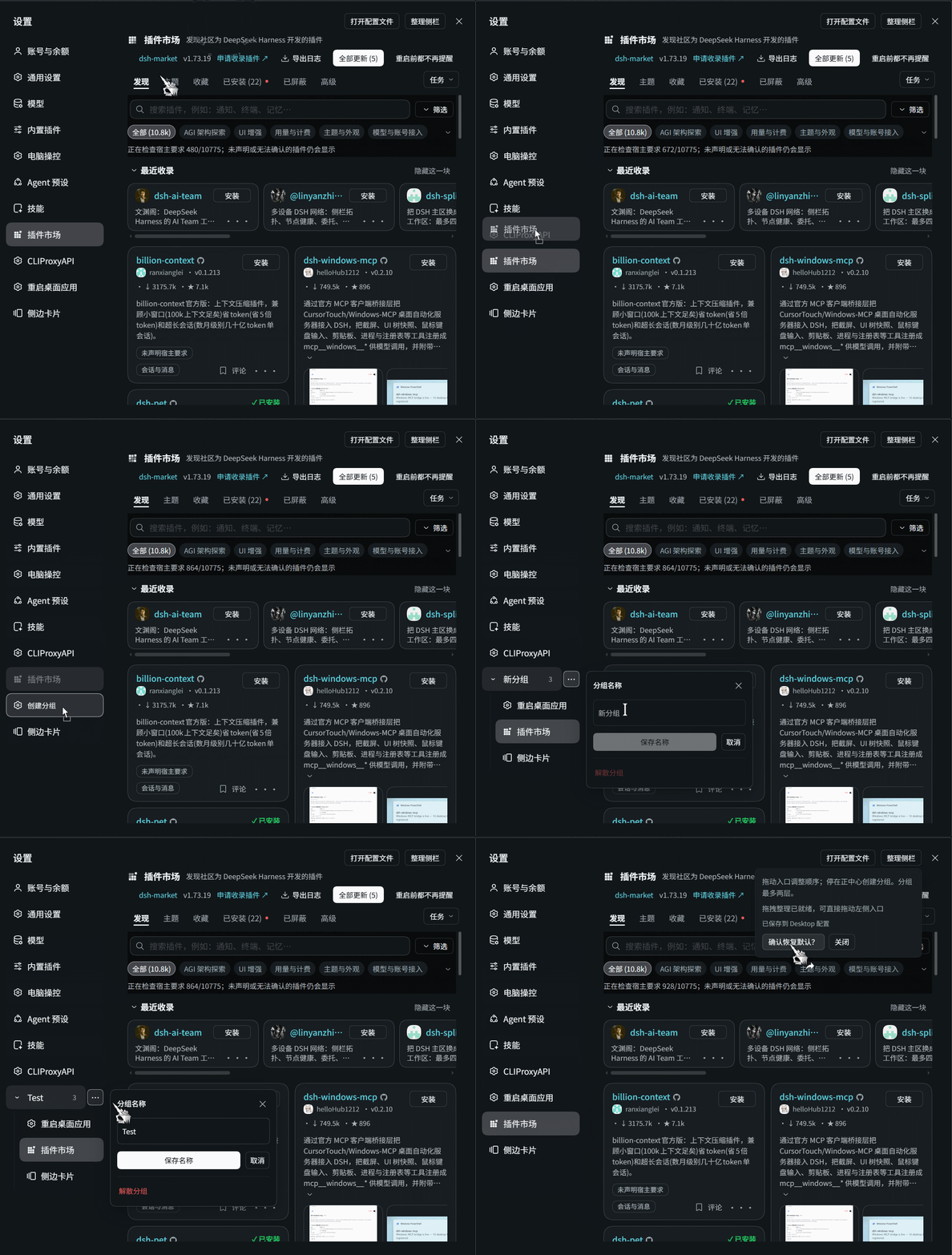
Organize DSH's settings sidebar with drag-and-drop. Put frequently used pages first, collect related entries into named groups, and keep your layout between sessions.
- Reorder entries: drag to an edge or the gap between entries.
- Create collapsible groups: drop an entry in the center of another; move entries into, out of, or between groups.
- Rename without crowding the sidebar: use the group's ⋯ popup to rename or dissolve it.
- Save your layout: order, group membership, names, and expanded state are stored through DSH's settings.
- Follow DSH's appearance: theme-aware controls and Chinese/English UI that follows the application language.
Installation
Host requirement: >=0.2.2-rc.1. Verified on DSH 0.2.2-rc.1 and 0.2.2-rc.3; other versions have not been verified.
npm
For DSH Desktop's desktop profile:
dsh plugin --profile desktop add dsh-settings-sidebar-organizer
For the default CLI profile:
dsh plugin add dsh-settings-sidebar-organizer
GitHub
For DSH Desktop's desktop profile:
dsh plugin --profile desktop add github:Six6stRINgs/dsh-settings-sidebar-organizer
For the default CLI profile:
dsh plugin add github:Six6stRINgs/dsh-settings-sidebar-organizer
If you use a different named profile, replace desktop with its name. These commands register the bundle with DSH; a plain npm install is not a substitute.
Usage
| Goal | Action |
|---|---|
| Reorder | Drop at an entry's edge or an insertion gap. |
| Create a group | Drop an entry in the center of another entry. |
| Add to a group | Drop onto a group or one of its children. |
| Expand or collapse | Click the group heading. |
| Rename | Click ⋯, edit Group name, then choose Save name or press Enter. |
| Cancel editing | Choose Cancel, press Escape, or click outside the popup. Blur alone never saves. |
| Dissolve a group | Choose Dissolve group in ⋯. Its entries return to the top level. |
| Move a child out | Right-click it and choose Move to root. |
| Reset | Open Organize sidebar, choose Reset layout, and confirm. |
Groups have two levels at most: a group can contain entries, not other groups. Keyboard alternatives are Alt+Up/Down to reorder and Alt+Left to move a child to the top level.
Changing DSH's language translates controls, not your group names or unsaved drafts. Read-only settings still allow opening pages and locally expanding groups, but cannot save layout changes.
Compatibility and troubleshooting
- Supported version: DSH
>=0.2.2-rc.1(verified on0.2.2-rc.1and0.2.2-rc.3; other versions have not been verified). - Dragging does not respond: check for conflicts with other sidebar or drag-enhancement plugins.
- Changes are not saved: open Organize sidebar and check for read-only or save-error messages.
- Need help? Open an issue with your DSH version, the status message, and steps to reproduce the problem.
How it works
A version-specific adapter decorates the existing settings component while keeping native pages and actions. Layout is recorded by stable entry IDs and saved through DSH's Host settings transport with revision checks, not by directly editing profile files. The group editor is rendered into the existing settings dialog, outside the sidebar's scroll area, so it does not move entries or get clipped by the sidebar.
Development
git clone https://github.com/Six6stRINgs/dsh-settings-sidebar-organizer.git
cd dsh-settings-sidebar-organizer
npm install --ignore-scripts --no-package-lock
npm run check
lib/      Installable Host entry and generated Client bundle
src/      Internal source modules and build script
test/     Automated tests
assets/   Logo and showcase GIF
locale/   Plugin display translations
Run npm run build after source changes. Development dependencies are used only for testing and are not included in the distributed plugin. Automated tests do not replace visual testing in DSH.
License
MIT.
Comments
Loading…
Similar plugins
侧栏面板自由拖动:长按拖到任意位置排序,拖进「更多」即收纳、拖出即放回 | Sidebar panel organizer for DeepSeek Harness
★ 0
MIT
JavaScript
dsh plugin --profile web add dsh-panel-tidyby var-lin
Drag-and-drop reordering, official/third-party dividers and a stash panel for the buttons DSH renders in the sidebar, the sidebar footer, the conversation tabs, the composer dock and Settings. Only di
★ 1
MIT
TypeScript
Nov 6, 2026
dsh plugin --profile web add dsh-plugin-layout-organizerby HighToward
DSH左上角插件侧栏管理,可以把面板入口收进一级分类/二级分类,也可以把某个入口隐藏或显示。
★ 2
MIT
JavaScript
Nov 11, 2026
dsh plugin --profile web add dsh-plugins-sidebar-managerby LUMIAO9527
Reorganize the home sidebar entries into groups above and below the workspace, toggle each installed plugin entry, and save every change immediately.
★ 0
MIT
JavaScript
Nov 7, 2026
dsh plugin --profile web add dsh-focusby xishuai-zero
Drag-reorders the dsh sidebar panel entries and the conversation view tabs, and moves an entry between the sidebar and the tab strip as a real tab; order and moves are saved locally and survive restar
★ 0
MIT
JavaScript
Oct 30, 2026
dsh plugin --profile web add dsh-entry-organizerby yingqi-studio
Keep three plugin panels in the DSH sidebar, drag to reorder them, and collect the rest into a More menu. 侧栏插件面板压缩:默认三个,可拖动排序,其余收进更多。
★ 0
MIT
JavaScript
Nov 3, 2026
dsh plugin --profile web add dsh-panel-compact