

dsh-doc-rail
Manifest validRight-side document rail for the DeepSeek Harness web GUI — Markdown/plain-text viewer with light & deep-navy themes, drag-resize, recent files, auto-sync. (Chinese: dsh web right-side document panel, supports light/deep-navy themes, drag-resize, recent files, auto-sync)
dsh-doc-rail
A resizable right-side document rail for the DeepSeek Harness web GUI
(dsh web). It shows a Markdown or plain-text file beside your conversation —
the natural home for a session handover note — with:
- Light (warm paper) and deep-navy dark themes, switchable in the panel;
- drag-to-resize width (double-click the left edge to reset to 400 px);
- open any local
.md/.txtpath (paste a path, or pick from Recent); - auto-sync: the file is re-read every 4 s, so saves show up by themselves;
- appearance, width, last-opened file and recent history are kept in process memory (survive page refreshes; reset on restart, like the plugin itself).
The panel mounts in the frame-wide shell.overlay seat — additive only, it
never replaces shipped UI.
Screenshots
Sample-content previews (no real documents), light and dark themes:
| Light theme | Dark theme |
|---|---|
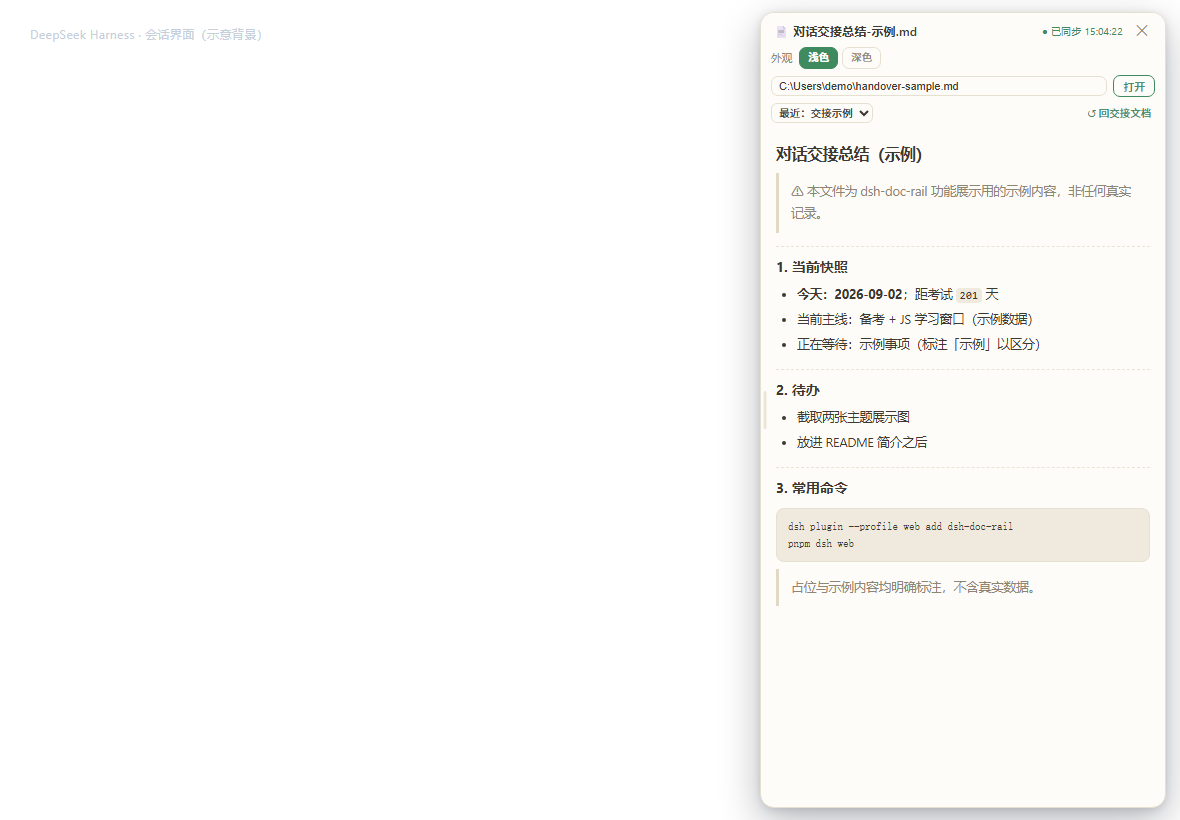 | 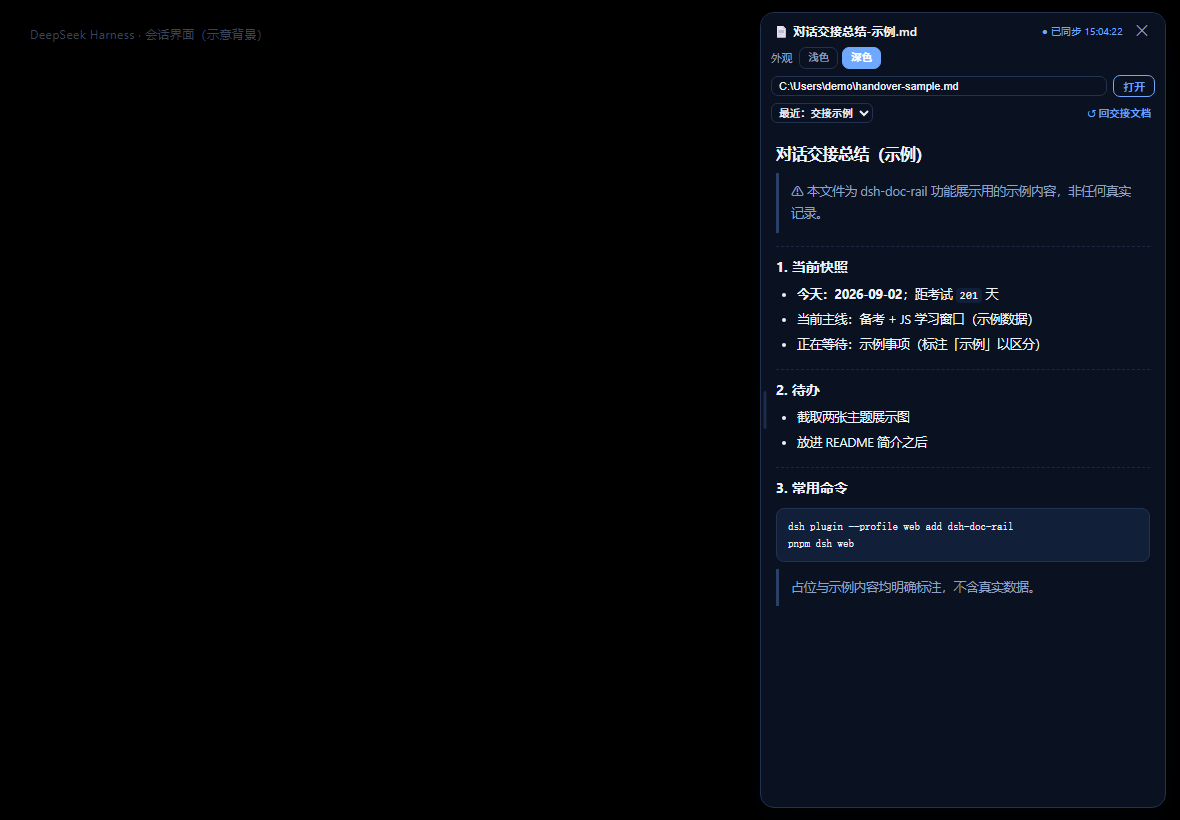 |
Requirements
- DeepSeek Harness running from a source checkout or release that composes the
web GUI profile (
dsh web), Node.js >= 24 (the node half is plain TypeScript run directly; the browser half ships pre-built aslib/client.js). - The plugin needs the
webServerservice, so it only activates under the web profile. Installed into a CLI-only profile it stays inert on purpose.
Compatibility note:
dsh-doc-railtargets the web client slot/layout APIs as of this package's development snapshot. If you use a publisheddshrelease, prefer a matching dsh-doc-rail version (see releases) and verify the panel appears once after install.
Install
From the registry (once published):
dsh plugin --profile web add dsh-doc-rail
From a local checkout or tarball instead:
dsh plugin --profile web add /path/to/dsh-doc-rail
# or
dsh plugin --profile web add ./dsh-doc-rail-0.1.0.tgz
Restart the web GUI (dsh web) — the page then boots with the rail on the
right. Click ✕ to collapse it; the small 📄 文档面板 pill reopens it.
Set a default document (optional)
The panel starts with a path input and no default file, so it is safe to ship
to anyone. To pin your handover note (or any file), override the row config in
the profile's own cordis.patch.yml:
- replace:
    - id: dsh-doc-rail
      name: dsh-doc-rail
      config:
        defaultPath: 'C:/Users/you/Documents/handover.md'
Paths may use / or \\ separators; the file is read as UTF-8 text.
Usage
- Paste a full path (
.md,.txt, or any UTF-8 text file) and press Enter, or click 打开. - Use 最近 to jump back to an earlier file and 清空输入 to reset the field. Files you open are added to the recent list automatically.
- 浅色 / 深色 switches the palette immediately; the choice is remembered.
- Drag the thin bar on the panel's left edge to resize; double-click it to reset.
Privacy
Everything is local: the node half reads files inside your own dsh web
process and the browser half talks to it over the same-origin JSON routes
/dsh-doc-rail/api/doc and /dsh-doc-rail/api/pref. No network service, no
telemetry, no path leaves your machine.
Development
npm install
npm run typecheck   # tsc --noEmit
npm run bundle      # tsdown → lib/client.js (lazy-CJS module-table factory)
npm run smoke       # structural checks
The browser bundle contract is documented in
packages/client/tsdown.client.ts of the harness checkout (external packages
must replicate it until the preset ships to npm).
Layout
package.json          # dsh.bundle + dsh.client manifests, exports
cordis.patch.yml      # inserts the plugin row by package name
src/index.ts          # node half: doc + pref JSON routes over ctx.webServer
src/client/index.ts   # browser half: registers shell.overlay
src/client/Rail.tsx   # panel UI (themes, resize, path input, markdown render)
src/client/styles.ts  # injected stylesheet (CSS variables, no CSS pipeline)
scripts/smoke.mjs     # structural smoke check
License
MIT — see LICENSE.
Compatibility
Versions
| Latest version | Published | Size |
|---|---|---|
| 0.1.0 | — | — |
Comments
Loading…
Similar plugins
by xinspark
Basic Right Sidebar — a right sidebar plugin for DeepSeek Harness: two-level navigation (Functions / Sessions), workspace/session breadcrumb, session overview with log download, native trajectory view
★ 3
MIT
JavaScript
Aug 16, 2026
dsh plugin --profile web add dsh-basic-right-sidebarby omdsh-dev
DSH Web UI 文件追踪插件:记录并查看模型读取/写入/编辑的每个文件,带行号内容、终端风逐行 diff(红删绿增蓝改)与 hunk 上下文折叠;支持 present 交付文件查看(Markdown 渲染 / KaTeX / Mermaid / 图片)。适配至 dsh 0.2.0-rc.2,纯客户端零核心改动。
★ 3
BSD-3-Clause
JavaScript
Oct 24, 2026
dsh plugin --profile web add @dsh-external/dsh-file-traceby lhh010
DSH Web UI 文件追踪插件:记录并查看模型读取/写入/编辑的每个文件,带行号内容、终端风逐行 diff(红删绿增蓝改)与 hunk 上下文折叠;支持 present 交付文件查看(Markdown 渲染 / KaTeX / Mermaid / 图片)。适配至 dsh 0.2.0-rc.2,纯客户端零核心改动。
★ 4
BSD-3-Clause
JavaScript
Oct 28, 2026
dsh plugin --profile web add @dsh-external/dsh-file-traceby taxueseek
DeepSeek Harness 插件:原生上传管线上的文件夹按钮 + read_document 文档解析(PDF/DOCX/XLSX)。The folder button on the native upload pipeline, plus the read_document parser.
★ 41
↓ 52/wk
MIT
TypeScript
Oct 26, 2026
dsh plugin --profile web add dsh-filesby g1998815
DSH(DeepSeek Harness) 右侧原生工具侧边栏插件:文件系统浏览器 / Git 变更与 diff / 会话变更 采用·撤回 / PTY 控制台。Windows 直连 node-pty,跟随 DSH 主题,RPC fail-closed。
★ 3
JavaScript
Aug 16, 2026
dsh plugin --profile web add dsh-workspace-toolsby PastSheep
Right-side drawer host for DeepSeek Harness Web: dockPanels registry, edge-tab stacking, resizable width. 右侧抽屉宿主:dockPanels 注册表、边缘标签堆叠、宽度拖拽。
★ 0
MIT
JavaScript
Aug 17, 2026
dsh plugin --profile web add dsh-right-drawer