
dsh-duplex
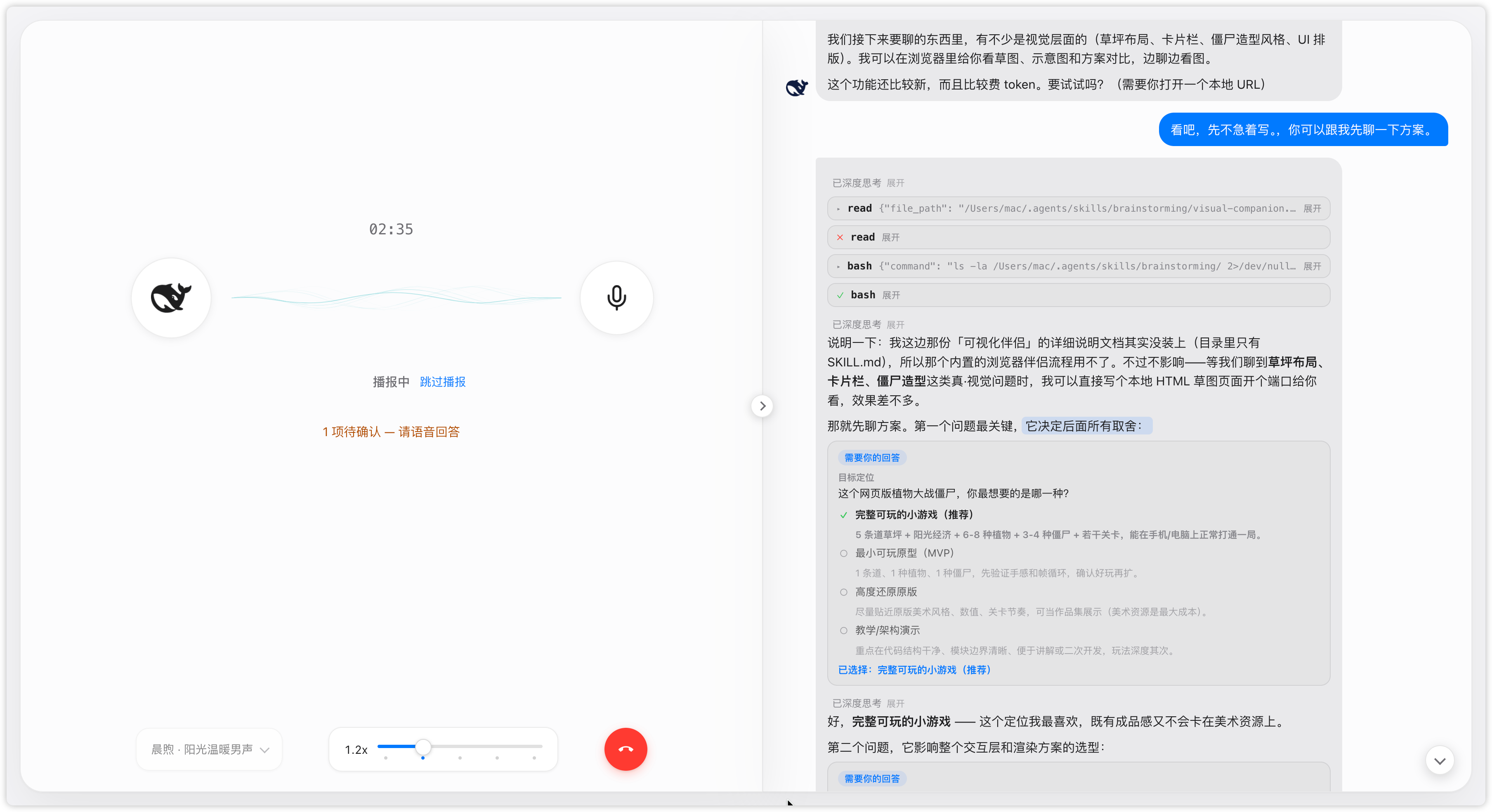
IdentifiedVoice mode for DSH: read replies aloud, dictate through browser speech recognition, and answer approvals by voice; high-risk tools require a second spoken confirmation.
dsh-duplex
Hands-free voice mode for DeepSeek Harness. Speak your request, hear the result, approve by voice.



简体中文 | 中文说明
Not affiliated with, endorsed by, or supported by DeepSeek.
Why
DSH already has desktop, mobile, TUI and IM surfaces. Voice is the only modality
without a working champion: the best voice plugin in the ecosystem is a
companion toy (1,066★) and official support is dictation only. dsh-duplex is
built for work: short spoken summaries, voice approvals, and hands-free use
away from the keyboard.
What works today (v0.1.0)
| Capability | Status | Notes |
|---|---|---|
| Read any assistant reply aloud | ✅ | Button next to every assistant message; pause/resume/stop; code blocks and URLs are skipped with a short spoken marker |
| Auto-read new replies | ✅ | Toggle in the composer dock; waits ~1.4 s for the reply to settle, and prefixes a turn summary such as "本轮用了 3 个工具:bash ×2、read" |
| Dictate into the composer | ⚠️ Browser only | Browser SpeechRecognition writes the transcript into the draft (optional auto-send) |
| Voice approval | ✅ | Speak pending approvals, accept a spoken allow/reject; high-risk tools (bash, pwsh, terminal, computer, browser, …) need a second "确认批准" confirmation |
| Voice answers for questions / plans | ✅ | Single-select questions with ≤5 options can be answered by number or option name; plan reviews by approve/reject; multi-select and multi-question batches are announced only |
| Cloud/local ASR fallback | 🚧 Planned (P1.5) | Electron desktop cannot use browser ASR today |
| Mobile PWA / QR pairing | 🚧 Planned (P2) | Reuse DSH remote pairing ideas |
Desktop note: the DSH Desktop app is Electron, where Chromium's Web Speech recognition is normally unavailable. TTS and voice approval work there (approval prompts are spoken and answered from the same microphone input the OS provides), while dictation needs a Chromium browser. Cloud-ASR fallback is planned.
Voice approval & safety
Voice approval is off by default. Turn it on with the 🎙 语音审批 button in
the composer dock. It is designed to fail closed:
- Nothing is approved without an explicit spoken decision. Silence, background noise, ambiguous speech, and unknown pending-interaction kinds never settle a request.
- High-risk tools require a second confirmation phrase (
确认批准/confirm approve); saying取消there cancels. - Requests that were already answered or withdrawn (
answerable === false) are skipped. - Questions with multiple answers, unsupported option counts, or multiple questions are only announced; the UI keeps the decision.
- Speech recognition happens in the browser's own service; the plugin stores no audio and no transcript. Voice decisions are ordinary DSH approvals, so they appear in the session audit exactly like clicking the card.
- There is no LLM judging approvals: unlike auto-review plugins,
dsh-duplexnever invents a decision on your behalf.
Install
- Clone this repository.
- In DSH, open Plugins → Add plugin and pick the checkout directory
(the manifest declares
dsh.bundle.patch, so the directory is installable). - Restart or let HMR pick it up, then open a session: the speak button appears on assistant replies, and the mic / auto-read / auto-send / voice-approval controls appear in the composer dock.
CLI alternative:
dsh plugin --profile web add github:shidesheng0218/dsh-duplex
Or install the pinned release tarball (no build step, avoids the pnpm minimum-release-age wait):
dsh plugin --profile web add https://github.com/shidesheng0218/dsh-duplex/releases/download/v0.1.0/dsh-duplex-0.1.0.tgz
Uninstall leaves no patches: the client bundle only registers slots and removes its styles on dispose.
Requirements
- DSH
>=0.2.1 <0.3.0(web or desktop profile; the client bundle targets the web UI) - A system voice for TTS (macOS/Windows/Linux ship one; Chromium needs at least one installed voice)
- For dictation: a Chromium-based browser (Chrome/Edge). Desktop Electron ASR is a known limitation, not a bug report
Roadmap
P0.1 approval and user-question announcements with voice yes/no(v0.1.0)P0.2 turn activity summaries(v0.1.0, rule based)- P1 continuous conversation, barge-in, global shortcut
- P1.5 cloud/local ASR fallback for Electron and mobile browsers
- P2 mobile PWA with QR pairing, TTS while screen locked
See docs/PLAN.md for the plan, verified API seams, and launch checklist, docs/DETAIL.md for the plugin detail page, and CHANGELOG.md for release notes.
Development
Plain JavaScript, no build step:
host/index.js— Host half (no-op today; the approval loop is client-side)client/client.js— browser bundle (window.__ModuleLoader__.load, React from the module table)locale/en.json,locale/zh.json— plugin display metadatadocs/— plan, demo script, detail pagescripts/smoke.mjs— dependency-free test harness
Validate before installing:
npm run check   # node --check on host and client entries
npm test        # manifest checks + client smoke test (no browser needed)
npm test loads the bundle in a vm sandbox with fake DOM, speech synthesis and
speech recognition, then verifies slot registration, Markdown stripping, the
approval allow/deny/high-risk/cancel paths, question option selection, ambiguous
speech, withdrawn requests and turn summaries.
Limitations
- Speech quality depends on the platform's system voices; this release does not ship neural TTS.
- Reading long replies is chunked; interruption/pause behaviour varies by browser engine.
- Voice approval needs the Web UI to expose
uiSession.sessionStatus(DSH 0.2.1+); on older hosts the toggle is inert and the UI remains the only path. - Dictation requires network access in most Chromium builds (browser speech service), which is also why Electron is unsupported for ASR today.
License
MIT. Not affiliated with, endorsed by, or supported by DeepSeek.
Comments
Loading…
Similar plugins
 4
No screenshots
by duoduoqian708
Voice conversation mode for the DSH Web GUI: tap the mic to start a full-screen call, talk hands-free, and hear each reply read aloud as it streams. Bilingual (Chinese/English) UI, light and dark them
★ 2
↓ 159/wk
MIT
HTML
Sep 13, 2026
dsh plugin --profile web add dsh-voice-talkby lgquan
Continuous voice conversations for DSH with hands-free listening, push-to-talk, speech recognition, TTS replies, and background Agent delegation.
★ 3
↓ 504/wk
MIT
TypeScript
Oct 27, 2026
dsh plugin --profile web add @flowingspring/dsh-vocoby 3274375092
Voice input plugin for DeepSeek Harness: mic → local/browser speech recognition → text submitted as a normal chat message. Input-only and preset-agnostic.
★ 8
↓ 145/wk
MIT
TypeScript
Oct 1, 2026
dsh plugin --profile web add @nn12138/dsh-voiceby PensiveFei
DSH voice input plugin: tap Alt to talk, get text in composer. Web Speech default (zero config), optional OpenAI-compatible ASR, polish via DSH LLM.
★ 36
↓ 1.2k/wk
MIT
JavaScript
Nov 1, 2026
dsh plugin --profile web add dsh-voice-scribeby underworld-oddball
Read the newest turn aloud from the DSH composer
★ 0
MIT
JavaScript
Sep 27, 2026
dsh plugin --profile web add sh-volume-shuffby ljz970803
Local wake-word voice input for DSH. Say the wake word, wait for the chime, then speak; text is sent to a DSH session. Audio is processed locally by default and not stored. Requires the DSH speech inp
★ 0
MIT
JavaScript
Oct 26, 2026
dsh plugin --profile web add dsh-voice-wake