

dsh-doyourweb
Manifest valid★ 4Reference and control existing Chrome and Edge tabs from DeepSeek Harness (DSH plugin + companion extension)
dsh-doyourweb
Reference and control your existing, logged-in Chrome and Edge tabs from DeepSeek Harness, with compact page context and batched browser actions.



English | 简体中文
Local Demo · Quick Start · Usage
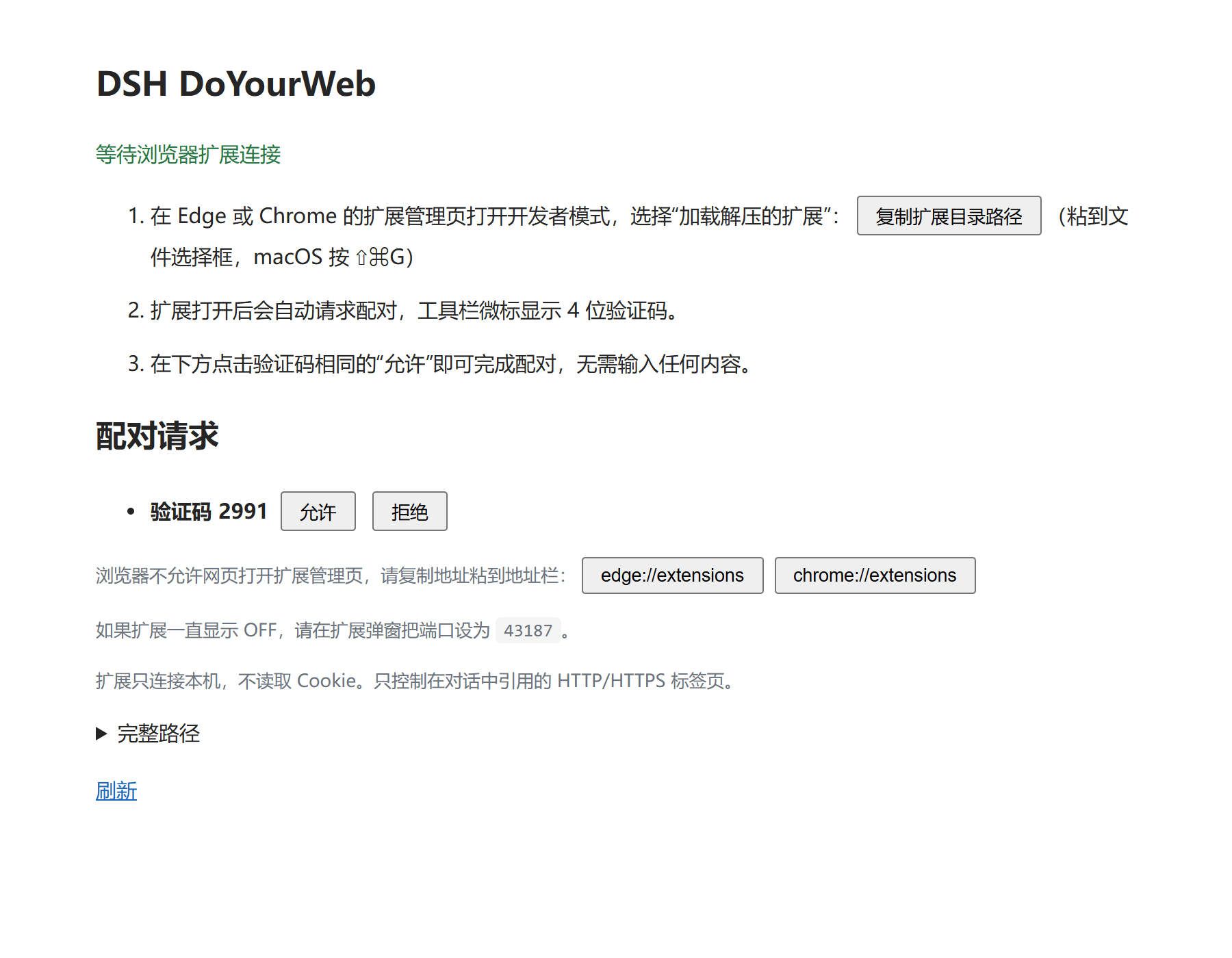
The local pairing page connects your browser extension to the DSH plugin.
01 · Introduction
Browser tasks often depend on pages you have already opened and accounts you have already signed into. dsh-doyourweb connects those tabs to DeepSeek Harness instead of launching a separate automation browser or exporting cookies.
The project has two parts: a DSH plugin and a companion Manifest V3 extension. The plugin adds browser references to the native @ and / menus; the extension supplies tab metadata and browser control. Once paired, the extension reconnects in the background without keeping its popup open.
Current version: ver0.1.0. The package and browser extension use the numeric version 0.1.0.
02 · Preview
- Use
/browserto open the connection page and locate the extension folder. - Load the extension in Chrome or Edge, then approve its matching four-digit pairing code.
- Select an existing page with
@and describe the task in DSH.
The screenshot above shows the pairing interface, not a recorded automation run.
Local Demo
There is no public hosted demo. After the DSH plugin starts, its default local connection page is http://127.0.0.1:43187/setup. Browser control runs through this local bridge and the installed extension.
03 · Core Features
| Feature | Current behavior |
|---|---|
| Existing tabs | Reuses regular HTTP/HTTPS tabs and their login state in Chrome and Edge. |
| Native references | Lists page titles, sites and icons through DSH's @ and / menus. |
| Compact reading | Accessibility snapshots support selector/query narrowing and cursor pagination. Initial reference context shares a default 2,400-character budget. |
| Batched actions | Runs up to 12 typed actions per call; stops on failure or navigation. |
| Result extraction | Returns selected text, value and href fields, with up to 20 rows per extraction. |
| Short receipts | observe: "summary" skips the next page snapshot. Action results have a 1,600-character output budget. |
| Screenshots | Saves PNG files locally and returns their paths instead of embedding base64. |
| Background connection | Saves pairing settings, reconnects automatically, and releases idle debugger connections. |
Budgets count JavaScript characters, including JSON escaping and metadata, not model tokens. They limit returned context, not DOM traversal time. The project does not claim a measured token-saving percentage or a speed ranking.
04 · Architecture
| Layer | Technology |
|---|---|
| DSH host plugin | Node.js 22+, JavaScript ESM, Cordis integration |
| Native client UI | React and DSH UI primitives |
| Browser engine | Playwright Core 1.64.0, Chrome DevTools Protocol |
| Local bridge | WebSocket (ws), Zod validation |
| Browser extension | Manifest V3, chrome.tabs, chrome.debugger |
| Build and checks | esbuild, Node.js test runner, GitHub Actions |
flowchart LR
    subgraph DSH["DeepSeek Harness"]
        UI["Native @ / menus"]
        Host["Host plugin"]
        Grants["Conversation grants and context budget"]
        Engine["Playwright engine"]
        Bridge["Loopback WebSocket / CDP relay"]
    end
    subgraph Browser["Existing Chrome / Edge"]
        Extension["Manifest V3 extension"]
        Tabs["Logged-in HTTP/HTTPS tabs"]
    end
    UI <-->|"Strict Remote RPC"| Host
    Host --> Grants --> Engine
    Engine <-->|"CDP"| Bridge
    Bridge <-->|"Origin check and pairing token"| Extension
    Extension <-->|"Tab inventory and debugger"| Tabs
    Engine -->|"Snapshots, receipts, PNG paths"| Host
Only tabs referenced by the user in the current conversation are available to the model's browser tools. Page content is treated as untrusted data, not instructions or permission.
05 · Quick Start
Requirements
- Node.js 22+ and npm.
- DeepSeek Harness; plugin API compatibility has been checked against
0.2.0-rc.2. - Chromium-based Chrome or Edge 125+, with developer mode available for loading an unpacked extension.
Install the DSH Plugin
For npm installation, open Plugins > Add Plugin in DSH, select the official npm registry, and enter:
dsh-doyourweb
This requires a published package. If the registry returns 404, use the local installation below. Mirrors may take time to sync a newly published version.
Build and Install Locally
git clone https://github.com/SheepofSheep/dsh-doyourweb.git
cd dsh-doyourweb
npm ci
npm run build
In DSH, open Plugins > Add Plugin and enter the absolute path to this built project directory. The bridge starts when the plugin activates. No separate development server is required.
Connect the Browser
- Enter
/browserin DSH and open the local connection page. - Open
edge://extensionsorchrome://extensions, enable developer mode, and load the project'sextension/folder as an unpacked extension. - Compare the extension's four-digit badge code with the pending request on the connection page, then approve it.
- Return to DSH, select a tab with
@, and send your request.
The extension popup and pairing page do not need to remain open. Installing the DSH plugin does not install the browser extension automatically.
Configuration
Defaults are declared in cordis.patch.yml:
| Setting | Default | Purpose |
|---|---|---|
port | 43187 | Local bridge port |
snapshotChars | 2400 | Page-read and initial reference-context budget |
idleTimeoutMs | 120000 | Idle time before releasing the debugger connection |
The data directory is <DSH_HOME>/browser-tabs/, or ~/.dsh/browser-tabs/ when DSH_HOME is unset. An explicit plugin home setting takes precedence. Set environment variables on the DSH process; the plugin does not require its own model API key.
Usage
After referencing a page, you can ask:
Read the result list on this page and collect its titles and links. Do not submit any forms.
| Model tool | Use |
|---|---|
browser_read | Read a snapshot; narrow with selector, query or depth; use cursor for remaining content. limit accepts 400-8,000 characters. |
browser_act | Use the latest snapshot ID to click, fill, press, select, check, hover, scroll, navigate, go back/forward, wait or extract. |
browser_capture | Save a screenshot when visual inspection is needed. |
When multiple tabs are authorized, pass the selected tab's reference as tab.
Tool example: read a page, then extract a short result list
Call browser_read for the single authorized tab:
{
  "depth": 8,
  "limit": 2400
}
Use the returned snapshot ID in browser_act. Replace the selector with one from the actual page:
{
  "snapshot": "<latest snapshot ID>",
  "observe": "summary",
  "steps": [
    {
      "op": "extract",
      "selector": "a.result-title",
      "fields": ["text", "href"],
      "maxRows": 10
    }
  ]
}
These are model-tool arguments, not shell commands. summary does not return a new snapshot; read again before another action call.
06 · Structure and Technical Details
src/
  host.js            Plugin lifecycle, tools and conversation context
  client.js          Native mention and slash-menu sources
  client-entry.js    React UI and icons
  bridge.js          Pairing, extension connection and CDP relay
  engine.js          Snapshots, actions, extraction and screenshots
  grants.js          Conversation-scoped tab authorization
  protocol.js        Tab references and Remote RPC descriptors
  output.js          Serialized output budgeting
  vendor/            Adapted Playwright browser model
extension/           Manifest V3 extension and popup
scripts/             Build, integration and compatibility checks
test/                Unit tests and fixtures
docs/setup-page.png  Pairing-page screenshot
cordis.patch.yml     DSH plugin registration and defaults
lib/                 Generated build output, not tracked in Git
Snapshots and actions. Full snapshot text is cached locally for pagination. Element references require a current snapshot; reads, actions and navigation can invalidate previous references. Calls are serialized per tab. Cancellation reports completed or uncertain steps rather than promising rollback.
Connection lifetime. Idle connections detach the debugger without closing the tab. A later read reconnects. Restarting the browser changes tab-reference sessions, so select the page again with @.
Data handling. Pairing credentials and authorization records live in the local data directory; screenshots are stored under captures/. Referenced page excerpts enter DSH's model context and may be sent to your configured model provider. Keep pairing files and screenshots private. Purchases, destructive actions and sensitive submissions require explicit user authorization; the plugin does not provide a separate transaction-confirmation dialog.
Development checks
npm run build
npm test
npx playwright-core install chromium
npm run test:browser
npm run verify:dsh -- --asar "<path to DeepSeek Harness app.asar>"
CI is configured for unit tests on Windows and Linux, plus isolated headless Chromium integration on Linux. The badge links to the actual workflow result. Headless checks do not replace end-to-end validation of a daily browser profile and the native DSH UI.
07 · Roadmap / FAQ / License
Roadmap
This README describes the implemented 0.1.0 release. No delivery schedule for later versions is announced. Report bugs and discuss changes in Issues.
FAQ
Do I have to open the extension every time? No. Pair once; the extension reconnects in the background. Reload it after updating its files.
Why are some pages missing? Only regular HTTP/HTTPS tabs are exposed. Browser-internal and incognito pages are excluded. Check that the extension is enabled and paired if no tabs appear.
What if port 43187 is already in use? Avoid activating two plugin copies on the same port. Stop the duplicate bridge or change the plugin's port setting and reconnect the extension to that port.
What are the current limits? The companion extension is loaded unpacked, not installed from a browser store. Firefox and Safari are not supported. Host API compatibility has been checked against DSH 0.2.0-rc.2; other versions and native UI workflows need their own verification.
Contributing and License
Issues and pull requests are welcome. Include reproduction steps and relevant DSH/browser versions; remove tokens, private page contents and account data from logs. For code changes, run the checks relevant to the affected behavior.
Project code is licensed under MIT. Playwright-derived code and Lucide artwork retain their respective licenses; see NOTICE, Apache-2.0 and ISC.
Comments
Loading…