

dsh-remote-sudo
Manifest validAsk for a sudo password in the DSH composer and run remote root commands over SSH without putting the password in the transcript.
dsh-remote-sudo

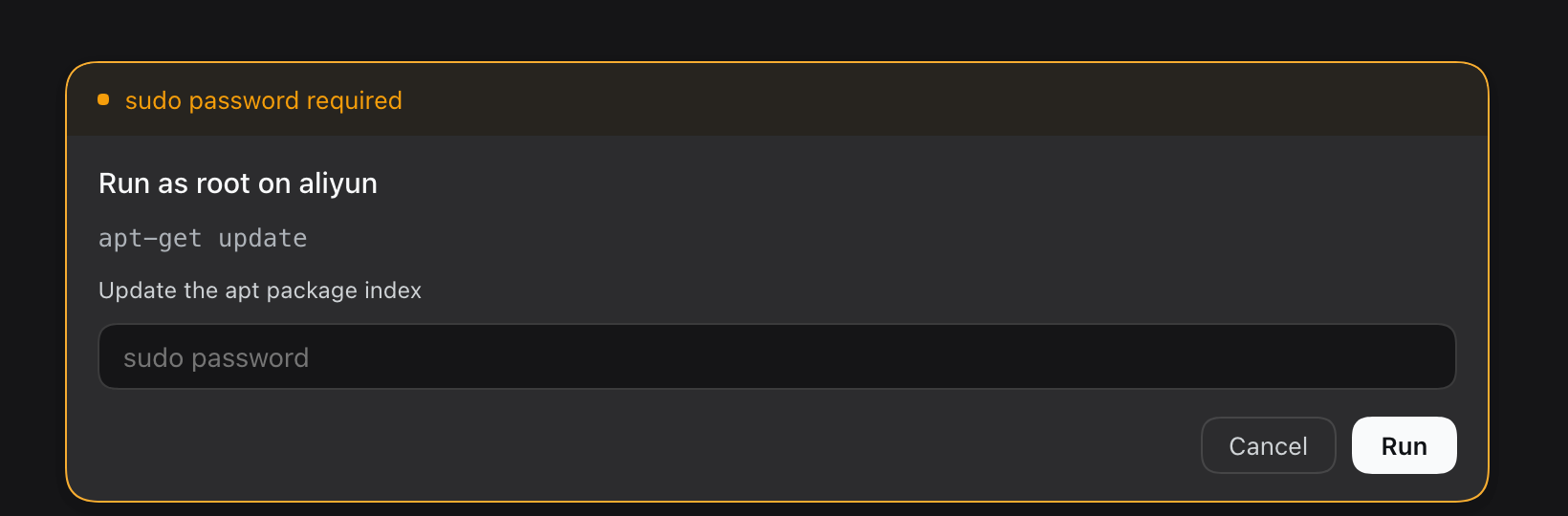
DSH 的远端 sudo 密码面板:在输入框位置弹出,密码只走 stdin,不进对话、工具参数、环境变量或磁盘。
A composer-hosted sudo password prompt for DeepSeek Harness: the password goes to the remote sudo over stdin and never enters the transcript, tool arguments, environment, or disk.
中文
功能
- composer 面板:接管输入框,显示主机、命令、密码;Enter 提交,Esc 取消。
- 单一缓存开关:
passwordTtlMs: 0每次都要密码;正整数时密码只在宿主内存保留该时长。 - 不依赖 sudo ticket:每次执行后
sudo -k,不假设 ticket 能跨 ssh 复用。 - 自动探测 sudo:先试常见绝对路径,再用
command -v sudo兜底。 - 中英文:跟随 DSH 语言;root 命令的 stdin 固定
/dev/null。
安装
从 npm(推荐):
dsh plugin --profile desktop add dsh-remote-sudo
从 GitHub:
dsh plugin --profile desktop add github:seudut/dsh-remote-sudo#v0.1.0
或在插件管理器里选“从 Git 仓库安装”,填 github:seudut/dsh-remote-sudo#v0.1.0。
然后在 profile 的 cordis.patch.yml 加入:
- insert:
    - id: sudo-askpass
      name: 'dsh-remote-sudo'
重启 DSH。前置条件:ssh <host> 能密钥登录。
插件管理器安装会同时处理 bundle 选择;命令行安装需要手动加这一行。本地开发时,把 github:... 换成插件目录的绝对路径即可。
配置
config:
  passwordTtlMs: 0   # 0 = 每次都要密码;正整数 = 内存缓存毫秒数
| 键 | 默认 | 说明 |
|---|---|---|
passwordTtlMs | 0 | 0 = 每次都要密码;正整数 = 密码在宿主内存保留的毫秒数 |
使用
让 agent 调用 remote_sudo:
用
remote_sudo在 aliyun 上执行apt-get update
| 参数 | 必填 | 说明 |
|---|---|---|
host | 是 | ~/.ssh/config 别名 |
command | 是 | 远端 root 命令 |
description | 否 | 面板里的短标签 |
需要密码时弹面板;passwordTtlMs 内不重复弹;取消/停止会结束调用。
安全边界
- 能挡:argv、环境变量、shell history、工具参数、对话记录、远端磁盘、SSH 明文传输。
- 挡不住:浏览器插件域(任何 client 插件都能读输入)、宿主内存、本机回环 HTTP、被入侵的远端、JS 内存残留、单因子。
- 建议:专用 sudo 密码;Web UI 只绑 loopback 或上 HTTPS;需要更强隔离时用原生 askpass、Touch ID 或 scoped
NOPASSWD。
限制
- 只支持 SSH 远端,不支持本机 root。
- 没有内置超时:密码等待和命令执行都会一直阻塞,直到回答/取消/ssh 结束。
- 取消/停止只杀本地 ssh,远端进程不保证停止;需要硬上限时在远端命令里用
timeout。 - 同时只展示一个 prompt;远端需 POSIX shell + sudo。
开发
npm test
node test/real-host-probe.mjs   # 手动:真实主机 + 错误密码验证链路
English
Features
- Composer panel: takes over the input box with host, command, and password; Enter submits, Esc cancels.
- One cache knob:
passwordTtlMs: 0asks every call; a positive value keeps the password in host memory for that window. - No sudo ticket reuse: runs
sudo -kafter every command and never assumes a no-TTY ticket survives across ssh. - Auto-detect sudo: common absolute paths first, then
command -v sudo. - Bilingual: follows the DSH locale; the root command's stdin is always
/dev/null.
Install
From npm (recommended):
dsh plugin --profile desktop add dsh-remote-sudo
From GitHub:
dsh plugin --profile desktop add github:seudut/dsh-remote-sudo#v0.1.0
Or use the plugin manager's "install from Git repository" with github:seudut/dsh-remote-sudo#v0.1.0.
Then add this row to the profile's cordis.patch.yml:
- insert:
    - id: sudo-askpass
      name: 'dsh-remote-sudo'
Restart DSH. Requires key-based ssh <host> access.
The plugin manager also selects the bundle; a CLI install needs this row manually. For local development, replace the github:... spec with the absolute path of the checkout.
Configuration
config:
  passwordTtlMs: 0   # 0 = ask every call; positive = in-memory TTL in ms
| Key | Default | Meaning |
|---|---|---|
passwordTtlMs | 0 | 0 asks every call; a positive value is the in-memory password TTL in milliseconds |
Usage
Ask the agent to call remote_sudo:
Use
remote_sudoto runapt-get updateon aliyun
| Argument | Required | Meaning |
|---|---|---|
host | yes | SSH alias from ~/.ssh/config |
command | yes | root command to run remotely |
description | no | short label shown in the panel |
The panel appears when a password is needed; within passwordTtlMs it does not ask again. Cancel/stop ends the call.
Security
- Protected: argv, environment, shell history, tool arguments, transcript, remote disk, plaintext transport.
- Not protected: the browser plugin realm (any client plugin can read the input), host memory, loopback HTTP, a compromised remote, JS memory residue, a single factor.
- Recommendations: a dedicated sudo password; bind the Web UI to loopback or use HTTPS; for stronger isolation use a native askpass, Touch ID, or scoped
NOPASSWD.
Limitations
- Remote SSH only; no local root.
- No built-in timeout: both the password wait and the command run block until answered, cancelled, or ssh exits.
- Cancel/stop kills the local ssh; the remote process is not guaranteed to stop. Use
timeoutin the remote command for a hard limit. - One prompt at a time; the remote must be POSIX with sudo.
Development
npm test
node test/real-host-probe.mjs   # manual: real host + wrong password
License
MIT
Comments
Loading…
Similar plugins
by CrazyShout
SSH remote workspaces for DeepSeek Harness: browse/read/write remote files, run remote commands, with connection status dots.
★ 13
↓ 75/wk
MIT
TypeScript
Oct 20, 2026
dsh plugin --profile web add dsh-ssh-remoteRead and search bounded log output from allowlisted SSH servers and log roots without exposing arbitrary remote commands.
★ 0
dsh plugin --profile web add dsh-ssh-logsSSH remote execution set: give a session an ssh:// workspace and every file, command, and shell operation runs on the remote host.
★ 0
dsh plugin --profile web add dsh-ssh-remoteDSH plugin: password SSH into a remote host — a natural-language tool (connect/exec/close/status) over a persistent ControlMaster session, plus a browser terminal panel (right-side floating) with a real PTY over WebSocket.
★ 0
dsh plugin --profile web add dsh-ssh-shellby weisiren000
SSH remote ops for DSH: pair servers over SSH or a one-time-code remote-hostd, then run commands, manage background jobs, and read or write remote files with reviewable changes (host_pair/host_bash/ho
★ 3
JavaScript
Aug 17, 2026
dsh plugin --profile web add dsh-remote-ssh-opsby hcyinnn
SSH tools plugin for DeepSeek Harness (dsh): run remote commands and transfer files via OpenSSH. dsh 插件——让 Agent 通过 SSH 在远程主机执行命令、上传/下载文件。
★ 0
MIT
TypeScript
Sep 1, 2026
dsh plugin --profile web add dsh-tool-ssh