
dsh-r-runner
Manifest validR in the sidebar: an RStudio-shaped workbench backed by a persistent R session over a loopback driver (6-9 s cold boot, then 12-84 ms per run). R syntax highlighting with a multi-buffer editor, file t


dsh-r-runner
Run R inside the DeepSeek Harness sidebar: a persistent R session, a file tree, a syntax-highlighted editor, a console, an environment table, and plot thumbnails — laid out like RStudio, with the keyboard habits of VS Code.
Status: v0.1.6 on npm, macOS + R 4.6 tested. See docs/PLAN.md for the design notes and roadmap.
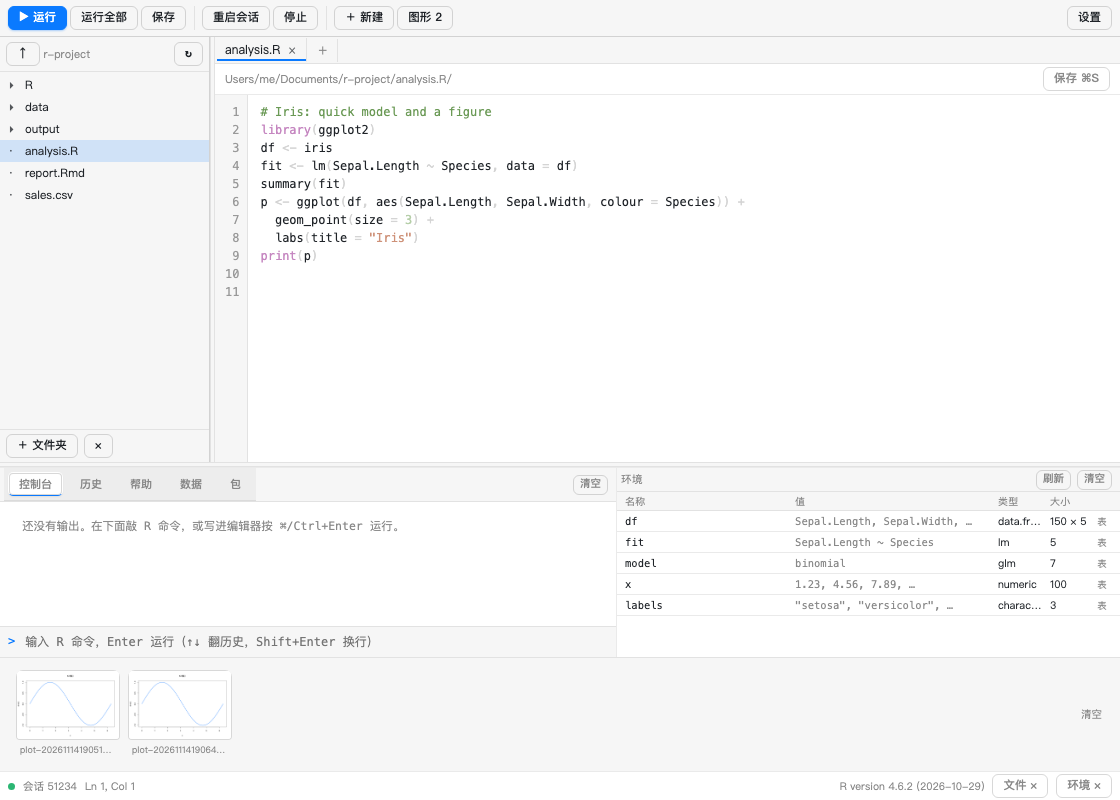
Click any plot thumbnail to open it full-size — fit-to-window or 100 %, flip through the set with ← →, copy the path, or open the PNG in a new tab:
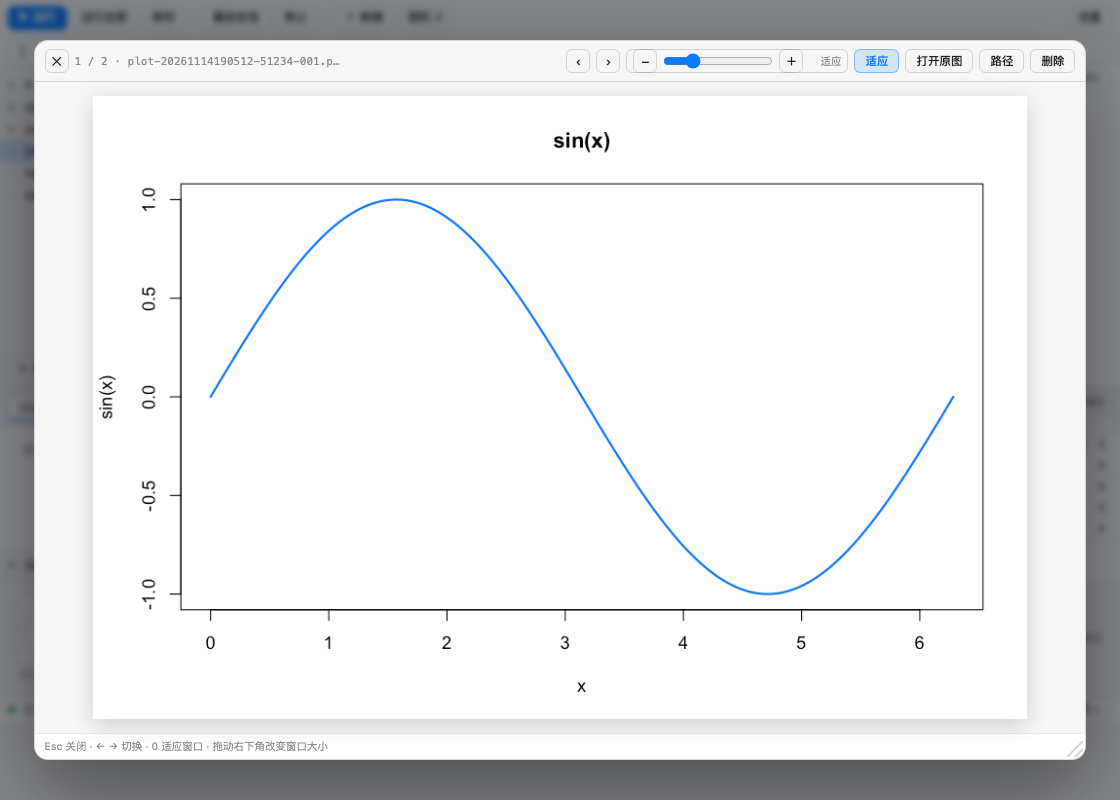
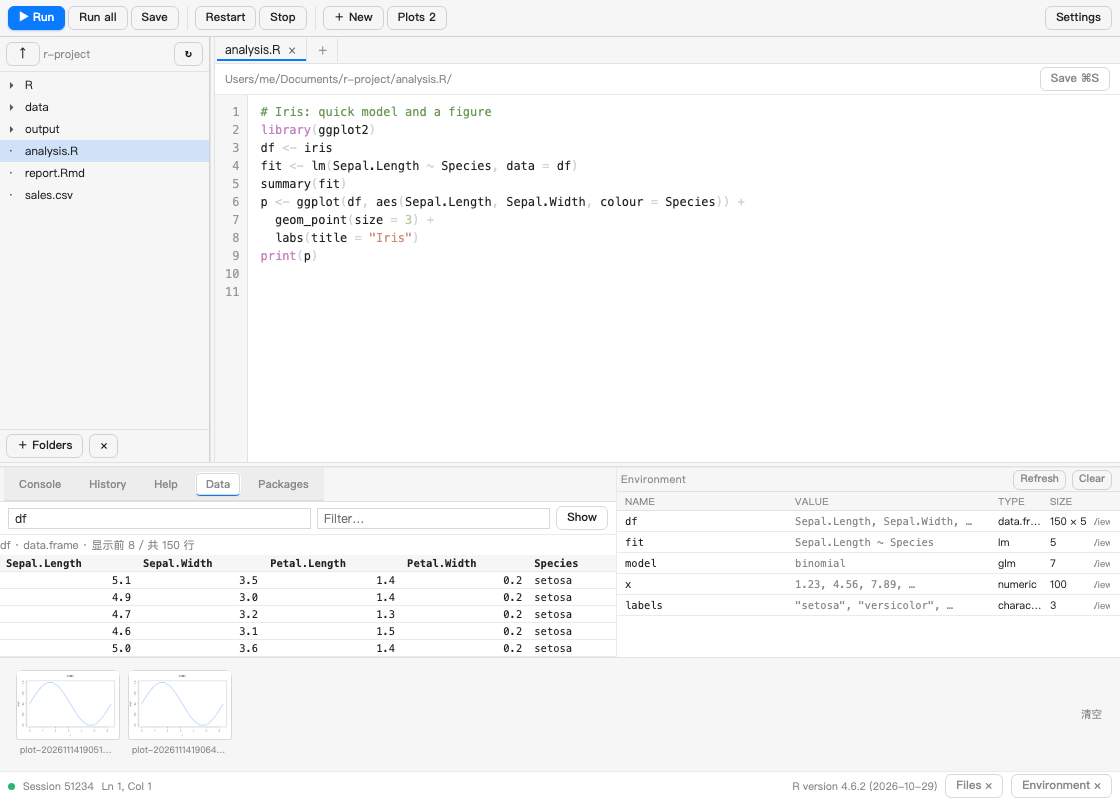
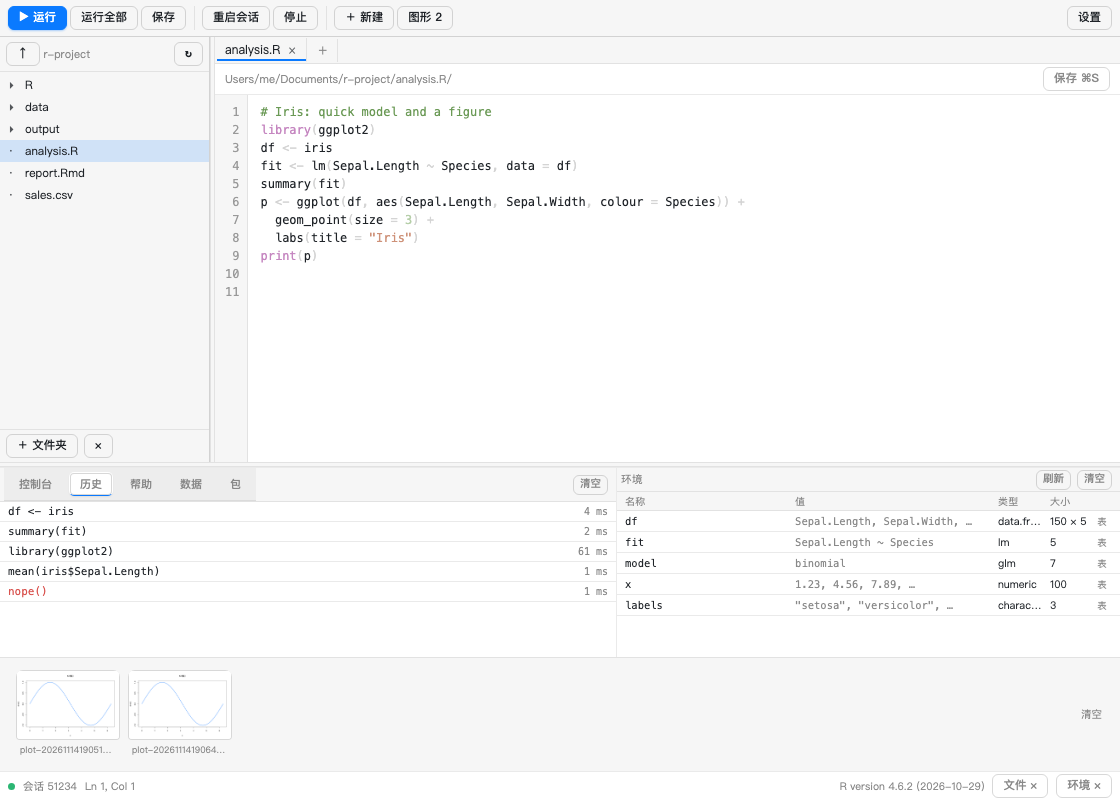
The bottom pane has five tabs — console (with a real prompt), history, help, the data viewer and the package manager:
What you get
- A session, not a script runner. One long-lived
R --slaveprocess: variables, loaded packages and the graphics device survive between runs. A run costs 1–40 ms after the ~1 s boot. - RStudio-shaped layout. File tree on the left, multi-tab editor in the middle, console and environment side by side at the bottom, plot strip above the status bar.
- Editor habits from VS Code.
⌘/Ctrl+Enterruns the selection (or the buffer),⌘/Ctrl+Ssaves, Tab indents two spaces, the breadcrumb shows where you are. - Environment table. Name / value / class / size, double-click a row to assign a
new value with any R expression (
1:10,c("a","b"), …); the 表 button opens the object in the data viewer. - Console prompt. Type R straight into the panel: Enter runs,
Shift+Enteradds a line,↑/↓walk the commands you already sent. Output lands in the same log as editor runs. - History. Every run (editor, console,
r_run) is kept in~/.dsh/r-runner-history.json; the 历史 tab lists them, click a row to put the code back in the prompt. - Help. The 帮助 tab is
?topic: it renders the real R help page (utils:::.getHelpFile+tools::Rd2txt) for anything installed locally. - Data viewer. The 数据 tab previews a
data.frame/matrix/ vector — first 100 rows, numeric columns right-aligned,<NA>marked. - Plots open in a floating window. Every
plot()is written to.dsh-r-runner/plots/plot-<ts>-<pid>-NNN.png. Clicking a thumbnail opens it in a centred window (portalled todocument.body, so the sidebar cannot clip it):‹ ›browse,适应 ⇄ 100%, 原图 opens the PNG in a tab, 路径 copies the file path, 删除 removes that one plot, and the strip has a 清空 button. The files are plain PNGs an agent can read. .Rmdruns one chunk. With the caret inside an{r}fenced chunk,⌘/Ctrl+Enterruns just that chunk (the prompt sayschunk 2/3 · L12-18); outside any chunk it falls back to the first one.- Completion, diagnostics, go-to-definition.
Ctrl+Space(or just typing.,$,::) opens a suggestion list built from your objects, the exports of every loaded package and base R; the gutter marksparse()errors and a few lint rules (setwd(,attach(,=for assignment), andF12/⌘-click jumps to a function's source —source()d files keep theirfile:line. - Package panel. The 包 tab lists what is loaded (with versions) and what is
installed (searchable, 载入 runs
library());install.packages()runs in a separateRscript --vanillaprocess so the session never blocks, and the log stays on screen. If a run failed with there is no package called 'x', the panel offers a one-click install. - Rmd preview. 预览 Rmd calls
rmarkdown::render()into<workdir>/.dsh-r-runner/rmdand shows the HTML in an iframe; a failed render shows the tail of the log, and ifrmarkdownis missing it offers to install it. - All plots grid. The 图形 N button opens every plot as a grid, from which you can zoom one or delete it.
- Sortable data viewer. The 数据 tab fetches up to 2000 rows: click a column header to sort (click again to reverse), type in 筛选 to filter across all cells.
- Plot window you can resize. Drag the bottom-right corner, use the zoom slider (10–400 %), − / +, 适应 ⇄ 100%, or 打开原图 (which falls back to copying the path when the browser blocks the new tab).
- English UI. 设置 → 信息 → 界面语言 switches the shell (toolbar, tabs, headers, status bar, plot window) between 中文 and English; the choice is remembered.
- Folder picker, no blind typing. The desktop shell has no
window.prompt(), so + 文件夹 (tree header and settings) opens an in-panel browser (GET /r/api/browse):⤴up, 主目录, 工作区, click a folder to walk in, double-click or 添加此文件夹 to add it as an extra root. The picker ignores the workdir guard on purpose — it only lists directory names. - Switchable working directory. Settings → 选择目录 → 浏览… picks a folder
(this turns
autoDetectoff so the choice sticks), the 会话工作区 dropdown lists the DSH workspaces, and 跟随当前会话 makes the panel follow the session again. - RStudio projects. The host reports the first
*.Rprojin the working directory (settings → 信息 → 项目), and the defaultscriptDirfollows the project root (<project>/R) instead of the bare working directory. - Shiny / Quarto preview. With
app.R/ui.R/server.Ropen the toolbar shows 运行 Shiny (shiny::runApp()on a free loopback port, embedded in an iframe, 停止 kills it); with a.qmdopen it shows 预览 Quarto (quarto render --output-dir .dsh-r-runner/quarto, then the HTML is embedded). Both degrade to a readable message plus an install button whenshinyor thequartoCLI is missing. - Agent tool.
r_run({ code })/r_run({ file })lets the model run R directly and get back the console output plus plot paths.
Install
Requires R on the machine (R on PATH, or point the
plugin at it in settings). No R packages are required.
From the market
Search for R Runner in the plugin market, install, reload the page (⌘/Ctrl+R), then open the right sidebar → add control → R Runner.
From a checkout
cd plugins/dsh-r-runner
sh bin/install-local.sh          # copies the payload into the desktop profile
# reload the page, then open the R panel

# verify the host half is live (routes registered, R spawns, plots work)
node bin/check.mjs http://127.0.0.1:<gui-port>
bin/install-local.sh writes ~/.dsh/r-runner.json on first run and adds the bundle
to the profile manifest; bin/reload-host.sh forces the host to re-compose.
Use
| Action | Shortcut |
|---|---|
| Run selection / buffer | ⌘/Ctrl+Enter |
| Run everything | toolbar 运行全部 |
| Save (overwrite the real file) | ⌘/Ctrl+S |
| Open the panel | ⌘⇧R (web: ⌥⇧R) |
| Restart the R session | toolbar 重启会话 |
| Edit a variable | double-click its row in the environment table |
| View a data frame | the 表 button on its environment row, or the 数据 tab |
| Run a console command | type in the prompt, Enter |
| Previous / next command | ↑ / ↓ in the prompt |
| Look up help | 帮助 tab, type a topic, Enter |
| Completion | Ctrl+Space, or type after . / $ / :: |
| Jump to definition | F12 or ⌘-click on a name |
| Install a package | 包 tab → type a name → install.packages() |
| Add a folder | + 文件夹 (tree) or 添加文件夹 (settings) → browse |
| Change the working directory | Settings → 选择目录 → 浏览… / 会话工作区 |
| Run a Shiny app | open app.R → toolbar 运行 Shiny |
Preview a .qmd | open it → toolbar 预览 Quarto |
Render the .Rmd | 预览 Rmd in the toolbar |
Run the current .Rmd chunk | ⌘/Ctrl+Enter inside an {r} chunk |
| Enlarge a plot | click its thumbnail (floating window) |
| Close / browse the plot window | Esc / ← → / 0 (fit ⇄ 100 %) |
| Zoom a plot | the slider in the window bar, or − / + |
| Resize the plot window | drag its bottom-right corner |
| All plots | 图形 N in the toolbar |
| Delete a plot | hover a thumbnail → ×, or 删除 in the window |
| Empty the environment | 清空 next to 刷新 in the 环境 header |
Notes:
- Files opened from the tree are edited in place;
+新建creates a draft that is written to<scriptDir>/<name>.Rwhen you save it. - Unsaved edits live in
localStorage, so reloading the page does not lose them. - Running a file switches the working directory to that file's folder
(
runInFileDir), which is whatread.csv("data.csv")usually wants. plot()output is a PNG per plot.par(mfrow = c(2, 2))therefore yields four files.- 清空 in the environment header runs
rm(list = ls(envir = globalenv())), so it empties your objects but keeps the session (and its loaded packages) alive.
Configuration
~/.dsh/r-runner.json (edited from the panel's settings page, or by hand):
{
  "rBinary": "/usr/local/bin/R",
  "rscriptBinary": "/usr/local/bin/Rscript",
  "sessionArgs": "",
  "workdir": "/path/to/your-project",
  "scriptDir": "/path/to/your-project/R",
  "extraRoots": [],
  "runInFileDir": true,
  "autoSave": true,
  "plotWidth": 960,
  "plotHeight": 640,
  "plotRes": 110,
  "timeoutMs": 600000,
  "maxOutputChars": 400000,
  "env": {}
}
- R binary —
Ris resolved from the setting, thenPATH, then the common macOS framework locations. - Working directory —
autoDetect(default on) makes it follow the current DSH session workspace: switching projects in DSH moves the tree and the R cwd, and the panel re-checks every 15 s without a reload. Turn the checkbox off (or pick a folder) to pin it. - Script folder —
scriptDirAuto(default on) keeps drafts in<workdir>/R, or<project>/Rwhen the folder holds an*.Rproj. Untick it to write to a fixedscriptDir(older installs pinnedscriptDir; that stale value is now ignored while auto is on). - Extra roots — additional folders shown in the tree (read/write allowed).
- Plot size / resolution — the PNG device parameters.
- env — extra environment variables for the R process (JSON object).
Architecture
sidebar (lib/client.js: React via ModuleLoader, no build step)
      │  fetch /r/api/*
host half (lib/index.js: webServer + subprocess + workspaceRegistry)
      │  loopback TCP, newline-delimited JSON
R session (lib/driver.R: ping / run / vars / assign / rm / quit)
lib/driver.R— the in-R server. Everything is wrapped inlocal({ … })so the driver's own objects never land inglobalenv;options(device = …)redirects plots to PNG files;capture.output(type = "output")collects whatprint/catprinted.lib/runner.js— config,RSession(spawn, connect with retries, request queue), and the file helpers (tree, read/write, path policy).lib/index.js— routes, ther_runagent tool, workspace detection.lib/client.js— the panel. Hand-writtenwindow.__ModuleLoader__.load({ factory })bundle; no bundler, so editing it and reloading the page is the whole dev loop.
Development
npm test                     # import / driver / host-unit / client-tokenize / client-smoke
node bin/preview-ui.mjs      # writes /tmp/rr-panel.html + /tmp/rr-settings.html
node bin/check.mjs <gui-url> # live check against a running DSH
test/import.mjs enforces the rule that keeps this plugin loadable across DSH
releases: the host half may only import Node built-ins (see Troubleshooting).
Troubleshooting
The panel is missing from the sidebar, and r_run is not in the tool list.
The host half did not load. Check the route first:
curl -s -o /dev/null -w '%{http_code}\n' http://127.0.0.1:<gui-port>/r/api/state
200 means loaded; 404 means it is not. On DSH ≥ 0.2.2 the usual cause is an import
that the profile can no longer resolve (@deepseek-ai/dsh-tools and friends). The
plugin then disappears silently — the plugin manager shows enabled: true with
fiberPhase: null (not failed, so there is no diagnostic). test/import.mjs exists
to catch exactly this; keep the host half on Node built-ins only.
The tab opens but stays blank after an update. A render-time throw leaves React with
no boundary to catch it. Two traps, both hit once in this plugin: the client factory only
receives require — ctx exists only inside apply(ctx), so never read a free ctx in a
component; and the client context refuses services that are not declared in the plugin's
inject list (cannot get property "sessions" without inject). POST /r/api/debug/props
reports what the shell actually hands the panel (propsKeys, sessionId, resolved cwd)
when a slot seems to give nothing.
The tree does not follow the session. The panel asks for its seat's workspace through
props.sessionId → ctx.sessions → ?cwd=; if that chain breaks it falls back to the
first registered workspace and settings shows 「来自注册工作区」 instead of 「来自当前会话」.
"R 不可用" in the settings page. Point rBinary at the real binary
(which R, e.g. /usr/local/bin/R), then press 重启会话.
Run does nothing / hangs. Open the toolbar 重启会话, then run
1 + 1. If the session keeps dying, check sessionArgs (a bad flag kills R at
boot) and the console's error line.
No plot thumbnail. Plots come from the graphics device, so plot() must actually
be called; ggplot2 objects need print(p). Output lands in
.dsh-r-runner/plots/ of the workdir — check the directory exists and is writable.
First run feels slow. The session boots R (~1 s) the first time; later runs reuse
it. 重启会话 pays that cost again.
Warning: the R process can touch anything your user can. It is not sandboxed;
extraRoots is a UI convenience, not a security boundary.
License
MIT
Comments
Loading…
Similar plugins
Two-line session cards for the sidebar: per-workspace project tiles (monogram, emoji, color or image), pinning, hand or timed archiving with a collapsible archived shelf, running and waiting status ma
★ 0
MIT
JavaScript
dsh plugin --profile web add dsh-sidebar-shelvesWork todo reminders in a sidebar panel with four stage tabs (not started, in progress, overdue, done) plus separate recurring and paused filters, priority derived from the end time in real time, pinni
★ 0
dsh plugin --profile web add dsh-todos-diyby tianxiaz
A Workspaces-native Recent sessions section for the DSH left sidebar: favorites, running, waiting-for-you and unread sessions at a glance, with a one-click ☆ on every session row, one-line collapse an
★ 3
MIT
JavaScript
Nov 15, 2026
dsh plugin --profile web add dsh-recent-sessionsdsh的diff审核
★ 1
MIT
JavaScript
dsh plugin --profile web add dsh-diff-reviewby FleetingEcho
A dockable IDE workbench for the DSH web UI: a GPU-accelerated terminal (restty renderer over a Rust PTY), a CodeMirror editor, a file explorer, notes, a sandboxed browser, and ripgrep content search.
★ 3
MIT
JavaScript
Aug 18, 2026
dsh plugin --profile web add dsh-powerdeskby windrover
Four right-Sidebar panels for the dsh web client — an artifacts browser, long-term memory, a terminal and notes — paired two per tab with a draggable split, so two panes show all four at once. Ships t
★ 1
MIT
JavaScript
Oct 22, 2026
dsh plugin --profile web add dsh-minimal-ui-panels