

dsh-plugin-obsidian-catalog
DiscoveredObsidian vault table of contents as a conversation view — folders, tags, word counts, headings, and one-click @-path copying.
Obsidian Catalog · 知识库目录
A DeepSeek Harness bundle that renders an Obsidian vault as a live table of contents inside a conversation view.
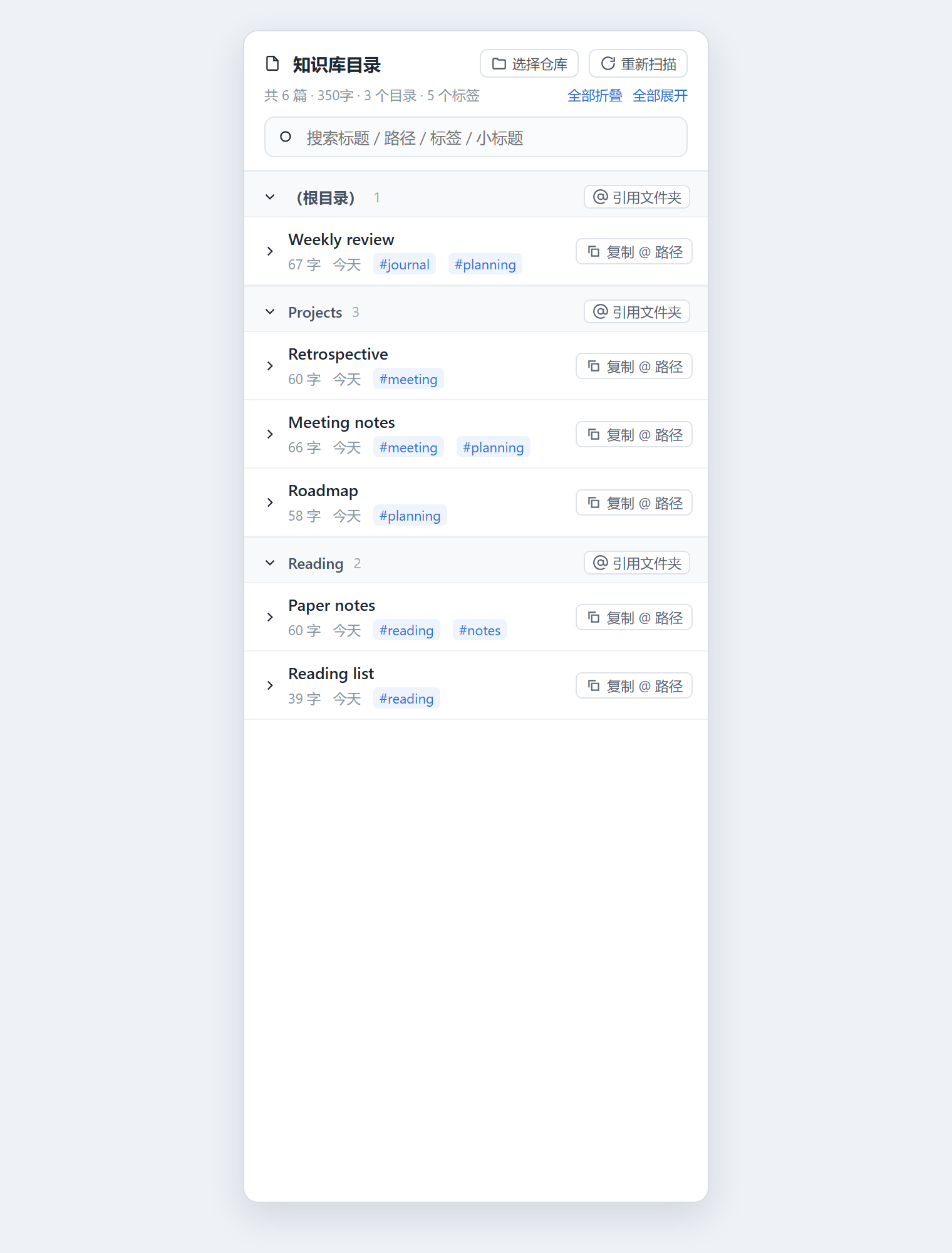
The panel reads the vault directory straight off disk on the host side and shows it grouped by folder: note titles, word counts, relative dates, tags, and a collapsible outline of each note's headings. Every note row and folder row has a one-click @absolute\path copy button, so the note can be referenced in the chat box without typing the path by hand. The vault itself is chosen from inside the panel, so a second vault does not need a second install.
What it does
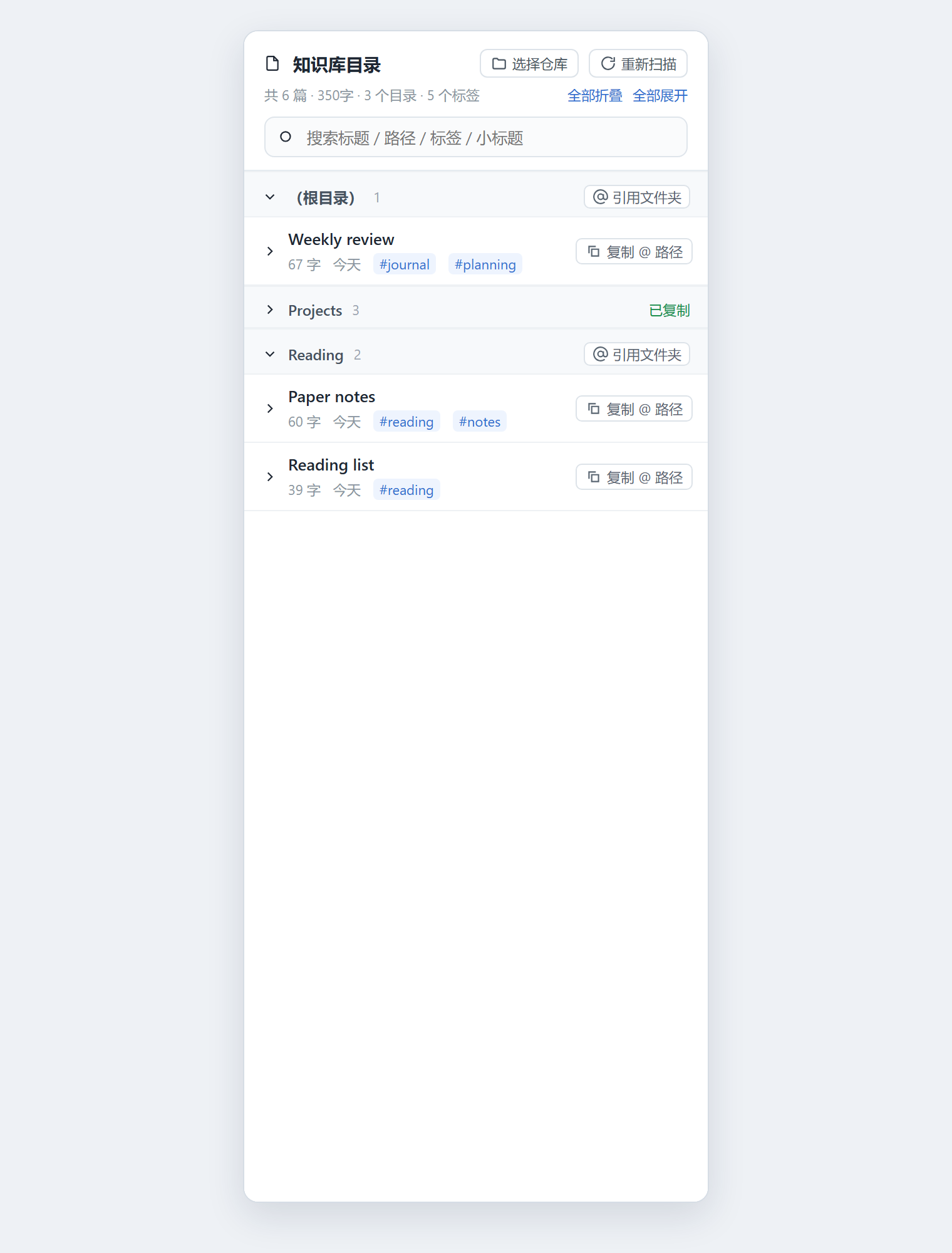
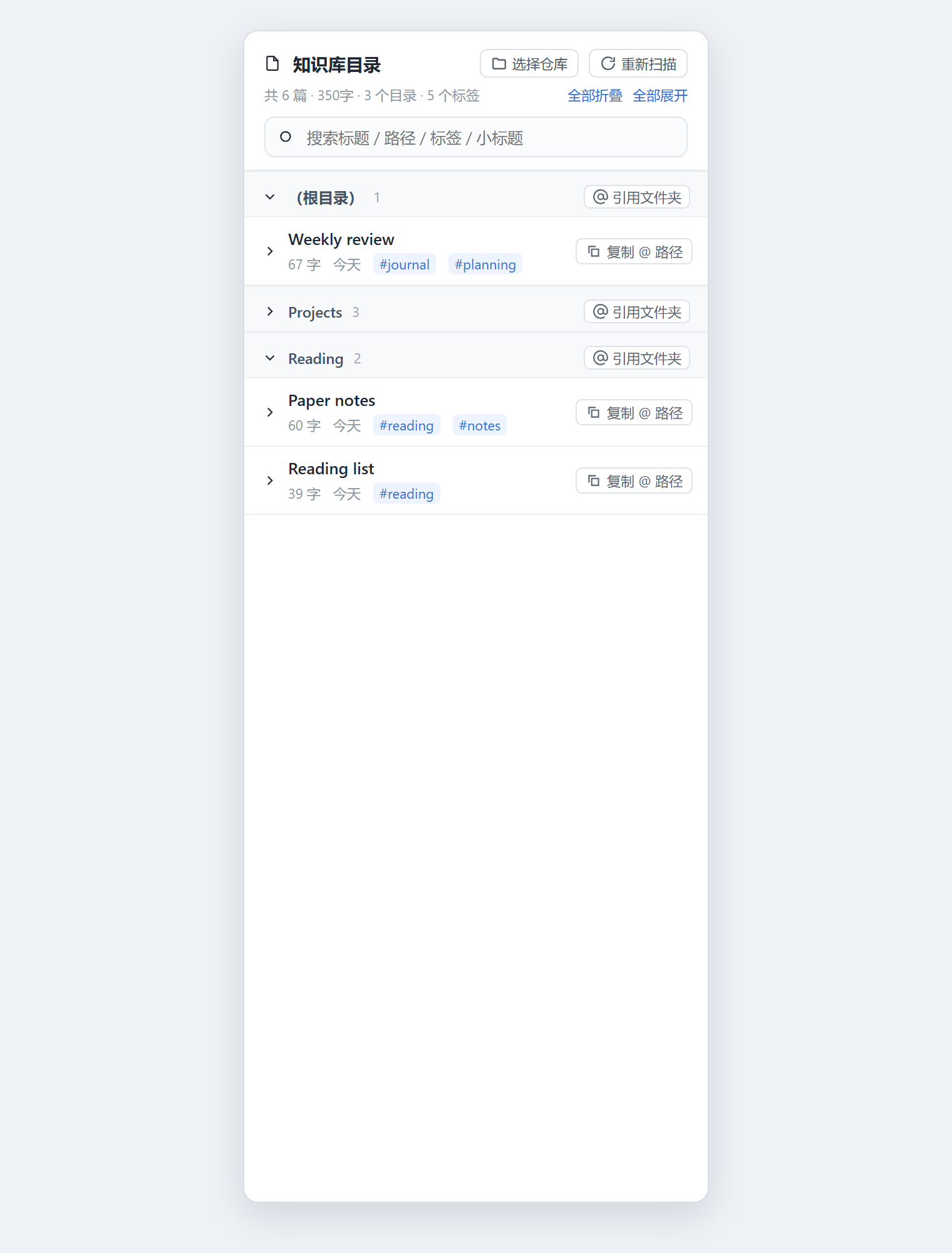
- Live folder tree — groups follow the vault's directory structure, with a note count per group. Each group and each note collapses independently; two header buttons collapse or expand everything at once.
- Search — filters across title, full path, tags and heading text. Search temporarily expands every match.
- Per-note stats — CJK-character plus Latin-word count, relative modification date, and frontmatter tags read from the vault.
- Heading outline — the first three heading levels of each note, indented by level, with the leading
#stripped. A heading identical to the note title is skipped. @path copying —复制 @ 路径on a note row copies@D:\Notes\MyVault\folder\note.md;@ 引用文件夹on a folder row copies@D:\Notes\MyVault\folder(the vault root copies@D:\Notes\MyVault). Both flash a confirmation in place.- Vault switching —
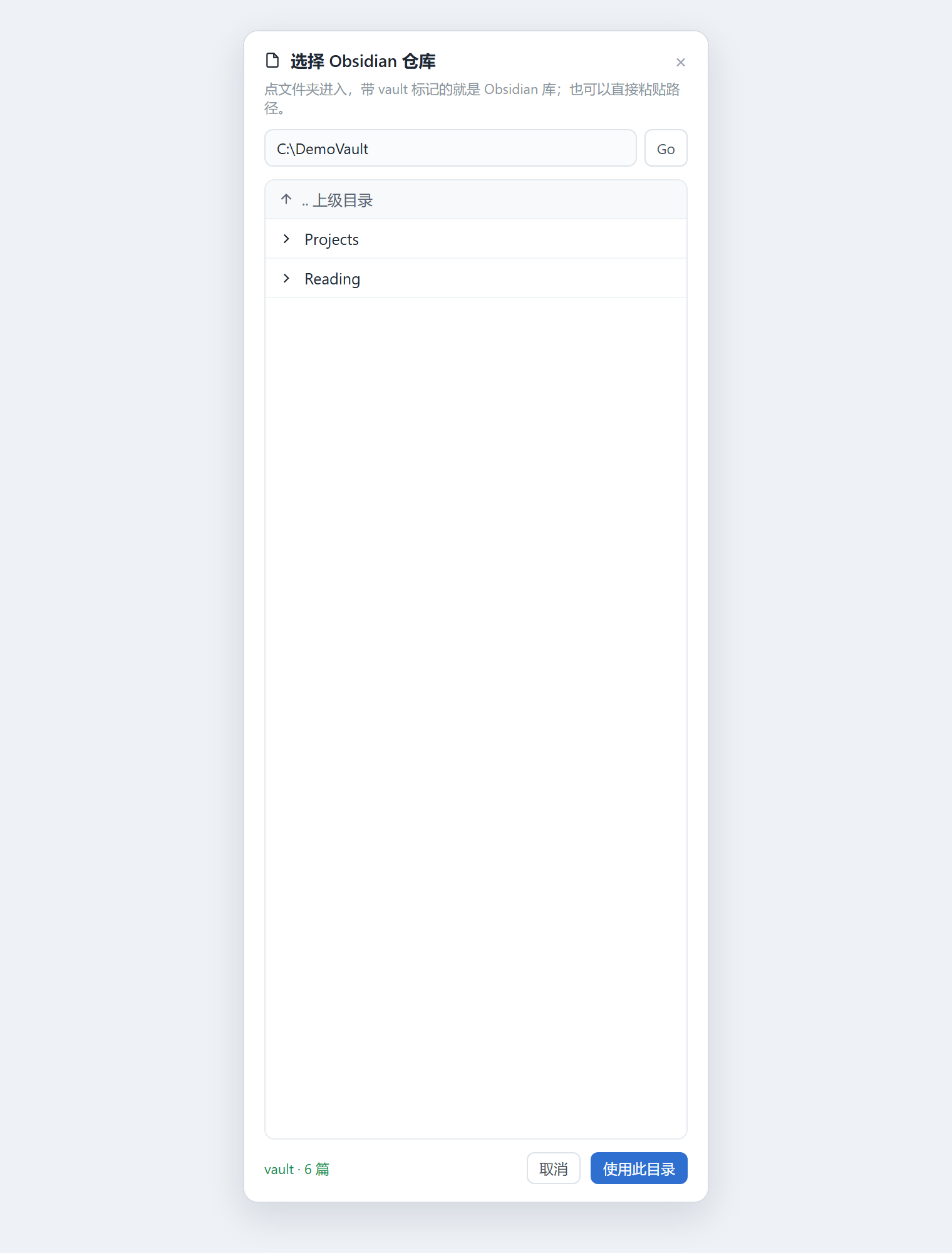
选择仓库opens a directory browser: paste a path and pressGo, walk up with.. 上级, or pick a drive. Directories that look like a vault (contain a.obsidianfolder) are marked;使用此目录switches the panel to that vault and remembers the choice. - Refresh — rescans on demand, and polls every 15 seconds. Unchanged notes are served from a
mtime + sizecache.
Install
dsh plugin --profile web add dsh-plugin-obsidian-catalog
Restart DeepSeek Harness if the plugin does not appear, then open a session and pick 知识库目录 / Obsidian Catalog from the conversation view switcher.
To install straight from a checkout instead of npm:
plugin_manager { action: "install_bundle", target: "<absolute path to this repository>" }
Requires DeepSeek Harness 0.2.x.
Configuration
The vault is resolved in this order:
~/.dsh/obsidian-catalog.json— written by使用此目录, shaped{ "vault": "D:\\Notes\\MyVault" }- the
DSH_OBSIDIAN_VAULTenvironment variable <home>\obsidianas a fallback
Deleting the config file returns the panel to the fallback.
HTTP routes
The bundle registers three routes on the host webServer service. All are read-only except the vault switch, and all are scoped to markdown files inside the selected vault.
| Method and path | Purpose |
|---|---|
GET /api/obsidian-catalog | Snapshot of the selected vault: notes, tags, headings, word counts |
GET /api/obsidian-catalog/dirs?path= | Directory browsing: an empty path lists drives, otherwise subdirectories plus whether each one is a vault |
POST /api/obsidian-catalog/vault | { "path": "D:\\Notes\\MyVault" } — validates the directory, scans it, then persists the choice |
Layout
| File | Purpose |
|---|---|
index.js | Host side: registers the three routes, scans the vault, caches by mtime + size |
client.js | Client side: window.__ModuleLoader__.load(...), registers the obsidian-catalog view on conversation.view |
cordis.patch.yml | - insert: [{ id: obsidian-catalog, name: dsh-plugin-obsidian-catalog }] |
locale/*.json | Chinese and English title and description |
screenshots.json | Storefront screenshots, relative to this file |
The panel uses only --dsw-alias-* theme tokens, so it follows the active light or dark theme.
Notes
- The panel is read-only with respect to the vault: it stats and reads files, and never writes to them.
- Word counts use the same rule as the companion Obsidian plugin: CJK characters plus Latin words (
[A-Za-z][A-Za-z0-9'’\-]*). - Scan limits: at most 12 directory levels and 5000 markdown files per scan.
- Every screenshot on this page was rendered from a synthetic six-note demo vault; no real notes, paths or account names appear in them.
License
MIT
Comments
Loading…
Similar plugins
by DedsecLemon
把 Obsidian 知识库放进 DSH 右侧栏:目录树、全文搜索、Obsidian 排版风格笔记页、笔记大纲;对话交给应用自己的面板在中间打开,不占侧栏。/ Obsidian vault in the DSH right Sidebar: tree, search, Obsidian-styled note pages, outline, and the vault conversation i
★ 3
MIT
JavaScript
Oct 27, 2026
dsh plugin --profile web add dsh-obsidian-panelby 2310770803
One button in the DSH session header: copy a deep link, the whole conversation as Markdown, or the working directory. · DSH 会话标题栏一键复制:深度链接、整段对话 Markdown、工作目录。
★ 1
MIT
JavaScript
Nov 1, 2026
dsh plugin --profile web add dsh-session-copyby revive123456
Obsidian-style notes panel in the DSH right sidebar: a tree over a local folder, Markdown preview with line numbers, edit and save, Obsidian callouts, tables and wikilinks, screenshot paste into the v
★ 2
MIT
JavaScript
Nov 9, 2026
dsh plugin --profile web add dsh-obsidian-notesby Wang-Chuming
Plain click on an Obsidian vault file in the DSH conversation opens it in the right app: notes in the Obsidian app, configured types (for example .tex) in VS Code with their project folder as the work
★ 0
MIT
JavaScript
Oct 30, 2026
dsh plugin --profile web add @dsh-external/dsh-obsidian-file-openerby DEVbyQIN
DSH session bundle: session tabs, quote-to-chat and session Markdown export, installed once with every component switchable on the Plugins page.
★ 0
MIT
JavaScript
Nov 3, 2026
dsh plugin --profile web add dsh-session-expandby NOOBnoob163
DSH 插件:会话在 Obsidian 库里工作时自动把库打开——这样你装的同步插件(坚果云同步等)就会开始跑,AI 改的东西才能真正同步出去。已开着的库跳过,新窗口不抢焦点。(是 DSH 插件,不是 Obsidian 插件)
★ 0
MIT
JavaScript
Oct 17, 2026
dsh plugin --profile web add dsh-open-obsidian