
dsh-approval-notify
Manifest validDesktop notification when DSH is waiting for your approval of a tool call, with click-to-focus on the DSH window.
dsh-approval-notify
English | 中文
A DeepSeek Harness bundle that pops a desktop notification when DSH is waiting for your approval of a tool call, and brings the DSH window to the front when you click that notification.
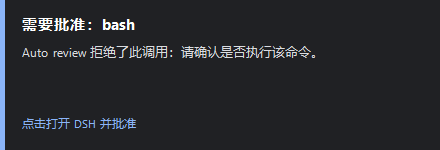
The fallback card presenter, captured on Windows 11 while a toast was unavailable.
It covers every ask the approval service raises, including the asks produced by @deepseek-ai/dsh-experimental-auto-review under the ask approval policy — the case it was written for: Auto review denies a call, DSH asks you, and you are not looking at the window.
Notifications are a reminder, not a permission. The notification cannot approve anything; the decision still happens in the DSH UI, and the notification never changes an approval outcome.
What it does
- Attaches one listener to the
approval/requestwaterfall owned by@deepseek-ai/dsh-user-approval. - Renders a localized title and body from the request's own fields (
toolName,displayReason,reason). Nothing is inferred: a request without a tool name is labelled as unknown rather than guessed. - Suppresses an exact repeat (same tool and same reason) inside a configurable window, so one request is never announced twice while distinct requests always are.
- Presents it on Windows through a long-lived PowerShell helper: a WinRT toast when the process can raise one, otherwise an always-on-top notification card in the corner of the screen.
- On click, restores and focuses the DSH window; if DSH is not running, it launches the configured executable instead, whose single-instance lock restores the existing window.
- Never throws and never awaits its own I/O inside the approval waterfall: a notification problem cannot turn an approval into a fail-closed
unavailableoutcome, and the answerers are never delayed.
macOS (osascript) and Linux (notify-send) get a plain notification without the click-to-focus action.
Requirements
- DSH with the
approvalservice (@deepseek-ai/dsh-user-approval) mounted, which is the case in the shipped Desktop and Web profiles. - Windows 10/11 for the toast and card presenters. macOS/Linux work with
osascript/notify-sendpresent. - No npm dependencies. The bundle imports Node built-ins only.
Install
dsh plugin --profile <profile> add /absolute/path/to/dsh-approval-notify
The CLI installs the package and appends this bundle's declared patch, so the approval-notify row becomes part of the profile. Restart DSH if the loader reports the change as restart-required. Replace <profile> with the profile whose approvals you want announced — desktop is the profile that ships Auto review.
Verify the notification path before relying on it:
node bin/cli.mjs test        # present one test notification
node bin/cli.mjs doctor      # print every resolved input of the path
node bin/cli.mjs logs        # tail the plugin and helper logs
Configuration
The row's config accepts these fields. Defaults are shown; an unusable value falls back to its default and is written to the plugin log as a warning.
| Field | Default | Meaning |
|---|---|---|
enabled | true | false activates the bundle without notifying anything |
mode | auto | auto = toast, then card. Also toast, popup, balloon, none |
clickAction | focus-dsh | focus-dsh focuses or launches the DSH window; none does nothing |
locale | auto | auto follows the host locale; or zh, en |
title | '' | Custom title; empty selects the localized default |
includeReason | true | Include the request's own reason in the body |
maxBodyChars | 220 | Truncate title and body beyond this |
dedupeWindowMs | 4000 | Suppress an identical tool + reason repeat inside this window; 0 disables it |
appId | '' | WinRT toast AppUserModelID; empty tries DSH's own IDs, then Explorer's |
dshExePath | '' | Executable used when no DSH window exists; empty auto-detects |
windowTitleSuffix | DeepSeek Harness | Title suffix identifying the DSH window to focus |
registerProtocol | true | Register the dsh-approval-notify:// handler so a toast click can focus DSH |
popupTimeoutMs | 12000 | How long the card stays on screen; hovering pauses the countdown |
helperIdleMs | 900000 | Stop the helper after this much inactivity |
sound | true | Play the notification sound |
dshExeCandidates | [] | Extra executable paths tried before the built-in ones |
Example patch row:
- id: approval-notify
  name: 'dsh-approval-notify'
  config:
    mode: popup
    locale: zh
    dedupeWindowMs: 10000
How the click-reaches-DSH part works
registerProtocol writes three values under HKCU\Software\Classes\dsh-approval-notify so Windows hands dsh-approval-notify://focus to the bundled helper script. Removing it is one command:
node bin/cli.mjs unregister-protocol
The card presenter does not need the protocol handler at all: the click is delivered to the helper process itself, which is why the card is the reliable path for click-to-focus.
Windows only lets a process raise a window when that process has just received user input, so focus is attempted on the click path and never in the background. The helper logs which strategy produced the result (setForegroundWindow, isForeground, or launched) into helper.log, which is what dsh-approval-notify logs prints.
Verified behaviour
Tested on Windows 11 (build 26100), DSH Desktop profile, Node 24:
| Behaviour | Result |
|---|---|
approval/request listener receives a live ask and queues a notice | verified — notified: tool=pwsh reason=displayReason.zh in plugin.log |
| Bundle activates in a running profile without a restart | verified — hot-loaded into the desktop profile, activated: … presenter=windows in plugin.log |
| WinRT toast from the helper spawned by the DSH host | verified working — toast sent with AppUserModelID "com.deepseek.dsh" |
| WinRT toast from a sandboxed child process | rejected with 0x80073D54 (no package identity) for com.deepseek.dsh, ai.deepseek.dsh.desktop, Microsoft.Windows.Explorer, and the PowerShell AUMID |
| Card fallback after a rejected toast | verified — on screen and clickable (assets/screenshot-popup.png) |
| Click focuses the DSH window | verified — setForegroundWindow=True isForeground=True, logged from real clicks |
| Protocol handler registration | verified — reg.exe exit codes 0, 0, 0 |
Hook wiring: prepended listener, next() passthrough, contained notifier failure | verified by test/plugin.test.mjs |
| Unit tests | 40 passing (node --test) |
The toast is the primary path and it does work where the host allows it: package identity is decided by whoever starts the helper, so auto keeps the toast first and the card second, and records which one each notice took rather than assuming either.
The live ask above was a sandbox-escalation approval. Auto review's asks arrive on the same seam — its tools/pre-execute listener returns { kind: 'ask', reason, displayReason }, which the tools pipeline routes through ctx.approval.request() — so it is covered by the same listener, but it was not separately observed end-to-end here.
Not verified: the macOS and Linux presenters (no such host available), multiple monitors, and DSH running elevated while the helper does not.
Troubleshooting
| Symptom | Cause and fix |
|---|---|
| No notification at all | The session's approval policy is never (the service rejects before any answerer, so nothing is asked), the bundle row is disabled, or mode is none. Check dsh-approval-notify logs. |
| Toast never appears, card always does | Expected on hosts without package identity — 0x80073D54 in helper.log. Set mode: popup to skip the attempt. |
| Click does not focus DSH | registerProtocol: false, or no window title ends with windowTitleSuffix. Set windowTitleSuffix to the suffix DSH uses in your language. |
| Wrong language | Set locale explicitly; auto follows the host process locale. |
| Notification repeats | Different reasons are different notices by design. Raise dedupeWindowMs to collapse near-duplicates. |
| Helper left running | It exits when the host exits and after helperIdleMs. Force it with mode: none and restarting DSH. |
Logs live in %TEMP%\dsh-approval-notify\ (plugin.log, helper.log). Set DSH_APPROVAL_NOTIFY_DIR to pin that directory when the host gives every process a different temporary directory.
Development
node --test        # 40 tests, no dependencies
node bin/cli.mjs test --mode popup --wait 20000
Layout: index.js (the Cordis plugin), lib/ (config, copy, gate, presenters, helper lifecycle), assets/notify-helper.ps1 (toast, card, balloon, and the protocol handler in one file), bin/cli.mjs, test/.
License
MIT — see LICENSE.
Comments
Loading…