

dsh-notify
Manifest validDSH 插件:会话 AI 回复结束时用 DeepSeek 鲸鱼图标弹系统通知 | DSH plugin: system notification with the DeepSeek whale when a session's AI turn finishes
dsh-notify
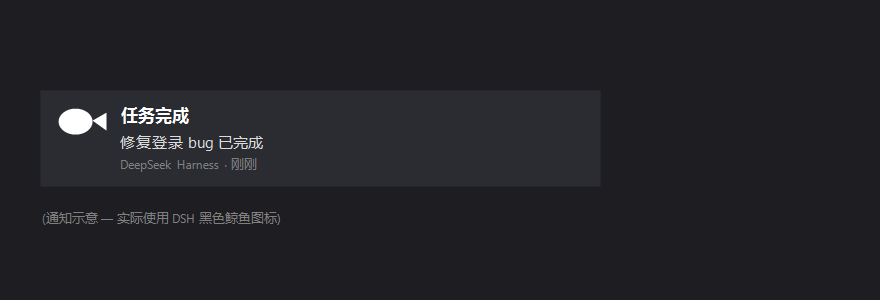
System notifications for DeepSeek Harness (DSH): when a session's AI turn finishes, DSH raises a system notification carrying its black-whale mark and tells you which task completed.
English
How it works (and why it is built this way)
The host subscribes to the session log's own session/event stream and reacts to turn/end; the browser receives those completions over Server-Sent Events and raises the notification.
This split is deliberate. Earlier versions tried to detect completion in the browser by reading client-side projections, and both attempts failed silently:
| Attempt | Why it never fired |
|---|---|
sessions.list.byId[*].running | DSH 0.2.x keeps running on the session object and no longer refreshes the list row live, so no true → false edge ever appeared. |
sessions.binding(id).session | binding() returns this.scopes.get(id)?.binding — it only answers for an already-retained scope, so a root-level plugin got undefined for every session. |
Both are private internals. session/event is the documented seam — the dsh-session package documents "Persistence is a plugin concern (subscribe to session/event, drain on session/flush)" — and turn/end is a stable type in the session log's own event vocabulary. The host also has the durable session header, so titles come from the source of truth rather than from a UI projection.
Behaviour
- Fires for every finished turn, in any session.
- Title
任务完成(任务出错when the turn failed); body names the session. - Icon: the DeepSeek whale, served by the host at
/dsh-notify/whale.svgand rasterized to a PNG in the browser (Windows toasts prefer a bitmap). - Click the notice to ask the shell to focus that session.
- One
EventSourcehandles reconnection on its own.
Install
dsh plugin --profile web add github:SailingBoat-ovo/dsh-notify
dsh plugin --profile desktop add github:SailingBoat-ovo/dsh-notify
Restart DSH afterwards — the node half is loaded at boot, so a page refresh alone is not enough.
Diagnosing
Settings → General shows the permission state, a "Send a test notification" button, and the live link state:
Link: live · 3 completion event(s) received
- Test button works but the counter stays 0 → the host half is not loaded (restart DSH).
- Counter grows but no toast → the OS/browser is suppressing notifications.
Endpoints
| Path | Purpose |
|---|---|
GET /dsh-notify/stream | text/event-stream of completion frames |
GET /dsh-notify/completions | recent completions + current sequence watermark |
GET /dsh-notify/whale.svg | the whale mark |
Tests
npm install
npm test
tests/host-test.mjs (29 assertions) covers the event mapping (only turn/end counts; title/cwd/id fallbacks; failure text), the feed (monotonic seq, history cap, detach), and every route including the SSE handshake, a pushed frame, and detach on close. tests/client-test.mjs (20 assertions) covers the two-slot registration, the stream wiring, notification content, click-to-open, denied permission, and the settings row.
License
MIT — see LICENSE. Third-party marks: NOTICE.md.
中文
工作原理(以及为什么这样设计)
宿主订阅会话日志自身的 session/event,对 turn/end 作出反应;浏览器通过 SSE 收到完成事件后弹出通知。
这个分工是刻意的。此前两版都试图在浏览器里读客户端投影来判断"是否跑完",两次都静默失效:
| 尝试 | 为什么从不触发 |
|---|---|
sessions.list.byId[*].running | 0.2.x 把 running 放在会话对象上,列表行不再实时刷新,因此永远等不到 true → false 边沿。 |
sessions.binding(id).session | binding() 返回的是 this.scopes.get(id)?.binding —— 它只对已被 retain 的 scope 有答案,根级插件对每个会话都拿到 undefined。 |
这些都是私有内部实现。而 session/event 是文档化的扩展点(dsh-session 包里写明"订阅 session/event"是持久化插件的做法),turn/end 是会话日志事件词汇表里的稳定类型。宿主还能读到会话的 header,所以标题取自事实来源,而不是 UI 投影。
行为
- 任何会话的每一轮结束都会通知;
- 标题
任务完成(该轮失败则任务出错),正文带会话标题; - 图标是 DeepSeek 鲸鱼:由宿主在
/dsh-notify/whale.svg提供,浏览器栅格化成 PNG(Windows 通知偏好位图); - 点击通知让外壳聚焦该会话;
EventSource自带重连。
安装
dsh plugin --profile web add github:SailingBoat-ovo/dsh-notify
dsh plugin --profile desktop add github:SailingBoat-ovo/dsh-notify
装完必须重启 DSH —— 宿主半边在启动时加载,只刷新页面不够。
怎么排查
设置 → 通用 里显示权限状态、「发一条测试通知」 按钮,以及实时连接状态:
连接:已连接 · 已收到 3 条完成事件
- 测试按钮能弹、但计数一直是 0 → 宿主插件没加载(重启 DSH);
- 计数在涨、但没弹窗 → 系统/浏览器在拦截通知。
接口
| 路径 | 用途 |
|---|---|
GET /dsh-notify/stream | 完成事件的 text/event-stream |
GET /dsh-notify/completions | 最近的完成记录 + 当前序号 |
GET /dsh-notify/whale.svg | 鲸鱼图标 |
测试
npm install
npm test
tests/host-test.mjs(29 项)覆盖事件映射(只有 turn/end 算数;标题/cwd/id 兜底;失败信息)、feed(序号单调、历史上限、解绑),以及全部路由(含 SSE 握手、推送一帧、断开解绑)。
tests/client-test.mjs(20 项)覆盖两个 slot 注册、流接线、通知内容、点击跳转、权限拒绝、设置行渲染。
许可
Comments
Loading…
Similar plugins
by LapStdy
DSH(DeepSeek Harness)钉钉群通知插件:AI 需要你选择/审批、或一轮任务完成时推送到钉钉群,自带设置面板
★ 0
MIT
JavaScript
Oct 17, 2026
dsh plugin --profile web add dsh-dingtalk-notifyby wally8-8
DeepSeek Harness 插件:标签页鲸鱼状态灯 —— 会话完成变绿,有待处理交互变琥珀。Tab-whale status light: green when done, amber when something awaits you.
★ 11
MIT
JavaScript
Sep 24, 2026
dsh plugin --profile web add dsh-done-whaleby CoachLeong
DeepSeek Harness plugin: desktop notifications when the model starts, finishes, or needs your input (approval / question / plan review).
★ 0
MIT
TypeScript
Aug 16, 2026
dsh plugin --profile web add dsh-notifyby pedesdestiny
Browser desktop notifications for DeepSeek Harness (dsh) — get notified when a turn completes or an approval is needed
★ 3
↓ 443/wk
JavaScript
Aug 18, 2026
dsh plugin --profile web add dsh-notifyby omdsh-dev
Desktop notifications for DeepSeek Harness turn completions, with per-outcome controls and include/exclude keyword rules.
★ 88
↓ 461/wk
MIT
JavaScript
Sep 1, 2026
dsh plugin --profile web add dsh-notificationby c-ling
DeepSeek Harness 消息提醒插件:回合结束或等待确认时向浏览器、系统、飞书/钉钉/企业微信/通用 Webhook 发送通知
★ 7
↓ 355/wk
MIT
JavaScript
Aug 21, 2026
dsh plugin --profile web add dsh-plugin-notify