
dsh-quicktime-player
IdentifiedSidebar video player for DSH: it registers its own right-sidebar tab type, so any video opened through the harness — the Files tab, a chat file reference, another sidebar plugin's file tree — lands in
dsh-quicktime-player
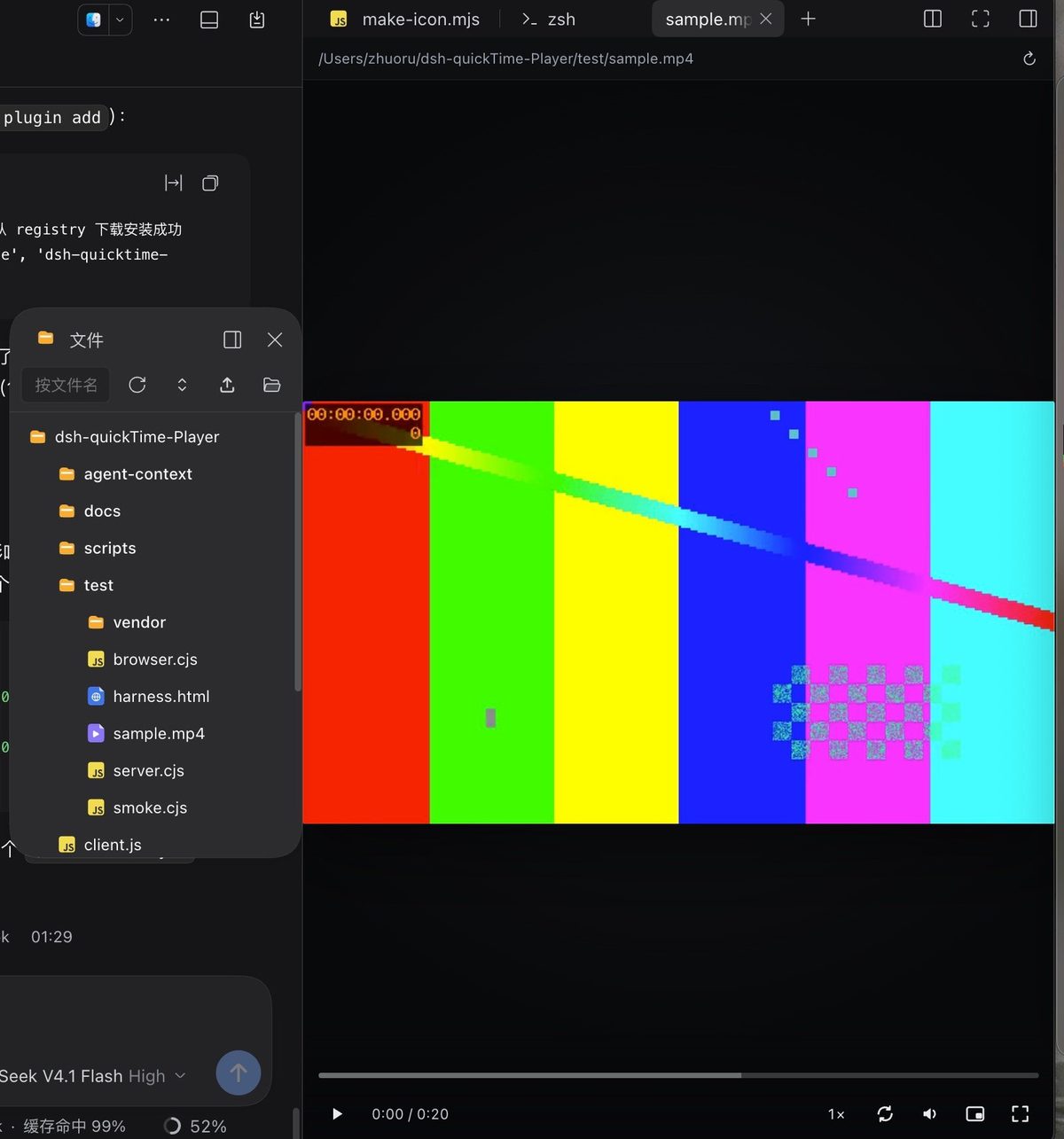
A sidebar video player for DeepSeek Harness — streaming playback with seek, wheel zoom and drag pan, plus frame capture and clip export.
Features
- Plays from anywhere. Registers its own right-sidebar tab type, so any video opened through DSH — Files tab,
chat file reference, another sidebar plugin's tree,
sidebar_open— lands in this player. Nothing else needs to be installed, and no other plugin needs adapting. - Seekable. A Host route streams bytes with HTTP
Range(206), so the progress bar scrubs instead of snapping back. Bytes stay on disk — a multi-GB video is never read into memory. - Seek works on Desktop too. The Electron shell serves the page from
dsh-app://, where Chromium cannot seek a<video>response; the player therefore streams from a tokenized127.0.0.1port and falls back to the same-origin route when that port is unavailable. - Zoom and pan. Wheel zooms around the pointer (1× – 8×), drag pans while zoomed, and panning stops at the video's edge — the picture can never be dragged out of the frame. Double-click toggles fullscreen.
- Own controls. Play/pause, time ⇄ frame number, speed slider (0.2× – 5×, 0.2 steps), loop, vertical volume popup, mute, picture-in-picture, fullscreen. The chrome fades out while the mouse is idle.
- Frame stepping. ← / → step one frame; the frame rate is measured from delivered frames.
- Picks up where you left off. Each file's position, speed, loop, volume and mute are remembered by absolute path (the last 50 files, ignored after 30 days), so switching sessions and coming back resumes on the same frame. If the file was re-rendered (duration changed), the old record is dropped rather than seeking somewhere unrelated.
- Copy the current frame. The camera button next to
?writes the frame under the playhead to the clipboard as a PNG (falling back to a download), with a toast confirming it. - Trim a range. The scissors button drops a marker at the playhead; two markers survive, linked by a dashed line,
and hovering the scissors reveals save/clear. Saving runs the Host's
ffmpegwith a stream copy, so the clip is byte-identical to the source — no re-encode, cut on the nearest keyframe. Withoutffmpegthe button says so. - Check for updates. The cloud button next to the camera asks the Host for this package's installed version and the registry's latest, then reports the answer in a small dialog. Manual only: no polling, no badge, no auto-install.
- Follows the harness theme. The chrome (header, guide card, dialogs, toasts) is painted with DSH's own
--dsw-alias-*tokens, so a light theme gives a light player; the video stage stays dark because that is what sits under the picture. Without the tokens it falls back to the dark palette it has always used. - Built-in guide. The
?in the corner lays a click-through guide card over the player: one row per feature, with the same control glyphs you see in the toolbar. It is plain text — no arrows to keep in sync. - Keyboard is never stolen. While focus is inside the pane — even on a slider — Space and the arrows stay with the player.
Install
dsh plugin --profile <profile> add dsh-quicktime-player
Reopen the window once so the client bundle is picked up.
Requirements
- DSH with profile bundles (the package declares
dsh.bundle.patch). ffmpegon the Host, only for clip export. It is looked up at/opt/homebrew/bin/ffmpeg,/usr/local/bin/ffmpeg, thenffmpegonPATH. Without it everything else still works; the save button says the Host has noffmpeginstead of failing silently.
There is nothing to configure: the route prefix, the 4 GiB ceiling, the loopback media server and the working-directory confinement are fixed.
Controls
| Input | Action |
|---|---|
| Space / K | play / pause |
| ← → | one frame back / forward |
| Shift + ← → | ±1 s |
| ↑ ↓ | volume |
| M | mute |
| F / Enter | fullscreen |
| 0 | reset zoom |
| + / − | zoom in / out |
| click the clock | switch between time and frame numbers |
| the scissors button | drop a clip marker at the playhead (the last two are kept) |
| hover the scissors | reveal save / clear for the marked range |
| the camera button | copy the current frame to the clipboard as a PNG |
| the cloud button | check the registry for a newer version |
How it works
- One tab type.
ctx.sidebarRightTabs.registerclaims video addresses with per-suffix globs (dsh-resource://file/**/*.mp4, …). The registry ranks tab types by band, then by pattern length, then by registration order — a longer, video-only glob outranks a sidebar plugin's genericdsh-resource://file/**, so videos route here and every other file keeps its usual viewer. - One Host route.
ctx.webServer.registerserves/quicktime/source,/quicktime/stream,/quicktime/clip,/quicktime/capabilities,/quicktime/versionand the tokenized loopback port. Paths are confined to the session working directory. - Clip export shells out to
ffmpegwith-ss / -t -c copy: the streams are copied, not re-encoded, so the cut lands on the nearest keyframe and the frame data stays byte-identical. The temp file is deleted after it is sent. - No dependency on any other plugin: the core is the tab type plus that route.
.mkv, .avi, .wmv and .flv are accepted but Chromium cannot decode them; the player reports that instead of
pretending to play.
Troubleshooting
~/.dsh/quicktime-player.log— one JSON line per player event (source resolved, metadata, decode errors).- "宿主上没有 ffmpeg" when saving a clip — install
ffmpeg(brew install ffmpeg) and reopen the window. - The update check says "检查失败" — the Host could not reach
registry.npmjs.org(offline, proxy, or DNS). GET /quicktime/_graph— dev probe for whether the client bundle is in the module graph.
License
MIT. The icon is ours: a dark plate, a gradient ring and a play glyph, generated by scripts/make-icon.mjs
(violet, teal, amber or rose). It contains no Apple artwork.
Comments
Loading…
Similar plugins
by zemul
dsh-better-sidebar 的视频文件预览插件: 在侧边栏打开 .mp4 .webm .mov .mkv .avi 等视频文件时,内联渲染一个可播放、可拖拽进度条的 <video> 播放器。
★ 9
↓ 508/wk
MIT
JavaScript
Aug 27, 2026
dsh plugin --profile web add dsh-video-previewTikTok-style video feed in a floating sidebar window: swipe local or SMB-NAS folders, or paste online video URLs (yt-dlp, bilibili/YouTube, cookies.txt login state); the window auto-fits the video asp
★ 0
dsh plugin --profile web add dsh-plugin-video-playerby wilsonchengassistant
Plays video and audio files in the right Sidebar preview pane, streamed over an authenticated HTTP Range route so a remote browser can play and seek a large file without launching a native player on t
★ 0
MIT
JavaScript
Oct 21, 2026
dsh plugin --profile web add dsh-media-web-previewby rex178178
Video-style turn navigation for the Web UI: full-map progress bar with hover preview cards (tools/files/tokens), drag scrub, ⌘K in-conversation search, ⌘↑/⌘↓ stepping, Esc-return. Event-log powered —
★ 0
↓ 25/wk
MIT
JavaScript
Sep 16, 2026
dsh plugin --profile web add dsh-turnbarby Zhuang-YiQing
Right-sidebar file-preview enhancement built on `dsh-better-sidebar` (required — without it the plugin stays inert): a floating find bar for any text file (Ctrl+F, literal or regex, case-sensitive, ma
★ 0
JavaScript
Nov 4, 2026
dsh plugin --profile web add dsh-search-outlineby sailoumili
DSH 插件:对话里的文件与目录路径点一下就打开——可预览的在右侧侧边栏显示,其余用系统默认程序打开。Click file and directory paths in DSH chat to preview them in the right sidebar or open them with the system default application.
★ 1
MIT
JavaScript
Oct 3, 2026
dsh plugin --profile web add dsh-file-opener