

agent-pet
DiscoveredA desktop pet that shows what your coding agents (Claude Code, Codex, DeepSeek Harness) are doing — and lets you answer their permission prompts
agent-pet
A floating desktop pet for coding agents. One character per active agent (Claude Code, Codex, DeepSeek Harness, or anything that can run a shell command); her mood follows the agent, and when an agent asks for permission the pet shows the prompt in a bubble you can answer without switching windows.
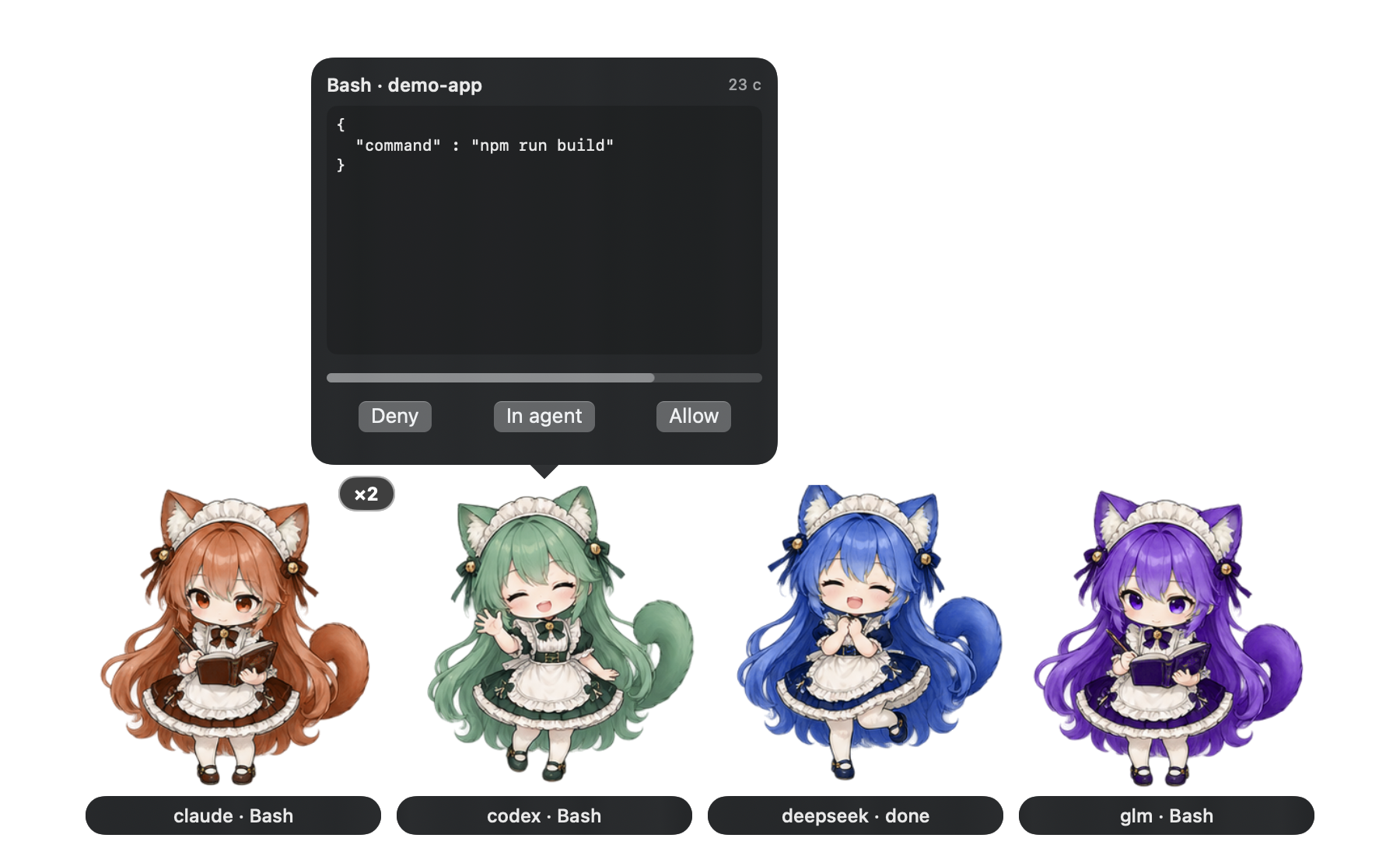
Pets appear only while a session is working, waiting for you, or just finished. Everything is local: agents append JSON lines to a file and the overlay tails it. Nothing is sent over the network and there are no accounts; the optional DSH plugin opens a loopback-only port (127.0.0.1) for the overlay's open-session commands.
Requirements
- macOS 14 or later
- Swift 6 toolchain (Xcode or the Command Line Tools)
- Python 3 (ships with macOS; used by the installer)
ChatGPT (the chat app) has no local plugin API, so there is no integration with it. Codex running inside ChatGPT.app is covered by the Codex plugin below.
Install
git clone https://github.com/rpegorov/agent-pet.git
cd agent-pet
scripts/install.sh                  # build, install to ~/.local/agent-pet, hook up Claude Code and Codex
scripts/install.sh --launch-agent   # also start the overlay at login
install.sh also accepts --no-claude-hooks and --no-codex-hooks (use these with the plugins below), and --uninstall.
Connect your agents
Use either the plugin or the install.sh hooks for a given agent, not both. Both together would deliver every event twice and ask every permission twice; the emitter does not de-duplicate because it cannot tell which hook fired first. Plugins carry only the hook wiring, so run scripts/install.sh --no-claude-hooks --no-codex-hooks once for the binary and the overlay.
Claude Code. install.sh adds hooks to ~/.claude/settings.json. Or, as a plugin:
/plugin marketplace add rpegorov/agent-pet
/plugin install agent-pet@agent-pet
Codex. install.sh adds hooks to ~/.codex/hooks.json and trusts them in ~/.codex/config.toml. Or, as a plugin:
codex plugin marketplace add rpegorov/agent-pet
codex plugin add codex-agent-pet@agent-pet
Codex does not trust the plugin's hooks on a command-line install, so they stay silent until you approve them (see Troubleshooting). The install.sh route has no such step.
DeepSeek Harness (DSH). plugins/dsh-agent-pet is a standalone DSH plugin. In your profile's package.json add a dependency "dsh-agent-pet": "link:/path/to/agent-pet/plugins/dsh-agent-pet" and add "dsh-agent-pet" to dsh.profile.bundles, install, and restart DSH. It reports session state and lets the overlay open a session or start a chat in the Harness UI.
Anything else (scripts, task runners, other agents):
agent-pet-emit send --agent glm --session task-1 --label "refactor" --mood working
agent-pet-emit send --agent glm --session task-1 --mood complete
Event protocol
agent-pet-emit appends one line per event to ~/.agent-pet/events.jsonl (override with AGENT_PET_LOG); the overlay tails the file. The file is rotated to events.jsonl.1 above 512 KiB.
{"v":1,"agent":"claude","session":"5e9d","mood":"working","label":"Bash","ts":1792276251.42}
mood is idle, working, attention, complete or ended (removes the session). label is at most 40 characters. Optional fields, omitted when unknown: cwd, app (bundle id of the hosting app), tty, detail (permission summary, at most 200 characters), permission (id of a pending request).
Decay: working with no event for 120 s is hidden, complete is hidden after 10 s, attention after 10 min, a session silent for 30 min is dropped. An agent's pet shows the highest-priority mood of its live sessions: attention, working, complete.
Permission bubble
With the overlay running, agent-pet-emit permit (the PermissionRequest hook) shows the pending tool call in a bubble with Deny, In agent and Allow, and a countdown.
- The bubble shows the whole tool input (pretty-printed JSON, capped at 8 KiB). If the input is capped or unreadable, Allow is withheld.
- In agent hands the prompt back to the agent's own dialog. If nobody answers before the countdown ends (at most 40 s,
AGENT_PET_PERMIT_WAITseconds, default 30), or the overlay stops running, the native dialog appears as usual. The pet never auto-allows. - Tools that ask you something (
AskUserQuestion,ExitPlanMode) are never turned into a bubble. - Requests live in
~/.agent-pet/permissions/(owner-only) and are removed when answered, expired or when the hook is killed. - The overlay's own texts (Deny, In agent, Allow, status labels) are English and not localised; labels that come from agents (tool names, session titles) appear as sent.
- To turn the bubble off, quit the overlay (the hook then stays silent), or change the
PermissionRequestcommand frompermittohookin the agent's hook config.
Privacy
agent-pet keeps everything on your Mac and sends nothing over the network.
- What is written.
~/.agent-pet/events.jsonlholds one line per hook event: agent name, session id, mood, a short label (tool name, session title or notification text), the working directory, the hosting app's bundle id, the terminal tty and, for permission requests, a summary of the tool call (at most 200 characters). Prompts, tool output and file contents are not recorded. - Permission requests. While a request is pending,
~/.agent-pet/permissions/holds its full tool input (at most 8 KiB). The file is deleted when the request is answered, expires or the hook is killed; leftovers older than 2 minutes are cleaned up. - Access. The directory is owner-only (0700) and the log is 0600. The log is rotated at 512 KiB, keeping one previous file.
- What is read. The overlay reads the event log, and, to open a Claude Desktop session, the session index in
~/Library/Application Support/Claude/claude-code-sessions(read only). Selecting a Terminal or iTerm2 tab uses AppleScript and asks macOS for Automation permission once. - System log. Clicks and jumps are logged under the subsystem
agent-petwith agent, session id, app and the opened URL; no tool input or paths. - Network. None outbound. The DSH plugin listens on a loopback-only port and accepts commands only from local processes and the Harness web UI; the overlay talks to it over
127.0.0.1.
Delete ~/.agent-pet to remove all recorded data.
Uninstall
scripts/install.sh --uninstall
Removes the binaries, hooks, trust entries and LaunchAgent. A no-op agent-pet-emit stub stays behind so sessions that are still open do not report a missing command; restart them and delete the stub. Plugins are removed with /plugin uninstall, codex plugin remove or by editing the DSH profile.
Troubleshooting
- Nothing appears. Is the overlay running (
pgrep -x AgentPet)? Does~/.agent-pet/events.jsonlgrow when an agent works? If not, the hooks are not installed or the agent was started before they were; restart the agent. - Codex plugin hooks do nothing. Codex 0.163 does not trust hooks from a plugin installed with
codex plugin add; they ran only with--dangerously-bypass-hook-trust. Approve them in Codex (/hooks) or usescripts/install.sh, which writes the trust entries itself. Re-runinstall.shafter changing a hook command: the trust is tied to its text. - DSH changes are not picked up. DSH caches plugin ES modules; restart it after installing or editing a plugin.
- DSH commands are refused. The plugin's bridge answers only the Harness web UI origin (
http://127.0.0.1:50306) and local processes; a UI served from another origin cannot read its queue.
License
MIT. The sprite art in Sources/AgentPet/Resources is included under the same license.
Comments
Loading…
Similar plugins
by youzhoujiMrLiu
Codex-compatible desktop pet for the DeepSeek Harness web GUI: animated pets that follow the agent state|兼容 Codex 格式的 DSH 桌面宠物:随智能体状态变化的动画宠物
★ 0
MIT
TypeScript
Aug 16, 2026
dsh plugin --profile web add dsh-codex-compatible-petby ESROAMER
Delegate tasks from Codex to desktop-visible DeepSeek Harness agents, with scoped credentials, persistent sessions and a reusable skill.
★ 1
MIT
JavaScript
Oct 6, 2026
dsh plugin --profile web add @esroamer/codex-dsh-collabby xlight
使用 DeepSeek 官方多模态视觉模型让你的 Agent 不再眼瞎(支持 DSH、Zed、OpenCode、Codex、Claude Code、Cursor、Claude Desktop)
★ 17
↓ 35/wk
Rust
Oct 19, 2026
dsh plugin --profile web add @xlight-oss/visionary-dshby hasan-aghayev
Floating desktop pet for DeepSeek Harness with a growing local pet library
★ 0
NOASSERTION
JavaScript
Sep 23, 2026
dsh plugin --profile web add dsh-pet-companionby LeemanCheung
Privacy-safe local Codex, Claude Code, WorkBuddy and CodeBuddy activity scanner that recommends DSH agent presets.
★ 2
MIT
JavaScript
Sep 5, 2026
dsh plugin --profile web add dsh-agent-preset-recommenderby MJorgin
⚡ DSH 指挥家 / Conductor for DeepSeek Harness — in-session dispatch to 11 external agent CLIs (Codex, Claude Code, TraeCode, OpenCode, Gemini, Cursor, Kimi, Qwen, Copilot, WorkBuddy, Grok). Zero-dep skil
★ 12
MIT
JavaScript
Sep 30, 2026
dsh plugin --profile web add dsh-agent-conductor