

dsh-subagent-model-tags
Discovereddsh-subagent-model-tags

English | 中文
A DeepSeek Harness plugin that shows each subagent's model name in the session-header subagent panels, and widens those panels from 360 px to 460 px.
Screenshots
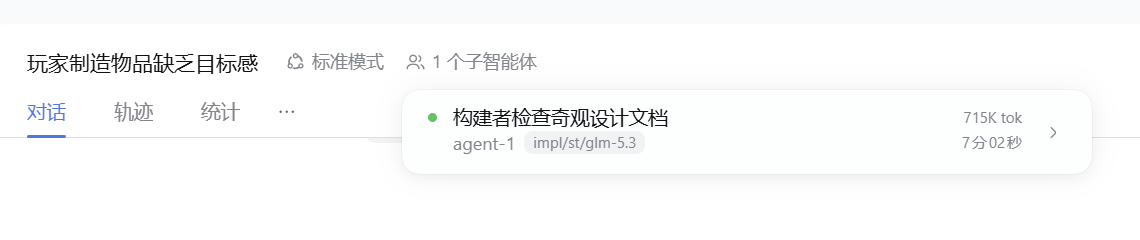
The model name appears on the row's name line — the second line when the row shows a description:
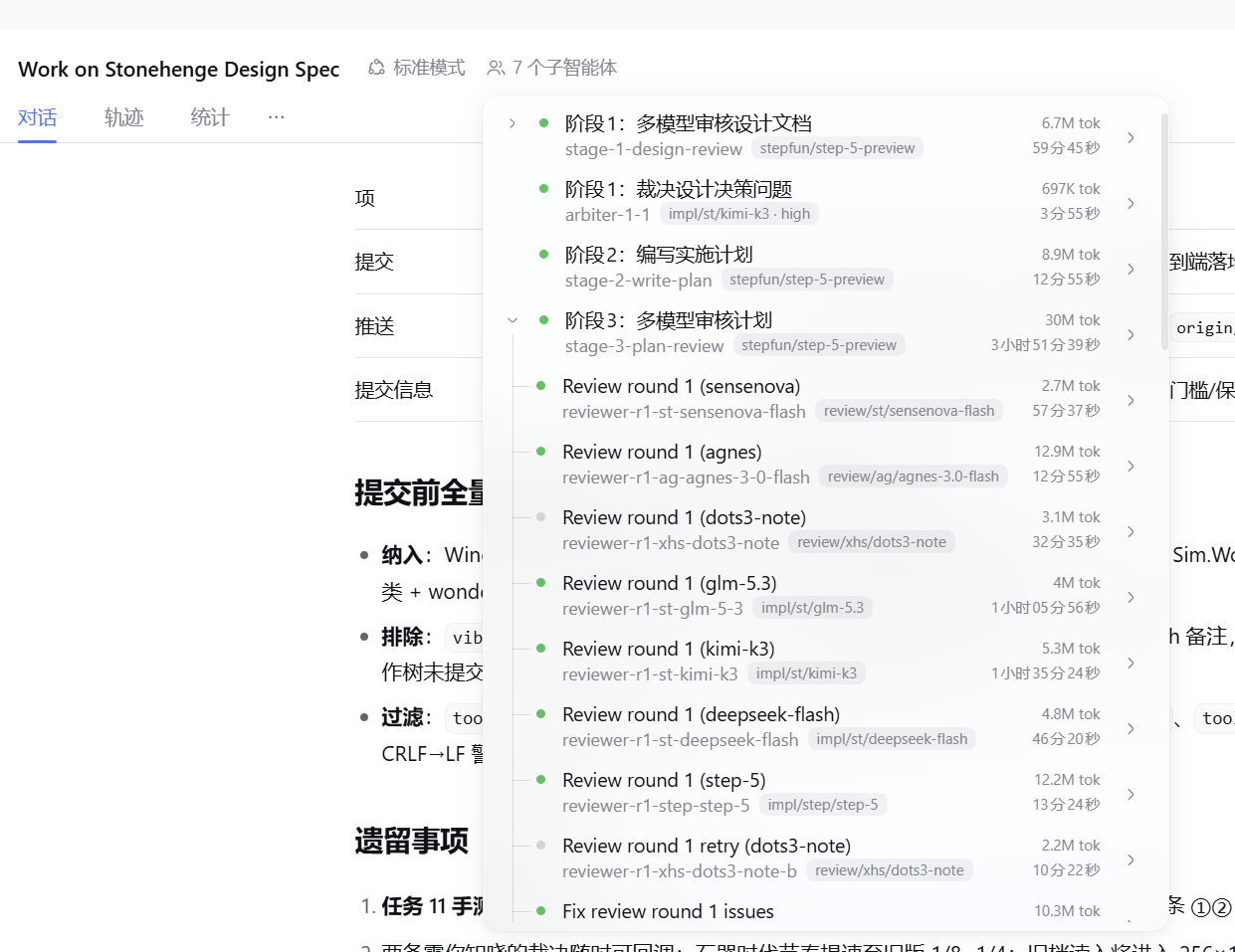
Every nesting level carries its own model name, including provider and reasoning effort:
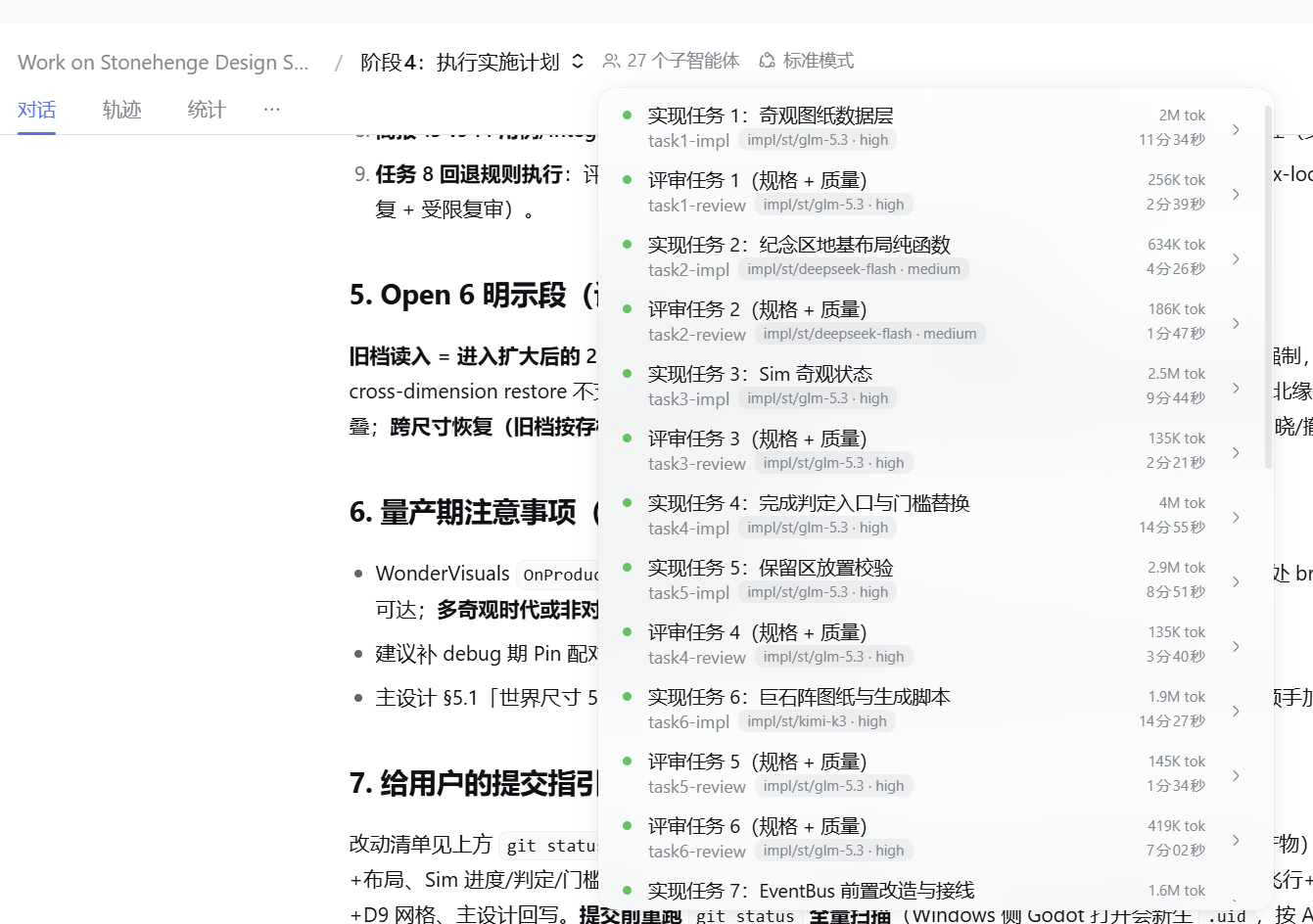
Inside a subagent conversation, the breadcrumb panel shows model names too:
What it does
- Adds each subagent's model name on its row's name line in every subagent panel: the root session's subagent panel, a subagent conversation's sibling switcher, and its own children panel. The name is written as
provider/model · reasoning effort, at every nesting level. - A subagent with no recorded model, and external subagents that have no local session, show
—. - Widens the subagent panels to 460 px (still bounded by the window width).
The model name comes from each subagent session's modelSelection projection, which the Harness records durably, so it shows what the subagent actually runs with rather than what a parent was asked for.
Install
Requires DeepSeek Harness 0.2.2-rc.4 and later 0.2.x.
- Published package: open Plugins in the Web sidebar, choose Add plugin, and enter
@hukj/dsh-subagent-model-tags. The Plugin Manager picks the registry through its own configuration and falls back through the configured registries. - Local development: enter the absolute path of this directory in the same dialog.
Then enable the bundle if it is switched off. The change takes effect after a page refresh.
Limitations
- The model name is injected as text into the panel's rendered rows, so a future DSH panel change can silently stop it. The plugin writes a name onto a row only when it can pair every rendered row against a catalog it knows (the conversation's own or an ancestor's) and verify each paired row's displayed label; a panel that verifies against nothing stays untouched instead of showing a wrong model.
- Two catalogs with identical row labels in the same order could still cross-match; in practice that requires two identical agent sets on the same chain.
- The panel width is raised through the host's
--dsh-subagent-menu-widthvariable; if the host restructures the panel, the width rule may stop applying. - Diagnostics: with a panel open, run
__subagentModelsDebug()in the page console to see what the last syncs paired and why a candidate root was rejected.
Files
| File | Role |
|---|---|
client.js | Web client module: panel widening and the two invisible seats that write model names |
index.js | Inert Host entry |
cordis.patch.yml | Bundle patch inserting the plugin row |
locale/*.json | Plugin display metadata in eight languages |
docs/DETAIL.md, docs/preview.svg | Detail page image |
docs/images/*.png | README screenshots |
screenshots.json | Screenshot list for plugin storefronts |
assets/icon-180.png | Raster icon for plugin storefronts |
icon.svg | Plugin icon |
Development
The self-check loads the client module with a stub module loader, runs its factory, exercises both slot registrations, renders both components, and executes the effect bodies against a minimal fake DOM — including a panel sync where an equal-count wrong catalog root must be rejected by label verification.
node test/selftest.cjs
It is not part of the published package.
Releasing
Publishing is automated: pushing a version tag runs the Release workflow, which checks that the tag matches package.json, runs the self-check, and publishes to npm.
# 1. bump the version in package.json and commit it
# 2. tag and push
git tag v1.0.1
git push origin v1.0.1
The workflow needs the NPM_TOKEN repository secret: an npm token that may publish @hukj and may bypass 2FA (an "Automation" token or a granular token with publish access). With npm Trusted Publishing configured for this repository, the secret can be removed and the workflow publishes over OIDC instead. CI runs the self-check on every push to main and on pull requests.
License
MIT
Comments
Loading…