

dsh-ui-tool-graph
Manifest validTool-call value graph tab for the DeepSeek Harness (dsh) Web UI: cost/duration/error weights over conversation trajectories with one-click next-turn optimization prompts.
dsh-ui-tool-graph
A tool-call value graph tab for the DeepSeek Harness (dsh) Web UI.
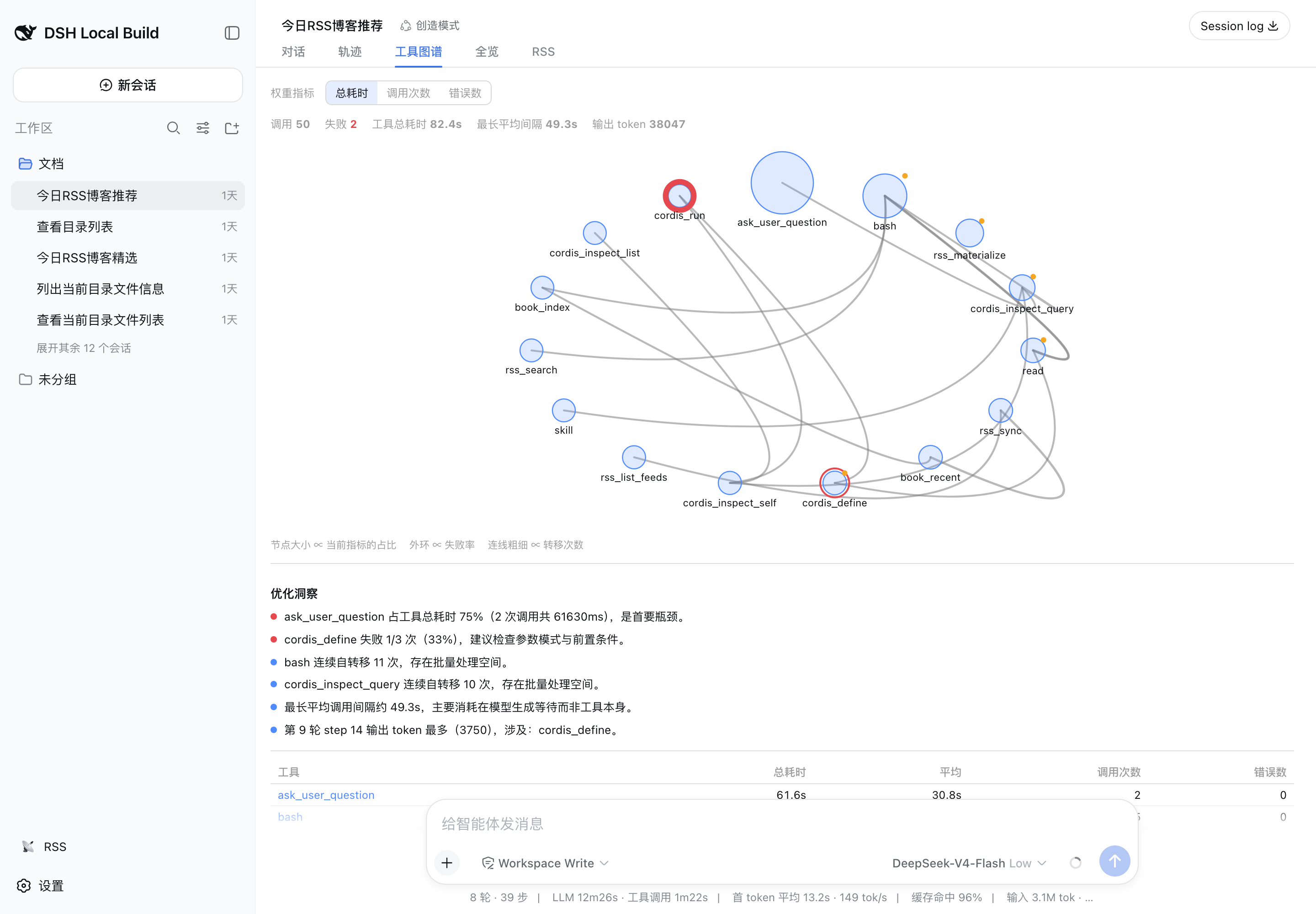
Agent trajectories bury their own economics: which tool ate the wall time, where calls failed, how many tokens each round burned, which calls repeated themselves verbatim. This plugin adds a Tool Graph (工具图谱) tab to the conversation view ring that folds the session log into one weighted relationship graph:
- Nodes are tools, sized by the metric you pick (total duration, call count, errors) with an outer ring proportional to the error rate;
- Edges are transitions, one per consecutive dispatch pair within a turn, weighted by transition count;
- Insights call out the dominant bottleneck, error-prone tools, identical repeat calls, self-loops worth batching, the longest inter-call wait, and the step that produced the most output tokens;
- Next-turn guidance renders those metrics into a self-contained analysis prompt you can copy to the clipboard or queue as your literal next message.
Everything is folded client-side from the durable session log — deterministic, replay-safe, no extra model calls, no persistence, zero token cost.
Features
- Weighted radial graph — switch node weighting between total duration / call count / errors at any time; edge width ∝ transition count.
- Optimization insights — rule-derived findings with severity dots: bottleneck share, error-prone tools, verbatim repeats (cache/dedup candidates), consecutive same-tool chains, model-generation waits, token-heavy steps.
- Per-tool ranking table — total / average duration, calls, errors; click a row or node to drill into every individual call with its duration and argument excerpt.
- Session totals strip — calls, running, failures, tool wall time, longest average gap, output tokens.
- One-click next turn — copy the analysis prompt, or send it as your next queued message after an explicit second click.
Installation
This checkout targets Harness 0.2.0-rc.2 and Cordis 4.0.4. Place the repositories at ai/deepseek-harness and ai/dsh-plugins/dsh-ui-tool-graph, and build Harness first; development dependencies link to its built libraries. Build this package, then install its tarball.
pnpm install --ignore-scripts
pnpm run typecheck
pnpm test
pnpm build
pnpm pack
dsh plugin --profile web add ./dsh-ui-tool-graph-0.1.3.tgz
Restart the profile if the Plugin Manager reports that a restart is required. Every conversation gains a 工具图谱 (Tool Graph) tab.
For Desktop, install the generated tarball through Plugins in the running application, enable the bundle, and restart Desktop when requested. Open a conversation and select Tool Graph (工具图谱). A conversation without tool calls displays an empty state. The CLI commands here manage a Web profile, not Desktop's reserved profile.
Uninstall: dsh plugin --profile web remove dsh-ui-tool-graph.
How it works
| Metric | Definition |
|---|---|
| Call duration | tool/result time − paired tool/call time (wall clock) |
| Tool wall time | Sum over completed calls in the loaded window |
| Error rate | Error results ÷ completed calls per tool |
| Transition edge | Consecutive call pair within one turn, in log order |
| Average gap | Per-edge mean of result→next-start latency (dominated by model generation wait) |
| Tokens | Provider usage carried by each finalized assistant message, deduplicated per step |
The view target folds incrementally (replace/apply over the event window), so totals cover exactly what the history window holds; page older turns in the Trajectory tab to extend coverage. Result-only records without their loaded call are excluded because the name and start time are unavailable. The plugin registers event definitions and its view through uiConversation and receives its per-session target through the framework-bound useToolGraph hook. Colors follow the application's light and dark theme tokens.
Known limitations
- Nested sub-calls (delegations) fold as their parent result only.
- The LLM-vs-tool wall-time split is approximated by inter-call gaps; per-request timing attribution is not yet surfaced.
- Single-tool sessions render one node without edges — by definition.
Development
pnpm install
pnpm typecheck   # tsc --noEmit (strict)
pnpm test        # vitest: folding parity, layout purity, prompts, component behavior
pnpm build       # lib/index.js (node half) + lib/client.js (browser bundle)
pnpm pack        # installable tarball
The package is a dual-identity bundle: dsh.bundle ships the patch layer, dsh.client declares the web plugin. Runtime imports are limited to the host-shared React, Cordis, Client Store, UI Slots, UI Primitives, and Dockkit modules; feature plugins are accessed through type declarations and injected services.
License
MIT
Comments
Loading…
Similar plugins
by noone89A
为 DeepSeek Harness Web UI 提供精确缓存命中率、token 用量与费用估算
★ 4
MIT
TypeScript
Aug 15, 2026
dsh plugin --profile web add dsh-gaugeby Sttrevens
Per-turn USD cost badge in the Web UI: session total in the header and per-turn cost in each message footer, with a hover breakdown.
★ 1
↓ 276/wk
MIT
JavaScript
Aug 17, 2026
dsh plugin --profile web add @steven-wu/dsh-cost-meterby wangyong1972
Draggable quota/cost dashboard for DeepSeek Harness web GUI: OpenRouter + DeepSeek balances & spend (official APIs + session-log pricing)
★ 0
JavaScript
Aug 23, 2026
dsh plugin --profile web add @wangyong1972/dsh-quota-dashboardDeepSeek API quota panel collapsed into a left-edge handle for the Web UI: click to expand balance, official today's consumption (with platform token) and live conversation cost; fork of dsh-deepseek-
★ 0
dsh plugin --profile web add dsh-deepseek-quota-leftby Max-Samson
A DeepSeek Harness Web plugin for real-time Token usage, cost estimates, per-round charts, and DeepSeek API balance.
★ 9
↓ 492/wk
MIT
TypeScript
Sep 23, 2026
dsh plugin --profile web add dsh-usage-chartby Jolly-J
DSH WebUI 插件:DeepSeek 余额显示与按会话费用估算
★ 4
MIT
TypeScript
Sep 22, 2026
dsh plugin --profile web add dsh-deepseek-billing