

dsh-pulse-rail
Manifest validMusic visualiser for the DeepSeek Harness turn-navigation rail: bars grow and thicken with system audio (WASAPI loopback), geometry only, no admin rights.
dsh-pulse-rail
Turn the DeepSeek Harness turn-navigation rail into a music visualiser: every thin bar grows and thickens with the system audio that is playing right now.

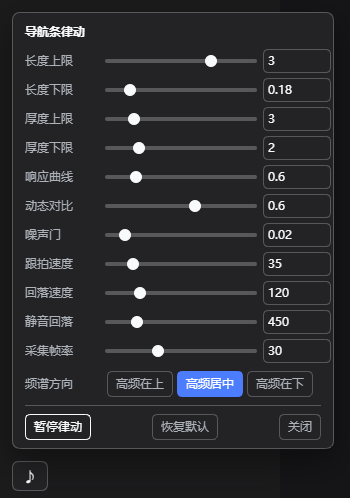 | A ♪ button sits right above the bottom-left user row. It opens a slider panel; every change is written back to config.json immediately — no restart. |
- Windows, no admin, no drivers, no third-party runtime. System audio is captured with WASAPI
shared-mode loopback by a tiny self-contained helper (
lib/pulse-tap.exe, built fromlib/pulse-tap.cswith the in-box .NET Framework compiler). - Nothing but the bars change. Bar length tracks its frequency band; bar thickness follows the
beat. No glow, no colour, no shadow — pure geometry, and the whole thing is a compositor-only
transform: scale(), so the right edge never jitters. - Native behaviour is untouched. Hover previews, click-to-jump and wheel scrolling of the rail keep working exactly as before; with silence the bars return pixel-for-pixel to the stock look.
Requirements
| DSH | desktop / web profile (platform: web client half) |
| OS | Windows 10/11 x64 (WASAPI loopback) |
| Runtime | none — .NET Framework 4.x csc is used only to build the helper |
| Audio | any default render device (headphones, USB DAC, HDMI, …) |
Install
A. Through the plugin manager (recommended)
- Settings → Plugins → Add plugin and give this repository's URL (or a local path to a clone).
- Enable it, then restart DSH (the host half is composed at boot).
The manager refuses to install while an agent is running — do it from an idle session.
B. Manual (what this plugin was developed with)
git clone https://github.com/<you>/dsh-pulse-rail.git
xcopy /E /I dsh-pulse-rail "%USERPROFILE%\.dsh\profiles\desktop\node_modules\dsh-pulse-rail"
Then add "dsh-pulse-rail" to dsh.profile.bundles in
%USERPROFILE%\.dsh\profiles\desktop\package.json:
{
  "dsh": { "profile": { "bundles": [
    "@deepseek-ai/dsh-base", "@deepseek-ai/dsh-web-app", "dsh-pulse-rail"
  ] } }
}
and restart DSH. (Adding the package to dependencies as well makes it show up in the
installed-plugin list and protects it from pnpm install pruning.)
Tuning
Everything lives in %USERPROFILE%\.dsh\pulse-rail\config.json. Edit it from the ♪ panel, or by
hand — then apply with the bundled helper:
%USERPROFILE%\.dsh\pulse-rail\tune-config.cmd
{
  "enabled": true,      // false = stop immediately, rail returns to stock
  "minW": 0.18,         // shortest bar, in units of the native 20px bar
  "maxW": 2.6,          // longest bar (panel slider goes up to 4 = 80px)
  "minH": 2,            // thinnest bar (px) — 2 is the app's native thickness
  "maxH": 7,            // thickest bar (px) — keep <= 8, marks are 10px apart
  "gamma": 0.6,         // response curve: <1 punchier, >1 calmer
  "gate": 0.02,         // noise floor: bands below this count as silence
  "agcMix": 0.6,        // dynamic contrast: compare each band with its own slow baseline
  "atkMs": 35,          // attack / release time constants of the bars
  "relMs": 120,
  "silentMs": 450,      // how long after the last audible frame the rail resets
  "freqLayout": "center",// "top" high frequencies on top | "center" both ends low | "down" highs at the bottom
  "fps": 30,            // capture frame rate
  "tapIdleMs": 20000    // stop the capture helper after this much idle time
}
Live apply without editing files (the port is the one in DSH_WEB_URL):
Invoke-WebRequest -UseBasicParsing -Method POST -ContentType 'application/json' `
  -Body (Get-Content -Raw $env:USERPROFILE\.dsh\pulse-rail\config.json) `
  http://127.0.0.1:19387/pulse-rail/config
| Want | Turn |
|---|---|
| much more dramatic | maxW → 3–4, agcMix → 0.8–1.0 |
| calmer / less busy | agcMix → 0.3, gate → 0.05–0.1 |
| thicker pumping | maxH → 8 (max before the bars touch) |
| faster reaction | atkMs → 15–25 |
How it works
default render device
   │  WASAPI shared-mode loopback (48 kHz, N-channel, float32)
   ▼
lib/pulse-tap.exe ── 1024-point FFT ──► 12 log-spaced bands (45 Hz – 15 kHz)
   │  one JSON line per frame on stdout, 30 fps
   ▼
host half (lib/index.js)  ──  GET /pulse-rail/state  ──►  browser half (lib/client.js)
                                    │                        │
                                    │                        └─ finds the rail, maps the 12 bands onto
                                    │                           however many marks are on screen right now
                                    └─ /pulse-rail/config, /pulse-rail/health, /pulse-rail/diag
- Host half (
lib/index.js+lib/tap.js): lazily spawns the capture helper, keeps the last frame, serves it on same-origin routes. The helper is killed after 20 s without a request, is restarted with back-off if it dies, and self-terminates if the host stops heart-beating it. - Browser half (
lib/client.js): locates the rail by geometry (narrow column of small marks near the right edge, with abutton[data-index]fallback), re-maps every frame to the currently rendered mark count, and writes one custom property per mark. Length and thickness are both expressed astransform: scale()on the mark's::before, withtransform-origin: 100% 50%. Because the scroll container of the rail clips horizontally at 28 px, the plugin widens that container leftwards (right edge unchanged, hit area unchanged,pointer-eventspassed through) so long bars are actually visible. - Silence removes every override — the rail is byte-for-byte the app's own rendering again.
Privacy
The helper reads the system mix in memory and emits only band levels (12 floats) plus RMS/peak.
No audio is recorded, buffered or written to disk. It runs only while the page asks for data and
stops on its own 20 s after the last request; you can also watch it as pulse-tap.exe in Task
Manager, or set "enabled": false.
Troubleshooting
GET /pulse-rail/health | helper status: running / playing / pid / restarts / last error |
POST /pulse-rail/restart | restart the capture helper |
GET /pulse-rail/diag | last browser-side discovery reports |
%USERPROFILE%\.dsh\pulse-rail\diag.jsonl | rolling client diag log (256 KB cap) |
%APPDATA%\@deepseek-ai\dsh-desktop\logs\crash-*-web-boot.log | renderer console.error lines (e.g. [dsh-pulse-rail] …) |
lib\pulse-tap.exe --fps 30 | run the helper by hand and watch the JSON stream |
No sound in the bars? Play something and check /pulse-rail/state → playing. If running is
false, look at lastError (a USB/Bluetooth endpoint that reports all-zero samples is re-initialised
automatically after 5 s of silence).
Development
| Tool | What it does |
|---|---|
tools/verify-install.mjs | quickest sanity check: route registration + helper frames |
tools/harness.mjs (+ page.mjs) | offline bench that replicates the rail DOM/CSS and reports every bar's measured geometry |
tools/host-test.mjs | runs the real lib/index.js against a minimal webServer |
tools/cdp-check.mjs | headless Edge + CDP: samples ::before transforms, right-edge alignment and hit-testing |
tools/mktone.py, tools/mkmusic.py | generate test tones / pseudo-music |
Rebuild the helper whenever pulse-tap.cs changes:
"C:\Windows\Microsoft.NET\Framework64\v4.0.30319\csc.exe" /nologo /platform:x64 /optimize+ ^
  /out:lib\pulse-tap.exe lib\pulse-tap.cs
Uninstall
- remove
"dsh-pulse-rail"fromdsh.profile.bundles(and fromdependencies), - delete
node_modules\dsh-pulse-rail, - optionally delete
%USERPROFILE%\.dsh\pulse-rail\, - restart DSH.
License
MIT — see LICENSE.
Comments
Loading…
Similar plugins
by yuanyiHY
Make DSH's turn-navigator rail react to system audio in real time (Windows). WASAPI loopback capture via koffi - no permission prompt, no microphone, no screen recording; the browser half injects one
★ 0
MIT
JavaScript
Sep 16, 2026
dsh plugin --profile web add dsh-rail-equalizerby caesarjue
System-audio driven UI visualizer for DeepSeek Harness (dsh web / DSH Desktop): a draggable 48-band spectrum chip + frame-wide bass glow.
★ 0
MIT
JavaScript
Sep 12, 2026
dsh plugin --profile web add dsh-audio-visualizerby Lingwuxin
A DeepSeek Harness (DSH) plugin that makes the quick-jump anchors (turn rail) on the right edge of the conversation page dance with whatever music your system is playing.
★ 0
MIT
C#
Sep 27, 2026
dsh plugin --profile web add @local/dsh-audio-railby jypjypjypjyp
Music composition for DeepSeek Harness: the model writes a score against a bundled composing skill, and a play_score tool renders it as an inline card with a piano roll, Web Audio playback and WAV/JSON export.
★ 1
JavaScript
Oct 10, 2026
dsh plugin --profile web add @jypjypjypjyp/dsh-music-studioby Goothe13-gugu
用于Deepseek Harness的插件,让你的大模型边思考边唱歌。A plugin for Deepseek Harness (DSH) to play music or audio when your LLM is thinking.
★ 0
MIT
JavaScript
Sep 23, 2026
dsh plugin --profile web add dsh-audio-cueby xxxxxxxyu
DSH (DeepSeek Harness) web plugin: plays a sound when the agent finishes replying (turn/end). Sound, volume and on/off configurable in Settings.
★ 3
↓ 45/wk
MIT
TypeScript
Aug 14, 2026
dsh plugin --profile web add dsh-notify-sound