
dsh-super-leader
Manifest validLeader agent preset that clarifies requirements, dispatches tasks to workspaces and sessions, and relays worker reports.
Super Leader for DeepSeek Harness
English | 中文
One chat to run all of your DSH sessions. Tell the Leader what you want. It works out which project and session the work belongs to, hands it to a worker session, and tells you when it is done.
Each DSH session works in one workspace. Once you have several projects going, you have to remember which session is doing what and switch between them. That is slow in the Web UI and slower from your phone, where an IM bot is bound to one session at a time. A Leader session is one entry point for all of them: you talk to the Leader, and the Leader talks to your sessions.
The Leader does not write code or edit files. It clarifies the request, routes it, dispatches it, and relays the result. The workers do the work with their own tools, context and model.
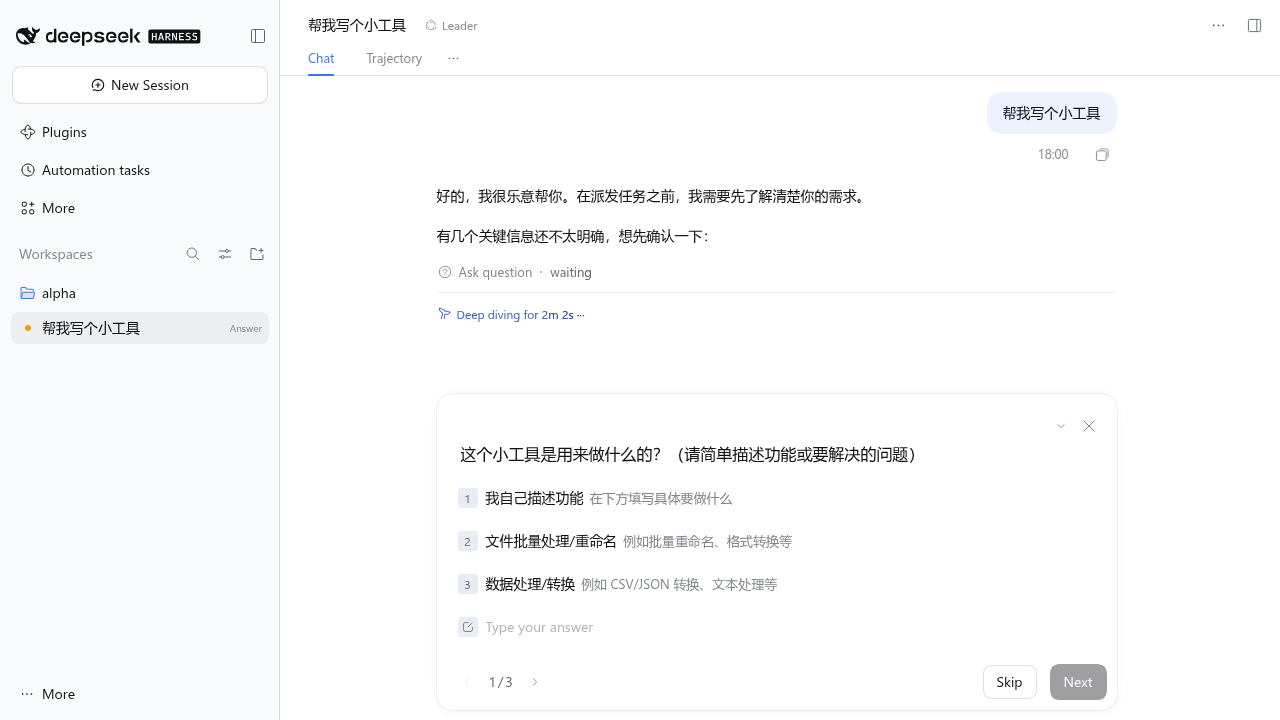
What a conversation looks like
You: Add a
--sortoption to the file-stat tool. Sort by size by default.Leader: (reads the session that built file-stat) That session wrote
file_stat.pyand its README two days ago and is idle. Should it continue there, or start a new session?
- Continue the existing session (recommended)
- New session in file-stat
You: 1
Leader: Sent as T-1f7c67 to "T-80a129 File extension stats". I'll report back when it finishes.
(a few minutes later)
Leader: T-1f7c67 is done.
--sort size|countadded, size descending by default, README updated, both orders checked on a sample directory. No open questions.
The brief the worker received was four lines, because the worker already knew the project.
What it does
- Asks before it acts. Before dispatching, the Leader checks that it knows the goal, scope, deliverable, how you will judge it done, and which workspace it belongs to. Anything missing becomes a question with one-tap options, which works well in a chat app.
- Routes by what sessions actually did. Session titles are often stale.
read_sessionshows a session's recent requests and replies, its todo list and the files it changed, so the Leader picks the right session instead of guessing from a title. - Sends short follow-ups. An existing session already has its context, so a follow-up brief says only what is new. A new session gets a self-contained brief with goal, background, constraints, deliverable and acceptance criteria.
- Starts new projects. For new work it can create a workspace under the roots you allow: an empty directory, a
git clone, orgit init, with an optionalAGENTS.md. - Reports back on its own. When a worker's turn ends, its report goes to the Leader, which summarizes it for you and turns open questions into questions for you. You don't have to check on anything.
- Keeps you in control. Creating workspaces, dispatching, cancelling and changing models need your approval. The approval card shows the target workspace, session and queue status before the brief. In Full access they run without asking.
- Keeps a task ledger.
task_statuslists every task with its status and report. After a restart, tasks are checked against the workers' logs, so nothing stays stuck at "running" and a lost report is labelled as lost. - Picks models per session. It can show which model each session uses, run a new task on a given model, or switch a worker's model, without touching your default model.
- Remembers you. The Leader keeps a plain
MEMORY.mdwith your preferences, which workspace or session handles what, and decisions you made. It reads the file at the start of each conversation. - Uses few tokens. The Leader never reads code or command output; it sees bounded summaries and capped reports. Its context grows slowly, a turn usually takes one or two model calls, and it runs well on a small, fast model. See Why it is cheap to run.
- Stays a coordinator. A Leader session only sees its own tools and
ask_user_question. Tools from other plugins stay hidden unless you allow them.
Why it is cheap to run
A session that does the work reads files, runs commands and keeps all of that in its context. The Leader does none of it:
- It only sees what it needs to route work:
list_sessionsrows,read_sessiondigests with truncated replies, and worker reports capped atreportMaxChars(4,000 characters by default). - A request usually takes one or two model calls: maybe a question, then a dispatch.
- Its tool set is small, so the fixed part of every request stays small.
- Because it only talks and routes, it runs well on a small, fast model, while each worker uses whatever model suits its task.
From the author's own use: over two days, the Leader session, on DeepSeek Flash, handled 79 turns with 165 model calls and 31 dispatches, and its context was about 149K tokens at the end. For comparison, the standard-preset session used to develop this plugin took 730 model calls for 31 turns and reached 577K tokens. These are the numbers from one setup, not a benchmark, but they show the pattern: the expensive reading and editing happens in the workers, and the session you talk to stays light.
Quick start
Requires DeepSeek Harness >=0.2.2-rc.1 <0.3.0.
dsh plugin --profile web add dsh-super-leader
To install the latest code from GitHub instead: dsh plugin --profile web add github:RickT34/dsh-super-leader.
- Restart
dsh web. - Click New Session, open the mode menu next to the workspace picker, and choose Leader. The preset can only be chosen while a session is empty, so use a new session.
- Pick an access mode. With Workspace Write, every dispatch waits for your approval. With Full access, the Leader dispatches as soon as the request is clear.
- Tell it what you want.
The Leader can create workspaces only under ~/Work by default. Change that in the settings (see Configuration).
Use it from your phone (dsh-im)
The Leader works well as the one session your chat bot talks to. Setup with @xmanrui/dsh-im (behavior described for 5.10.0):
- Make the bot start Leader sessions. In dsh-im's settings, open your bot and set Agent Preset to Leader. The setting applies to new sessions only, so send
/newin the chat, then a normal message. From then on, each new conversation with that bot is a Leader session. The bot's workspace setting is the Leader's working directory, so that is where itsMEMORY.mdlives. - Turn on report delivery. Settings → IM bots → General settings → Delivery → Session sync: check Deliver model answers and click Save delivery settings. Without it, the Leader's replies to worker reports appear only in the Web UI (details below).
- Optionally allow dsh-im's tools. For example
dsh_im_return_filelets the Leader send a worker's output file to the chat, anddsh_im_group_history/dsh_im_group_filelet it read group messages and files. Add them under Extra tools the Leader may use. - Choose how approvals work. In Full access the Leader dispatches without asking, which is the smoothest from a phone. Otherwise each dispatch needs an approval, which dsh-im can show in private chats with session sync enabled on that delivery target.
- id: super-leader
  config:
    allowTools:
      - dsh_im_return_file
      - dsh_im_group_history
      - dsh_im_group_file
Why reports need "Deliver model answers". When you write in the chat, the Leader's answer goes back on the chat's own reply path. A worker report arrives as an agent message, so the turn in which the Leader relays it was not started by the chat, and dsh-im does not deliver such turns by default.
What else the switch sends. It is global, for every bot and every session bound to a chat. When a turn that did not start in that chat completes, dsh-im sends the turn's final answer (the text after its last tool call) to the chat. Besides relayed reports, that includes answers to messages you send that session from the Web UI, and turns started by schedules, answered questions or internal notices such as subagent-settled. It does not send turns that started in the chat, cancelled or failed turns, tool progress, images, files or approval cards. Sessions with no chat binding, such as the workers the Leader creates, send nothing. Mirror messages typed in the Web UI (mirrorUserInput) is not needed and can stay off.
Approvals in a chat. dsh-im shows the approval's reason. For Leader actions it ends with a one-line summary of the target: workspace name and path, session title and id (or "new session"), and idle, queue or steer status. The task brief is not included there. Approve and reject are matched by approval id, not by this text.
If the Leader asks a question or needs an approval while handling a report, and dsh-im cannot show it in that chat, answer it in the Web UI. The turn, and the reply to the chat, wait until you do.
Tools
| Tool | Approval | What it does |
|---|---|---|
list_workspaces | No | List registered workspaces with their purpose notes |
list_sessions | No | List sessions with workspace, running state, model, the first line of the latest request, and the latest Leader task |
read_session | No | Show what a session did: recent requests and replies, earlier requests, todo list, changed files, Leader tasks sent to it |
list_models | No | List routable providers and models with their reasoning efforts, and the host default model |
task_status | No | Show dispatched tasks, their reports, and whether a report was delivered, recovered or lost |
read_memory | No | Read MEMORY.md in the Leader's working directory |
write_memory | No | Append to MEMORY.md or rewrite it (mode: "replace"); at most 32,000 characters |
create_workspace | Yes | Create a directory under an allowed root (optionally git clone, git init, AGENTS.md) and register it as a workspace |
dispatch_task | Yes | Send a brief to an existing session, or to a new session in a workspace; optionally on a given model |
set_session_model | Yes | Change the model an existing worker session uses |
cancel_task | Yes | Stop the worker's current turn |
"Yes" means the call waits for Allow once unless the Leader session's permission preset is in fullAccessPresets (default danger-full-access, shown as Full access). writeTools sets which tools need approval. A list you saved in an earlier version is kept, and set_session_model is always added to it.
Memory
Built-in memory. MEMORY.md lives in the directory the Leader session was opened in. The Leader reads it once at the start of a conversation and saves durable facts: your preferences, which workspace or session handles what, and decisions you made. It does not save task progress, reports or secrets. It is a plain Markdown file you can edit or delete. Writing it needs no approval.
Other memory plugins. You can also give the Leader tools from a memory plugin you already use. Enable that plugin in your profile, then check its tools under Extra tools the Leader may use (or add their names to allowTools). Nothing is granted automatically. For example, with Mnemon:
- id: super-leader
  config:
    allowTools:
      - mnemon_runtime_memory
      - mnemon_document_search
Merge these with the tools you already allow. Allowing a tool only makes it visible to the Leader. The memory plugin still owns storage, scope, permissions, context snapshots and its own instructions; do not mount its host service inside the Leader preset. For Mnemon, mnemon_recall also needs an active, searchable Memory Space offered by the current View; allowing the tool does not create that. To put a memory write tool behind the Leader's approval, add its name to writeTools.
Configuration
Open Plugins → Super Leader in the Web app. Changes apply to Leader sessions right away, including open ones. The form edits the super-leader entry in your profile's cordis.patch.yml, so you can also edit the file:
- id: super-leader
  config:
    workspaceRoots:            # create_workspace may only create directories here
      - ~/Work
    allowTools: []             # extra global tools the Leader may use
    fullAccessPresets:         # permission presets under which write tools skip approval
      - danger-full-access
    workerPreset: standard     # preset for new worker sessions; empty uses the host default
    reportMaxChars: 4000       # maximum length of a relayed report
| Option | Default | Meaning |
|---|---|---|
workspaceRoots | [~/Work] | Allowed parent directories for new workspaces |
workerPreset | host default | Preset for new worker sessions; must not be the Leader preset |
fullAccessPresets | [danger-full-access] | Permission presets that skip approval |
writeTools | create_workspace, dispatch_task, cancel_task, set_session_model | Tools that need approval; set_session_model is always included |
allowTools | [] | Extra global tools a Leader session may use |
reportMaxChars | 4000 | Report length limit |
presetId | leader | Agent preset id treated as the Leader (file only, needs a restart) |
ledgerFile | $DSH_HOME/super-leader/ledger.json | Task ledger location (file only, needs a restart) |
How it works
- The plugin adds a
leaderagent preset: the Leader tools,ask_user_question,AGENTS.md/CLAUDE.mdinstructions (loaded as in the standard preset), time context and context compaction. A host plugin does the rest. - For each Leader session, the host plugin hides every global tool that is not in
allowTools, including tools registered later. - An approval gate turns write tools into approval requests unless the session has full access. DSH's own Full access policy rejects anything that asks for approval, so the plugin checks the access mode itself.
read_sessionbuilds its summary from the session's event log, so it reflects what the worker did, not just the title.dispatch_taskrecords the task, creates the worker session if needed, and sends the brief with a report format. When the worker's turn ends, the last reply of that turn goes to the Leader as an agent message.- Model changes are per session: the same
model/selectionevent the model picker writes, without changing the host default.dispatch_taskrefuses a model change for a session that is running. - The Leader cannot dispatch to itself or to another Leader session.
See DESIGN.md (Chinese) for details.
Task recovery
On startup, on recovery and whenever task_status runs, the ledger is checked against each worker's turn log. Ended turns get their real final status. Tasks whose turn is still running, or whose request is still queued, stay tracked. A turn that stopped without ending, a removed request or a missing session is marked interrupted. If a log cannot be read for now, the task stays open with reconciliation_error and is checked again later.
task_status shows report_state and report_missing for every task. A report that never reached the Leader but was found in the worker's log is recovered; no report at all is lost. Nothing is re-run and no old report is re-sent.
Limitations
- If a worker asks a question or waits for approval in the middle of a turn, the Leader finds out only when that turn ends.
- Interrupted tasks are not resumed automatically.
- Prompt sections from other plugins may still mention tools the Leader cannot see.
Development
git clone https://github.com/RickT34/dsh-super-leader.git
cd dsh-super-leader
mkdir -p node_modules/@deepseek-ai
ln -s "$(npm root -g)/@deepseek-ai/dsh/node_modules/@deepseek-ai/schemastery" node_modules/@deepseek-ai/schemastery
npm test
dsh plugin --profile web add "$(pwd)"
License
Comments
Loading…
Similar plugins
by Funny1Potato
DSH agent presets whose leader does no work itself: non-management tool calls are denied at the harness boundary and every task goes to a subagent (a second preset deliberately picks weaker models for harder tasks).
★ 7
↓ 530/wk
MIT
JavaScript
Nov 16, 2026
dsh plugin --profile web add dsh-outsourcing-expertby xiebaiyuan
Lead mode for DSH: an agent preset, a working-method skill, a dependency self-check, and two reminders that tell you to enable the official Agent Teams. | 给 DSH 加 Lead 模式:预设、skill、依赖自检、两条前置提醒。
★ 3
MIT
JavaScript
Nov 11, 2026
dsh plugin --profile web add dsh-lead-modeby running-grass
DeepSeek Harness plugin: a `team` agent preset whose Lead decides and dispatches while short-lived workers do the writing
★ 0
MIT
JavaScript
Oct 7, 2026
dsh plugin --profile web add dsh-team-modeReusable subagent definitions managed from a Settings page and dispatched through a single delegate_agent tool; ships with a built-in read-only Explorer preset and a nested-delegation policy toggle.
★ 0
dsh plugin --profile web add dsh-custom-subagentsGroup-chat multi-agent orchestration console for DSH: autonomous decision-making, task dispatch, verification and iterative optimization for long tasks; bundles its own backend, installs with `dsh plu
★ 0
dsh plugin --profile web add dsh-agent-hubby stayw1thme999
Companion to dsh-superagent: dispatch work between receivers, record failures, wake sleeping sessions. Zero external dependencies.
★ 0
MIT
JavaScript
Nov 8, 2026
dsh plugin --profile web add dsh-workflow-kit