
dsh-compaction-manager
Manifest valid★ 1Compaction settings panel: orders model-free compaction steps (official head/tail pruner, Magic Compact-style output omission, DCP-style dedupe and error purge, tool-call folding), tunes compaction-ba
dsh-compaction-manager
English | 中文
Keep long agent sessions small without asking a model to summarize them.
In a long DeepSeek Harness session, most of the context is old tool output and tool call arguments: file reads, search results, command logs, whole files passed to write. Stock DSH trims only results over 8192 characters, then asks a model to summarize the oldest history. That summary costs an extra request and loses the details the agent may need later.
This plugin adds a model-free stage in front of the summary, and you decide exactly what that stage does: which steps run, in what order, with which thresholds, and for which tools. The steps hide old, bulky, duplicate or failed tool calls and leave a short notice in their place. The notice keeps the call's full description and an id, so the model can call restore_context to read the original back. If the steps bring the context under the threshold, the LLM summary does not run at all.
What you get
- You define what compaction does. Stock DSH compaction is fixed: one trim rule, then a summary. Here the compaction that runs is your own list of steps. Pick from six single-purpose methods, put them in any order, use the same method several times with different thresholds or for different tools, and turn steps on and off. Each step's options and tool scope are editable in the panel, and other plugins can add methods of their own.
- No model calls. Every step runs locally on the session history, so it adds no requests and no cost.
- Nothing is lost. Hidden content stays in the session log. The model sees what each call was for and can restore any part of it by id.
- Tool call arguments, too. Besides outputs, steps can fold whole tool calls, such as a
writethat carried an entire file, down to a summary or just the call's description. - You define the text, too. Every method's output is a template. A Format… button on each step opens an editor with the available variables, a live preview on sample data, and a preview on a real session, so you can decide exactly what the model sees in place of a hidden call.
- Presets to start from. Presets modeled on Magic Compact and OpenCode DCP, plus an aggressive one, fill in the steps for you; edit them afterwards. Save your own step lists as presets, and import or export them as JSON to share.
- Per session, too. Each session's Compaction tab can switch that session, and the subagents it starts, to any preset.
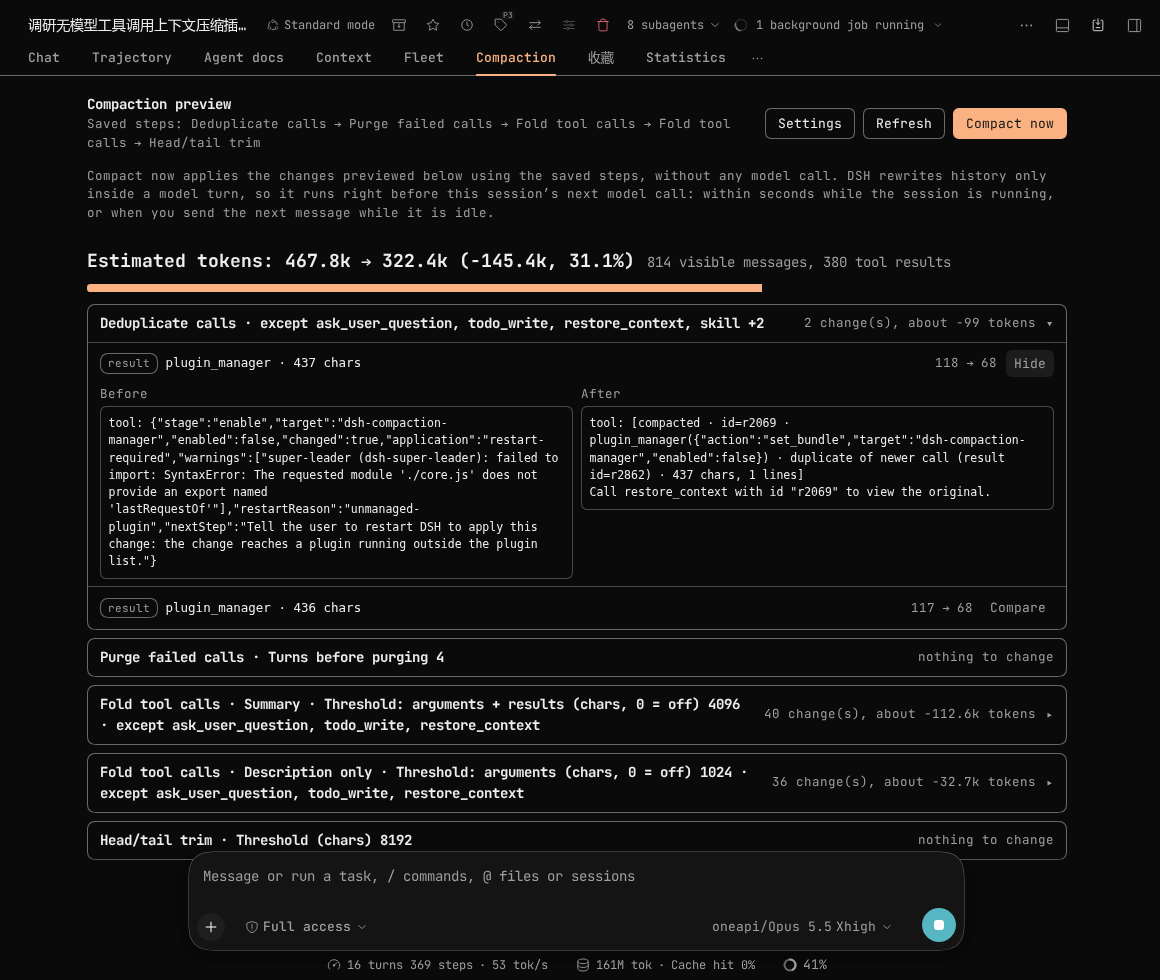
- See it before it happens. Each session gets a Compaction tab showing every change the steps would make, with the text before and after and the estimated tokens saved. Compact now applies them.
- One place for all compaction settings. The official summary's threshold, retention, retries and summary model are in the same panel and apply without a restart.
- Safe by default. With no configuration it behaves exactly like stock DSH. Sessions stay readable after the plugin is removed.
On the session this plugin was developed in (about 470k estimated tokens, 380 tool results), the Aggressive preset cut the estimate by 31% without any model call.
Install
Requires DeepSeek Harness >=0.2.2-rc.1 <0.3.0.
dsh plugin --profile web add dsh-compaction-manager
Or in the Web app, open Plugins → Add plugin and enter dsh-compaction-manager. To install the latest commit from GitHub instead of the npm release, use github:RickT34/dsh-compaction-manager.
After installing:
- Compaction in the sidebar opens the settings panel. The plugin's page under Plugins links to it too.
- Each session gets a Compaction tab next to Chat and Trajectory, with a preview and a Compact now button.
How compaction runs
DSH compacts when a request would exceed the threshold, when the provider reports a context overflow, or when you switch models. With this plugin installed, compaction runs in two stages:
- Steps. The enabled steps run in order. Each step rewrites some old tool results or tool call groups and never calls a model.
- LLM summary. If the context is still over the threshold,
compaction-basicreplaces the oldest history with a model-written summary. This stage is always last. Its settings are in the panel (see Panel settings).
Notices left by the steps keep the call's description argument in full and carry an id. Head/tail trim is the exception: it leaves the call untouched and adds an id only when Include recall id is on. While any enabled step leaves ids, the model gets a restore_context tool that returns the original content for an id.
Methods
Each method does one kind of change with one selection rule. A step is one method plus its own options. The same method can appear in several steps with different options. For example, the Magic Compact preset uses three Omit output steps with different thresholds for different tools.
Most methods have a tool scope: Only these tools (empty means all) and Skip these tools. Skip these tools starts with ask_user_question, todo_write and restore_context; Deduplicate calls also skips skill, subagent and subagent_fork, and head/tail trim skips nothing, like the official pruner. Drop superseded reads uses its own lists of read and write tools instead.
| Method | What it does | Main options (defaults) | Restorable |
|---|---|---|---|
| Head/tail trim | Results over the threshold keep their head and tail, with a fixed marker in between. With default options it matches the official tool-result-pruner byte for byte. | threshold 8192, head 4096, tail 1024 chars | Only with Include recall id |
| Omit output | Older results over a character or word threshold become a one-line notice: tool, key arguments, full description, size, id. | 1024 chars, words off, keep newest 3, skip failed results | Yes |
| Deduplicate calls | For calls with the same tool and identical arguments, only the newest result stays. Older ones point to it. | minimum 200 chars, keep newest 2 | Yes |
| Drop superseded reads | A read result is replaced once the same path is later written, edited, or fully read again. | read tools read; write tools write, edit | Yes |
| Purge failed calls | A call group in which every call failed is folded to tool names, descriptions and error messages once it is old enough. | 4 turns, keep newest 2 | Yes |
| Fold tool calls | An older call group, arguments and results together, is replaced with text. Summary keeps key arguments, status, size and the head of each result. Description only keeps just each tool name and description. | over 8192 chars in total, or over 1024 chars of arguments; keep newest 4 groups | Yes |
DSH does not allow rewriting tool call arguments on their own. Purge failed calls and Fold tool calls therefore replace a closed assistant tool-call message and its results with a single user message. After that the model no longer sees native tool-call structure for that group, and reasoning blocks in it no longer apply.
Results the model has not answered yet are never touched. The one exception is head/tail trim, which matches the official pruner and processes every result.
Presets
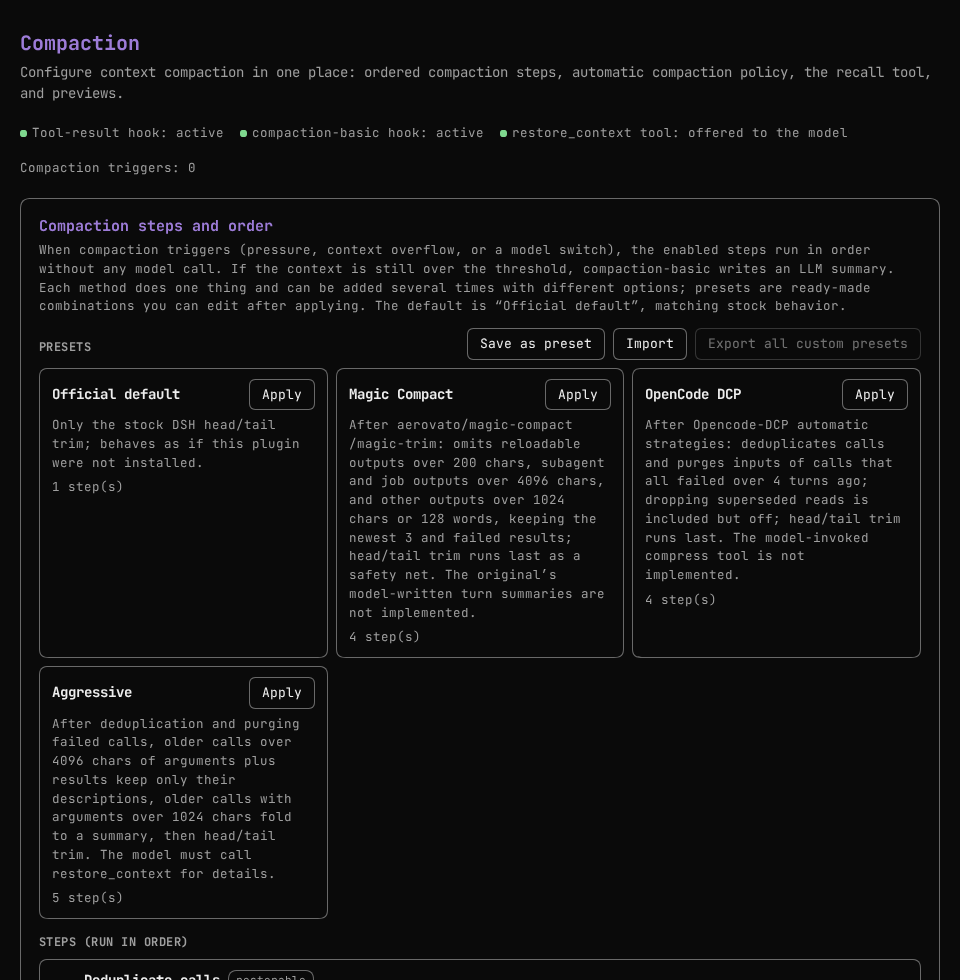
A preset is a ready-made list of steps. Apply replaces the current steps, which you can then edit before saving. The preset that matches the current steps is marked Current.
| Preset | Steps |
|---|---|
| Official default (default) | Head/tail trim. |
| Magic Compact | Omit output for read, read_image, skill, web_fetch over 200 chars; Omit output for subagent and job tools over 4096 chars; Omit output for all other tools over 1024 chars or 128 words; head/tail trim. After the model-free /magic-trim rules of aerovato/magic-compact. |
| OpenCode DCP | Deduplicate; drop superseded reads (off); purge failed calls after 4 turns; head/tail trim. After the automatic strategies of Opencode-DCP. |
| Aggressive | Deduplicate; purge failed calls; fold calls over 4096 chars in total to a summary; fold the remaining calls with over 1024 chars of arguments to descriptions only; head/tail trim. The largest calls lose the most, so they keep the most detail. |
Neither Magic Compact nor OpenCode DCP is ported in full. The parts of those projects that call a model (Magic Compact's turn summaries, DCP's compress tool) are not implemented.
Custom presets
- Save as preset stores the steps being edited, including unsaved changes, under a name and an optional description. Saving under the name of an existing custom preset replaces it.
- Delete on a custom preset asks for a second click to confirm.
- Export on a custom preset downloads it as JSON. Export all custom presets downloads every one.
- Import reads such a file. Each preset is validated, valid presets are added, a name that already exists gets a number appended, and the reason for each rejected preset is listed.
Saving, deleting and importing are written to the settings at once, separately from the step draft. Built-in presets cannot be deleted or exported; apply one and save it under your own name to share it.
The file format:
{
  "format": "dsh-compaction-manager.presets",
  "version": 1,
  "presets": [
    {
      "name": "Trim reads early",
      "summary": "Omit read output over 500 chars, then the official trim.",
      "steps": [
        { "method": "omit-output", "options": { "tools": ["read"], "minChars": 500 } },
        { "method": "trim-head-tail" }
      ]
    }
  ]
}
A bare array of presets, or a single preset object, is accepted as well. Imports are limited to 200 KB, 50 presets per file, 50 steps per preset, 60-character names and 400-character descriptions. Step options must satisfy the method's own rules. A preset that uses a method from a plugin you have not installed still imports, with a warning.
Custom formats
The text a step writes in place of hidden content comes from a template. Each method has its own: one notice template for Omit output, Deduplicate calls and Drop superseded reads, the middle marker for head/tail trim, the folded text for Purge failed calls, and two templates (summary and description only) for Fold tool calls. The defaults produce exactly the text shown above.
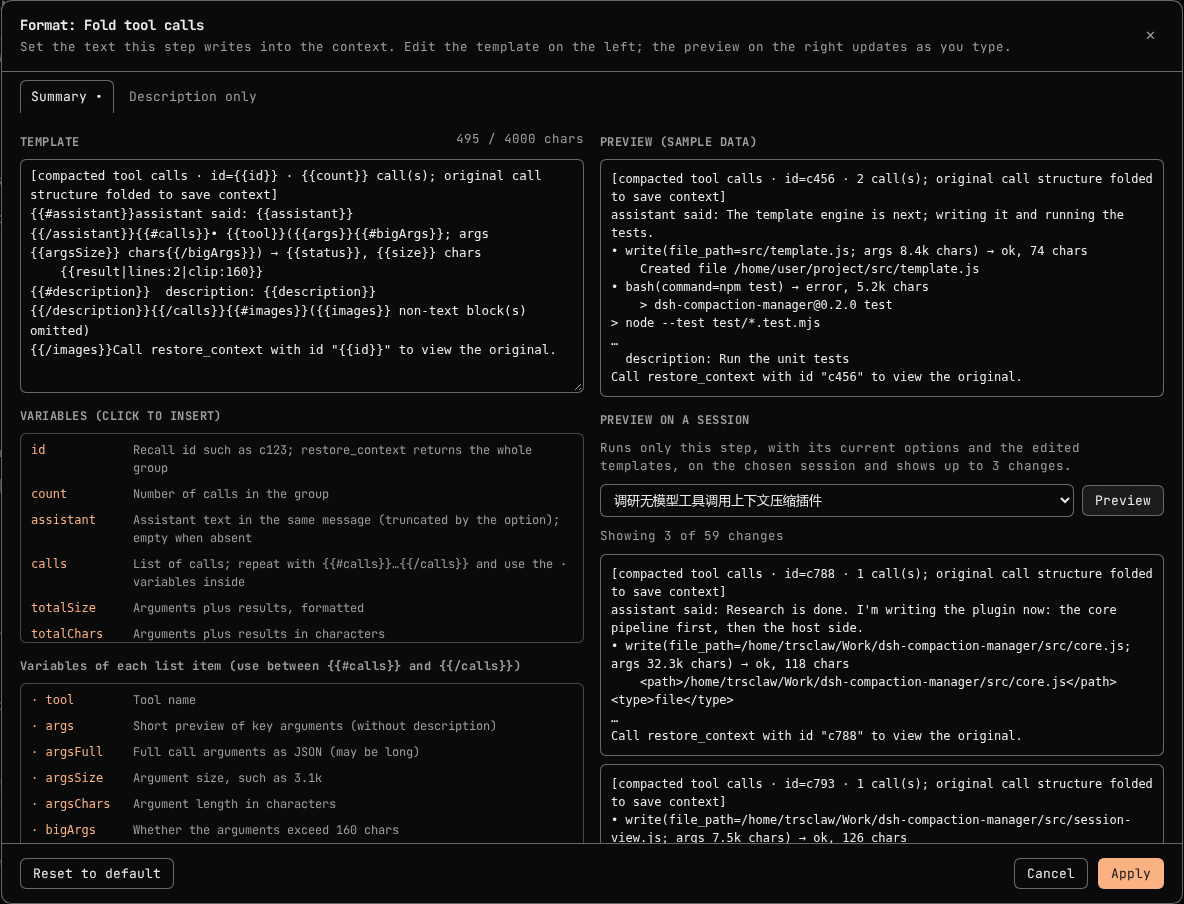
To change one, expand a step and click Format…. The dialog shows:
- the template, with its length (up to 4000 characters);
- the variables this format receives, each with a description; click one to insert it;
- a preview rendered from sample data, updated as you type;
- Preview on a session, which runs only this step with the edited template on a session you choose and shows up to 3 real results;
- errors with their line number, and warnings for unknown variables.
Apply stores the template in the step draft; Save on the page makes it take effect. A step with a custom format is marked Custom format, and custom presets and exported files include the step's formats.
Template syntax:
| Syntax | Meaning |
|---|---|
{{name}} | Insert a variable. |
{{name|clip:120}} | Insert with filters: clip:N cuts to N characters, oneline joins lines, oneline:N joins and cuts, lines:N keeps the first N lines, trim removes surrounding whitespace. Filters can be chained. |
{{#name}}…{{/name}} | Repeat for each item of a list (such as calls), or show once when the variable has a value. |
{{^name}}…{{/name}} | Show only when the variable is empty, false, 0 or an empty list. |
{{! comment }} | Not written. |
Templates cannot run code. Two safeguards apply to custom formats as they do to the defaults: a step never makes content larger, so a template that would grow a result is skipped, and the preview skips it too. For notice templates, the plugin recognizes results it already compacted by the fixed text at the start of the template, so the editor warns when a notice template does not start with at least 3 fixed characters. For example, a fold summary that keeps the first three lines of every result instead of a one-line head:
[compacted tool calls · id={{id}} · {{count}} call(s)]
{{#calls}}• {{tool}}({{args}}) → {{status}}, {{size}} chars{{#description}} · {{description}}{{/description}}
{{result|lines:3|clip:300}}
{{/calls}}Call restore_context with id "{{id}}" to view the original.
Panel settings
- Compaction steps and order: presets, custom presets, and the step list. You can add, remove, reorder, enable and configure steps, and edit each step's output format. Save applies the steps at the next compaction; no restart is needed.
- Automatic compaction (compaction-basic): automatic compaction on or off,
thresholdRatio,retainRatioorretainTokens,headroomTokens, summarymaxTokens, summary retries, overflow recoveries, and the summary provider and model. A blank field keeps the official value, and the placeholder shows the value in effect. Turning automatic compaction off also stops overflow recovery;/compactstill works. - Recall tool restore_context: Auto offers the tool only while an enabled step leaves ids. Always and Never override that.
- Recent runs: the last 20 pipeline runs, with the number of changes per step and the estimated tokens saved.
Session tab: preview and compact now
This session uses at the top of the tab picks the steps for this session: the global settings, or any built-in or custom preset. Automatic compaction and Compact now follow the choice. A subagent session without its own choice inherits its parent's, so a preset chosen for a main session also applies to the subagents it starts. A preset is referenced by id: editing a custom preset changes every session that uses it, and deleting one sends those sessions back to the global steps, with a notice in the tab. LLM summary settings stay global. The Compaction panel shows how many sessions chose their own preset.
The Compaction tab simulates the saved steps on the current session without writing anything. It shows the estimated token count before and after, and every change each step would make, with the text before and after.
Compact now applies those changes without a model call. DSH accepts history rewrites only inside a model turn, so the request is queued and runs right before the session's next model call: within seconds while the session is running, or when you send the next message while it is idle. A queued request can be cancelled. Compact now runs only the steps; for an LLM summary, use /compact.
restore_context
restore_context(id, offset?, max_chars?)
idisr<seq>for a single tool result, orc<seq>for a folded tool call group.- The tool returns the original text from the session log, up to
max_chars(1–60000, default 20000) starting atoffset. Longer content tells the model which offset to request next. - It is read-only and stores nothing extra; the originals are already in the session log.
How it hooks in
The Web app mounts compaction-basic and tool-result-pruner inside each agent preset, where another plugin cannot replace the services. While this plugin is loaded, it wraps their prototypes:
ToolResultPruner.prototype.pruneSessionruns the configured steps. When the steps are exactly the default, it calls the original method unchanged.- The
BasicCompactionEngine.prototypemethods apply the panel's overrides of the compaction policy. With no overrides, the engine's own configuration is used as is.
Unloading the plugin restores the original methods. Every rewrite uses the same replay-safe events as the official pruner (compaction/prune followed by a surface replace), so sessions stay readable after the plugin is removed. Pipelines saved by 0.1.x, whose methods were the presets themselves, are converted to the equivalent steps when read.
Extending
Other plugins can register methods and presets through the compactionMethods service. Both calls return a disposer.
export const inject = ['compactionMethods']

export function apply(ctx) {
  ctx.effect(() => ctx.compactionMethods.register({
    id: 'my-method',
    name: { zh: '我的方法', en: 'My method' },
    summary: { zh: '…', en: '…' },
    details: { zh: '…', en: '…' },
    options: [{ key: 'minChars', type: 'number', label: { zh: '最小字符数', en: 'Min chars' }, default: 500 }],
    tagKeys: ['minChars'],          // options shown on the step card
    recall: () => true,             // whether this method leaves restore_context ids
    formats: [{                     // optional: editable output templates
      key: 'notice',
      label: { zh: '提示', en: 'Notice' },
      default: '[compacted · id={{id}}] {{tool}} output hidden',
      marker: true,                 // its fixed start identifies compacted results
      vars: [{ name: 'id', description: { en: 'Recall id' } }, { name: 'tool', description: { en: 'Tool name' } }],
      sample: { id: 'r123', tool: 'bash' },
    }],
    plan(view, options) {
      return view.nodes
        .filter(n => n.type === 'tool' && !n.pending && n.chars > options.minChars)
        .map(n => ({
          type: 'result',
          seq: n.seq,
          content: [{ type: 'text', text: ctx.compactionMethods.render(options.formats.notice, { id: `r${n.rootSeq}`, tool: n.toolName }) }],
        }))
    },
  }))

  ctx.effect(() => ctx.compactionMethods.registerPreset({
    id: 'my-preset',
    name: { zh: '我的预设', en: 'My preset' },
    summary: { zh: '…', en: '…' },
    steps: [{ method: 'dedupe' }, { method: 'my-method', options: { minChars: 2000 } }],
  }))
}
- Option types are
number,boolean,string,listandselect. The panel builds the form from these declarations. options.formatsholds the template for each declared format: the step's custom one, or the default. Render it withctx.compactionMethods.render(template, vars). The format dialog usesvarsandsamplefor its variable list and preview.view.nodeslists the visible messages in order. Each node hasseq,rootSeq,type(user,assistant,tool, …),text,charsandturn. Tool nodes also havetoolName,args,isErrorandpending.planmust not change anything. It returns candidates of two kinds:{ type: 'result', seq, content }rewrites one tool result.{ type: 'fold', startSeq, endSeq, content }replaces a closed tool call group with one user message.
- Built-in methods skip content that starts with
[compacted. Notices that use the idsr<rootSeq>andc<rootSeq>work withrestore_context.
Development
npm run link-dsh   # link the DSH packages the tests need from the local dsh installation
npm test           # node --test test/*.test.mjs
npm run build      # regenerate dist/client.js from src/client/*.js
| Path | Contents |
|---|---|
src/core.js | Surface view, candidate simulation, preview |
src/template.js | Template engine, shared with the browser panel |
src/formats.js | Default templates, variables and samples of the built-in formats |
src/methods.js | Built-in methods |
src/presets.js | Built-in presets and 0.1.x migration |
src/session-presets.js | Per-session preset choice and subagent inheritance |
src/user-presets.js | Validation, saving and import/export of custom presets |
src/registry.js | Method and preset registry, pipeline normalization |
src/integration.js | Wrappers around the official compaction classes |
src/host.js | Settings schema, HTTP routes, restore_context, compact now |
src/client/ | Panel and session tab (built into dist/client.js) |
dist/client.js is committed so that installing from GitHub needs no build step. Rebuild and commit it after changing src/client/.
License
Comments
Loading…
Similar plugins
by TacitSay
可配置的上下文压缩插件:总压缩 / 思考压缩 / 工具输出压缩,带左栏面板(DeepSeek Harness)
★ 1
MIT
JavaScript
Nov 8, 2026
dsh plugin --profile web add dsh-compact-arsenalby zyd232
DSH plugin: stop automatic context compaction from firing far too early on smaller context windows. Set the trigger per provider/model — no config edits, no pinned presets.
★ 4
↓ 551/wk
MIT
JavaScript
Nov 18, 2026
dsh plugin --profile web add dsh-compaction-policyby bvbhu
Compaction-chain backend for the DeepSeek Harness: tiered model-pool summarization with per-model cooldown, overlapping chunking, and session-model fallback.
★ 0
MIT
JavaScript
Oct 2, 2026
dsh plugin --profile web add dsh-quilt-compactStops compaction summaries and session titles from burning their output budget on reasoning, by lowering the thinking level and raising the token floor for auxiliary calls only.
★ 0
dsh plugin --profile web add dsh-aux-degradeby JoblessJoe
Lets the model trigger compaction itself at a safe point via a compact_now tool (works mid-turn), plus a context_status tool reporting real token usage against the session's actual context window.
★ 1
MIT
JavaScript
Oct 25, 2026
dsh plugin --profile web add smart-compactionContext fullness bands, the per-session compaction threshold derived from the model window, per-step cost computed from cache read and cache write rates, cache-hit, DeepSeek balance with the peak/off-
★ 0
dsh plugin --profile web add dsh-context-governor