
dsh-beads-viewer
Manifest validBeads issue browser in the right sidebar: filter and search the tracker with live ready and waiting counts, read issue Markdown with clickable project-file and issue links, and copy or insert the issu
dsh-beads-viewer
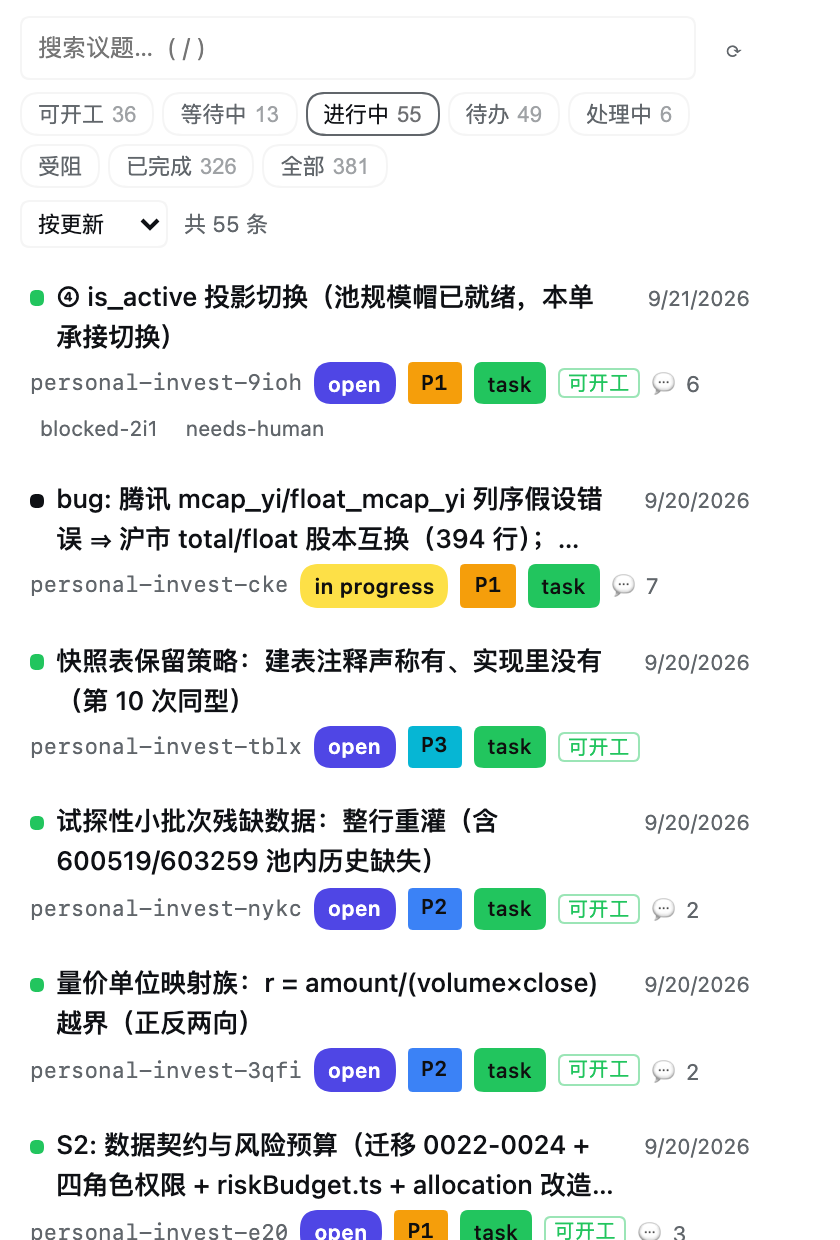
Beads issues in the DeepSeek Harness right sidebar — the browser counterpart of
the terminal bv viewer.



| 浅色 Light | 深色 Dark |
|---|---|
 |  |
✨ Features
🗂️ A tab beside Files — registers a beads tab type in the sidebar's new-tab guide, dockable, split and floatable like any other page. State survives a tab switch. | 🎨 Colour-coded badges — status, priority and type on every row, each dimension its own shape and hue. Label ink is derived from each fill's luminance, so text is always legible; two fills can never read as the same colour (ΔE ≥ 25, test-enforced). |
📏 Uniform rows — exactly three line boxes tall (calc(3 * 1lh + padding)), so the list scans as a grid. Long titles truncate at the container edge; the label track is reserved even when empty. | 🖱️ Hover marks the target — a resting row is plain; the row under the pointer takes a teal wash. One hue mixed against transparent reads correctly on both themes. |
🔍 Ready vs waiting — a Ready chip from bd ready, a Waiting chip for issues held by open blockers, plus the status chips with live counts, a search box (/ focuses it) and sorting. | 📝 Polished Markdown — headings, nested and task lists, tables, fenced code, quotes and emphasis, rendered by a small built-in renderer. Long threads open on the newest comments. |
| 🔗 Clickable references — a path that names a real project file opens in the document preview; an issue id opens that issue. Both stay plain text when the target does not exist. | 🧾 Id at hand — ⧉ copies it, ↵ inserts it into the composer at the caret as one undoable edit. |
🌓 Theme in three ways — the Host's text size, font choices and interface language (zh / en) all apply. | 🧩 Secondary blocks on a wash — design, notes, acceptance criteria and comments sit on a faint accent wash; the description stays primary. |
More screenshots
Issue detail — description first, secondary blocks on the wash:
| Light | Dark |
|---|---|
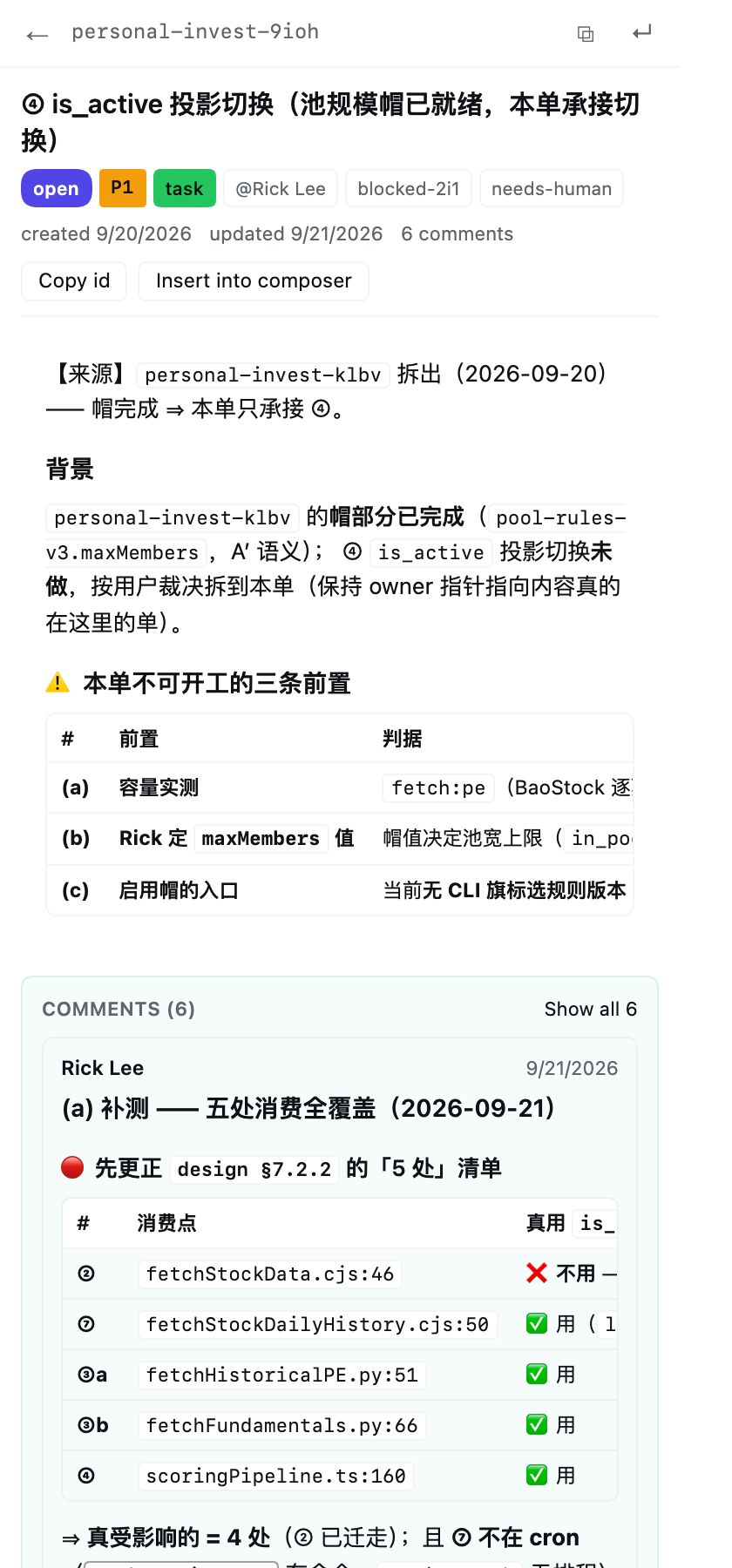 | 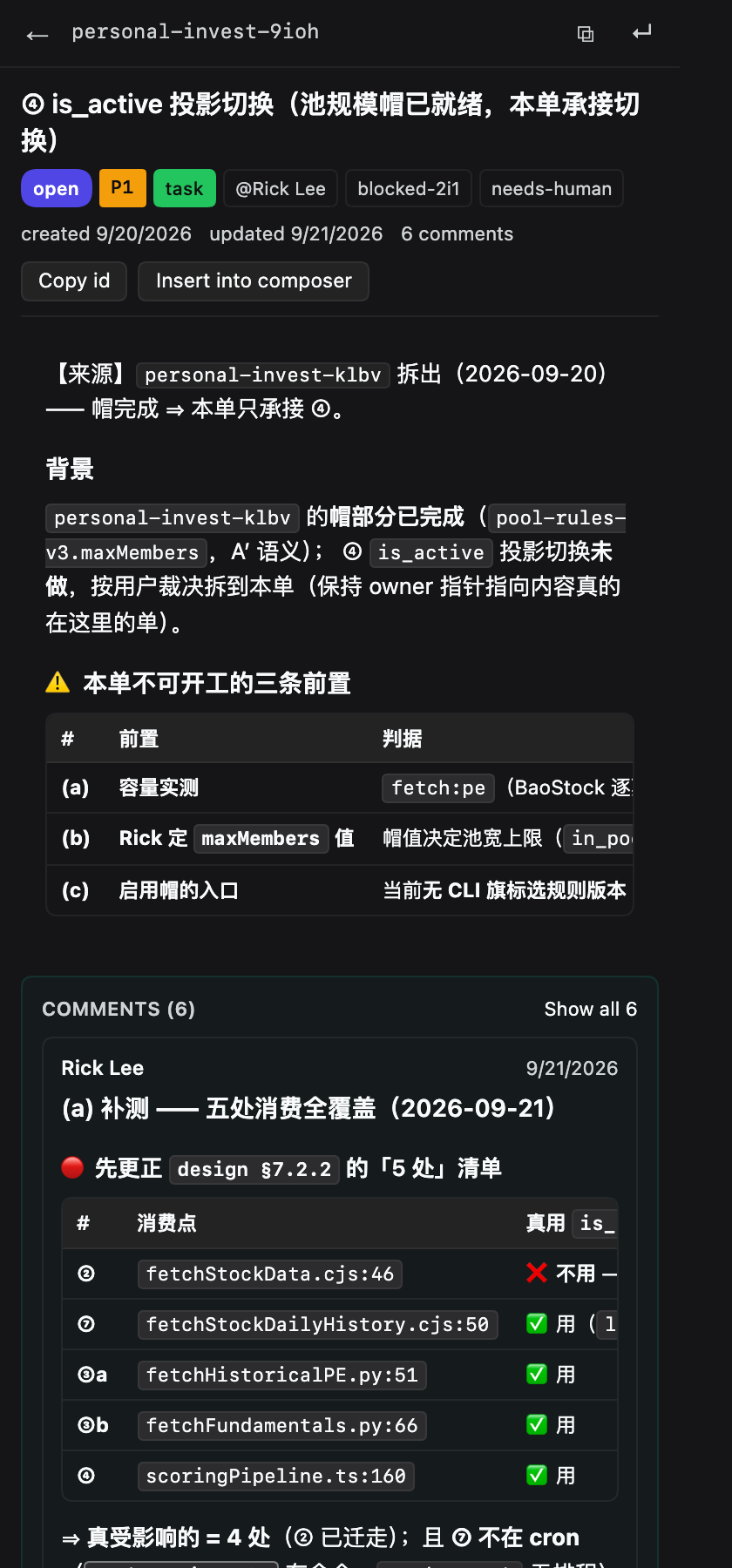 |
The full badge palette, contrast-checked in both themes:
| Light | Dark |
|---|---|
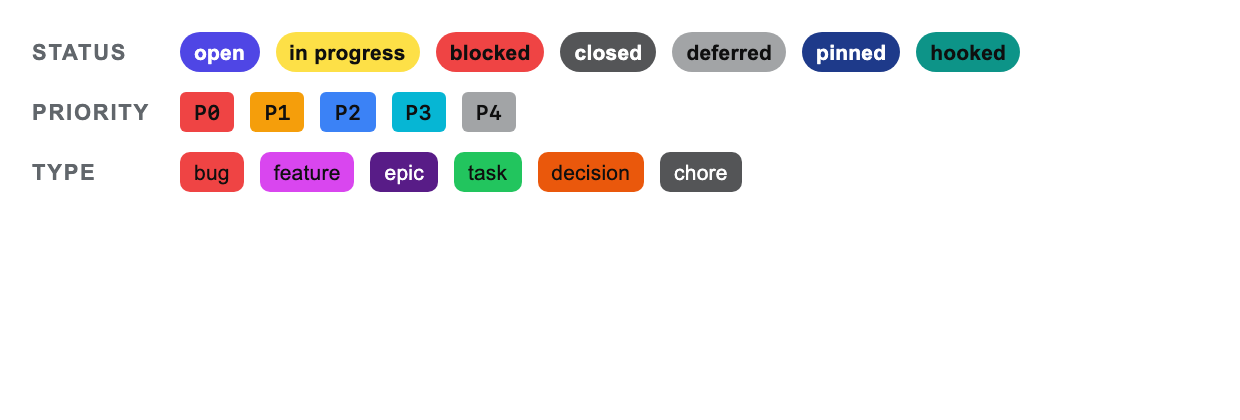 | 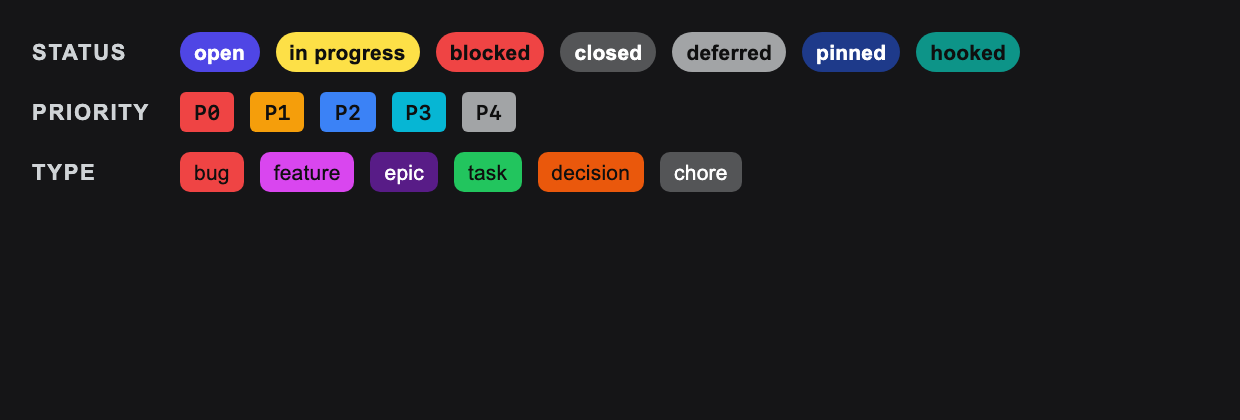 |
The interface follows the Host language:
🚀 Installation
# from the registry
dsh plugin --profile <name> add dsh-beads-viewer

# or from a checkout, which links the profile entry to this directory
dsh plugin --profile <name> add /path/to/dsh-beads-viewer
Then restart the Harness so the new bundle's client half loads (a hard browser refresh also picks up a newer bundle). The tab appears in the right sidebar's new-tab guide.
A linked install picks up edits on the next load with no reinstall; a registry
install is a normal package, so upgrading means running add again.
Requirements
- The
bdCLI on the machine running the Harness. The Host finds it onPATH, then at the usual Homebrew and Go install locations;brew install beadsis enough. - A project with a Beads workspace. The panel asks
bd wherewhich workspace it would open, so a subdirectory, a git worktree and aBEADS_DIRoverride all resolve the waybditself would.
If either is missing the panel says which one — in the panel itself, with the reason
bd gave.
FAQ
| Symptom | Cause & fix |
|---|---|
| Tab shows HTTP 404, but the search bar and filters are there | The client half is a static asset and still rendered, but the data route was never registered — the plugin activated before the Host's web server. Fixed in 1.0.0 by waiting on the service; if you see it on an older version, restart the Harness. |
| Fonts or sizes in the panel do not follow the Host's appearance settings | Same cause as above: the running client bundle is older than the page. Hard-refresh (Cmd/Ctrl+Shift+R). The panel derives its sizes from --dsh-content-font-size and its fonts from the Host font variables. |
bd not found | Install it (brew install beads) or make sure it is on the PATH of the process running DSH. |
| "This project has no Beads workspace" | Run bd init in the project, or point BEADS_DIR at an existing one. The panel shows the reason bd gave. |
| A workspace that used to open now reports a migration | Old Beads workspaces must be migrated by bd itself; the panel prints bd's instruction verbatim instead of guessing. |
| Numbers in an ordered list look wider than the bullet beside them | That is the point: the numbered gutter is wider (2.35em vs 1.9em) because digits need the room. The two lists share one text start. |
🔧 How it reads the tracker
The Host half serves one read-only route, GET /beads-viewer/api:
| Query | Answer |
|---|---|
?cwd=<dir> | every issue (slim rows), status counts, the status vocabulary, and each issue's readiness |
?cwd=<dir>&action=issue&id=<id> | the whole issue, its comments, and both dependency directions |
?cwd=<dir>&action=files&paths=<newline-separated> | which of those paths exist, and where |
?force=1 bypasses the four-second list cache. Three properties are deliberate:
- It shells out to
bd, and reads no database file. A Beads workspace is either a Dolt server or a SQLite file depending on how it was initialised, and the schema moves betweenbdreleases.bd --jsonis the interface that stays correct across both — and when a workspace is too old,bdprints the migration instruction, which the panel shows verbatim rather than guessing at. - It is read-only. Every read goes through one
readBdhelper that prependsbd --readonly, so the guarantee is structural rather than a per-call habit — a test asserts the flag is on the argv. No route mutates anything. - It only answers itself. The route refuses non-loopback peers, and
?cwd=must be an existing directory that (or whose parent) holds.beads. The directory is then used as the workspace for everybdcall, so a request cannot pointbdat an arbitrary tree.
📁 Layout
index.js            Host half: the read-only route and the bd calls
client.js           Client half: the sidebar tab, panel, and Markdown renderer
cordis.patch.yml    The bundle patch that mounts the host row
locale/{en,zh}.json Plugin title and description for the Plugin Manager
icon.svg            Panel artwork
test/               Five suites, 103 checks
docs/               Screenshots referenced by this README
🧪 Tests
npm test
114 checks in five suites:
| File | Covers |
|---|---|
test/host.test.mjs | the helpers, the handler's error states, and a real bd workspace (skipped when bd is missing) |
test/client.test.mjs | the Markdown parser, path extraction, file addresses, list indent |
test/activation.test.mjs | apply against a fake context, including a profile without the right sidebar, and the language switch |
test/render.test.mjs | the Markdown renderer with real React, badge contrast, the row pitch, and the section wash |
test/panel.test.mjs | the panel's states — list, detail after a row click, failure card, transport error, language change |
The last two render the shipped component tree, so a crash, a bad prop or a broken hook order fails the suite instead of blanking the panel.
Readiness is not computed here. bd ready owns the predicate; re-deriving it
would drift the moment bd changes a rule. When that command fails the payload says
unavailable and the panel offers no readiness chip — "nothing is startable" is a
different, actionable statement from "the question could not be asked".
📋 Known limits
- Reading the tracker costs two
bdprocesses per refresh (list + ready; ~0.8s on a 380-issue project); the list is cached four seconds, refreshes when the window regains focus, and the Refresh control bypasses the cache for its one request. - The list is capped at 2000 issues and 200 comments per issue.
- The panel is a viewer. Creating, editing and closing issues stays with
bdand with the agent, which is the one place that can report exactly what changed. - Markdown comes from a small built-in renderer rather than a full CommonMark implementation: it covers what issue bodies actually use and adds file and issue links on top.
📄 License
Comments
Loading…
Similar plugins
by LX2000WASD
在 Web UI 中一键管理 DeepSeek Harness (DSH) 插件:查看、实时启停、安装/卸载、更新检测、健康检查(依赖/冲突/兼容性分析)、环境管理、插件市场。bundle 与非 bundle 插件全覆盖
★ 66
MIT
TypeScript
Sep 20, 2026
dsh plugin --profile web add dsh-web-plugin-managerA Codex-style right side panel for the DSH Web UI — session artifacts browser (live file tree, scan include, preview, reveal) plus a side chat that forks the current session with a model picker, human
★ 0
dsh plugin --profile web add dsh-sidepanelby Missher12
Independent Missher plugin: current source, installable bundle and documentation.;桌面入口与其他插件见主页链接。
★ 0
MIT
JavaScript
Oct 19, 2026
dsh plugin --profile web add @missher/dsh-session-bridgeby miao-ge
DSH plugin: browser-style project tabs in the window title bar - one tab per session, running / finished / waiting-for-approval badges, drag to reorder, restored across restarts.
★ 0
MIT
JavaScript
Oct 5, 2026
dsh plugin --profile web add dsh-project-tabsby Missher12
Independent Missher plugin: current source, installable bundle and documentation.;桌面入口与其他插件见主页链接。
★ 0
MIT
JavaScript
Oct 16, 2026
dsh plugin --profile web add @missher/dsh-reasoning-effortby kimirong
bbs.dsher.cn 社区面板 — DeepSeek Harness Web 的 bundle 插件:右下角悬浮入口,浏览/搜索/发帖/回帖/点赞/粘贴截图上传/一键登录。dsh plugin --profile web add 一键安装
★ 0
MIT
TypeScript
Aug 17, 2026
dsh plugin --profile web add @kimirong/dsher-bbs-plugin