
dsh-3-features-screenshot
IdentifiedScreenshot tool for the composer: drag a rectangle on any monitor (a borderless PowerShell layer on Windows, so nothing is frozen) and the PNG is attached as a normal image, waiting to be sent. The ca
我是个小白,这个插件全靠 DeepSeek Harness 帮我说出来的——我描述需求、它写代码,所以下面的介绍里可能有些读起来蹩脚的地方,但功能我自己反复测过,非常合我意,希望大家喜欢~
I'm a beginner, and this plugin was built entirely by telling DeepSeek Harness what I wanted — I described it, it wrote the code. So some wording below may read a little awkward; the features are ones I tested myself and am genuinely happy with. Hope you like it too.
3 features screenshot
A plugin for DeepSeek Harness — drag any region of any monitor, the picture lands in the composer as an attachment, and the model reads its text, translates it, or describes it. One screenshot, three things you usually want from it.
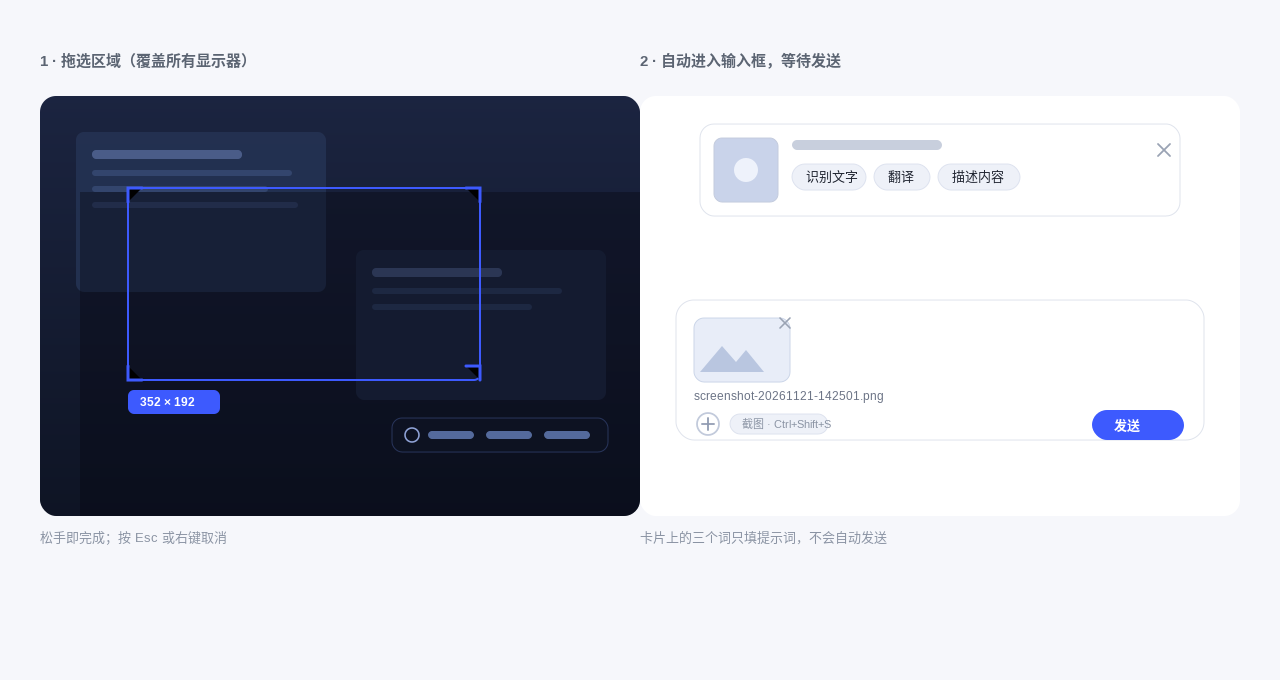
Features
- Any size, any monitor. One borderless layer covers the whole virtual screen; the rectangle you drag is the only thing captured. The desktop keeps running behind a light veil — nothing is frozen, and nothing is grabbed behind your back when you click.
- Lands in the composer. The PNG is inserted as a normal image attachment and waits for you to send it. Nothing is submitted automatically.
- Ask the model about it. A small card offers Read text, Translate, and Describe, which fill in the prompt — they never send.
- Your own shortcut.
Ctrl+Shift+S(⌘⇧S) by default, rebound like any other DSH command in Settings → Shortcuts — see Change the shortcut. - Never duplicates. If the composer refuses files while a reply is still streaming, the shot is held and retried until the composer accepts it, instead of pasting it twice or dropping it.
- No extra runtime. The Host half draws the selection in one PowerShell process on Windows and calls the platform's own snipper on macOS and Linux. No native module, no bundled binary, no screenshot service.
Install
Requires a DeepSeek Harness build that ships the plugin manager (dsh desktop 0.2.x or newer).
-
Clone this repository somewhere stable:
git clone https://github.com/reiaaaaa/dsh-3-features-screenshot.git -
In DeepSeek Harness open Plugins → Add plugin and pick the cloned directory.
-
Restart the app once. The Host half is loaded when the app starts, so the very first install needs a full quit and reopen; after that, edits to
client.jsreload live.
Use
| Step | What happens |
|---|---|
Click the screenshot button in the composer tool row (labeled 截图 in Chinese), or press Ctrl+Shift+S | A borderless selection layer covers every monitor |
| Drag a rectangle and release | Only that rectangle is captured |
Esc or a right-click | Cancels; nothing is attached |
| The image appears in the composer | Plus a card with Read text / Translate / Describe |
The three card actions only write a prompt; edit it and send when you like.
Change the shortcut
The plugin registers one command instead of hard-coding a key, so the binding lives in Harness's own shortcut settings:
- Open Settings → Shortcuts (中文界面:设置 → 快捷键).
- Find Take a screenshot — the row this plugin ships (中文界面显示为 截取屏幕区域).
- Click the keycaps on the right, press the new combination, and confirm.
Esccancels; clearing the binding falls back to the default. - It applies immediately: hover the composer button and the tooltip shows the keys now in effect.
The default is Ctrl+Shift+S (⌘⇧S on macOS), checked against every other command for conflicts. Desktop and web keep separate bindings — desktop writes them to keybindings.json in the app's user data, web to the dsh.keybindings.v1 browser key.
Platforms
| Platform | How the rectangle is picked |
|---|---|
| Windows | One PowerShell process draws a topmost form across the virtual screen, cuts the drag rectangle out of the veil, and copies that rectangle into a PNG. Clipboard untouched. |
| macOS | screencapture -i -x -t png — grant Screen Recording permission the first time |
| Linux | maim -s, scrot -s, gnome-screenshot -a, spectacle -r, or import, whichever is installed first |
How it works
Two halves, no native code:
- Host (
index.js+windows-script.js) registers exactly one authenticated route,GET /api/dsh-shot.snip, on the DSH connection fetch registry. A call runs the selection once, reads the PNG, and answers with the bytes. - Browser (
client.js) registers a trigger inconversation.input.leftand the result card inshell.overlay, then hands the PNG to the composer by dispatching the same file-intake path a real paste uses. The shortcut is actx.shortcutscommand, which is why rebinding comes for free.
The image never leaves the machine except as part of a message you send.
Development
client.jsis awindow.__ModuleLoader__module;index.jsis a plain ESM Cordis plugin. No build step, no dependencies.docs/DETAIL.mdis the page shown in the plugin's detail view;locale/en.jsonandlocale/zh.jsonhold the metadata.- Editing
client.jshot-reloads the running app within a few seconds. Editingindex.jsorwindows-script.jsneeds an app restart. - The Windows script is generated:
windowsScript()returns the PowerShell text, so the script can be parsed and checked without opening a capture.
中文说明
在输入框左边点「截图」(或按 Ctrl+Shift+S),在屏幕上拖出一块区域,松手后这张图会作为附件出现在输入框里,等你发送。输入框正上方浮出的卡片可以一键填入「识别文字 / 翻译 / 描述内容」的提示词——只填提示词,不会自动发送。
- 覆盖所有显示器,选区之外屏幕只是变暗,不会冻结画面;
Esc或右键取消。 - 快捷键和其他 DSH 命令一样,在 设置 → 快捷键 里改。
- 截图时如果助手还在回复,会先显示「正在插入截图…」,回复结束自动放进输入框,不会重复插入。
- 图片只用本机的临时文件转交,不会上传到任何第三方。
改快捷键
插件只注册一个命令、没有把按键写死,所以绑定就在 Harness 自己的快捷键设置里:
- 打开 设置 → 快捷键;
- 找到 截取屏幕区域 这一行(英文界面是 Take a screenshot);
- 点右侧的键帽,按下新的组合键并确认(
Esc取消,清空绑定即恢复默认); - 立刻生效 —— 鼠标悬停在输入框左边的「截图」按钮上,提示里显示的就是当前绑定。
默认是 Ctrl+Shift+S(macOS ⌘⇧S),新组合会和其他命令做冲突检查。桌面版和网页版各存一份:桌面版首次修改后写入应用数据目录的 keybindings.json,网页版存浏览器里的 dsh.keybindings.v1。
安装:克隆本仓库后,在 DeepSeek Harness 里打开 插件 → 添加插件,选择克隆下来的目录,然后完整退出并重开一次应用。
License
MIT — see LICENSE.
Comments
Loading…
Similar plugins
by loftspire
Windows-only screenshot button for the DSH composer: freezes the desktop and dims it, selects a whole window by hovering or a region by dragging, marks it up with rectangles, ellipses, arrows and pen
★ 0
MIT
JavaScript
Nov 17, 2026
dsh plugin --profile web add @loftspire/dsh-shotby sfunction-guo
Snipping tool for the composer: freeze the screen, drag a region, annotate it, and drop the result into the message box. Windows only; the selector is a bundled WinForms binary (rebuilt from the inclu
★ 0
MIT
C#
Oct 30, 2026
dsh plugin --profile web add @sfunction/dsh-screenshotby joythatway
Composer screenshot menu with three modes: region capture that hides the harness window, a window list with live hover previews, and full screen; captures land in the draft, and multi-image drafts ope
★ 0
MIT
JavaScript
Nov 21, 2026
dsh plugin --profile web add @joythatway/dsh-screenshotby liu19666
Windows screenshot overlay: highlights the window, screen or taskbar under the cursor and dims the rest, then annotates (shapes, arrows, pen, text, mosaic) and drops the image into the composer withou
★ 0
MIT
C#
Oct 31, 2026
dsh plugin --profile web add dsh-screenshotby deepseekbluefish
WeChat-style in-app screenshot button: drag a region, fine-tune with 8 resize handles, Enter to capture and Esc to cancel; auto-numbered PNGs plus a [Shot N HH:mm] marker written into the composer. Wi
★ 0
MIT
PowerShell
Aug 24, 2026
dsh plugin --profile web add dsh-screenshot-pluginby Max-Null
Dual-engine screen capture for DSH: inside the SSiD desktop shell, a global hotkey or tray opens a fullscreen box-select overlay (all monitors, per-display pixel-perfect frames) with in-place red-box
★ 2
↓ 101/wk
MIT
TypeScript
Oct 30, 2026
dsh plugin --profile web add @max-null/dsh-capture