

dsh-bluefatfish
Manifest validBig Fat Fish
蓝色大肥鱼 · DSH 深海皮肤
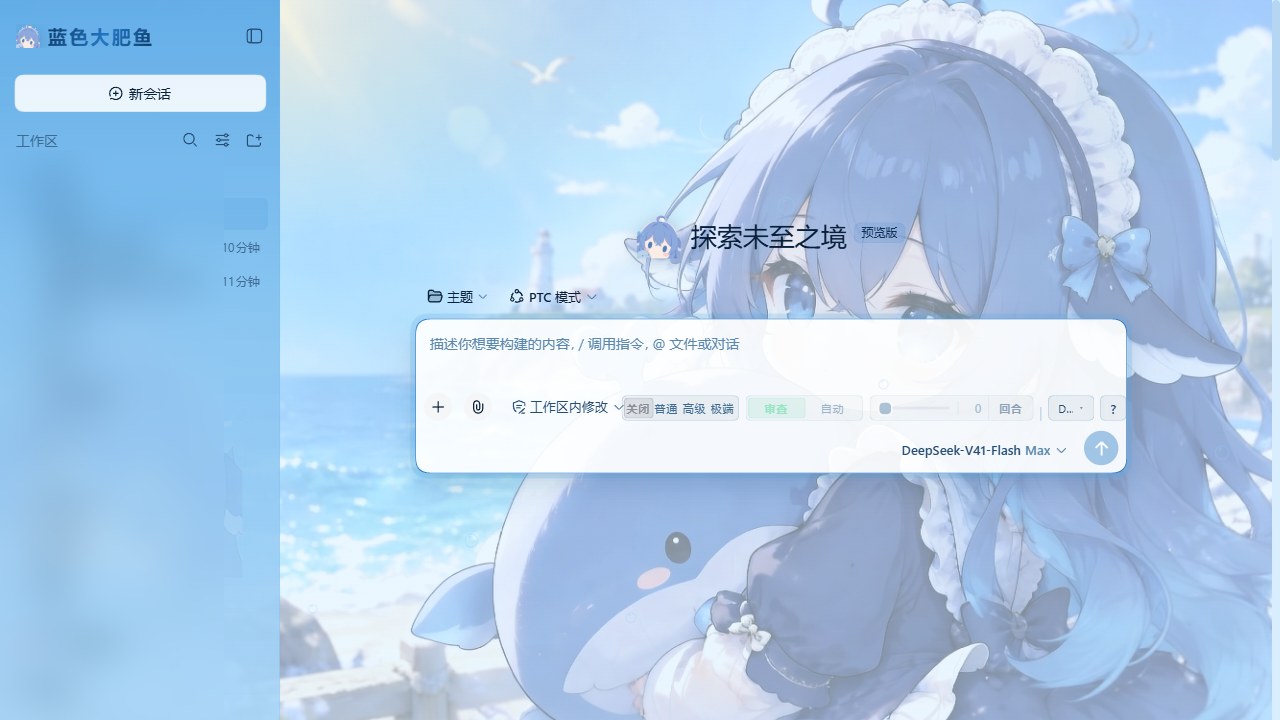
DeepSeek Harness Web 界面的一整套深海皮肤:主题令牌层 + 背景两层 + 侧栏大字标开关 + 运行状态文案轮播。 它是一个常驻客户端插件(不是动态插件):刷新页面、重启 DSH 之后皮肤都还在。
装
# 方式一:直接从 GitHub 装(推荐)
dsh plugin --profile web add github:qaz040619/dsh-bluefatfish

# 方式二:下载 Release 里的 tgz 再装
dsh plugin --profile web add "/你的路径/dsh-blue-fat-fish-1.0.1.tgz"
装完 重启 DSH。左上角会出现鲸鱼娘贴纸 + 渐变「蓝色大肥鱼」大字标,背景换成海面。
卸载:dsh plugin --profile web remove dsh-blue-fat-fish,再重启。
桌面端(Electron)卸载时多做一步:桌面 profile 的
cordis.patch.yml里可能有一条- id: locale/config: preference: zh-whale(动态插件时代留下的语言偏好)。这门语言由本插件提供, 插件卸了它就成了指向不存在语言的偏好 —— 记得把那条一起删掉。
profile 名按你自己的填(多数人是 web,桌面端是 desktop);dsh plugin 只是个 pnpm 转发器,
它会自己把本包加进 dsh.profile.bundles,不需要手改配置。
它做了什么
| 层 | 做法 |
|---|---|
| 色彩 | theme.overrideTokens 压一层 80 条 --dsw-* 令牌,明暗各一套(「晴海白昼」/「深海夜」) |
| 背景 | body::before 铺图(带饱和度/对比增益),body::after 压一层海水纱;浓度由 --bff-vis 控制 |
| 侧栏 | --dsw-specific-sidebar-fill 喂渐变(一整块有颜色的面板,不是半透明糊一层)+ 中下部鲸鱼娘水印 |
| 入口 | 左上角大字标占 sidebar.brand.name 座位,同时就是皮肤总开关 |
| 氛围 | shell.overlay 里一层气泡 + 鲸影(aria-hidden,纯装饰) |
| 组件 | 按钮、输入框、卡片边框、代码块、引用、滚动条、选中色、气泡、toast、tooltip、三态提示 |
| 状态文案 | 一轮对话运行时那行「深度求索中...」换成本包的 10 条台词,每 6 秒轮播一条 |
图标全部是手写 SVG(React.createElement 逐个拼),没有任何图标库、没有 emoji。
开关
点左上角「蓝色大肥鱼」即可开关:
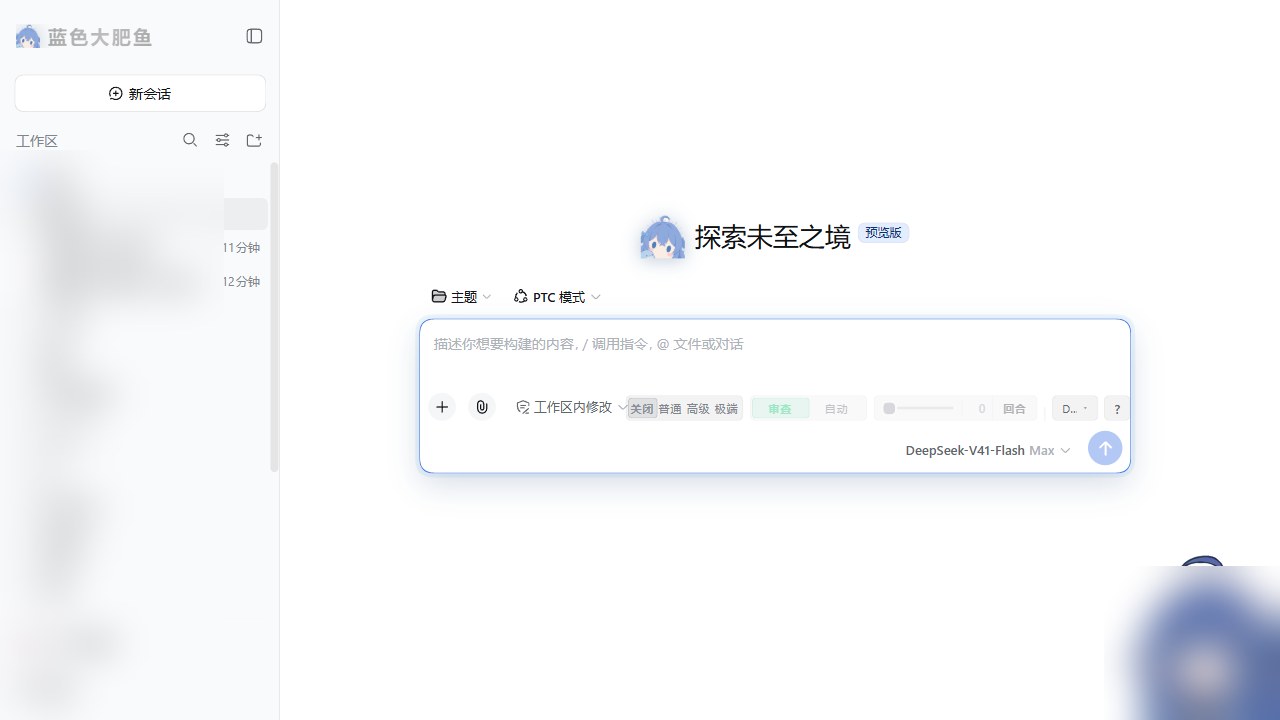
- 关掉:只有背景那两层撤走(靠
--bff-on归零),组件样式保留 —— 所以关掉之后不会出现没样式的裸按钮; - 开关状态是页面内的,刷新即回到开启(皮肤默认开)。
运行中的状态文案
一轮对话进行中,输入框上方那行状态文案会被替换并轮播:
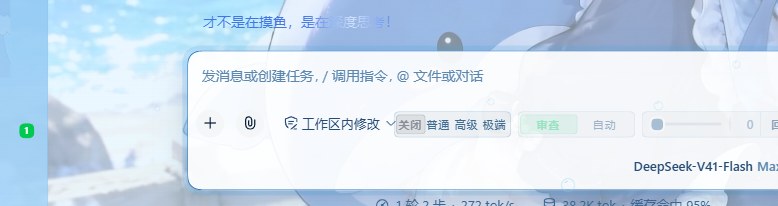
产品那句话取自 chat 命名空间的 chat.deepDiving 键。思考那一行的标题(message.think,默认「思考」)不动,
保持产品原样。
实现走的是官方口子 locale.addLanguage:注册一门回退中文的新语言(zh-whale「鲸鱼语 · 蓝色大肥鱼」),
在它下面只写 chat.deepDiving 一个键,其余文案沿回退链落到中文 —— 所以它只动那一行,坏不了别的。
(locale.register 的键是字面字符串、不加命名空间前缀,所以「注册到 chat 命名空间 + 键写 chat.deepDiving」才对得上。)
皮肤关闭或插件停止时自动切回你原来的语言;你自己手动换了语言,它不会再抢回来。
关掉皮肤的样子
改样式
改 theme/ 与 src/ 下的源码,然后:
node build.mjs          # 把源码 + 图 + CSS 打成 lib/client.js
node build.mjs --check  # 只看产物是不是旧的(比对源指纹)
node test/smoke.mjs     # 冒烟测试(29 项,不用浏览器)
改完不用重启也不用刷新:DSH 自带的 client HMR 每 500 ms 轮询一次 bundle,发现 lib/client.js 变了
就把新版换进浏览器(约半秒生效)。
连续热换几次之后,页面侧那条热换链偶尔会卡住(表现为"改了没反应",但宿主其实已经发了新版)。 按一次 Ctrl+R 重载页面即可,不用重启应用 —— 实测桌面端连换三版后会卡,重载后立刻跟上。
| 想改什么 | 动哪 |
|---|---|
| 配色、边框、背景两层、组件样式 | theme/skin.css |
| 明暗两套颜色令牌 | theme/theme.json |
| 状态文案与轮播间隔 | src/client-body.js 顶部 DIVE_LINES / DIVE_INTERVAL_MS |
| 图标、气泡、鲸影、开关行为 | src/client-body.js |
build.mjs 会把源文件的 sha256 前 16 位写进产物头部,随时能看出产物是不是旧的。
它同时支持两种目录布局:仓库布局(theme/ 在包内)与开发布局(主题文件在上一级 src/)。
目录
package.json          包清单:dsh.bundle.patch + dsh.client + exports["./client"]
cordis.patch.yml      bundle 层:把本包那一行插进 profile 组合
lib/index.js          宿主半侧(只负责"占一行",让 client-modules 扫到 dsh.client)
lib/client.js         浏览器半侧 —— **构建产物,必须提交**(见下)
src/client-body.js    浏览器半侧源码
theme/                皮肤源码:skin.css + theme.json
assets/               背景图与两张贴纸
build.mjs             构建脚本(素材内联进 bundle)
test/smoke.mjs        冒烟测试
tools/                辅助脚本(截图打码)
为什么 lib/client.js 必须提交进仓库
DSH 的浏览器插件走三段链路:dsh.profile.bundles 里的一行 → 该包 dsh.bundle.patch 声明的 patch 层
把行插进组合 → client-modules 扫描这行、读包里的 dsh.client 声明,把 exports["./client"] 那份
bundle 发给浏览器。
而 pnpm 安装 git 依赖时不会跑构建脚本(pnpm ≥10 默认拦 prepare),所以仓库里没有构建产物就装不起来。
lib/client.js 因此是提交进仓库的产物,本仓库的 .gitattributes 也把它标成二进制,保证跨平台 clone 后字节不变。
bundle 用的是客户端模块系统的 lazy-CJS 格式(不是 ESM):
window.__ModuleLoader__.load({
  id: 'dsh-blue-fat-fish',            // 必须等于包名
  factory: (require) => { /* 模块体在浏览器首次需要时才跑 */ },
})
能 require 的只有外壳播种的冻结模块表:react · react/jsx-runtime · react-dom · react-dom/client ·
@deepseek-ai/cordis · @deepseek-ai/dsh-client-store · @deepseek-ai/dsh-client-ui-slots ·
@deepseek-ai/dsh-client-ui-primitives · @deepseek-ai/dsh-client-ui-dockkit。
本皮肤只用 react,不声明任何 dsh.client.external。
兼容性
两个版本上都实测通过:
| DSH | 环境 | 结果 |
|---|---|---|
| 0.1.5-rc.2 | 命令行 web profile | 通过 |
| 0.2.0-rc.1 | 桌面端(Electron) | 通过(下面两条 0.2.0 的适配) |
皮肤依赖四样随 DSH 版本走的东西:
- 客户端基座模块表(
react); - 四个 slot 座位:
sidebar.brand.mark、sidebar.brand.name、shell.overlay、conversation.hero.brand.mark; chat命名空间的两条状态文案键:chat.deepDiving与chat.deepDivingFor;theme.overrideTokens。
版本差太远可能部分失效(最坏情况:背景与配色还在,大字标或状态文案没了)。
0.2.0 带来的两处差异(都已适配,写在这里免得别人重踩):
-
状态文案拆成了两条键:起始阶段用
chat.deepDiving(「深度求索中...」), 一旦这一轮有了开始时间就换成chat.deepDivingFor(「深度求索中,用时 {duration}...」)。 只覆写前者的话,实际看到的几乎永远是后者 —— 症状就是"文案没换"。 -
桌面端多了两层整窗底色。Electron 外壳给 Windows 标题栏加了这两条规则:
html[data-windows-titlebar] .ZTP-Xa_frame(整窗底板)和它的::before(顶部那条拖动区, 高--dsh-windows-titlebar-height),两者都用background: var(--dsw-specific-sidebar-fill)—— 也就是拿"侧栏那条渐变"铺满窗口顶。任何把--dsw-specific-sidebar-fill设成不透明颜色的皮肤, 在桌面端都会看到"图被这层盖住"(我们的背景图在body::before,z-index -2,正好在它下面): 整窗一片蓝,顶部那栏还会因为渐变是半透明的而"透"出背景图,变成发花的水洗色。我们的处理是把底板还原成
--dsw-alias-bg-base、把顶部拖动区改成透明,让海图从标题栏到内容连成一片。 选择器不写产品哈希类名(ZTP-Xa每版都会变),用结构兜底:html[data-windows-titlebar] :has(> [class*="_sidebarCol"])。
给其它插件作者的两个坑(都是移植时踩出来的):
sidebar.brand.mark/sidebar.brand.name是 single 槽:同一个优先级只允许一个登记, 撞了直接抛single slot "…" already has a registration at priority 0,而且渲染优先级最低的那个。 产品自带的dsh-client-ui-brand-official登记在 0,所以想盖住它必须显式写priority: -1(动态插件不用管,动态运行时会自动分配更低的优先级;常驻包没有这层代劳)。- 大字标那个开关必须用原生捕获阶段监听(
node.addEventListener('click', fn, true)): 整行是产品的一个<button>(无障碍名「新建会话」),ReactonClick拦不住它。 另外别把「点一下之后会话被切走」当成这个 bug —— DSH 自己在页面加载后几秒就会恢复上一个会话, 验证穿透要看事件有没有冒泡到根容器,不是看会话变没变。
素材与许可
- 三张图(背景 / 贴纸 / 头部特写)由本仓库作者提供,一并放在
assets/;贴纸是从纯白底原图抠出来的 (从画面四边洪水填充,只抠"与外部连通的白",避免掏空发箍内部高光)。 docs/screenshots/里的效果图已把侧栏会话列表、右下角挂件区域打码(脚本见tools/make-screenshots.py)。- 本仓库未附许可证文件:默认保留所有权利。若需 MIT / Apache-2.0 等授权,请先与作者确认。
English
A deep-sea skin for the DeepSeek Harness Web GUI: an 80-token theme layer (light/dark), a two-layer background, a gradient sidebar with a whale sticker, and a rotating status line. It is a regular resident client plugin — it survives page refreshes and DSH restarts.
dsh plugin --profile web add github:qaz040619/dsh-bluefatfish
# then restart DSH
Click the 「蓝色大肥鱼」wordmark at the top of the sidebar to toggle the skin. Built and tested against dsh 0.1.5-rc.2. No license file is included (all rights reserved) — ask the author before reuse.
Comments
Loading…
From the same category
by awesome-dsh-plugin
A curated list of plugins for DeepSeek Harness (dsh) · DeepSeek Harness 插件精选列表
★ 17.6k
CC0-1.0
Python
Oct 1, 2026
by zhu1090093659
DeepSeek Harness (DSH) Web Plugin Aggregation Ecosystem · Everything is a plugin, distributed via the Creative Workshop
★ 8.3k
↓ 172/wk
Apache-2.0
TypeScript
Oct 1, 2026
dsh plugin --profile web add dsh-webby yjh051108
dsh-routing-suite — injector + router-standard kit: install the runtime injector first, then the task-aware reasoning-mode router preset (measured P1-P23).
★ 7k
MIT
JavaScript
Sep 18, 2026
dsh plugin --profile web add @dsh-external/dsh-super-injectorby strukto-ai
The World's First Virtual Terminal for AI Agents
★ 3.7k
↓ 264/wk
Apache-2.0
TypeScript
Oct 2, 2026
dsh plugin --profile agent add @struktoai/mirage-dshby xmanrui
通过扫码或机器人凭据把IM机器人接入DeepSeek Harness(支持飞书、微信、钉钉、企业微信、QQ、Slack、Telegram、Discord和WhatsApp)。 Connect IM bots to DeepSeek Harness via QR code or credentials (9 channels).
★ 1.6k
↓ 17.5k/wk
MIT
JavaScript
Oct 1, 2026
dsh plugin --profile web add @xmanrui/dsh-imby hyhmrright
AI code reviews grounded in 12 classic engineering books — decay risk diagnostics with book citations, severity labels, and 6 analysis modes including full-sweep auto-fix
★ 1.5k
MIT
JavaScript
Sep 28, 2026